

Your thumb aches after hours of tapping the same spot in a mobile game. The progress bar barely moves. What if your phone could do the mindless work for you? That’s exactly what AG Auto Clicker – Auto Tap promises, but does it deliver without driving you mad with ads?
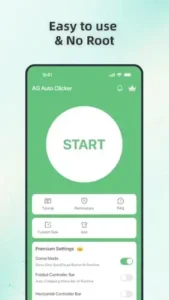

With over 10 million downloads and a 4.3 star rating (based on 500,000+ reviews), AG Auto Clicker app by Bright Prospect automates taps, swipes, and gestures. It’s lightweight (under 5MB) and works on devices running Android 5.0 and up. But dig deeper, and you’ll find a paradox: a tool praised for its utility yet criticized for aggressive ads that often overshadow its functionality.
AG Auto Clicker Use Case
Most auto clickers offer basic tap repetition. AG Auto Clicker goes further:
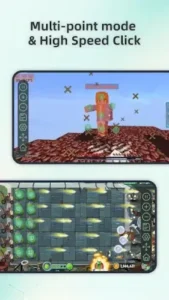
Multi Touch Mode: Two (or Ten) Fingers at Once
Need to tap multiple spots simultaneously? Set coordinates for each point and choose between:
-
Synchronous taps (all fire at once)
-
Sequential taps (one after another)
Record Mode: Your Gestures, Automated
Instead of programming individual taps:
-
Hit Record and perform swipes/long presses manually.
-
Replay the exact sequence later.
Ideal for:
-
Games requiring complex combos
-
Social media routines (e.g., rapid liking)
Game Mode: Fly Under the Radar
Some games ban auto-clickers. AG’s anti detection tweaks help avoid bans in titles like:
-
Roblox (farming simulators)
-
Cookie Clicker
-
Mobile RPGs with grind mechanics
Script Saving: Your Shortcuts, Ready to Go
Save configurations for:
-
Different games
-
Routine app tasks (e.g., bulk refreshing)
No more reprogramming from scratch.
Floating Controls: See Through the Clutter
Adjust transparency so buttons don’t block gameplay.
No Data Mining, Just Automation
Unlike shady alternatives, AG Auto Clicker uses Android’s Accessibility API solely to simulate touches. It doesn’t log keystrokes or access personal data.
The Catch: Ads and Paywalls
Here’s where enthusiasm wanes:
Interface: Functional but Frustrating
The UI is clean, but pop up ads appear:
-
When opening the app
-
Between configuring actions
-
After completing tasks
Worse, some ads mimic system alerts (e.g., “Missed call!”), a tactic users call deceptive.
Paywall Priorities
Key features like advanced recording and interval customization require a subscription (~$5/month). The free version feels like a demo.
Performance Hiccups
On older devices, users report:
-
Lag during complex sequences
-
Occasional crashes mid task
AG Auto Clicker vs. Alternatives: Picking the Right Tool
Auto Clicker – Automatic Tap (True Developers Studio)
-
Fewer Ads: The free version is less aggressive with pop ups.
-
More Free Features: Advanced interval controls and multi tap sequences aren’t paywalled.
-
Drawback: Lacks AG’s anti-detection game mode, making it riskier for titles with strict automation bans.
-
Best for: Users who prioritize a clean, ad-light experience over gaming specific features.
Macrorify
-
Image Recognition: Unlike AG Auto Clicker, Macrorify can trigger actions based on on screen visuals (e.g., tap when a specific button appears).
-
Steeper Learning Curve: Requires more setup but offers deeper automation for apps like TikTok or Gacha games.
-
Best for: Power users who need conditional automation (e.g., “Only tap when this icon pops up”).
Simple Design Ltd.’s Auto Clicker
-
Lightweight: Under 3MB, runs smoothly on budget devices.
-
Zero Frills: No recording or swipe gestures, just basic tap automation.
-
Best for: Those who want a no-nonsense clicker without ads or premium upsells.
Pro Tips: Squeeze Maximum Value from AG Auto Clicker
Disable Notifications (Unless You Love Spam)
-
Go to Android Settings > Apps > AG Auto Clicker > Notifications.
-
Toggle off.
Why? Prevents fake “Missed call!” alerts and promo spam.
Record Mode for Complex Game Routines
-
For RPG grinding: Record a combat combo (tap sequence + swipe to dodge), then loop it.
-
For social media: Automate rapid liking/scrolling by recording your finger gestures once.
Battery Optimization: Keep It Running
-
Navigate to Settings > Battery > Battery Optimization.
-
Select AG Auto Clicker and choose Don’t optimize.
Why? Stops Android from killing the app mid-session.
Ad Workarounds (Because Nobody Has Time for 30-Second Interruptions)
-
Use Airplane Mode: Blocks ad pop ups during offline tasks.
-
Temporarily Disable Wi-Fi/Data: Effective for games that don’t require internet.
AG Auto Clicker Easy Setup: A 60 Second Guide
-
Install and Open: Grant the Accessibility Service permission when prompted.
-
Set Tap Points: Press the “+” icon to place markers where you need clicks.
-
Adjust Intervals: Set delays between taps (e.g., 100ms for rapid firing).
-
Start: Hit the play button. No complex scripting needed.
Conclusion :
Best For:
-
Android gamers who need multi touch/recording features and can tolerate ads.
-
Grinding heavy games like Roblox, Idle RPGs, or clicker games.
Skip If:
-
You expect a seamless free experience, the ads are relentless.
-
You’re on iOS (no version exists).
-
You need image based automation (try Macrorify instead).
AG Auto Clicker is like a powerful car with a broken radio, it gets you where you need to go, but the noise might drive you crazy. For those who can mute the distractions (or pay to remove them), it’s a capable tool. Others might prefer a quieter ride elsewhere.
FAQ
Where can I download AG Auto Clicker?
Download AG Auto Clicker from Google Play Store.
How do I set up AG Auto Clicker quickly?
For an AG Auto Clicker easy setup:
-
Install and enable Accessibility Service.
-
Place tap markers with the “+” button.
-
Adjust speed/interval settings.
-
Press START. Need help? Email support at LDQ_feedback[at]outlook.com.
Does AG Auto Clicker work without rooting my phone?
Yes, it requires no root access. Just grant Accessibility permissions under Android settings.
What’s the difference between free and premium versions?
Free has ads and limits recording/advanced features. Premium (~$5/month) unlocks:
-
Game Mode (anti detection)
-
Folded Controller Bar
-
No ads