

Brave, a browser built on a radical premise: that speed and privacy are not just features, but the default state of a healthy web.

Brave holds a 4.9 star rating from over 5 million reviews on the Google Play Store, requires approximately 150 MB of storage, and is geared toward a privacy conscious teenage and adult audience.
Brave Experience: Speed and Privacy by Design
What does a browser feel like when it is designed to work for you, rather than to monetize you? The answer defines the Brave experience, which begins the moment you open the application and encounter a browsing environment stripped of the usual digital baggage.
The design philosophy is strategically familiar. Built on the same Chromium engine as Google Chrome, the interface will feel immediately recognizable to most users. The layout, tab management, and address bar are where you expect them to be. This is a deliberate choice that lowers the barrier to entry. But does it feel meaningfully different? The difference is not in the layout, but in the absence of noise. Without the constant barrage of trackers and ads, pages load in a cleaner, more focused state. The interface itself is uncluttered, putting the content of websites front and center. It feels like using a modern browser that has been meticulously cleaned of its surveillance mechanisms.
The speed claim is not an empty marketing point; it is a direct consequence of the browser’s architecture. By blocking ads and trackers by default, Brave prevents dozens, sometimes hundreds, of extra network requests from ever happening. This translates to measurably faster page load times and reduced data consumption. On media heavy news sites or blogs littered with ad networks, the speed difference can be dramatic. You are not just browsing privately; you are browsing more efficiently because the browser actively removes the digital drag that slows other browsers down.
The foundational privacy mechanics are the bedrock of this experience. The built in Shields feature acts as an intelligent, configurable firewall for every website you visit. It automatically upgrades connections to HTTPS whenever possible, blocks privacy invasive scripts, and prevents fingerprinting attempts. This is not a feature you need to hunt for in settings; it is active from your first click, providing a continuous, proactive defense against the most common web based tracking methods. This default on protection is the core of what makes Brave a truly private browser out of the box.
Brave Feature Set:
Where Brave evolves from a privacy tool into a unique ecosystem is in its suite of integrated features, all built with the same core principles in mind.
The Brave Leo AI assistant represents a new approach to integrated AI. Unlike other assistants that may use your queries for training, Leo processes requests anonymously through a server side API without storing personal data or linking queries to your identity. In practice, it functions as a handy contextual tool for summarizing articles, translating phrases, or answering questions directly from the address bar. Its utility is high for quick tasks, and its privacy model is consistent with the browser’s overall philosophy.
The Brave Rewards ecosystem is perhaps the most ambitious and debated feature. The system allows you to opt in to view privacy respecting ads and earn Basic Attention Tokens (BAT). These tokens can be used to automatically support the websites you visit or be held as a form of digital currency. For a user exploring how to use Brave Rewards, the process is straightforward, but the real world value of the earnings is modest for most casual browsers. Its true innovation is in proposing a user centric model for funding the web, though it requires a behavioral shift from both users and creators.
The integrated VPN and Firewall provides a solid layer of network privacy without the need for a separate subscription. It is easy to toggle on and off directly from the browser. While its performance is sufficient for general browsing and accessing region restricted content, it may not offer the same server variety or raw speed as a premium, dedicated VPN service. For the average user, its convenience and cost (included with the browser) make it a valuable addition.
Brave Search serves as a fully independent, privacy focused search engine. It provides credible results without tracking your queries or creating a profile. For users determined to leave Google behind, it is a capable and seamless default option that completes the privacy focused loop within a single application.
Brave User Experience: Control and Customization
A browser promising this much control must also deliver a manageable experience. Brave offers significant power, but it requires a slight shift in user mindset.
Shields management provides granular control, but this can introduce a learning curve. When a website does not function correctly often due to its aggressive blocking you can easily lower the shield level for that specific site with a few taps. This per site control is powerful, but it requires users to understand the trade off between functionality and privacy, a decision most other browsers make for them.
Secure Sync allows you to synchronize bookmarks and settings across devices using a cryptographic key, rather than storing your data in a central cloud account. This is more secure, but it places the responsibility of safeguarding that sync chain passphrase squarely on the user. Losing it means losing access to your synced data.
This introduces the initial complexity that some new users report. The array of privacy settings and the conceptual understanding required for features like Rewards and Sync mean Brave is not the most passive browser to set up. It asks for your engagement and understanding, rewarding that investment with a level of control and privacy that is rare in the mainstream market.
Brave Critique: Ambition vs. Execution
Synthesizing user sentiment reveals a clear divide between ideology and daily practicality. The community overwhelmingly praises the browser’s core privacy features and the noticeable speed boost from aggressive ad blocking. These are the pillars that define the Brave browser experience and the primary reason for its dedicated user base. However, this praise is tempered by consistent reports of technical friction. Some users encounter occasional bugs, such as tabs freezing or the browser crashing on specific websites.
A more common complaint involves site compatibility, where overzealous blocking breaks functionality on banking portals, complex web applications, or certain video players. These issues highlight the ongoing challenge of balancing absolute privacy with seamless web functionality.
The BAT controversy surrounding the Brave Rewards program is a central point of discussion. The concept of earning tokens for attention is innovative, but it raises practical questions. Some users find the payout rate for the Brave app rewards to be surprisingly low, leading to questions about the program’s tangible value. Others express skepticism about the entire model, uncomfortable with any system that monetizes attention, even in a privacy respecting way. Furthermore, the process of verifying a wallet to withdraw tokens can be cumbersome. It is a feature that demands careful consideration rather than passive participation.
Resource consumption is another area where ambition meets hardware limitations. While the core Brave browser is lean, activating additional features like the VPN or frequently using the Leo AI assistant increases battery and data usage. The VPN, while convenient, maintains a persistent connection that can have a more noticeable impact on battery life compared to browsing with it disabled. The Leo AI processes requests on remote servers, consuming mobile data. For users on limited data plans or with older devices, these powerful features come with a tangible cost that must be weighed against their benefits.
Optimizing Brave: A Pro Privacy Guide
To harness the full power of this browser, you need to configure it with intent. For those seeking practical Brave tips, this guide will help you build a more secure and efficient browsing environment.
Your essential privacy hardening should begin immediately after installation. First, open the settings and navigate to ‘Shields’. Ensure that ‘Block trackers & ads’ is set to ‘Aggressive’ and ‘Block scripts’ is set to ‘Block all scripts’. This establishes your maximum privacy baseline. Next, visit ‘Privacy and security’ and enable ‘HTTPS everywhere’ and ‘Strict fingerprinting mode’. These steps configure the Brave browser to provide the strongest possible defense against tracking before you even visit your first website.
If you choose to participate in the Brave Rewards program, a strategic approach yields better results. To maximize your earnings, ensure your rewards are set to show a maximum of 5 ads per hour. Regularly use the browser for your everyday searches and browsing, as this increases your opportunities to receive ads. Most importantly, if you plan to eventually withdraw your BAT, research the wallet verification process on the Brave Community site beforehand to understand the steps involved. This prevents frustration later and is one of the most valuable Brave tips for rewards users.
Troubleshooting site breakage is a fundamental skill for any Brave user. When a website does not load correctly, do not abandon the site or disable Shields globally. Instead, tap the Shields icon in the address bar. This opens a quick menu. First, try lowering the ‘Trackers & ads blocking’ from Aggressive to Standard. If that does not work, try allowing ‘Fingerprinting’ or ‘Scripts’ for that site. This methodical, per site approach restores functionality while maintaining your privacy protections on all other websites. It turns a problem into a learning opportunity about how web tracking works.
Conclusion :
So, who is the Brave app truly for? The answer points toward a specific, proactive user rather than a casual one.
Brave represents a transformative browsing experience for the individual who is deeply concerned about online privacy, frustrated by the pervasive tracking of the modern web, and willing to engage with their browser’s settings to maintain control. It is the ideal choice for the user who sees online advertising as a privacy violation and wants to support an alternative model. If you value principle over convenience and are technically comfortable enough to occasionally adjust settings for a broken site, this browser will feel like a liberation.
However, its unique model may introduce more complexity than benefit for the user who prioritizes absolute simplicity and seamless compatibility above all else. If you become frustrated when a website does not work perfectly on the first try, if you have no interest in managing crypto tokens, or if you primarily use complex, script heavy web applications for work, you may find Brave’s protective stance occasionally creates hurdles. For this user, a less aggressive browser might provide a smoother, if less private, daily experience.
Within the browser ecosystem, Brave successfully carves out a essential role as the premier choice for the privacy advocate. It delivers powerfully on its core promise of a faster, ad free, and tracker free web. Your decision to use it hinges on a simple question: are you willing to trade a small amount of convenience for a large amount of control and privacy? For a growing number of users, that is an easy trade to make.
Frequently Asked Questions
How does Brave’s private browsing differ from standard incognito mode?
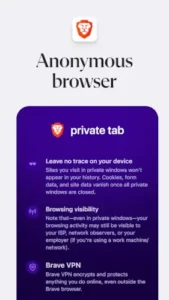
While both clear local history, Brave’s private windows provide enhanced tracking protection. For full network level privacy that hides activity from your ISP, you would need to enable the Brave VPN feature.
Where can I find the official Brave download?
You can download the Brave browser from the Google Play Store. For technical support with the installation or app functionality, contact Brave Software directly at support[at]brave.com.
Is there a community resource for advanced privacy settings?
Yes, the Brave Browser Wiki offers detailed guides on configuring Shields settings, optimizing rewards, and troubleshooting specific site compatibility issues.
Does Brave really block all ads by default?
Yes, the browser blocks most third party ads and trackers automatically. You can view and adjust what is being blocked for each site by clicking the Shields icon in the address bar.
Can I use Brave as my everyday browser without using the rewards program?
Absolutely. The Brave Rewards program is completely optional. You can use the browser solely for its privacy protection and ad blocking features without ever engaging with the BAT token system.