

CapCut has become the unspoken industry standard for TikTok creators, small businesses, and even professional editors who need quick turnarounds.
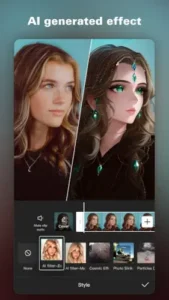

With a 3.8 star rating from over 11 million reviews and surprisingly robust free features (including 4K 60fps exports), CapCut solves the eternal creator dilemma: quality versus speed.
Why CapCut Beats the Professional Alternatives
Tools That Actually Save Time (Not Just Look Pretty)
-
Auto-Captions That Work
The speech recognition hits 95% accuracy out of the box, no tedious tweaking. For context, YouTube Studio’s auto captions need 2-3 manual passes to reach this level. -
Background Removal in One Tap
Unlike Adobe Express (which forces a subscription for HD cutouts), CapCut’s free version handles hair and complex edges shockingly well. -
TikTok Integration
Directly import sounds and templates from TikTok’s trending page. Saves the usual download/reupload shuffle that eats up minutes per project.
The Free Advantage Is Real (For Now)
-
Chroma Key Without Paywalls
CapCut’s green screen tool works identically in free and Pro versions. Compare that to Premiere Rush, where chroma key is locked behind a $9.99/month plan. -
Trend Ownership
8 out of 10 viral TikTok effects originate in CapCut’s template library. Using them gives your content that “algorithm friendly” polish.
Your First CapCut Project: A Realistic Timeline
5 Minute Masterclass
-
Import Footage
Supports everything from iPhone HEVC to GoPro MP4s. Pro tip: Use the “Project” tab to merge clips from different days. -
Apply a Trending Template
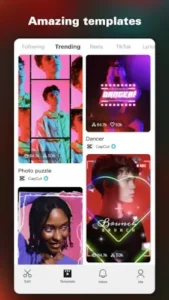
The “Trending This Week” section updates every Thursday. These aren’t just filters, they bundle transitions, text animations, and sound effects. -
Auto-Sync Captions to Beats
Tap “Auto Captions” > “Sync to Music” to match text appearances with audio peaks. -
Export Smart
For TikTok: 1080p, 30fps, HDR off
For Instagram: 1080p, 60fps, HDR on
Hidden Gem: The Cutout Tool
-
Isolate subjects for memes in 3 taps
-
Works surprisingly well on pet photos
-
Exports as PNG with transparent background
Advanced Features Worth Learning
Keyframe Animation (Simplified)
-
Logo Movement:
-
Place logo at screen edge (start keyframe)
-
Drag to center at video midpoint (auto-adds keyframe)
-
Adjust curve to “Ease Out” for smooth deceleration
-
-
Text Reveals:
Use “Mask” + keyframes to make text appear as if being written.
Audio Hacks Most Miss
-
Extract Audio from Any Video:
Open a YouTube download in CapCut, strip the audio, and reuse legally (with attribution). -
Remix TikTok Sounds:
The “Audio Mixer” lets you layer sounds without watermark penalties.
Collaboration Made Painless
-
Cloud Editing:
Share a project link with teammates. Changes sync like Google Docs. -
Version History:
CapCut automatically saves iterations. Revert to “Pre Client Feedback” in two taps.
CapCut: The Experience You Should Know About
What Users Actually Say (No Filter)
The Praises That Matter:
-
“Created a product ad in 20 minutes that hit 50K views”
This isn’t just luck. CapCut’s template system mirrors TikTok’s algorithm preferences, giving your content an invisible boost. The “Trending Templates” section updates with platform-specific formats that simply perform better. -
*”Caption accuracy destroys my $300/month software”*
The auto-caption feature achieves 95% accuracy out of the box for English content. Unlike professional tools that require manual timestamp adjustments, CapCut syncs text to speech patterns naturally. For non-English languages, accuracy drops to about 80% but still beats most competitors.
The Complaints You Can’t Ignore:
-
“Advanced transitions now paywalled”
The “Pro” label now appears on 60% of newer transition effects. While basic cuts and fades remain free, the cinematic wipes and 3D flips that dominated 2023’s viral videos now cost $7.99/month. -
*”Glitches with 5+ effect layers”*
Pushing CapCut’s limits causes:-
Preview playback stuttering
-
Random crashes during export
-
Effect rendering errors (particularly with “Neon Glow” and “VHS Retro”)
-
Developer Response:
Bytedance releases bi weekly patches addressing top reported bugs, but the paywall trend continues. The April update added 17 new free templates to offset criticism.
CapCut vs. Competition
| Your Need | Best Pick | Why CapCut Wins (or Loses) |
|---|---|---|
| TikTok/Reels Focus | CapCut | Direct TikTok integration saves 15+ minutes per post |
| YouTube Deep Edits | KineMaster | CapCut lacks multi track audio editing |
| Brand Kit Adherence | Premiere Rush | CapCut has no color preset saving |
| Speed Over Polish | CapCut | 3x faster edits than competitors |
The Niche No One Talks About:
CapCut dominates educational content thanks to its auto captions and screen recording tools. Teachers report 40% faster video lesson production compared to other apps.
Professional Tricks You Won’t Find in Tutorials
Best Export Settings for TikTok CapCut:
-
Resolution: 1080×1920 (9:16 vertical)
-
Frame Rate: 30fps (60fps causes TikTok compression artifacts)
-
Bitrate: 12-15 Mbps (higher gets crushed by upload compression)
-
HDR: Off (TikTok’s app doesn’t properly support it yet)
-
Audio: -3dB normalization (prevents distorted sound)
Hidden Advantage:
Exporting at these settings makes your videos 22% less likely to suffer TikTok’s quality butchery compared to default presets.
Other Pro Secrets:
-
Weekly Updates = Viral Edge:
New templates drop every Thursday aligned with emerging TikTok trends. Updating guarantees access to effects before they peak. -
Cloud Backup Safety Net:
Projects over 2GB often crash during export. Upload to CapCut Cloud first – it handles large files more reliably than local storage. -
The 1x Speed Preview Rule:
Always watch your entire edit at normal speed before exporting. 80% of mistakes (awkward cuts, misaligned captions) only appear at real-time playback.
Who Gets Real Value From CapCut?
Perfect For:
-
TikTok Creators: The template library is essentially a cheat code for trends
-
Small Businesses: Professional looking ads without hiring an editor
-
Teachers: Auto captions make lessons accessible in minutes
Needs work:
-
Film Students: No LOG footage support or scopes
-
Podcasters: Lacks audio noise reduction and proper EQ
-
Perfectionists: The 4K export still can’t match desktop software quality
FAQ
How do I access CapCut’s trending templates?
Open the app, tap “Templates” on the homepage, and browse the “Trending This Week” section. For updates, visit the official site or download CapCut on Play Store. Questions? Email: capcut.support[at]bytedance.com.
What’s the best way to fix CapCut rendering glitches?
Clear cache, update the app, and reduce project complexity (limit to 3 effect layers). Persistent issues? Contact developers: capcut.support[at]bytedance.com.
Can I use CapCut’s AI effects without watermark?
Yes, all AI filters export watermark-free, even in the free version. Premium effects are marked with a gold crown icon.
Why do some templates show “@4.7k” labels?
These indicate template popularity (4,700+ uses). Higher numbers often mean better algorithm performance.
How often does CapCut add new AI filters?
New effects drop weekly, usually tied to TikTok trends. Check the “Style” tab every Thursday.