

Claude operates on a different wavelength.


Claude positions itself as a reliable partner for complex tasks, prioritizing depth of analysis, robust reasoning, and the secure handling of sensitive information in professional writing, research, and data analysis. But in a world that often values quick answers, what is the practical value of a slower, more methodical intelligence?
The Claude Philosophy: The Architecture of Considered Thought
The significance of being powered by models like Claude Opus and Sonnet lies in their foundational approach to processing information. The terms “robust reasoning” and “actionable insights” are not just marketing language; they describe a methodical, structured form of problem solving. When you present Claude with a complex data analysis task, it doesn’t just give you a surface level observation. It often deconstructs the query, explores underlying assumptions, and builds a logical pathway to its conclusion.
This makes it particularly effective for using Claude for technical writing or legal document review, where the rigor of the thought process is as critical as the final output. It is designed for situations where a flawed reasoning chain is more dangerous than a delayed response.
Claude Professional’s Toolkit: Depth Through Integration
This philosophical commitment to depth manifests in a toolkit built for professional utility. As a writing and editing specialist, Claude excels at transforming fragmented ideas into polished, professional prose. Its nuanced understanding of tone and structure allows it to help refine a rough draft into a client ready report or a persuasive email, maintaining a consistent voice throughout.
Perhaps its most powerful differentiator is its function as an integrated research hub. The ability to grant it secure access to documents in Google Drive or emails in Gmail, and then ask it to synthesize information across these sources with citations, is a transformative capability. This moves it beyond a chat interface into the role of an AI research assistant, capable of Claude document analysis at scale. Furthermore, its visual analysis feature is more than simple image recognition. It can provide constructive feedback on a UI/UX design mockup, interpret the story told by a data visualization, or summarize the key points from a dense, text heavy screenshot, acting as a perceptive visual partner.
Claude User Experience: Balancing Power with a Learning Curve
The application’s interface reflects its professional ethos. The sleek, modern design is clean and uncluttered, prioritizing focus and reducing distraction. The layout facilitates a smooth, conversational flow, making complex interactions feel manageable.
User feedback from its over 5 million downloads and a 4.7 star rating tells a consistent story of high capability meeting some complexity. The praise is resoundingly for its detailed, thoughtful responses and its powerful support for writing, coding, and analysis. Its user base tends to skew towards working professionals, researchers, and graduate students (20-50 age range) who require this depth. However, this power introduces a steeper learning curve compared to more straightforward chatbots. Users note that unlocking its full potential requires understanding how to frame complex, multi part queries effectively.
Some also report encountering occasional “overload” errors on extremely demanding tasks, indicating the computational heaviness of its reasoning process. These factors highlight that Claude is a tool that rewards investment and a methodological approach.
The Strategic Position: Where Claude Finds Its Niche
In the competitive AI ecosystem, Claude’s position is that of the specialist’s choice for depth and security. When compared to the versatile generalism of ChatGPT, Claude’s advantage often lies in producing more measured, thoroughly reasoned, and structurally coherent outputs, especially for long form professional writing and complex analysis.
Against other capable reasoners like DeepSeek, Claude’s edge is its deep, secure integration with productivity suites like Google Workspace and its strong, built in emphasis on privacy, making it a more natural fit for enterprise environments. For those comparing tools, a noteworthy alternative that also emphasizes creative tasks is Canva, which you can learn more about through directories like free-apps-android.com.
Compared to Microsoft Copilot, Claude’s strength is its model-agnostic approach to productivity integration and its focus on deep analysis rather than being tied to a single software ecosystem. Its unique standing is built on a powerful triad: proprietary models optimized for reasoning, a clear commitment to security and user privacy, and feature integrations tailored for serious, research intensive work.
To truly leverage Claude’s capabilities, you need to adopt the mindset of a collaborator rather than a commander. This tool rewards a thoughtful approach to interaction, where the quality of your input directly shapes the depth of its output.
The most critical principle is providing ample context. Claude’s reasoning engine operates like a brilliant analyst who needs a full brief. Instead of asking, “Improve this paragraph,” frame your request with background: “This paragraph is from the introduction of a white paper targeting CTOs in the fintech sector. The goal is to establish credibility about blockchain security. Please refine it to be more authoritative and include a reference to recent regulatory changes.” This level of detail allows Claude to apply its full analytical power, making it exceptionally capable for Claude legal document review or Claude business plan analysis. The more context you provide, the more precise and valuable its reasoning becomes.
Next, actively leverage its integration capabilities. The document upload and cloud storage connections are not just features; they are fundamental to its utility as a research hub. When starting a research project, upload your collection of PDFs, spreadsheets, and articles, then ask Claude to synthesize the key findings across all documents. Use the Claude PDF analysis feature to extract specific data points or summarize lengthy reports in minutes. This transforms it from a conversational partner into a centralized intelligence engine, capable of processing information from your entire digital workspace and delivering consolidated, actionable insights.
Finally, integrate Claude into your workflow where it adds the most value: structured tasks and multi stage planning. Use it in the early phases of a project to help outline a report, generate a project charter, or create a detailed flowchart. Its strength lies in building coherent, logical structures from complex requirements. Because its outputs are so detailed, manage your workflow by treating interactions as iterative drafts. Use its first output as a foundation, then ask follow up questions to refine specific sections. This collaborative, step-by-step process is where Claude truly shines as a professional partner.
Conclusion:
Claude’s position in the AI landscape is defined by its unwavering commitment to depth, security, and producing well-reasoned, structured outputs. It distinguishes itself as the tool you turn to when the task demands more than a superficial answer, when you need analysis you can trust, writing that reflects professional standards, and insights drawn from deep synthesis of complex information.
Looking forward, Claude’s evolution will likely focus on expanding its role as a central, intelligent hub for knowledge work. This means deeper integrations with enterprise platforms, more sophisticated Claude data analysis capabilities, and enhanced tools for collaborative workflows. For users comparing options, researching Claude similar apps helps clarify its unique position as the deliberate, security focused choice in a field of faster, more generalized assistants.
While keeping abreast of general ChatGPT news provides market context, Claude’s development path remains distinct: refining its ability to serve users and organizations that prioritize reliable, auditable, and deeply considered AI assistance above all else. In an increasingly noisy digital environment, the value of a tool that prioritizes substance over speed only continues to grow.
Frequently Asked Questions (FAQ)
Where is the official Claude download available?
Download official Claude for free from the Google Play Store.
What does Claude mean by being “the AI for problem solvers”?
This reflects its core design philosophy. Unlike assistants focused on quick answers, Claude is built to break down complex challenges methodically, making it ideal for tasks requiring deep analysis, structured planning, and clear explanation of difficult concepts.
How effective is Claude at explaining complicated topics?
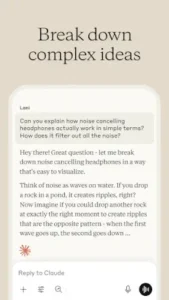
As the example shows, Claude specializes in translating complex ideas into simple, relatable concepts. It uses analogies and step-by-step reasoning to build understanding, which is particularly useful for students, researchers, or anyone needing to grasp or communicate sophisticated information.
Is there a cost associated with using Claude?
The standard version of the Claude app is free to use and offers robust access to its core models and features. Anthropic also offers a premium subscription, Claude Pro, which provides higher usage limits, priority access, and early access to new features.
Who should I contact for technical support or developer inquiries?
For general user support, the help center within the Claude app or on the Anthropic website is the recommended first step. For developer-related questions or issues concerning the API, use the dedicated developer contact.
-
Official Website: https://claude.com/product/overview
-
Play Store Link: https://play.google.com/store/apps/details?id=com.anthropic.claude
-
Claude Wiki: https://en.wikipedia.org/wiki/Claude_(AI)
-
General Support: https://support.claude.com/en/
-
Developer: support+android[at]anthropic.com