

You have an old item. A vase from your grandmother. A painting from a thrift store. A piece of jewelry with strange markings. You have no idea what it is worth. Curio solves that problem.
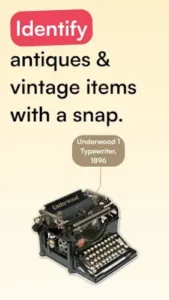

Take a photo. The Curio app identifies the item. It gives you history, origin, and an estimated value. No expert required. The question is whether this AI powered tool is reliable enough to trust with your collectibles.
What is Curio exactly?
You are looking at a mobile app by Dionysus Labs, LLC that uses AI and visual recognition to identify antiques, provide historical context, and estimate market value from a single photo.
Curio positions itself as an antique expert in your pocket, letting users snap a photo of an item and receive an instant identification with title, description, origin, and time period. Beyond identification, it adds historical context, craftsmanship details, and cultural significance to help users understand their items more deeply. It is free to download with a limited number of free scans, then moves to a subscription model for unlimited use.
Curio holds a 4.7 star rating from more than 2,600 reviews. The app size is roughly 93 MB. The age rating is 12 and up. The app is free with optional in app purchases for subscription access.
An AI powered antique identifier that provides history and value estimates from photos
The category matters here. Curio is not a game. It is not a social app. It is a utility tool. You take a photo. The AI analyzes the image. It returns identification, origin, era, and value estimates. The process is simple and fast.
Who this app was built for
Collectors who want quick identification of antiques and vintage items
If you collect antiques, you know the value of quick identification. Curio gives you information in seconds.
Thrifters and resellers who need fast appraisals for flipping items
You find items at thrift stores. You need to know their value. Curio gives you estimates on the spot.
People who have inherited items and want to know their value
Inherited items come with stories. You do not know the value. Curio helps you understand what you have.
Anyone curious about the history and worth of their old belongings
You have old things. You want to know their history. Curio satisfies that curiosity.
Curio Main Features you will use
Instant Antique ID from a photo with title, description, origin, and era
The core feature is identification. Take a photo. The app identifies the item. It gives you a title, description, origin, and era.
In depth context and history explaining cultural significance and craftsmanship
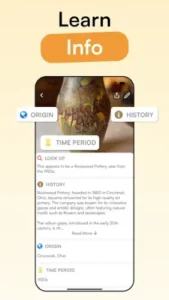
Beyond identification, the app provides context. Cultural significance. Craftsmanship details. Historical background.
Quick appraisals with estimated market value ranges
The app gives value estimates. The ranges are based on comparable items. The estimates are guidelines.
Visual matches that show similar items online for comparison
You can see similar items online. The visual matches help you compare features and prices.
Personal antique collection to save and organize identified items
You can save identified items. The collection is personal. You can revisit details later.
AI chat to ask about history, preservation, market trends, and collector insights
Some versions have AI chat. You can ask questions. History. Preservation. Market trends. Collector insights.
Real time camera scan and gallery import for flexible photo input
You can use the camera. You can also import from your gallery. The input is flexible.
Simple, intuitive UI designed for quick identification
The interface is simple. The flow is quick. The design supports fast identification.
Subscription access after a small number of free scans
The free version gives limited scans. Usually three. A subscription is required for unlimited use.
Available on iOS and Android
The app is available on both platforms. The cross platform support is broad.
Curio Graphics and Design
Clean, modern, minimalist design focused on the photo and result card
The design is clean. The focus is on the photo. The result card is clear.
Interface built for quick flows: take photo, get identification, read history, save
The flow is simple. Take photo. Get identification. Read history. Save. The interface supports the flow.
Sleek and easy to use layout that feels approachable for novice collectors
The app is easy to use. Novice collectors feel comfortable. The layout is approachable.
Where the design works well
The app is fast. The interface is responsive. The design supports the identification flow.
Where limited free scans and subscription model may frustrate users
The free version is limited. Three scans is not much. The subscription model frustrates some users.
What users actually say about the Curio app
The parts people enjoy
Positive reviews often mention the speed. The detail is praised. The value estimates are useful.
The parts people complain about
Limited free scans frustrate users
Three free scans is not enough for some users. The limit feels restrictive.
Occasional misidentification or off value estimates
The AI is not perfect. Some items are misidentified. Some value estimates are off.
Subscription paywall after limited free use
After the free scans, you must subscribe. The paywall is a barrier for some.
Accuracy issues on some items
The accuracy varies. Some items are identified correctly. Others are not.
How the Curio app mechanics work
Capture or import a photo of an antique or vintage item
The first step is capturing a photo. You can use the camera or import from the gallery.
AI and visual engine analyzes the image
The AI analyzes the image. It identifies the item. It extracts details.
Returns identification, era, origin, and historical notes
The result includes identification, era, origin, and historical notes. The information is detailed.
Shows estimated value and visual matches to similar items online
The app shows value estimates. It also shows visual matches. The matches help with comparison.
Users can save items to their collection and track estimated values
You can save items to your collection. You can track estimated values over time.
Progression is in building your digital collection and knowledge base
The progression is personal. You build a collection. You build knowledge. The app is a research tool.
Looking for another visual identification app that helps you identify objects from photos? Check out Google Lens, a free tool that can identify objects, landmarks, and products from images.
Curio Tips
You can start Curio app and identify your first antique in seconds. Getting the most accurate results and building a useful collection takes a little technique. These tips help you get better identifications and more reliable value estimates.
Use clear, well-lit photos with plain backgrounds and multiple angles, especially for marks and hallmarks
Here is a question. Why do some users get accurate identifications while others get vague guesses? Photo quality.
Curio tips from experienced users all say the same thing. Use clear photos. Good lighting. Plain backgrounds. Multiple angles. Photograph marks and hallmarks separately. A player who uses good photos gets accurate results. A player who uses poor photos gets poor results.
Take advantage of the free scans on your most valuable or uncertain items first
The free version gives limited scans. Usually three. Use them wisely.
Scan your most valuable items first. Scan the items you are most uncertain about. A player who uses free scans strategically gets the most value. A player who wastes scans on random items loses the opportunity.
Treat value estimates as guidelines, not guarantees; cross-check with auctions or dealers
Curio similar apps give estimates. The estimates are rough. They are not guarantees.
Cross-check the estimates with auctions. Check with dealers. A player who treats estimates as guidelines avoids disappointment. A player who treats them as facts may be misled.
Use visual matches to compare features, provenance, and price points
The app shows visual matches. The matches show similar items online.
Use the matches to compare features. Compare provenance. Compare prices. A player who uses visual matches gets a broader understanding. A player who ignores them misses context.
Save important identifications to your personal collection for a reference library
Curio app lets you save identified items. The collection is personal.
Save important identifications. Build a reference library. A player who saves items can revisit details later. A player who does not save loses the information.
If you thrift or flip regularly, consider whether a subscription makes sense
Curio codes for free trials sometimes appear during promotions. More importantly, the subscription cost matters.
If you thrift regularly, a subscription may make sense. If you only scan occasionally, the free version may be enough. A player who evaluates their usage makes a smart decision. A player who subscribes without thinking wastes money.
For ceramics, silver, and jewelry, photograph marks and signatures as well as the full item
Full item photos are useful. Marks and signatures are more useful.
Photograph the marks. Photograph the signatures. A player who photographs marks gets better identifications. A player who only photographs the full item misses key details.
Use the app as a research assistant, not a replacement for professional appraisal
Curio app is a tool. It is not an expert.
Use it as a research assistant. A player who uses it as a starting point gets value. A player who uses it as a final answer may be disappointed. Professional appraisals are still necessary for high value items.
Apps similar to Curio
Google Lens
Google Lens is the most direct comparison. Visual search for objects. Curio similar apps should start here. The difference is that Google Lens is free and broader, but less specialized. Good for users who want free identification without antique-specific features.
PictureThis and PlantNet style ID apps
PictureThis and PlantNet identify plants, not antiques. The difference is the domain. Good for users who want a similar photo identification experience for a different subject.
WorthPoint
WorthPoint focuses on value estimates and mark guides. The difference is that WorthPoint is paid and more comprehensive. Good for users who want deeper value information.
Other antique identifier apps
Other antique identifier apps exist. Antique Dian and Kovels are examples. The difference is in the database and features. Good for users who want alternatives to Curio.
Curio Community
Curio is a personal research tool. The community exists outside the app.
Primarily a personal research tool with limited built in social features
No multiplayer. No chat. No leaderboards. The app is for solo research.
Community aspect comes from shared user experiences in reviews and social media
Users share their finds on social media. They post reviews. They discuss valuations. The community is external.
Users show off finds and valuations in online posts
People love showing their finds. They post before and after photos. They share valuation surprises. The social sharing is organic.
Data acts like a living encyclopedia where better photos improve future identifications
The app learns from user inputs. Better photos improve future results. The data is a living encyclopedia.
Conclusion
Curio works for three types of people. First, collectors who want quick identification of antiques and vintage items with historical context. Second, thrifters and resellers who need fast appraisals for flipping items and estimating value. Third, people who have inherited items and want to know their value and history.
Limited free scans frustrate users. Occasional misidentification or off value estimates. Subscription paywall after limited free use. Accuracy issues on some items.
Do you want a quick, AI powered way to identify antiques and get rough value estimates, even if the free version is limited and the accuracy is not perfect? Or do you prefer professional appraisals for your collectibles?
If the first one, Curio offers a fast and convenient research tool for antique identification. If the second one, stick with professional appraisers for high-value items. Both answers are fine. Just know what you want.
FAQ
How do I get Curio download on my phone?
Go to the Google Play Store if you use Android. Search for Curio Antique Identifier. The developer is Dionysus Labs, LLC. Tap install or use the direct link to Download Curion from the Official Google Play Store.
Is Curio free to use, or do I need to pay?
The app is free with limited scans. You can identify a small number of items (usually three) without paying. After that, you need a subscription for unlimited scans. The free version is enough to test the app and see if it works for your needs. The subscription unlocks unlimited identifications, AI chat, and full access to all features.
Where can I find the official website and help documentation?
The official Curio website has information about the app and its features: Official Curio Website. For troubleshooting, user guides, and community discussions, check the help section in the app or the community wiki: Curio Wiki.
I have a problem with the app. Who do I contact?
Send an email to the developer support team. They handle account issues, billing problems, bug reports, and technical support. Here is the address: support[at]curio.app. For Curio download problems or installation issues, that same email applies. Include your device model, app version, and a description of the problem.
How accurate is Curio’s antique identification?
Curio’s accuracy depends on photo quality and the item being identified. Clear, well lit photos with plain backgrounds and visible marks or hallmarks give the best results. The app is good for general identification and rough value estimates. It is not always perfect. Some items may be misidentified. Value estimates should be treated as guidelines, not guarantees. For high value items, always consult a professional appraiser.