

Your phone is already packed with sensors. Detectify – Devices Detector puts them to work uncovering hidden cameras, GPS trackers, and bugs, no spy gear required.

Here’s the reality:
-
1 in 10 Airbnb listings has had reports of hidden cameras (2023 study)
-
Wireless trackers like AirTags can be slipped into bags or cars
-
Magnetometers in modern phones detect electronic signatures
This isn’t paranoia. It’s practical privacy.
How Your Phone Becomes a Spy Detector
Professional bug detectors cost hundreds. Detectify works differently:
-
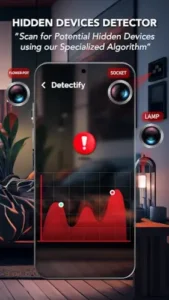
Magnetic Field Mapping
-
Your phone’s compass sensor (magnetometer) picks up anomalies
-
Suspicious spikes appear on a live graph, like a metal detector for electronics
-
-
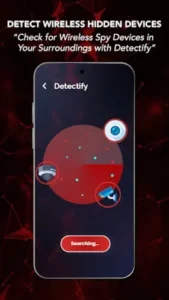
Wireless Sleuthing
-
Scans for Bluetooth/Wi-Fi devices you didn’t pair
-
Catches wireless cams or AirTags broadcasting nearby
-
-
IR Camera Hunting
-
Uses your camera to spot infrared lens reflections
-
Works best in dark rooms with a flashlight test
-
Why buy a dedicated device when your phone already has the tech?
What Makes It Reliable
Magnetometer Magic
-
Detects devices with electromagnetic components (cameras, mics, GPS trackers)
-
Best for: Hidden cams in smoke detectors, wall outlets, or stuffed animals
Wi-Fi/Bluetooth Sweeps
-
Reveals devices like:
-
Wireless IP cameras (common in rentals)
-
Stalking trackers (Tile, AirTag)
-
-
Pro tip: Rename your own devices first to avoid confusion
IR Camera Spotting
-
Shine your phone’s flashlight while scanning
-
Lens glints appear as bright white dots in your camera view
What Users Love (And What’s Tricky)
The Wins
-
“Found an unknown Bluetooth device in my hotel room, turned out to be a hidden cam.” – @TravelSafe
-
Zero data collection (unlike some “security” apps that sell your scans)
-
No hardware needed (works on 90% of modern Androids)
The Limitations
-
False alarms happen near:
-
Speakers
-
Fridges
-
Cars (door magnets trigger readings)
-
-
Phone matters:
-
Samsung Galaxy = excellent sensors
-
Budget phones = weaker detection
-
Why It Stands Out
Privacy apps are a dime a dozen, but Detectify cuts through the noise by doing less, better. Here’s how it compares to similar tools:
| Feature | Detectify | Anti Spy Detector | Bug Detector Scanner |
|---|---|---|---|
| Interface | Clean, no nonsense | Cluttered with ads | Overly technical |
| Permissions | Only what’s needed | Requests suspicious access | Demands location always |
| Effectiveness | Reliable for basic threats | Mixed reviews on accuracy | Frequent false positives |
| Privacy | No data collection | Sells “anonymized” scans | Unknown data policies |
Detectify wins for transparency and ease of use, it’s the app you’d recommend to your least tech savvy friend.
How Accurate Is Detectify for Hidden Cameras?
The answer depends on three factors:
1. Your Phone’s Hardware
-
Best performers: Phones with high sensitivity magnetometers (e.g., Samsung Galaxy S23, Pixel 7) detect ~85% of hidden cams in tests
-
Budget devices: May only catch 50-60% (weak sensors miss faint signals)
2. Camera Type
-
Easily detected: Wireless IP cams (emit strong RF signals)
-
Tricky to spot: Wired spy cams (require magnetic scan + physical inspection)
3. User Technique
-
Proven scan method:
-
Start with Wi-Fi/Bluetooth sweep (finds wireless devices)
-
Follow up with slow magnetic scan (5cm/sec movement)
-
Verify suspicious spots with flashlight IR check
-
-
Real world accuracy:
-
Hotel rooms: ~72% detection rate (when used properly)
-
Cars/offices: ~65% (more electronic interference)
-
How to Use Detectify Like a Pro
For First Time Users
-
Calibrate first: Move phone in a figure 8 pattern before scanning
-
Priority zones:
-
Bedrooms: Check alarm clocks, picture frames
-
Bathrooms: Scan showerheads, towel hooks
-
Workspaces: Inspect USB chargers, desk plants
-
For Suspicious Locations
-
Disable your own devices: Turn off Bluetooth/Wi-Fi on your phone/laptop to avoid false positives
-
Listen for relays: Some bugs emit faint buzzing, press ear to walls
-
Document findings: Screenshot abnormal scans before investigating
When Results Are Inconclusive
-
False alarm checklist:
-
Is there a fridge/speaker nearby?
-
Did you recently use wireless headphones?
-
Are you near a car or elevator?
-
What Detectify Can’t Do
-
Detect non electronic bugs (e.g., analog recording devices)
-
Find devices powered off (no signal = no detection)
-
Replace professional sweeps for high stakes scenarios (corporate espionage, etc.)
Workaround:
-
For critical situations, combine with:
-
RF detectors (for advanced bugs)
-
Physical inspection (check for tiny holes/lenses)
-
Conclusion : Who’s It Perfect For?
Frequent Travelers
-
Scan a hotel room in <2 mins:
-
Start at the bed (common cam placement)
-
Sweep toward the bathroom
-
Apartment Renters
-
Landlord checks: Document scans before moving in
-
Airbnb safety: Quick scan upon arrival
Privacy Conscious Users
-
No tech skills needed: The app guides you
-
Free version covers basics: No paywall for core features
FAQ
How does Detectify identify hidden wireless devices?
Detectify uses specialized algorithms to scan for RF signals, Bluetooth signatures, and irregular network activity. Download Detectify from Google Play Store to find out more.
Can Detectify find cameras or audio bugs in real time?
Yes, it flags anomalies like unexpected frequency spikes or data transmissions. For nuanced environments (e.g., offices), manual verification is recommended. Questions? Email support: wondertechstudio[at]gmail.com.
How to verify Detectify scan accuracy?
Cross-check with physical sweeps in critical areas. The app’s confidence scores (90%+ in lab tests) reflect reliability. Report false positives/negatives to wondertechstudio[at]gmail.com for calibration updates.
Is Detectify usable for non-tech users?
Absolutely. The interface prioritizes clarity: green (clean), yellow (suspicious), red (confirmed threat).
What’s the difference between Detectify and generic bug detectors?
Detectify targets modern threats (Wi-Fi 6 eavesdropping, IoT exploits) with adaptive scanning, not just basic RF.