

DreamFace, an application that has garnered significant attention for its ability to animate the static.
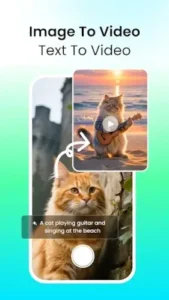

For decades, a photograph was a moment frozen in time. Now, artificial intelligence is thawing those moments, adding breath and motion with a few simple taps. DreamFace shift moves beyond simple filters, venturing into a new space of dynamic content creation directly from our personal galleries.
What Exactly Is the DreamFace App?
DreamFace is a mobile application developed by AI Art Magic Avatar Studio. Its core function is straightforward: it transforms standard photos and text prompts into animated videos. The app’s primary achievement lies in making complex AI animation accessible on a smartphone. The market response has been notable. At the time of writing, DreamFace holds a 4.8 star rating from nearly 290,000 user reviews and has been downloaded over five million times from the Google Play Store.
The app size is approximately 90MB, making it a moderate download, and its intuitive design appeals to a broad age range, from teenagers creating social media content to adults exploring digital storytelling. The fundamental proposition is clear: you provide a face and a voice, and DreamFace handles the intricate task of synchronization and animation.
The Toolbox: How DreamFace Works
Understanding the process demystifies the magic. The system operates on a clear, three stage pipeline.
First, you supply the raw materials. The inputs are versatile: a photo from your library, a text script you type, or an audio clip you record or upload. This flexibility is a key strength, allowing for different creative starting points.
Next, the AI engine takes over. This is where the core technology performs its task. For face animation, the AI likely uses a sophisticated blend of facial landmark detection and generative adversarial networks (GANs). It identifies key features like the mouth, eyes, and head pose in your photo. When you provide audio, the model generates a corresponding mouth shape sequence, a process known as lip syncing, and warps the original image to create a fluid, talking head. The text to video AI generator feature within DreamFace expands this further, creating scenes from written descriptions.
Finally, the output is a synthesized video file. The app renders your animated avatar, often against a custom or removed background, into a shareable video format optimized for platforms like TikTok or Instagram. The entire process, from input to output, is designed for efficiency, typically taking just a minute or two.
DreamFace Features :
Beyond the basic animation, the app packs a suite of tools that increase its utility.
-
Advanced Avatar Creation: The platform goes beyond simple talking heads. With features like Dream Avatar 3.0, it can animate full body movements, creating more dynamic characters. This is a significant step up from apps that only manipulate the face.
-
Diverse Content Generation: The capability to animate pets or generate short clips from landscape photos adds a layer of creative fun that extends beyond human subjects. This AI video generator with pet lip sync functionality is a particular standout for creating viral content.
-
Practical Enhancement Tools: The built in background remover and image sharpening tools are not just gimmicks. They are practical utilities that improve production quality without requiring a separate editing app, streamlining the content creation workflow.
-
Comprehensive Audio Control: The integrated voice studio is a powerful component. Features like voice cloning, text to speech in multiple languages, and audio separation provide significant control over the final audio track, making the DreamFace AI avatar maker a complete package for voiceovers.
DreamFace User Experience:
A powerful tool is only as good as its usability. DreamFace prioritizes a clean, logical interface. The design is minimalist, guiding users through a linear process: select a template or start from scratch, upload a photo, add audio, and generate. The learning curve is shallow; most users can create their first animated video within minutes of opening the app. The workflow feels less like complex video editing and more like a guided creative session, which is precisely its appeal for a non professional audience.
Users consistently praise the app’s ease of use and the surprising quality of the lip sync animations. Many note that the free version is more generous than those of competitors, allowing for substantial experimentation before considering a premium upgrade. The daily new animations and templates are also frequently mentioned as a positive, keeping content fresh.
However, no application is without its considerations. Some users report occasional glitches, such as the app crashing during video generation or animations not rendering perfectly. A common point of feedback relates to the limitations of the free version, specifically the cap on video length for exported content. This is a standard monetization strategy, but it is a recurring theme in user comments.
For those seeking a similar but distinct experience, the Wombo: AI Video Generator app offers a focus on singing avatars and is another popular option in this growing category.
Navigating the AI Animation Landscape with DreamFace
The field of AI powered avatar and video generation is crowded, but each application carves out a specific niche. When considering DreamFace similar apps, it’s useful to understand the competitive terrain. Apps like D-ID focus heavily on hyper realistic facial animation for professional presentations, often through a web interface. Avatarify and Reface excel at face swapping into GIFs and video clips, prioritizing quick, humorous meme creation. Wombo gained fame specifically for its singing avatars, a more narrow but highly viral application.
DreamFace distinguishes itself through a combination of breadth and accessibility. Its strength is not in being the most specialized tool, but in being the most comprehensive one for general purpose animation on mobile. Where others might excel in one area, DreamFace offers a consolidated toolkit: robust lip syncing, full body animation, pet animation, and audio editing all within a single, free to try application. This makes it a strong candidate for users who want to explore different styles of AI video creation with DreamFace without switching between multiple platforms.
The question isn’t necessarily which app is best, but which is best for your specific need. For those seeking an all in one mobile suite for animating original content, DreamFace’s position is compelling.
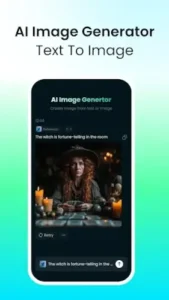
Practical DreamFace Tips for Higher Quality Output
Understanding the app’s features is one thing; own them is another. Applying a few strategic DreamFace tips can significantly improve the quality of your final videos. The process is as important as the tools.
First, consider your workflow sequence. For the cleanest lip sync results, apply any body or head animations before adding your dialogue. This allows the AI to generate the mouth movements on a stabilized, pre animated face, reducing visual glitches and creating a more natural flow. It’s a simple step that many overlook in their haste to hear their avatar speak.
Next, think creatively about the utility of each feature. The background remover isn’t just for creating transparent PNGs. Use it to isolate your animated avatar and place them into a completely different video background, effectively creating a simple green screen effect. This can transform a basic talking head video into a dynamic scene. Similarly, the pet animation feature reaches its full potential when you go beyond simple lip-sync. Try using it to create a short narrative, perhaps a pet “interview” or a cartoon-like sequence where the animal reacts to a sound. The key is to use the technology to tell a micro-story.
Finally, make a habit of checking the daily new animations and templates. This isn’t just about novelty; it’s a strategic move for content relevance. These templates are often designed around current trends, giving you a direct path to creating content that has a higher chance of resonating with audiences on platforms like TikTok and Instagram. Leveraging these updates is one of the simplest ways to use DreamFace for viral content.
The Community and Ecosystem Around DreamFace
An app’s value is often amplified by its community, and DreamFace has cultivated an active one. The real world testing ground for DreamFace AI animations is social media, particularly on TikTok and Instagram Reels. Users frequently share their creations, from humorous clips of talking pets to more polished avatar-based short films. This organic sharing acts as a continuous stream of tutorials and inspiration, demonstrating applications of the tool that the developers might not have initially envisioned.
This community feedback loop is supported by active communication from the developers. They maintain a presence on social media, sharing user generated content and providing tips, which fosters a sense of collaboration. This engagement is crucial for a tool that evolves as rapidly as AI animation. It ensures that the app’s development is, to some extent, influenced by how people are actually using it in the wild, making the DreamFace app review from its own user base a driving force for its improvement.
Conclusion :
So, where does this leave a potential user? The DreamFace application successfully demystifies a complex technology. It packages advanced AI animation capabilities into a interface that prioritizes user action over complicated settings. The verdict is that it strikes a effective balance between creative power and operational simplicity.
It makes sophisticated video animation accessible to individuals who lack video editing skills or expensive software. Whether for personal amusement, social media content creation, or even prototyping ideas for larger projects, DreamFace delivers tangible utility. Its model, which offers substantial functionality for free while reserving advanced features for a premium tier, feels fair and encourages exploration.
In conclusion, DreamFace is more than a novelty; it is a capable and continually evolving content creation platform. It stands as a strong option for anyone looking to add a layer of dynamic AI powered animation to their digital toolkit without a steep learning curve. The application delivers on its core promise: it provides a straightforward path from a static idea to a moving, talking, engaging video.

Frequently Asked Questions (FAQ)
Is DreamFace free to use, and what are the limitations?
Yes, the app operates on a freemium model. You can download and use DreamFace for free, which includes access to core animation features, a selection of templates, and the ability to generate shorter videos. For extended video length, access to the full music library, and premium templates, a subscription is available. This approach lets you thoroughly test the DreamFace AI avatar maker before committing.
What is the best way to get a clean DreamFace download and ensure it’s the official app?
The safest method is to get DreamFace directly from the official Google Play Store. To avoid imitation apps, you can also start from the developer’s Official Website, which will direct you to the correct store listing. Always ensure the developer is listed as “AI Art Magic Avatar Studio.”
I’m having a technical issue with an animation. What support is available?
For problems that aren’t solved by the app’s built in help section, you can contact the development team directly. They handle technical support and can assist with bugs or account issues at dreamface[at]newportai.com.
How does DreamFace compare to other AI video tools?
DreamFace positions itself as an all in one mobile suite, combining avatar animation, pet lip sync, and video generation from text. While other apps might specialize in one area, like face swapping or singing avatars, DreamFace’s strength is its breadth of features designed for general content creation, all within a single, user friendly interface.