

ESPN is a sports app that tries to be everything to every fan and most of the time, it succeeds.

ESPN currently holds a 3.6 star rating from over 1.2 million reviews on Google Play, with 100 million+ downloads. The install size sits around 100 MB to 150 MB depending on your device and the age rating is Everyone, which fits a platform designed for general sports consumption. It has won a Google Play Editors’ Choice badge and for good reason. It is one of the few apps that combines live streaming, real time scores, breaking news and podcasts into a single interface. The trade-offs are real, though. The app is dense, the subscription prompts are relentless and the spoilers are everywhere.
What Is ESPN
Disney built this app as the central hub for everything ESPN produces. You get access to ESPN, ESPN2, ESPNU, SECN, ACCN, ESPNEWS, ESPN+, ESPN Deportes and ESPN on ABC. That is a massive amount of content, from live NFL games to college basketball, golf, soccer and tennis.
The core value of ESPN is the breadth of its coverage, not its depth. You do not need to install a dedicated app to watch a college football game and you do not need to open a separate website to check NBA scores. It puts everything into one entrance. The problem is that when you stuff everything into one entrance, the entrance itself gets crowded.
ESPN Mechanics of Following Sports
Live Streaming
You can stream thousands of live events, studio shows, documentaries and on-demand content. The coverage includes NFL, NBA, MLB, NHL, college sports, golf, soccer and tennis. If you have a subscription, you can watch Monday Night Football, SportsCenter, Get Up, First Take and College GameDay.
Scores, News and Alerts
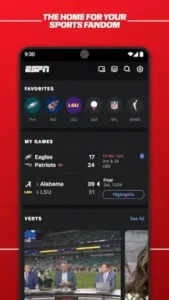
Real-time scores, updates and breaking news are available for your favorite teams and leagues. The “SC For You” feature delivers a personalized SportsCenter experience every day, which is useful if you want a quick highlight reel without scrolling through a feed.
Multiview and Second Screen
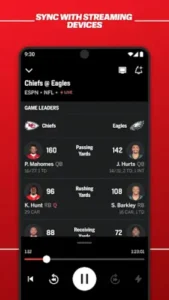
Multiview lets you stream up to four live events simultaneously on one screen. This is a genuinely useful feature on busy sports days. Streamcenter lets you watch a game on TV while engaging with your phone in real time, which adds a layer that the broadcast alone does not have.
Audio and Podcasts
You can listen live to ESPN Radio and your favorite ESPN podcasts. The limitation is that you cannot download podcasts for offline listening. If you are on a plane or in a dead zone, you are out of luck.
ESPN Subscription Plans
ESPN Select
This tier includes ESPN+ only. It is good for fans who want on-demand and select live events. It does not include the main ESPN networks.
ESPN Unlimited
This tier includes all ESPN networks and services, including ESPN+. It is the full package for users who want everything.
Content Availability
Content varies by region and blackouts and restrictions apply. The subscription design of ESPN has an implied premise. It assumes you are already watching cable or streaming TV and are using the app as a supplement. If you do not have a TV subscription, ESPN Unlimited becomes your primary entry point and the price will be higher than you expect.
ESPN Design and Interface
The UI is modern and polished. The home screen is personalized and you can tailor the layout to your favorite teams and leagues. The multiview and vertical content layouts are innovative.
The trade-off is density. Some users find the app hard to browse because there are too many pages and features. The interface design of ESPN makes a compromise between information volume and operability, but you have to spend time getting used to it. If you just want to know whether the Lakers won last night, the moment you open the app you may be overwhelmed by recommendations, banners and subscription prompts.
What Users Say About ESPN App
What users like
Users appreciate the wide range of sports and content types. Fans like the “SC For You” feature for tailored content. Multiview and second-screen features earn consistent mention. The app is seen as a comprehensive hub for everything sports-related.
What users dislike
The cluttered interface is the biggest complaint. Users find it hard to browse. Spoilers are the second complaint. On-demand content often reveals the outcome before you can watch. The subscription push is the third complaint. Some users feel ESPN+ is being pushed too aggressively. No podcast downloads is the fourth complaint. Users want to listen offline and cannot.
Best ESPN Subscription Plans: Which One Should You Choose?
The answer depends on one thing: Do you already have a TV subscription?
If you already have cable or a live TV streaming service like YouTube TV or Hulu + Live TV, you are likely already paying for ESPN’s main networks (ESPN, ESPN2, ESPNU). You just need to download the ESPN App and log in with your TV provider credentials to unlock those live channels. In this case, you do not need to buy any additional ESPN subscription.
If you do not have a TV subscription and only want ESPN’s digital content, you have two choices. ESPN Select only includes ESPN+. Its positioning is “supplementary content”: long tail college sports, outer courts of tennis Grand Slams, golf and 30 for 30 documentaries. ESPN Unlimited includes all ESPN networks plus ESPN+. It is for the person who says, “If it is related to ESPN, I want all of it.”
If your core need is watching NBA playoffs, NFL Monday Night Football or top tier college football matchups, those are on the main ESPN channels. You need Unlimited, not Select. The core difference between ESPN Plus and ESPN is this: Plus is the side dish. The main channels are the main course.
ESPN Plus vs ESPN: Which Subscription Has Live Games?
Both have live games, but the content is different.
ESPN+ (which is what ESPN Select gives you) streams “non main channel” content. It includes select NHL games, regular season MLS, niche college sports and UFC pay per views (which cost extra). It does not include NBA regular season, NFL or MLB national broadcasts. Those are core ESPN main channel assets.
The main ESPN channels (included in Unlimited or your TV subscription) are where you watch SportsCenter, Monday Night Football, NBA playoffs and top tier college football matchups.
If you are searching for how to watch live ESPN sport events, first confirm which channel the game is on. If it is a live broadcast on ESPN or ESPN2, Select is not enough. You need Unlimited or a TV provider login.
Can You Watch ESPN Without Cable? Complete Streaming Guide
Yes, but you need to understand that “without cable” in the ESPN context does not mean “for free.”
The most direct path is ESPN Unlimited. It puts all ESPN networks inside the app. You do not need any cable subscription to watch. The price is higher than Select, but if you keep finding that “the things I want to watch are not there” with Select, then Unlimited is worth the money.
Another path is live TV streaming services like YouTube TV, Hulu + Live TV, or Sling TV. These services include ESPN channels and you can log into the ESPN App with their credentials to watch live. The upside is you also get other channels. The downside is they cost more than subscribing to ESPN Unlimited alone.
The truth about watching ESPN without cable is this: you either pay for ESPN, or you pay for a bigger package that includes ESPN. There is no third path.
What Sports Can You Watch on Different ESPN Subscriptions?
ESPN Select (ESPN+): NHL, MLS, college sports (non premier events), outer courts of tennis Grand Slams, golf, UFC pay per views (extra cost), ESPN+ original documentaries and the 30 for 30 series.
ESPN Unlimited: Everything above, plus all live broadcasts on ESPN, ESPN2, ESPNU, SECN and ACCN, including Monday Night Football, NBA regular season and playoffs, MLB national broadcasts, top tier college football and basketball, SportsCenter, First Take and Get Up.
TV provider login (if you have one): Basically the same channel coverage as Unlimited, but you need to be subscribed through your TV provider first.
How to Get ESPN on Your Phone, Tablet and TV
On your phone, download the ESPN App from the App Store or Google Play. On your tablet, it is the same app and the interface adapts automatically. On your TV, the path depends on your device. Apple TV, Roku, Fire TV and Android TV all have official ESPN apps. Download them and log in with the same account.
The multi device experience on ESPN is connected, but there is one prerequisite. You need to be logged in with the same account. If you bought Unlimited on your phone, you can watch on TV by logging in with the same account. If you logged in with a TV provider account, use that same account on your phone.
Where is the safest place to get the ESPN download and what does it cost?
You can download ESPN from the Official Google Play Store. The app itself is free to download and use for checking scores, reading news and watching select clips. However, watching live games requires a subscription to ESPN Select or ESPN Unlimited, which is billed separately.
Can I watch live games on ESPN?
Yes, if you have a subscription. ESPN Unlimited includes live streams from all ESPN networks, including NFL, NBA, MLB and college sports. Some games are subject to regional restrictions and blackouts.
What is the official website and where do I find community resources?
The official hub is espn.com, where you can read articles, check schedules and manage your subscription. For community discussions and real time fan reactions, the r/ESPN subreddit is highly active.
How do I contact support if I have a subscription or streaming issue?
For app-specific bugs or feedback, the support email is espnmobilefeedback[at]espncustomercare.com. If you are having trouble with your ESPN+ or Unlimited subscription billing, you should go through the ESPN customer care portal on their official website, as billing issues are handled separately from app feedback.
What is the difference between ESPN Select and ESPN Unlimited?
ESPN Select only includes ESPN+, suited for people who want on-demand content and select live events. ESPN Unlimited includes all ESPN networks plus ESPN+, suited for people who want the full live streaming experience.
Why do I see spoilers before watching on-demand content?
Because the home page and push notifications are designed around real time updates. They assume you know the result or do not mind knowing it. If you want to watch a replay, go straight to the Watch section and avoid the home page.
Can I download podcasts for offline listening?
No. ESPN podcasts are online only with no download option. If you need offline listening, you need a different podcast app.
Why does the app sometimes show me the score before I watch a replay?
The ESPN home screen is built for real time updates, meaning it prioritizes showing you the latest scores and news. If you want to watch a replay without spoilers, you need to bypass the home screen and navigate directly to the “Watch” or “On Demand” section.