

We’ve all been there, you snap what should be the perfect shot, only to notice a rogue blemish, dull lighting, or hair that refuses to cooperate. No reshoot? No problem. That’s where Facetune steps in.
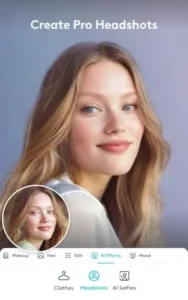

Facetune AI powered editor doesn’t just tweak photos; it transforms them with surgical precision, whether you’re polishing a selfie, upgrading a headshot, or editing a video, all from your phone.
What Exactly Is Facetune?
Developed by Lightricks Ltd., Facetune is a 4.8 star rated app ( based on 1.2M+ reviews) and more then 50M downloads that blends AI automation with manual controls. It’s not just another filter stack. Think of it as a virtual stylist and retoucher rolled into one, capable of everything from subtle skin smoothing to full hair color makeovers.
Who’s It For?
-
Casual users who want Instagram ready pics without Photoshop PhDs.
-
Influencers needing consistent, high quality content.
-
Professionals crafting LinkedIn headshots or portfolio shots.
-
Teens to adults (main user base: 16–34 year olds).
At 148MB (Android) or 256MB (iOS), it’s lightweight for its power, no surprise it’s a Top 10 photo app in 85+ countries.
Why Facetune Beats Basic Editing Apps
AI That Actually Works
Most apps overpromise with “smart” tools that leave photos looking plastic. Facetune’s one tap AI delivers:
-
Skin smoothing without erasing texture (no “mannequin face”).
-
Teeth whitening that avoids the unnaturally glowing chiclets.
-
Hairstyle swaps, blonde to brunette, straight to curls, with realistic roots and shine.
Ever tried an auto fix tool that made your face look like a wax figure? Facetune’s algorithms avoid this by preserving natural shadows and contours.
Manual Control Without the Guesswork
For purists who hate presets:
-
Reshape tools let you adjust jawlines or eye size subtly.
-
Hair color sliders offer 50+ shades with adjustable saturation.
-
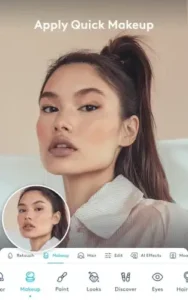
Makeup brushes layer blush, lipstick, or contour where you want it.
Unlike apps that force you into rigid templates, here, you steer the edits.
Video Editing That Doesn’t Half A
While rivals focus solely on photos, Facetune applies edits frame by frame in videos:
-
Smooth skin across a 60 second clip.
-
Consistent lighting adjustments.
-
Background swaps without glitchy edges.
Why edit a single photo when your entire reel can look pro grade?
Studio Quality Lighting & Backgrounds
-
Blur tools mimic DSLR bokeh.
-
Backdrop replacements (swap your bedroom for a marble loft).
-
Eye brightening that adds catchlights without looking alien.
Headshot Mode: LinkedIn Savior
AI generates professional headshots from casual selfies, ideal for remote workers or entrepreneurs. Adjust suit collars, even out skin, and sharpen details.
User Experience:
Facetune’s interface feels like it was tested by actual people. No hidden menus or cryptic icons:
-
Clean layout: Tools are labeled plainly (no “magic wand” vagueness).
-
Real time previews: See edits as you make them.
-
Compare button: Toggle before/after views to avoid over-editing.
Platform Differences?
-
iOS gets more free tools (e.g., basic blemish removal).
-
Android users need a subscription for some features.
For AI powered retouching with body sculpting, try Retouch Me (4.7 stars, 500K+ reviews). It’s lighter on video but excels at portrait fixes.
Facetune’s Limitations – And Smart Workarounds
Let’s be honest: no app is flawless. Facetune delivers professional-grade edits, but it has real drawbacks that might make you pause. Here’s what users complain about, and how to sidestep the frustrations.
The Subscription Trap
Facetune operates on a freemium model, meaning basic tools are free, but the best features require $5.99/month or $35.99/year. The problem? Even essentials like blemish removal and advanced hair color changes are locked behind the paywall.
-
Free Version Limits: You can smooth skin, but not selectively. Teeth whitening? Only in premium.
-
No One Time Purchase: Unlike some competitors (e.g., Fotogenic), there’s no lifetime option, just recurring fees.
Is it worth it? If you edit daily, yes. Casual users might balk.
Missing Features That Should Be Standard
-
No Pet Editing: Try retouching your dog’s fur, and the AI ignores it completely.
-
Limited Makeup Shades: Only 12 lipstick colors, unforgivable if you’re into bold looks.
-
Android Gets Less Love: iOS users enjoy more free tools (e.g., basic blemish removal), while Android requires a subscription for the same features.
Why can’t Lightricks unify the experience? No clear answer, but it’s a sore spot for Android loyalists.
AI Isn’t Perfect (Yet)
Facetune’s auto enhance works well, until it doesn’t.
-
Over smoothed skin if you rely solely on AI.
-
Hair color spills onto backgrounds if edges aren’t clean.
-
Video glitches when applying edits across frames with fast movement.
Alternatives When Facetune Falls Short
If these flaws are dealbreakers, try these Facetune competitors:
Retake AI – For Hyper Realistic Edits
-
Pros: Better AI skin retouching without the waxy look.
-
Cons: Fewer video tools.
-
Best For: Portrait purists who hate artificial smoothing.
Fotogenic – Body Reshaping + More Free Features
-
Pros: One-time purchase option, plus sliders for body sculpting.
-
Cons: Less intuitive for beginners.
-
Best For: Those wanting waist cinching or leg lengthening.
Perfect365 – Makeup Lover’s Dream
-
Pros: 200+ lipstick shades, lash customization.
-
Cons: Weak on background edits.
-
Best For: Experimenting with bold makeup looks.
Pro Tips: How to Edit Videos in Facetune Like a Pro
Facetune’s video editor is powerful but underused. Here’s how to maximize it:
-
Prep Your Clip First
-
Trim unnecessary frames to reduce processing time.
-
Stabilize shaky footage (use CapCut or InShot first if needed).
-
-
Apply Edits Consistently
-
Use “Apply to All Frames” for skin smoothing or lighting fixes.
-
Adjust frame-by-frame for precision (e.g., fix one blink but not the rest).
-
-
Avoid Overdoing It
-
Subtle edits look more natural in motion.
-
Check playback at 1x speed before exporting.
-
-
Export Smartly
-
1080p for Instagram/TikTok.
-
4K only if original footage supports it (otherwise, quality drops).
-
Why waste time editing each frame individually? Batch processing saves hours.
Conclusion :
Get It If:
-
You need quick, high quality retouching without desktop software.
-
Video editing is a priority (few mobile apps do it this well).
-
You’re okay with subscription costs for premium tools.
Skip It If:
-
You rarely edit photos (free tools like Snapseed suffice).
-
You hate recurring fees (Fotogenic offers lifetime access).
-
You edit pet photos (look into PetRetouch instead).
Future Updates We’d Love:
-
Pet recognition for dog/cat edits.
-
More lipstick/eyeshadow options.
-
One time purchase plan for Android users.

FAQ
How do I get Facetune for free?
The free version offers basic tools, but advanced features require a subscription. Download Facetune from Google Play Store or visit the Facetune official website for details.
How to edit videos in Facetune without losing quality?
Use the “Apply to All Frames” feature for consistent edits, and export in 1080p. For glitches, email facetune2.android.support[at]lightricks.com with your device specs.
Can I use Facetune for professional headshots?
Yes. The Pro Headshots mode auto adjusts lighting, skin tone, and even outfits. For best results, start with a well-lit photo.
Why does Facetune smooth skin too much?
The AI can overdo it. Manually adjust the “Smoothness” slider under Retouch for a natural look.
Are there better apps for virtual makeup than Facetune?
For detailed makeup looks, try Perfect365. But Facetune balances makeup with broader editing tools.