

Google Health (Fitbit) by Google LLC has crossed 100 million downloads on Google Play, holding a 4.1 star rating from over 1.3 million reviews.
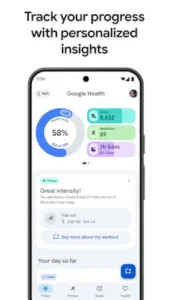

Google Health app sits at roughly 95 MB to 110 MB depending on your device and region and it carries an Everyone 12+ age rating because it handles menstrual cycle data, medical records and personal health metrics. Those numbers tell you something useful before you even open the app. This is not a niche experiment. It is a mainstream health platform that Google has been quietly building for years, and the Gemini AI layer is the piece that finally makes it feel different from everything else on the shelf.
Here is what most people get wrong about it. Google Health is not Google Fit. Google Fit is the older, simpler activity tracker built around Heart Points and Move Minutes. Google Health is the evolution of the Fitbit app, rebuilt from the ground up with a different feature set, a different design language, and a different purpose. If you searched for “what is Google Health app” expecting Google Fit with a fresh coat of paint, you are looking at the wrong product entirely.
So who is this actually for? If you own a Fitbit, a Pixel Watch or you live inside the Google ecosystem and want coaching that adapts to your real routines, this app was built with you in mind. If you own a Samsung Galaxy Watch and want a fully free tracker with no subscription tier, there is a better path. This Samsung Health breakdown covers that side of the conversation and the comparison is closer than either camp likes to admit.
The pitch is straightforward. Track everything in one place. Let Gemini read the data. Get guidance that responds to your actual patterns instead of recycled wellness advice. Whether that promise holds up depends entirely on how you use it.
How Google Health Works Under the Hood
The Tracking Loop
Your phone or watch sensors detect movement, the health record updates and steps plus calories get credited to your daily total. That sounds basic and it is. The difference is what happens after. Google Health pulls data from Fitbit devices, Pixel Watch and third party health apps into a single timeline, so your morning walk, afternoon workout and evening recovery all land in the same place. No app switching. No manual exports.
The AI Coaching Layer (Gemini)
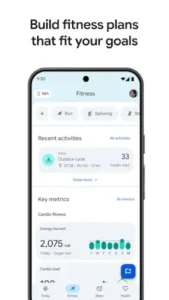
This is the part that separates Google Health from every step counter you have ever abandoned. Gemini powered coaching builds workout plans around your stated goals, whether that is weight loss, muscle building, cardio endurance or simply building healthier habits. It offers daily recommendations based on your preferences and past activity. You can ask follow up questions to dig deeper into any suggestion. Sleep analysis works the same way. The AI reads your sleep stages, spots patterns across weeks and gives you specific guidance instead of a generic “sleep more” nudge.
What Is Free vs What Is Premium
The free tier covers core tracking across fitness, sleep, nutrition and menstrual cycle data, plus basic insights and trends. Google Health Premium unlocks the AI fitness coach with personalized plans, advanced sleep insights and holistic health coaching across every metric. Premium requires a subscription, a Wi Fi connection, and internet access. The free version is not a demo. It is a functional tracker. Premium is for people who want the coaching layer on top.
Google Health Core Features
Google Health earns its 100 million downloads by doing something most fitness apps only promise: it pulls your entire health picture into one place. Not just steps. Not just workouts. Fitness, sleep, nutrition, cycle tracking and medical records all share the same timeline. That matters more than any single feature, because health data only becomes useful when you can see how one part affects another. Here is what the app actually does, feature by feature and where it holds up under real world use.
Fitness Tracking
Workouts, steps, active minutes and calories burned all land in a single dashboard. Sync works across Fitbit, Pixel Watch and other health apps, so your data does not stay trapped inside one device. If you have been searching for “Google Health Fitbit features,” this is where the two products overlap most cleanly. A morning run on your Pixel Watch shows up alongside your afternoon walk and your evening calorie burn, no manual logging required. The app detects movement automatically, which means the days you forget to hit start still count toward your weekly totals. That small detail is why people stick with it longer than most trackers.
Sleep Tracking
Google Health tracks light, deep and REM sleep stages, then stretches those readings across weeks and months to surface patterns you would never catch night to night. Bedtime reminders, a personalized sleep schedule and mindfulness exercises sit right beside the data, so the app does not just tell you that you slept poorly. It offers something to do about it. If you have been wondering “does Google Health track sleep quality,” the answer is yes, and it does it far better with a wearable on your wrist than with your phone alone on the nightstand. Wear it consistently for a week and the trends start telling a story.
Nutrition and Menstrual Cycle Tracking
Meal logging comes with full nutrition breakdowns and cycle tracking ties each phase to how your routine should shift. This is not a bolt on feature tucked away in a settings menu. It lives in the same timeline as your fitness and sleep data, which makes every insight sharper. Understanding how your energy changes across a cycle turns generic advice into something that actually fits your week.
Health Data Integration
Google Health syncs with other health tracking apps and medical records in select countries. That integration is the quiet advantage. Your doctor visits, lab results and daily activity can live in the same place, which means fewer apps, fewer screenshots and fewer gaps in your own history. Availability varies by region, so check what your country supports before assuming everything connects.
Google Health Design and Interface
Google Health looks like a product Google actually cares about. The interface is modern, polished and built around data visualization. Stats are easy to scan, colors carry meaning, and the layout pushes the numbers you care about to the front. Dark mode follows your Android system setting, which matters for anyone checking sleep data at 6 AM. But polish and simplicity are not the same thing, and that distinction shows up fast.
The Clutter Problem
The app is dense. Genuinely dense. Dozens of metrics, nested screens and data points compete for attention and new users often feel buried before they find their footing. Some reviewers on Google Play describe the experience as overwhelming and they are not wrong. The fix is not to use everything at once. Pick three metrics that matter to you, ignore the rest for the first month and let the app earn its complexity over time. That is how you turn a crowded dashboard into a tool instead of a chore.
Wearable Integration
This is where Google Health shines and where it stumbles, depending on what is on your wrist. With a Fitbit or Pixel Watch, the experience is seamless. Heart rate, sleep stages and workout detection flow continuously without you thinking about it. With anything else, the picture narrows. Users with non Google wearables regularly complain that the app only connects well to Google products, which makes “does Google Health work without Fitbit” a fair and frequent question. The short answer is yes, but you lose the depth that makes the app special. If you want a fully free alternative with deep Galaxy Watch integration, this Samsung Health breakdown is worth to have a look.
What Users Say About Google Health App
The Praise
Users appreciate having fitness, sleep and nutrition tracking in one place without juggling three separate apps. Privacy gets consistent credit too. The developer states no data is shared with third parties and data is encrypted in transit, which matters when you are handing over heart rate and cycle information. The Gemini AI coaching draws genuine excitement from users who expected another gimmick and found something useful instead. That combination of convenience, privacy and AI is why the app keeps growing despite the mixed rating.
The Complaints
Heart rate accuracy during intense workouts comes up often and it is worth taking seriously if you train hard. Partial day values also skew weekly and monthly averages, which throws off calculations in ways that frustrate long time users. Limited integration with non Google wearables remains the loudest complaint and the premium paywall sits behind it, with some users arguing that key features should not be locked behind a subscription.
Google Health Tips
Enable Automatic Activity Detection
Turn this on and the app catches walks, runs, and workouts without you pressing start. Sounds minor until you realize how many sessions you lose to forgetfulness. A twenty minute walk to the store counts. A lunchtime stroll counts. Set it once and stop babysitting the app.
Use the AI Coach Properly
The Gemini coach only gets sharp when you feed it real information. Tell it your preferences, your schedule and what you actually enjoy doing. Mention that you hate running but love cycling. Say you only have thirty minutes on weekdays. Generic input produces generic plans. Specific input produces something you might genuinely follow.
Wear Your Watch to Bed
Sleep stage analysis only works with consistent wear. If you strap on your wearable twice a week, the trends are noise. Give it seven straight nights and the patterns start speaking. That is when the sleep insights stop sounding like fortune cookies and start sounding like your actual life.
Log Meals and Use Mindfulness Sessions
Nutrition tracking only pays off if you do it consistently, even imperfectly. Log the meal, skip the guilt, move on. Pair that with the built in mindfulness exercises and you get a compounding effect. Lower stress improves sleep. Better sleep improves recovery. Recovery improves everything else. It is the least glamorous tip on this list and the one that changes the most.
Adjust Goals as You Improve
A goal you hit effortlessly is no longer a goal. It is a habit, and habits do not drive progress. Bump your step target when you clear it consistently. Increase your active minutes when the current number stops feeling like effort. Stale goals stop being useful the moment they become automatic.
Google Health Similar Apps
Google Health vs Google Fit
Google Fit is the simpler, older tracker built around Heart Points and Move Minutes. It is fully free, has no premium tier and does not try to coach you. Google Health replaces that simplicity with AI coaching, deeper data and a subscription for the best parts. If you want a clean activity log with zero pressure, Google Fit still works. If you want a coach, Google Health is the upgrade.
Google Health vs Samsung Health
Samsung Health is fully free, has no ads and integrates deeply with Galaxy Watch. Google Health counters with Gemini AI coaching, a tighter Fitbit and Pixel ecosystem and a premium paywall. If you own a Galaxy Watch, Samsung Health is the obvious call. If you own a Fitbit or Pixel Watch, Google Health is the one built for your hardware.
Google Health vs Strava
Strava is a social fitness platform built for runners and cyclists who want segments, leaderboards, and kudos. Google Health is broader and quieter, focused on holistic wellness rather than competition. If you want to chase personal records against strangers, Strava wins. If you want to understand your whole health picture, Google Health wins.
Google Health vs MyFitnessPal
MyFitnessPal is a calorie and nutrition specialist, and it does that job extremely well. Google Health covers nutrition plus fitness, sleep, cycle tracking and medical records in one place. If food logging is your entire focus, MyFitnessPal is sharper. If you want the bigger picture, Google Health holds more of it.
Conclusion
Google Health is built for Google ecosystem users, Fitbit owners and anyone genuinely curious about AI driven coaching. If you wear a Pixel Watch or a Fitbit and want Gemini reading your data, this app is the reason to keep both. Non Google wearable owners will find the sync frustrating. Anyone who wants fully free tracking without a paywall should look at Samsung Health instead. There is no shame in picking the app that matches your hardware.
Google Health is excellent for the right user and irritating for everyone else. You can track every step, every heartbeat, every hour of sleep and every calorie for a year. What does all that data actually change about what you do tomorrow morning? That is the only metric that matters.
FAQ
Where do I find the Google Health download and who do I contact if something breaks?
The Google Health download is available right now on the Official Google Play Store. The official product background lives at fitbit.com and the broader history and context sit on Wikipedia at en.wikipedia.org/wiki/Fitbit. If you hit a bug, a sync issue, or an account problem, the developer support email is android[at]fitbit.com. That is the real channel. Use it before you leave a one star review in frustration.
Does Google Health Work Without a Fitbit or Pixel Watch?
Yes, but limited. Core tracking works on your phone alone. The advanced features, especially sleep stage analysis and continuous heart rate, need hardware. If you are weighing whether to buy a wearable, this is the answer.
Is Google Health the Same as Google Fit?
No. Different apps, different purposes, different feature sets. Google Fit is the free, simple tracker. Google Health is the Fitbit evolution with AI coaching and a premium tier.
Can You Use Google Health on Non Google Devices?
Partially. The app runs on Android phones running Android 10 or newer, but sync is limited outside the Google ecosystem. If you own a non Google wearable, expect fewer features to connect cleanly.
Is the AI coaching genuinely useful or just a marketing angle?
It is useful when you give it real information. Tell the Gemini coach your schedule, your preferences and what you actually enjoy doing. Tell it you hate running but love cycling. Tell it you only have thirty minutes on weekdays. That is when the plans stop feeling generic and start feeling like something you might actually follow. Generic input produces generic output. That rule applies to every AI coach on the market.
How Do You Cancel Google Health Premium?
Through Google Play subscription settings. Open the Play Store, tap your profile, go to Payments and subscriptions, then Subscriptions, and cancel from there. Your free tier access continues after cancellation.