

Most workout apps try to do everything, track reps, count calories, play music, even cheer you on with cringey notifications. Interval Timer does none of that. Instead, it nails the one thing that actually matters during high intensity training: keeping your intervals precise without distraction.

With a 5.0 star rating from over 250,000 reviews and 10 million downloads, Interval Timer app has become the silent partner for everyone from weekend boxers to CrossFit addicts.
What Is Interval Timer?
At its core, Interval Timer is a no frills interval tracker that shines where other apps fail:
-
Background reliability: It won’t quit when you lock your phone or switch to Spotify.
-
Universal use: Set it for 3 minute boxing rounds, 30 second Tabata sprints, or custom circuits.
-
Glanceable feedback: Full screen color shifts (red = work, green = rest) mean you can track progress from across the room.
Unlike clunky fitness suites, it’s lightweight (under 15MB) and works on devices as old as Android 5.1.
Why It Stands Out (When Other Timers Fail)
Design That Actually Serves the Workout
While other apps bury timers in menus, Interval Timer puts everything on one screen:
-
Color-coded phases: Red for work, green for rest, no decoding needed mid-burpee.
-
Preset freedom: Save “Boxing 3×3” (3-min rounds) next to “HIIT Hell” (20s/10s intervals).
-
Silent mode: Vibrate alerts keep gym neighbors from glaring when your timer beeps.
It Stays Running When You Need It
Ever had a timer app crash during a sprint? Interval Timer:
-
Works locked or in background, critical when your phone’s across the room.
-
Plays nice with music (no audio clashes with your workout playlist).
-
Recovers smoothly: Interrupted by a call? It resumes where you left off.
Customization Without Complexity
-
Name presets like “Kettlebell Circuit” or “Sprint Day” for one tap access.
-
Adjust alerts: Choose between beeps, vibrations, or the jarring “Shriek” (for when you’re half-asleep).
-
Skip ahead/back: Lagging behind? Jump to the next interval without resetting.
How It Works (Without Making You Think)
-
Set your intervals: Prep time → work → rest → rounds.
-
Save as preset: Label it clearly (e.g., “Tabata: 20s ON, 10s OFF x8”).
-
Start and forget: The color shifts and vibrations keep you on track.
Pro tip: Use landscape mode if your phone’s on a tripod, bigger text for sweaty, blurry vision.
Real World Uses (Beyond the Obvious)
-
Boxing: Mimic pro fights (3-min rounds, 1-min rests) without a coach yelling.
-
Home HIIT: No more squinting at your phone mid burpee, just follow the colors.
-
Group workouts: Sync multiple phones (same preset) so everyone moves together.
For a more feature packed alternative, check out Seconds Pro, though it’s overkill if you just need reliable timing.
The Hidden Drawbacks of Interval Timer (And How to Beat Them)
Interval Timer’s simplicity is its strength, but that same minimalism comes with tradeoffs. Here’s what nobody tells you about the downsides, and exactly how to work around them.
The Ad Situation
Yes, you’ll see ads. They’re not brutal, but they can pop up at annoying moments. Here’s the insider fix:
-
Enable airplane mode during workouts (timer still works, ads don’t load)
-
Time your rest periods to hit “back” right before an ad would trigger
-
Consider it a built-in rest reminder when ads do appear
Those Occasional Glitches
About 1 in 50 users report:
-
Timer skips a beat (usually fixed by force closing/reopening)
-
Presets not saving (always double check before starting)
-
Audio alerts failing (test before each session)
The solution? Always:
-
Keep the app updated
-
Restart your phone weekly
-
Have a backup timer ready for critical sessions
Missing Features? Here’s the Workaround
Want more than basic timing? Pair Interval Timer with:
-
A simple fitness tracker for rep counting
-
Google Sheets for progress logging
-
A whiteboard for group workout tracking
Interval Timer Top Secrets: Pro Tricks Only Veterans Know
The “Shriek” That Works
Most users stick with default beeps. Big mistake. The piercing “Shriek” alert:
-
Cuts through gym noise
-
Wakes you up during early workouts
-
Can’t be ignored like gentler tones
Landscape Mode = Game Changer
Rotating your phone:
-
Doubles text size for visibility across the room
-
Creates a better tripod stand setup
-
Makes color changes more dramatic (better peripheral cues)
Preset Insurance Policy
Updates occasionally reset settings. Smart users:
-
Screenshot all presets
-
Name them clearly (“BOXING 3min/1min”)
-
Store backups in a workout note app
The Hidden Restart Trick
Need to restart a session? Don’t reset – just:
-
Pause
-
Swipe left on current interval
-
Resume exactly where you need to be
Battery Saver Mode
Extend your phone’s life by:
-
Lowering screen brightness
-
Using black background in settings
-
Closing other apps before starting
When Interval Timer Isn’t Enough: Smart Alternatives
For Data Lovers: Seconds Pro
-
Tracks workout history
-
Shares routines with friends
-
Costs $5 but overcomplicates simple timing
Tabata Purists: Tabata Timer
-
Laser-focused on 20/10 intervals
-
Lacks versatility for other workouts
-
Cleaner interface but limited use
Gym Rats: Strong App
-
Built-in timer with rep tracking
-
Significant learning curve
-
Better for weightlifters than HIIT
Conclusion :
Interval Timer won’t win awards for innovation. It won’t track your macros or cheer you on. What it will do – every single time – is keep perfect time without distracting you from your workout. In a world of bloated fitness apps, that focused reliability is why 10 million users keep coming back.
FAQ
What’s the best way to set up quick intervals in Interval Timer?
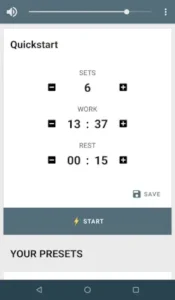
Save time by using the Quickstart feature shown in the app (sets:6, work:13:37, rest:00:15).
How do I report bugs or suggest improvements?
Email the developers directly at support[at]dreamspark.cc with screenshots of any issues. They typically respond within 2 business days.
Where can I download the latest version?
Get Interval Timer from the Google Play Store .
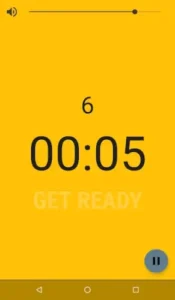
Why does my timer show ‘GET READY’ with a 00:05 countdown?
This preparation period helps you get positioned before intense intervals. You can disable it in Settings > Workout Preferences.