

Lose It! runs on a simple premise that most fitness apps overcomplicate: give people a massive food database and a daily calorie budget, then get out of the way.
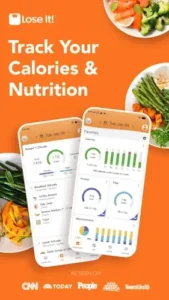

Lose It! made by FitNow built a tracker that sits at 4.6 stars from over 185,000 reviews on Google Play, crossed 10 million downloads and holds a Google Play Editors’ Choice badge. The install size lands around 157 MB on Android and its rated 3+ depending on region.
What Lose It! Brings to the Table
This is a calorie and macro tracker with a 56 million item food database, restaurant dishes included. That database size matters more than any feature list because logging speed determines whether you stick with tracking past week two. If you search Lose It! food database accuracy or Lose It! vs MyFitnessPal database, the short answer is that Lose It! leans on crowdsourced entries that occasionally disagree with package labels, but the sheer volume means you rarely hit a dead end.
The app launched in 2008 and has been featured in The Wall Street Journal, The Today Show and CNN. That longevity is the real credential. Apps that survive seventeen years in this category do so because the core logging experience works, not because they chased every trend.
The Mechanics of Tracking Your Intake
Food, Calories and Macros
The free tier tracks calories and the four basic macros: carbs, fat and protein. Custom nutrient targets, sodium and fiber included, sit behind Premium. The diary is the center of the experience and the daily calorie summary shows you remaining budget in a number large enough to read at a glance.
Scanning and Logging Options
Barcode scanning, meal photo logging and voice logging all require Premium. This is the shift that generated the most user frustration in recent reviews. One Google Play reviewer put it bluntly: the barcode scanner used to be free and now it is behind the subscription, so they are looking for an alternative. Lose It! is not alone in this move. MyFitnessPal did the same years ago. But if you searched Lose It! barcode scanner free hoping for a workaround, the answer is no. The scanner costs money.
Hydration and Fasting
Water tracking sits on the main dashboard. Intermittent fasting timers are Premium only on Lose It!, which separates it from Yazio’s free 16:8 option .
Diet Specific Modes
Net carb tracking for keto and low carb setups is Premium. Custom macro splits are Premium. The free tier gives you calories and basic macros, which is enough for general weight loss but thin for anyone running a specific protocol.
Lose It! Fitness Integration and Activity Tracking
Steps and Workouts
Lose It! pulls step and workout data from connected sources and adjusts your daily calorie budget accordingly. The free tier handles basic activity logging, and the adjustment is automatic once you connect a tracker.
Wearables and Sync
The app connects to Fitbit, Garmin, Withings scales, Google Fit, HealthKit and Health Connect. The integration list is broad and syncing a scale means your weight trends update without manual entry. Wear OS support lets you log water and view macros from your wrist.
The AI Coach
Lose It! introduced an AI Coach under Premium Plus, a higher tier than standard Premium. The AI analyzes your diary and offers guidance. Whether it justifies the additional cost depends on whether you want a second opinion on your logging habits or you just want the numbers to add up correctly. For most people, the diary itself does the coaching.
GLP-1 Tracking
The app includes a GLP-1 medication log that shows estimated levels and lets you track how you feel. It is a logging tool, not medical advice. If you searched Lose It! GLP-1 tracker worth it, the honest framing is that it gives you a place to record symptoms alongside your food, which can reveal patterns a doctor might find useful.
Lose It! Free Tier vs Premium Subscriptions
The Free Experience
Calorie tracking, basic macro percentages, weight loss planning and community groups all work without paying. Ads interrupt the experience. A one time Eliminate Ads purchase exists under Profile settings, which removes the ads without unlocking Premium features. That option is buried, and most users never find it.
What Premium Unlocks
Barcode scanning, photo and voice logging, intermittent fasting, custom nutrient targets, detailed progress comparisons and an ad-free diary. Premium is sold as an annual subscription only, with US pricing ranging from roughly $40 to $80 per year depending on promotions. Monthly options are not available.
Premium Plus
This tier adds the AI Coach, AI Restaurant Menu Scan and AI Suggest Meals. Menu scanning lets you photograph a restaurant menu and get recommendations that fit your calorie budget. It is a niche feature, but for anyone who eats out often, it solves a real problem.
Lose It App for Beginners: How to Get Started Today
Do not start by setting a goal to lose twenty pounds in three months. The app’s own onboarding advice is to spend the first week establishing a baseline. Enter your height, weight and age, let the app calculate an initial budget and then log your normal eating habits without trying to create a deficit. Your only task is to understand how many calories a typical Tuesday actually involves.
Make logging as frictionless as possible. One feature available on the free tier is custom meal naming. If you always snack at 4 PM, go into the settings and rename a meal slot to “Afternoon Snack.” This makes your daily diary easier to read later and helps you spot exactly when the extra calories creep in. While Premium offers voice logging and Snap It, manual search is actually better for the first two weeks. It forces you to look at portion sizes and learn what a real serving of peanut butter looks like.
Best Lose It App Features for Long Term Weight Loss
Custom Meal Targets: This Premium feature lets you distribute your calorie budget by percentage across specific meals. If you constantly run out of calories by dinner, shift your breakfast allocation down to 20% and dinner up to 35%. The numbers force you to adjust your habits.
Patterns: The app analyzes your logging history to spot trends. After two weeks, it might tell you that your Thursday dinners average 400 calories higher than the rest of the week. This specific, data driven feedback is more useful than generic diet advice because it points directly to your actual behavior.
GLP-1 Tracking: If you are on medication like Ozempic, the app includes a dedicated feature for this. It provides nutritional strategies for low appetite, suggesting targets like 1.5 grams of protein per kilogram of body weight and at least 14 grams of fiber per 1,000 calories. The app doesn’t make food decisions for you, but it tracks whether you are hitting those critical nutritional floors when you can barely eat.
If you are looking for a Lose It! alternative that keeps the barcode scanner free, MyNetDiary offers a different approach with its free tier including scanning and voice logging. But if community challenges and logging streaks are what keep you consistent, Lose It!’s social layer remains one of the strongest tools for pushing past week three.
Lose It! won’t stop you from eating the second slice of pizza. It just makes sure you see the number. The discomfort of that number is what drives change.
Does the Lose It App Really Work for Weight Loss?
Yes, but the mechanism is simpler than the marketing suggests. Lose It! won’t override your appetite. It just forces you to look at what you ate. The app’s own data shows a direct correlation: people who log their food seven days a week lose roughly 10 pounds more on average than those who log once a week. The habit of logging matters more than hitting a perfect daily target.
Users who succeed usually start with a baseline week. They don’t cut calories on day one. They just log what they normally eat to see where the hidden calories live. The ones who quit usually try to eat perfectly from the start and burn out by Thursday. The app works if you let it show you the truth before you try to change it.
A note on Lose It! Snap It accuracy: research indicates that photo based calorie estimation across major apps, including this one, routinely underestimates intake. One study found underestimations averaging 250 to 345 calories, with fat being the most severely underestimated macronutrient. Use the camera to save time, but always double check the portion sizes, especially for calorie dense foods.
What’s the 3-3-3 Rule for Losing Weight?
There is no official scientific definition for the 3-3-3 rule. It is a social media framework designed for memorability rather than clinical precision. The most common version floating around suggests eating three balanced meals a day, drinking three bottles of water before the afternoon and exercising for three hours a week. Another variation focuses on including three specific food groups in every meal (protein, fibrous carbs, healthy fats) walking for three minutes after eating and getting at least seven hours of sleep.
Does it work? Yes, because the underlying principles are sound. Three meals a day limits grazing. Drinking water supports satiety, which is especially critical if you are on GLP-1 medication and prone to nausea. Three hours of weekly exercise aligns with standard public health guidelines for moderate activity. The “3-3-3” name is just a mnemonic. If you want to use it with Lose It!, translate those rules into app actions. Log three meals, track your water intake and sync your workouts. The framework gives you a starting line, but the app provides the scoreboard.
Lose It! Design and Interface
The layout prioritizes data density. Charts, macro breakdowns and daily totals share screen space with logging buttons. Dark mode follows your system settings. The aesthetic is clean but busy. Reviews mention the interface feeling dense after a long day of logging, and the removal of the quick add button in a recent update drew complaints from long time users . The design assumes you want the numbers visible, not hidden behind gestures.
What Users Say About Lose It! App
What Work
Long term users credit the app with significant weight loss. The community features, challenges, friend leaderboards and logging streaks give it a social layer that most calorie trackers lack. One reviewer called it easy to use and complete even on the free version. The database size earns consistent mentions because finding obscure foods matters when you eat beyond the basics.
What needs attention
he barcode scanner moving behind the paywall angered users who remembered when it was free. Ads appearing for Premium subscribers were reported in multiple reviews, including auto playing pop-ups and GLP-1 promotions. And UI changes that added steps to logging, particularly the removal of the quick add button, frustrated people who had built routines around the old flow.
How to Refer a Friend to Lose It and Get Rewards
Here is the reality: there is no straightforward, cash equivalent referral code system where you invite a friend and instantly get a free month of Premium. Lose It!’s previous marketing leadership has noted that referral programs in the weight loss space are notoriously difficult because users are hesitant to recommend an app until they have seen results for themselves.
The closest thing to a referral reward is the Challenges feature. You can invite friends to join you in step challenges or logging streaks. However, this social layer is largely gated behind the Premium subscription. If you want to use the app as a social accountability tool with friends, you likely need to upgrade. The most effective workaround is to have a friend download the free version and you both commit to sharing your daily logging streaks with each other manually. Social pressure acts as the reward when the app itself doesn’t provide a financial one.
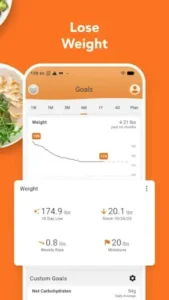
.Lose It! Tips
Enable Automatic Activity Detection
Lose It! pulls step data from Health Connect on the free tier. If you want direct sync with Garmin, Fitbit or Wear OS, that requires Premium.
The overlooked workaround: route your tracker’s data through Health Connect first. If your watch syncs to Health Connect, Lose It! can pull from there without you upgrading. It adds one step to the chain, but it gets the data into your diary.
A note on Lose It! app features: the Snap It photo recognition works on the free tier, though it is slower and less accurate than the premium version. Use it as a draft tool. Snap the plate, let it guess, then fix the portion sizes manually. It saves typing time even if it doesn’t get the numbers right on the first pass.
Use the AI Coach for Plans
The AI Coach sits in Premium Plus, a tier above standard Premium. It analyzes your logging habits and suggests adjustments. Whether that is worth the extra cost depends on whether you already know what to change when the scale stalls.
If you just want to know why progress stopped, the diary is more useful than the algorithm. Scroll back a week and find the 200 to 300 calories that sneak in daily. That beats any AI suggestion. Reviews note that Lose It!’s photo recognition handles complex mixed meals better than most competitors, estimating a Chipotle bowl’s protein and total calories closer to the reference than other apps in testing. That is the camera doing the work, not the AI Coach.
Adjust Goals as You Progress
Lose It! does not recalculate your calorie target automatically. You set 1,800 calories, and it stays 1,800 until you change it. That is a common flaw across trackers, and Yazio shares it.
But your body changes. The number that worked in week one can maintain your weight by week eight. A simple check: if the scale sits still for two weeks and your logging looks accurate, drop your daily target by 100 to 150 calories and watch for a week before adjusting again. Cut too much and you will quit from hunger.
One detail worth knowing about Lose It! codes and pricing: the app runs dynamic discounts. Use the free version for three or four weeks and the system often pushes 40% to 60% off Premium. If you are not in a hurry, wait for the discount instead of paying full price. The official Lifetime option lists at $299.99, but promotions have dropped it much lower. The pricing is not transparent, but the pattern is real.
Lose It! Similar Apps
Lose It! vs MyFitnessPal
Both databases are large, but the positioning splits. MyFitnessPal has deeper branded food coverage. Lose It! has a cleaner interface and offers a Lifetime purchase that MyFitnessPal does not. Both paywall the scanner. If you want a one time payment option, Lose It! is the only major app that offers it. If you want the biggest database, MyFitnessPal still leads.
Lose It! vs Samsung Health
Samsung Health is free, ad-free and tightly bound to Galaxy Watch. It logs steps, sleep, workouts, and nutrition if you enter everything manually. Lose It! goes deeper on food logging and macro tracking. If you own a Galaxy Watch and want one app for everything, Samsung Health covers the basics. If you log every meal and need a database that rarely fails you, Lose It! earns the space.
Lose It! vs Google Fit
Google Fit cares about activity, not food. Heart Points are its core metric and nutrition tracking is an afterthought. Lose It! handles the intake side Google Fit ignores. They solve different problems, and using both is not unusual. Sync steps through Health Connect so your calorie budget reflects movement.
Lose It! vs Strava
Strava is for athletes comparing segment times and collecting kudos on the Sunday ride. Lose It! is for people trying to understand why exercise is not moving the scale. Strava tracks performance. Lose It! tracks intake. They overlap only when you sync a Strava workout into Lose It! so the burn adjusts the food budget.
Conclusion
Who Lose It! Is For
People willing to spend a few minutes logging food daily and who respond well to community challenges and streak tracking. The 56 million item database means you will rarely fail to find a food. The free onboarding is among the smoothest in the category and reviews note low first-day drop-off. If you are starting out and need a push to get past week two, Lose It!’s challenge and friend systems do more for retention than most competitors.
Who Should Look Elsewhere
Anyone who refuses to pay for scanning. Anyone who cannot tolerate ads. And if your patience for interface changes runs thin, the recent redesign pushed plenty of long time users out the door. Also, if you need automatic weekly calorie target recalculations, Lose It! does not do that and neither does Yazio. MacroFactor and Carbon handle that specific job.
The Final Call
The free tier of Lose It! is an good product. It gives you enough to start logging, then uses ads and the missing scanner to remind you that upgrading exists. The 56 million item database matters, but the database alone does not move the scale. The habit of opening the app, logging what you ate and checking that number at night is what moves it.
FAQ
Where can I get the Lose It! download?
You can download Lose It! from the Official Google Play Store. The free version handles core calorie and macro logging, though you will see ads. If you want to remove the ads, there is a one time “Eliminate Ads” purchase buried in the profile settings. The full Premium tier, which unlocks barcode scanning and custom nutrient targets, runs around $39.99 annually, but the system often pushes 40% to 60% discounts if you wait a few weeks after signing up.
What is the official website and where do I find community resources?
The official hub is loseit.com, which handles account management and subscription billing. For user driven advice, the lose it! reddit is massive and functions as the de facto community wiki. It is packed with threads on meal prep, maintaining streaks, and comparing the app to alternatives. If you need formal documentation on data policies, the privacy page is linked directly at the bottom of their official site.
How do I contact support if my subscription is glitching?
The support email is android[at]loseit.com. For billing issues, include the email tied to your account and any Google Play receipt numbers to speed up the process. If you are dealing with diary sync errors or bugs where the app resets mid logging, reporting it through the app’s internal feedback form sends your device logs along with the message, which helps the developers pinpoint the problem faster.
Is Lose It! free to use?
Yes. The free tier covers calorie logging, basic macros, water tracking and community challenges. Ads appear between screens. Barcode scanning, voice logging, and fasting timers require Premium. The free macro view shows only calories, fat, carbs and protein. Deeper nutrient breakdowns sit behind the subscription.
Can I scan barcodes without Premium?
No. Barcode scanning lives behind the Premium paywall, which runs around $39.99 per year depending on region and promotions. If you eat mostly packaged food and refuse to pay, MyNetDiary and FatSecret keep scanning on their free tiers and are worth considering.
Does Lose It! work with my smartwatch?
Sync through Health Connect or Apple Health works on the free tier for basic steps and activity. Direct connection to Garmin, Fitbit or Wear OS requires Premium. The workaround: route your watch data through Health Connect first, then let Lose It! pull from there. It adds a step, and the sync occasionally lags, but it works without upgrading.
Is my data private?
The Play Store listing states no data is shared with third parties and data is encrypted in transit. You can request deletion. The app does collect location and personal information. Read the privacy policy before paying if data handling matters to you.
What is the GLP-1 tracking feature?
Lose It! includes a GLP-1 medication log that lets you mark dose timing and how you feel, so you can spot symptom patterns. It is not a medical tool and offers no dosing guidance. If you are on a GLP-1 medication and want food and symptom records in one place, it saves you a separate notes app.