

Fitness apps have a little secret: most promise transformation but deliver frustration. You download one hoping for structure, only to face rigid programs that don’t fit your goals, pop up ads mid squat, or progress charts that raise more questions than answers. Sound familiar?
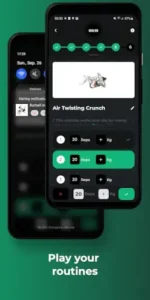

Here’s the fix: My Workout Plan, a gym tracker with a 1M+ download and 4.6 star rating (85K+ reviews) that cuts the bs. At just 15MB, it’s built for Android users aged 18-45 who want control, not handholding. No “AI coaches,” no subscription traps, just a tool that respects your intelligence.
Why This App Works When Others Fail
Custom Workouts Without the Headache
Most apps force you into pre made plans. My Workout Plan flips the script:
-
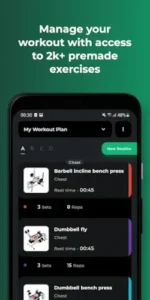
Build from scratch or tweak existing templates, no arbitrary limits.
-
200+ exercises with photos/form tips, plus options to add your own (ever tried a “single leg Romanian deadlift with kettlebell”? Now you can log it).
-
Real world flexibility: Adjust sets mid session, swap exercises, or extend rest timers when needed.
Tracking That Actually Helps You Improve
Progress isn’t just about pounds lifted. The app logs:
-
Workout history (volume, reps, trends)
-
Body measurements (arms, waist, etc.)
-
Personal bests with timestamps, so you know when you hit that deadlift PR.
Missing stats? The free version shows basics; Pro unlocks granular graphs (more on that later).
Design That Gets Out of Your Way
-
Clean interface: Color coded exercises, zero bloated animations.
-
Offline mode: Log sets even with spotty gym WiFi.
-
Wear OS support: Start/stop workouts from your watch.
What Users Say :
The Good:
-
“Finally an app that lets me create rehab routines for my knee. No other tracker had ‘banded lateral walks’ in their library.”
-
“Ads exist but don’t assault you. Huge win for a free app.”
The Gripes:
-
“Wish I could compare progress over custom date ranges without paying.”
-
“Editing a past workout feels like solving a puzzle.”
The Pro version ($6/month) adds cloud sync, advanced stats, and ad removal, worth it if you juggle multiple routines or train clients.
Getting the Most From My Workout Plan:
Downloading a fitness app is the easy part. The real challenge is making it work for your specific goals without wasting time on features you’ll never use. Here’s how to transform My Workout Plan from another icon on your phone to your actual training partner.
Pro Tips That Actually Save Time (Not Just Sound Good)
Color Coding Isn’t Just Pretty – It’s Practical
That “assign colors” feature? It’s your secret weapon for efficient workouts:
-
Red for compound lifts (squats, deadlifts – the heavy hitters)
-
Blue for mobility work (dynamic stretches, band exercises)
-
Green for accessories (curls, lateral raises)
Why this matters: When you’re halfway through a grueling session and fatigue sets in, those visual cues help you instantly identify what’s next without reading every line.
Notes Are Where the Magic Happens
The notes field isn’t just for grocery lists. Use it to:
-
Link to YouTube tutorials for unfamiliar moves
-
Record subtle cues (“drive elbows forward during bench press”)
-
Track equipment availability at your gym (“use rack 3 on Tuesdays”)
Pro insight: These notes become invaluable when you revisit an exercise after months off.
Cloud Sync – Your Insurance Against Frustration
Ever lost a perfect routine because you got a new phone? The Pro version’s cloud backup solves this, but there’s a smarter way to use it:
-
Sync before travel (gym WiFi is notoriously unreliable)
-
Create versioned backups (“Back-to-Basics Routine v3”)
-
Share with training partners without messy screenshots
When To Consider Alternatives (And What Works Better)
For Data Nerds: GymRun
If you live for spreadsheets and trend analysis:
✓ More detailed graphs (volume per muscle group over time)
✓ Community challenges for motivation
✗ Less flexible for unconventional exercises
For Beginners: Fitbod
If you need more guidance:
✓ AI generated suggestions based on equipment available
✓ Built in rest timers with form tips
✗ Less customization for experienced lifters
Conclusion :
The Perfect User
-
Self-motivated lifters who already know their way around a gym
-
Physical therapists creating rehab protocols
-
Experienced trainers designing programs for clients
-
Minimalists who hate flashy interfaces
Who Might Want To Look Elsewhere
-
Social exercisers needing community features
-
Complete beginners wanting daily guidance
-
CrossFitters needing specialized movement tracking
FAQ
Where can I download My Workout Plan?
Get My Workout Plan from Google Play Store or visit My Workout Plan official website for additional resources. Questions? Email support[at]myworkoutplan.app.
What are My Workout Plan limitations for beginner lifters?
While great for customization, beginners might miss guided programs. For structured plans, try Fitbod first.
Can I share my custom routines with friends?
Absolutely. Export any routine via text or email – perfect for training partners or clients.
How often does the exercise database get updated?
We add new moves quarterly, but you can always create custom exercises instantly.