

What if you could understand every word on your screen, no matter the language, without ever leaving your app? Screen Translate (4.3★, 1M+ downloads, 25MB) makes this possible.
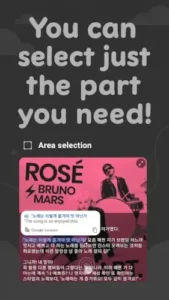

Unlike traditional translators that force you to copy paste text, Screen Translate app lets you simply drag a floating button over any content, Instagram captions, YouTube comments, even in game text, for instant translations in 146 languages. For polyglots, travelers, or anyone who’s ever struggled with foreign text, it’s a game changer.
Why Screen Translate Stands Out
Most translation apps work like dictionaries. Screen Translate works like magic.
The Floating Handle That Does It All
-
Hover over text in any app (Twitter, TikTok, WhatsApp)
-
Get translations without switching screens
-
Adjust for single words or entire paragraphs
Language Coverage That Surprises
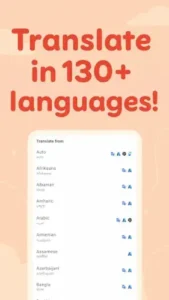
From common (Spanish, French) to niche (Zulu, Basque), it handles:
-
Social media slang
-
Game specific terminology
-
Technical documents
Messaging Made Smarter
Got a message in Korean? Translate and reply in Korean without leaving your chat.
Screen Translate Features :
Real Time Translation
-
Works on:
-
Social media (Facebook, Instagram)
-
Messaging (WhatsApp, Telegram)
-
Games (Genshin Impact, Honor of Kings)
-
-
Example: Understanding Spanish Twitch chat while watching streams
Multilingual Replies
-
Preserves conversation flow
-
Supports 20+ messaging apps
Free vs. Paid
-
Free version: Ads, but fully functional
-
Premium ($3/month): Removes ads, adds offline mode
Who Needs Screen Translate App?
1. Travelers
-
Translate street signs via camera
-
Decipher foreign language menus instantly
2. Gamers
-
Understand global teammates in MOBAs
-
Follow quest text in JRPGs
3. Language Learners
-
Look up words in context
-
Practice reading foreign news/articles
4. Professionals
-
Quick translations in multilingual emails
-
Review foreign documents without alt tabbing
Real World Scenarios
Scenario 1: The Social Media Scroll
You’re browsing Thai Facebook marketplace. Instead of:
-
Copying text
-
Switching to Google Translate
-
Pasting
…just drag Screen Translate’s handle over the text. Done.
Scenario 2: The Multilingual Chat
Your German colleague messages:
“Können wir das Meeting auf 14 Uhr verschieben?”
Translate → “Can we move the meeting to 2 PM?”
Reply in German without leaving WhatsApp.
Scenario 3: The Manga Reader
Struggling with untranslated Japanese manga? Hover over text bubbles to get English translations instantly.
Screen Translate vs Google Translate for social media reveals some surprising truths.
While Screen Translate’s floating handle wins for convenience, Google Translate still dominates for certain tasks.
The Ad Problem (And How to Fix It)
Every 4-5 translations, you’ll hit a full-screen ad. For power users, this becomes frustrating fast. Three ways around it:
-
Use airplane mode when translating offline content (ads won’t load)
-
Pay $2.99/month for ad free experience (worth it if you translate 10+ times daily)
-
Tap the ‘X’ immediately – most ads let you close them within 2 seconds
The premium version adds:
-
Offline translation packs
-
Priority text recognition
-
No waiting times between translations
When Translations Go Wrong
The app stumbles with:
-
Idioms (“Break a leg” becomes literal in Spanish)
-
Slang (Gen Z terms often mistranslate)
-
Vertical text (Chinese/Japanese sometimes scrambles)
-
Tiny fonts (below 8pt may not register)
Workarounds exist:
-
For idioms, manually type the phrase in Google Translate
-
Increase font size temporarily in app settings
-
Use the screenshot+zoom method for small text
The Language Paywall
About 12% of languages (including some African dialects) require premium. Before traveling, check if your needed language is:
Free: Spanish, French, Arabic
Premium: Xhosa, Maori, Basque
Pro Techniques Most Users Miss
1. Precision Handling
-
Light tap: Translates single word
-
Long press: Captures entire paragraph
-
Circle gesture: Selects custom text block
2. Language Pair Shortcuts
Set frequently used combos like:
-
English ⇄ Japanese
-
Spanish ⇄ Portuguese
Saves 3-4 taps per translation
3. The Update Advantage
Last month’s update improved:
-
Korean text recognition by 40%
-
Arabic font support
-
Gaming term databases
Always check patch notes in Play Store
Screen Translate vs. Competition
Google Translate
-
Better: Camera translations of physical signs/menus
-
Worse: No floating overlay for app text
iTranscreen
-
Better: Manga/game specific dictionaries
-
Worse: Only 68 languages supported
Instant Translate On Screen
-
Better: Full offline functionality
-
Worse: Clunky interface, frequent crashes
Conclusion :
Where Screen Translate Excels:
-
Real time social media translation (Facebook, Twitter, Instagram)
-
In app messaging (WhatsApp, Telegram, Discord)
-
Quick lookups while gaming or reading
Where It Falls Short:
-
Physical world translation (use Google Lens)
-
100% accuracy with slang/idioms
-
Completely free long term use
For digital content translation, nothing beats Screen Translate’s convenience. But keep Google Translate installed for everything else.
FAQ
How do I set up language pairs in Screen Translate?
Go to Settings > Language Preferences to save your most-used combinations (like English to Korean). This skips 3-4 taps per translation.
Does Screen Translate work for Asian languages like Korean or Japanese?
Yes, but enable “High Precision Mode” in settings for vertical text. The latest update improved Asian character recognition by 40%.
Can I use Screen Translate offline?
Partial functionality exists, but full offline translation requires Premium ($2.99/month). Download Screen Translate from Play Store to test both modes.
How accurate is it compared to Google Translate?
Better for in-app translations (thanks to the floating handle), but Google wins for camera translations.
Why does it struggle with slang and idioms?
The AI prioritizes literal accuracy. For colloquial phrases, try typing them manually in the app’s text box. Developers are crowdsourcing slang translations – suggest terms via the in-app feedback button.