

Termux brings a full Linux terminal environment to your Android device without requiring root access, giving you command line power in your pocket.
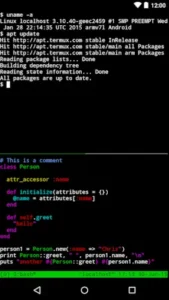

Developed by indie developer Fredrik Fornwall, Termux open source terminal emulator has earned a 4.2 star rating from 172K of users across Google Play Store. The app requires approximately 50-100 MB of storage, is rated for ages 12 and up.
What Is Termux?
Termux is an Android terminal emulator and Linux environment that runs a real Linux workspace directly on Android using APT, operating without requiring root access and aiming at users who want deeper control over their device. The app combines powerful terminal emulation with an extensive collection of Linux packages installable via the Debian style APT package manager, including shells (bash, zsh, fish), editors (nano, vim, emacs), development toolchains (clang, cmake, make, gdb/lldb, Go, Rust, Swift), remote access tools (OpenSSH, git), and even text based games.
What makes Termux special is how it unlocks your device’s potential. You can automate tasks, connect apps, and access advanced system features that are usually hidden behind the graphical interface. A small base system is installed at first start, and desired packages are then installable using the APT package manager. For power users, developers, and anyone comfortable with command line tools, Termux transforms a phone into a portable Linux workstation.
A Real Linux Environment on Android
Termux runs a full Linux workspace directly on Android without requiring root access. The small base system is installed at first start, and you can then install thousands of Linux packages using the APT package manager. This gives you access to a Debian style Linux ecosystem that includes shells, text editors, development toolchains, remote access tools, and scripting languages.
The app is perfect for anyone who wants deeper control over their device. You can edit files, run scripts, and reach servers using familiar tools. The command line comfort for shell lovers is unmatched in any other Android app.
Thousands of Packages via APT
Termux uses the Debian style APT package manager, letting you search, install, and update thousands of packages, including man pages and documentation. You can install multiple shells (bash, zsh, fish) with aliases, history, and prompts. Text editors like nano, vim, and emacs are available for file editing. The nnn file manager provides smart file handling.
The development toolchains are comprehensive. You can compile with clang, build using make or cmake, and debug via gdb or lldb . Run Python, Node.js, Perl, or Ruby for quick scripts and automation. Version control is ready with git. The full Linux package ecosystem is available without root.
Power User Tools and Android Integration
Termux provides full developer toolchains including clang, cmake, make, gdb/lldb, strace, Go, Rust, and Swift for coding and debugging on mobile. Built-in OpenSSH enables secure remote logins, file transfers, and server management. Git provides version control and project synchronization.
The optional Termux:API plugin exposes Android API to command line usage and scripts, with support for battery info, location, notifications, SMS, sensors, camera info, TTS, speech to text, media player control, job scheduler, and microphone record. The Termux:Styling plugin provides color schemes and powerline ready fonts to customize terminal appearance.
Termux Core Features
Powerful Terminal Emulation
Powerful terminal emulation for authentic command line experience. Full Linux environment without root access. Access to advanced command line tools. Traditional text-only interface. Small footprint, easy to install and remove.
Multiple Shells and Editors
Bash shell with aliases, history, and prompts. Zsh shell as an alternative. Fish shell for user friendly experience. Nano editor for simple text editing. Vim editor for advanced text editing. Emacs editor for powerful text editing. nnn file manager for file navigation.
Development Toolchains
C development with clang, make, and gdb. CMake support for building projects. Debugging tools (gdb, lldb). System tracing with strace. Go, Rust, and Swift language support.
Remote Access and Version Control
Built-in OpenSSH client for secure remote logins. SSH access for server management. Secure file transfers via SSH. Git version control for cloning, committing, pushing. Sync dotfiles with git.
Scripting Languages and Automation
Python console for quick calculations. Python scripting for automation. Node.js for web development. Perl for text processing. Ruby for scripting. Quick scripts and prototyping.
Termux:API Plugin
Exposes Android API to command line. Battery info via termux battery info. Location access via termux location. Notifications via termux notification. SMS access via termux sms list. Sensor access via termux sensor. Camera info, TTS support, speech to text, media player control, job scheduler, microphone record.
Termux:Styling Plugin
Color schemes for terminal customization. Powerline ready fonts. Appearance customization. Font options for visual enhancement.
Hardware Support
Bluetooth keyboard support. Mouse support. External display support. Long productivity sessions. Productive workspace setup.
Text Based Games
Frotz interpreter for interactive fiction. Classic Infocom style adventures. Terminal based games for entertainment. Game installation via APT.
Termux Graphics and Design
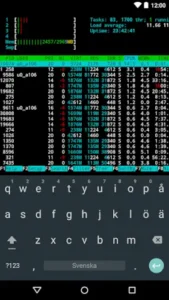
Termux features a traditional, text only interface with a black background and text UI for an authentic terminal experience. The minimalist design focuses on functionality over aesthetics, suitable for power users and developers comfortable with command line tools. The optional Termux:Styling plugin allows users to customize appearance with color schemes and powerline ready fonts, providing visual enhancement without compromising functionality.
What Users Say About Termux App
What Works
Users consistently praise the powerful terminal emulation with extensive Linux package collection. The no-root requirement for full Linux package ecosystem is a major advantage. Multiple shells (bash, zsh, fish) with aliases, history, and prompts provide flexibility. Text editors (nano, vim, emacs) and file manager (nnn) are available. Development toolchains (clang, cmake, make, gdb/lldb, Go, Rust, Swift) enable coding on mobile. Remote access tools (OpenSSH, git) support server management and version control. Scripting languages (Python, Node.js, Perl, Ruby) enable automation.
Termux:API plugin provides Android integration. Termux:Styling plugin offers customization. Hardware support for Bluetooth keyboard, mouse, and external display enhances productivity.
Termux is described as “best for power users, developers, and anyone comfortable with command line tools” with “command line comfort” for shell lovers and “smart file handling” with nnn and editors.
Where The App Could Improve
Common criticisms include a steep learning curve for beginners unfamiliar with command line tools. Some builds are incompatible with Android 12, so check compatibility before relying on it . The app is not suitable for users who prefer graphical interfaces. It is limited to text based interface with no GUI applications. Requires technical knowledge of Linux commands and package management. Not suitable for casual users unfamiliar with command line tools. Some features require optional plugins (Termux:API, Termux:Styling). Some users may want more frequent updates or new features.
Check out UserLAnd for another Linux environment on Android without root, or explore the full collection of Android apps to find your next power user tool.
Can Learning Termux Help Me Get a Tech Job?
Learning Termux can absolutely help you get a tech job, though not in the way you might expect. Termux itself is not a job qualification, it is a tool that helps you develop and demonstrate marketable skills.
Termux gives you a Linux environment on your phone. This means you can practice Linux commands, write scripts, and learn development tools anywhere, anytime. You do not need a computer to start learning. Your phone becomes a portable Linux workstation where you can run shells like Bash and Zsh, compilers, debuggers, and editors such as Nano, Vim, and Emacs, all running locally on the same device.
The skills you learn in Termux are directly transferable to the workplace. Linux administration, shell scripting, Python programming, Git version control, and SSH remote access are all skills that employers value. By using Termux, you are practicing real world tools that professionals use daily.
Termux exposes you to professional grade tools. You can check out entire Git repositories, compile programs, and fire up entire development environments. You can build and debug C programs with clang, make, and gdb. You can run Python, Node.js, Perl, or Ruby for quick scripts and automation. These are not simplified mobile versions, they are the same tools used on desktop Linux systems.
There are even books dedicated to learning Termux for professional skills. Guides like “Master Termux – Ethical Hacking with Android” and “TERMUX: THE REAL BEGINNERS GUIDE” teach everything from Linux commands and scripting to ethical hacking and penetration testing. These resources are designed to accelerate your learning journey and prepare you for real world applications.
Termux can help you build a portfolio. When you learn to automate tasks, manage servers, or develop scripts on your phone, you are building practical skills. You can showcase these projects on GitHub. Employers value candidates who demonstrate initiative and self learning.
The skills are in demand. Linux knowledge, scripting, and automation are valuable across IT, development, and cybersecurity roles. By practicing these skills consistently on your phone, you are investing in your professional development.
Think of Termux as your portable lab. Every command you type, every script you write, and every server you manage through your phone builds competence that translates directly to job readiness. No, learning Termux alone will not guarantee you a job. But the skills you develop while using it can significantly improve your employability in tech.
What Can You Actually Do With Termux on Android?
Termux transforms your Android phone into something far more capable than a typical mobile device. Here is what you can actually do with it.
Access desktop grade Linux tools. The most immediate benefit is access to tools that simply do not exist in any app store. You get shells like Bash and Zsh, compilers, debuggers, and editors such as Nano, Vim, and even Emacs, all running locally on the same device. This is not a simulated environment, it is a real Linux distribution with a package manager.
Write and run code on your phone. You can install programming languages like Python, Node.js, Perl, Ruby, Go, Rust, and Swift. You can write scripts, compile programs, and run development tools. You can check out entire Git repositories, clone projects, and push changes. Your phone becomes a portable development workstation.
Manage servers remotely. Built-in OpenSSH lets you connect to remote servers securely. You can manage servers, transfer files, and run commands from anywhere. You can even turn your phone into an SSH server to access it from your computer.
Turn your phone into a server. Your old Android phone can host services like a music server, a file sharing server to replace Google Drive, a web server, a torrent client, or an always-on node for home automation. You can install Jellyfin for media streaming, serve a personal webpage, or run Home Assistant as a smart home hub.
Run full Linux distributions. Using tools like proot distro, you can install and run full Linux distributions like Ubuntu, Debian, Arch, or Kali Linux inside Termux. This gives you access to even more packages and tools. You can even launch a lightweight desktop environment such as XFCE with Termux-X11.
Automate tasks with scripts. Termux supports scripting in Python, bash, and other languages. You can write scripts to automate repetitive tasks, integrate with Android features, and create custom workflows.
Access Android features via Termux:API. The Termux:API plugin exposes Android features to the command line. You can access battery status, location, notifications, SMS, sensors, camera info, TTS, speech to text, media player control, and more. You can write scripts that send notifications, vibrate your device, or control the torch.
Connect to external hardware. Termux supports Bluetooth keyboard, mouse, and external displays. This makes it suitable for long productivity sessions where you want a desktop like experience.
Run text based games. You can install frotz and play classic interactive fiction games like Infocom style adventures. It is a reminder that the terminal can also be a source of entertainment.
Termux is not just a terminal emulator. It is a full Linux environment that turns your phone into a capable computer for development, automation, and system administration.
Termux Tips
Getting started with Termux is straightforward if you have some command line experience, but a few smart choices early on will save you time and frustration. Here is what to focus on first.
Beginner Advice
Start with the base system installed at first start. Termux installs a small base system when you first launch the app. Do not rush to install everything at once. Explore what is already there first. The base system gives you a working Linux environment with basic commands that you can build upon.
Learn basic Linux commands (ls, cd, mkdir, rm, etc.). If you are new to the command line, start with the fundamentals. Learn how to list files (ls), change directories (cd), create directories (mkdir), and remove files (rm). These commands are the building blocks of everything you will do in Termux. A solid foundation makes advanced tasks much easier.
Install essential packages (bash, nano, git, python) first. Do not install everything at once. Start with the essentials. Bash is your shell. Nano is a simple text editor. Git is for version control. Python is for scripting. These four packages cover most beginner needs. Once you are comfortable, you can expand to more specialized tools.
Run apt update regularly to keep packages current. The APT package manager needs to know what packages are available. Run apt update regularly to refresh the package list. Run apt upgrade to install updates. Keeping packages current ensures you have the latest features and security fixes.
Use man pages to learn about installed packages. The man command shows you the manual for any installed package. Type man ls to learn about the ls command. Type man python to learn about Python. Man pages are the best documentation you have. Learn to read them.
Choose preferred shell (bash or zsh) and configure aliases. Bash is the default, but you can install and switch to zsh if you prefer. Configure aliases for commands you use frequently. For example, alias ll='ls -la' saves you typing. A well configured shell saves time and reduces errors.
Start with simple Python or bash scripts for automation. Do not jump into complex projects immediately. Start small. Write a simple Python script that prints “Hello, World!” Write a bash script that backs up a directory. Simple scripts teach you the basics of automation without overwhelming you.
Use SSH carefully for remote access. SSH is powerful but requires caution. Always use secure connections. Do not share your SSH keys. Use strong passwords or key based authentication. A careless SSH setup can expose your device to risks. SSH is best for experienced users who understand security basics.
Backup configuration files (dotfiles) with git. Your configuration files (bashrc, vimrc, etc.) are valuable. Store them in a Git repository. This lets you track changes, revert mistakes, and sync configurations across devices. A well managed dotfiles setup saves time when setting up new devices.
Check Android version compatibility before relying on it. Some Termux builds are incompatible with Android 12. Check compatibility before you rely on the app for critical tasks. If you are on Android 12 or newer, verify that your version of Termux works correctly. Compatibility issues can be frustrating if discovered late.
Advanced Strategy
Master APT package manager for efficient package management. APT is your gateway to thousands of packages. Learn the key commands: apt search to find packages, apt install to install them, apt remove to uninstall, and apt update/upgrade to keep everything current. Mastery of APT lets you manage your Linux environment efficiently.
Optimize shell configuration with aliases, functions, and prompts. Aliases save typing. Functions automate complex tasks. Custom prompts show useful information. A well optimized shell configuration makes you faster and more productive. Invest time in your shell setup. It pays off daily.
Develop complex scripts in Python, Node.js, or bash. As you grow comfortable, write more complex scripts. Automate repetitive tasks. Build tools that solve problems you face. Python is excellent for general purpose scripting. Node.js is great for web related tasks. Bash is perfect for system automation.
Set up full development environment with clang, make, gdb, git. Termux supports full development workflows. Install clang for C/C++ compilation. Use make for build automation. Debug with gdb. Manage code with git. This setup turns your phone into a portable development workstation.
Use Termux:API extensively for Android integration. Termux:API exposes Android features to the command line. Access battery info, location, notifications, SMS, sensors, and more. Integrate these features into your scripts. A script that sends a notification when a long running task completes is incredibly useful.
Customize appearance with Termux:Styling plugin. The default terminal is functional but plain. Termux:Styling lets you change color schemes and fonts. Install powerline ready fonts for a more polished look. A visually comfortable terminal makes extended sessions more enjoyable.
Integrate Bluetooth keyboard, mouse, and external display. Termux supports external hardware. Connect a Bluetooth keyboard for comfortable typing. Use a mouse for easier navigation. Connect an external display for a larger workspace. These hardware integrations make Termux suitable for long productivity sessions.
Manage remote servers efficiently with SSH and git. SSH lets you manage remote servers from your phone. Use git to sync code and configurations. A well configured SSH and git setup lets you work from anywhere. You can deploy code, manage servers, and collaborate with others from your phone.
Build and debug C programs with clang, make, gdb. Termux includes a full C development toolchain. Write code in vim or emacs. Compile with clang. Build with make. Debug with gdb. The full workflow is available on your phone. This is invaluable for developers who need to test or debug on the go.
Run text based games with frotz for entertainment. The frotz interpreter lets you play classic interactive fiction games . Install frotz and load Infocom style adventures. These text based games provide entertainment and nostalgia. They also demonstrate the versatility of the command line environment.
How Does Termux Compare To Other Apps?
Termux sits in a unique space among Android apps, but several alternatives offer similar functionality. Here is how it compares.
| App | Similarity | Key Difference |
|---|---|---|
| Termux:API | Official Termux plugin for Android API access | Only works with Termux; provides battery, location, notifications, SMS, sensors access. |
| Termux:Styling | Official Termux plugin for customization | Only works with Termux; provides color schemes and powerline fonts. |
| Linux Deploy | Linux environment on Android | Requires root access. Termux does not require root. |
| UserLAnd | Linux environment on Android without root | Different package management. Termux uses APT (Debian style). |
| SSH clients (e.g., JuiceSSH) | Remote access via SSH | No local Linux environment. Termux includes local Linux plus SSH. |
| Code editors (e.g., Acode, Dcoder) | Coding on Android | No full Linux environment. Termux includes full Linux plus editors. |
Termux is closest to UserLAnd because both provide Linux environment on Android without root access, though Termux uses APT package manager (Debian style) while UserLAnd uses different package management, and Termux has stronger community support and more extensive package collection. It differs from Linux Deploy through no-root requirement, making it more accessible for users without rooted devices. For users who need a full Linux environment on Android without root, Termux is the most complete option.
Who Is Termux For?
Termux is for power users who want a Linux terminal on Android without root access. If you are comfortable with the command line and want deeper control over your device, Termux delivers. The app gives you access to thousands of Linux packages, development toolchains, and automation capabilities that are not available through standard Android apps.
Developers who need coding and debugging tools on mobile will find Termux invaluable. You can write, compile, and debug C, Go, Rust, and Swift code directly on your phone. Python, Node.js, Perl, and Ruby are also available for scripting and web development. The full development environment turns your phone into a portable workstation.
System administrators who need remote access will appreciate the built-in OpenSSH client. You can manage servers, transfer files, and run commands from anywhere. Git provides version control and project synchronization. The secure remote access tools make Termux a practical tool for sysadmins on the go.
Command line enthusiasts who prefer text based interfaces will feel at home in Termux. The traditional terminal environment with black background and text UI is authentic and familiar. Optional plugins let you customize colors and fonts. The command line comfort is unmatched in any other Android app.
If you are a power user, developer, or command line enthusiast, Termux is worth trying.
Is Termux Still Being Updated and Maintained?
Yes, Termux is actively maintained and receives regular updates. The latest version available on Google Play is googleplay.2026.02.11, with updates continuing into 2026. The app is under active development with version 1.3.5 available.
Multiple distribution channels. Termux is available through several channels. The Google Play Store version has a Google Play specific build that is adjusted to pass policy requirements. The F-Droid version is recommended for most users as it is more stable and feature complete. APKMirror and Aptoide also provide APK downloads for users who prefer direct installation. (We recommand to use/get the app/s only from the official Google Play Store).
Active GitHub repository. The official Termux GitHub repository shows ongoing development activity. The community is actively involved in maintaining the app and contributing new features. The project has a dedicated wiki for the app and packages.
Active community. Termux has an active community across Reddit, Matrix (Gitter), Twitter, and Discord. The Reddit community is particularly active with discussions, troubleshooting, and tips. The developer community also maintains package repositories and addresses issues.
Known issues are being addressed. The project is aware of the Android 12 phantom process killer issue and has documented workarounds. The Google Play build is being developed to address policy changes while maintaining functionality.
Regular package updates. The Termux package repository is actively maintained, with community members submitting updates and fixes. You can check which packages are out of date on Repology.
Support channels are active. There are multiple ways to get help, including the official Termux Reddit community, Matrix channels, Twitter, Discord, and support email. The project welcomes contributions and issue reports.
Termux is not an abandoned project. It is actively maintained, with regular updates, a vibrant community, and ongoing development. The Google Play version continues to evolve, and the F-Droid version remains the stable recommendation for most users.
Conclusion
Termux delivers a Linux terminal emulator experience that stands out for its no-root Linux environment, extensive package collection, and powerful development tools. The APT package manager gives you access to thousands of Linux packages. The multiple shells and editors provide flexibility. The development toolchains enable coding on mobile. The remote access tools support server management. The Termux:API plugin integrates Android features. The Termux:Styling plugin customizes appearance.
The app has limitations. The steep learning curve may deter beginners. Android 12 compatibility issues exist. The command line only interface is not for everyone. The technical knowledge required is significant. Casual users unfamiliar with command line tools will struggle. Some features require optional plugins. Update frequency may not satisfy all users.
For users willing to invest time in learning the command line and Linux tools, Termux offers a compelling experience. It does not try to be a graphical app. It focuses on providing a powerful terminal environment on Android. And for power users, developers, and command line enthusiasts, that focus works.
If you want a Linux terminal on Android without root, Termux is worth downloading.
The terminal is waiting. Will you type your first command?
Termux FAQ
How do I download Termux and is it really free?
Termux is completely free and open source. You can download Termux from the Officia Google Play Store. Termux is free forever with no ads or in-app purchases.
Where can I find guides, tips, and community resources?
The Termux Wiki is the best starting point for guides, tips, and detailed documentation. The Termux GitHub repository provides source code, issue tracking, and development updates. For real time conversations, the community is active on Matrix (Gitter), Twitter, and Discord.
Can I run full Linux distributions inside Termux?
Yes. Using tools like proot distro, you can install and run full Linux distributions like Ubuntu, Debian, Arch, or Kali Linux inside Termux. This gives you access to even more packages and tools. You can even launch a lightweight desktop environment such as XFCE with Termux-X11. This makes Termux incredibly versatile for development, security testing, and system administration.