

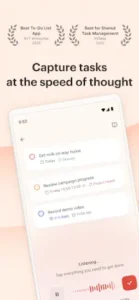
Todoist understands plain English, so you can type “Buy groceries tomorrow at 5pm” and it automatically sets the date and time.

With a 4.6 star rating from over 303,000 reviews, Todoist has become one of the most trusted task managers available. The app requires approximately 54 MB of storage, is rated for ages 4 and up, and syncs seamlessly across iOS, Android, Windows, Mac, web, and smartwatch.
What Is Todoist?
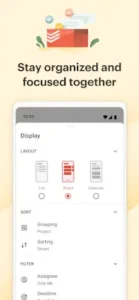
Todoist is a to-do list and task manager that helps you organize your work and life in one place. The app allows you to capture tasks on any device, group them into projects, schedule them with dates, deadlines, or reminders, and share them with teammates, friends, or family when you need to. It is intuitive from day one, with flexible views that let you view any project as a list for quick scanning, as a board for visual workflow, or as a calendar to plan your week.
The core difference between Todoist and other task managers is its natural language input. You do not need to click through multiple menus to set dates, priorities, or projects. You just type what you need to do, and Todoist figures out the rest. This speed of capture is what makes Todoist feel effortless.
Capture Tasks in Plain Language
The natural language input feature is Todoist’s superpower. Type a task like “Buy groceries tomorrow at 5pm” and Todoist automatically sets the date and time. Type “Submit report #Work p1” and it assigns the task to your Work project with priority 1. Type “Every Monday at 9am” and it creates a recurring task.
This means you do not need to think about formatting. You just type what is on your mind, and Todoist organizes it for you. The Quick Add feature (press Q from anywhere) makes capturing tasks even faster. Whether you are on your phone, computer, or web browser, your tasks are always one keystroke away.
Organize Your Way
Todoist gives you multiple ways to organize your tasks. Projects group tasks by life area, Work, Home, Errands, or anything else you need. Sections create hierarchy within projects. Sub-tasks break down complex tasks into manageable steps. Priority levels (P1-P4) help you focus on what matters most. Labels tag tasks by context (@email, @phone, @quick). Filters create saved searches like “today & p1” or “overdue.”
The flexibility means you can structure Todoist exactly how your brain works. Some people prefer simple lists. Others need complex hierarchies. Todoist adapts to both.
Cross Platform Sync
Todoist is available everywhere. iOS, Android, Windows, Mac, web, and smartwatch all sync in real time. Start a task on your phone, complete it on your computer, and check it off on your smartwatch. Offline mode lets you add and complete tasks even without internet. Everything syncs automatically when you reconnect.
This cross platform availability means you never lose a task. Whether you are at your desk, on the go, or somewhere with no internet, Todoist keeps your tasks accessible.
Todoist Core Features
Natural Language Input
Quick Add with the Q keyboard shortcut makes task capture instant. Date parsing recognizes “tomorrow,” “next week,” or “in 3 days.” Recurrence parsing handles “every Monday,” “every weekday,” or “every 30 days.” Project assignment uses #ProjectName. Label assignment uses @label. Priority flags use p1, p2, p3, or p4. The result is a task manager that feels like magic.
Flexible Project Views
List view provides quick scanning of tasks in a linear format. Board view (Kanban) offers visual workflow management. Calendar view visualizes tasks in a calendar layout for realistic planning (Pro feature). Today view shows everything due today. Upcoming view displays future tasks. Custom filters create saved searches for any criteria.
Tasks and Sub-Tasks
Projects group tasks by life area. Sub-projects handle complex organization. Sections create clear hierarchy within projects. Sub-tasks break down complex tasks. Priority levels (P1-P4) focus attention. Task durations support time blocking (Pro feature).
Recurring Tasks and Routines
Daily, weekly, and monthly recurrence supports habit formation. Custom schedules handle “every 3rd Tuesday” or “every weekday.” Flexible scheduling uses dates, deadlines, or reminders. The recurring tasks feature is perfect for building routines and maintaining consistency.
Calendar Integration and Sync
Google Calendar sync provides real time two way synchronization. Outlook Calendar sync works with Microsoft Outlook. Calendar layout visualizes tasks alongside events (Pro). Event integration shows calendar events with tasks. Time blocking adds estimated task durations (Pro). This integration makes Todoist the center of your productivity system.
Collaboration and Teamwork
Shared projects let you share with anyone and assign tasks. Task assignments delegate work to team members, friends, or family. Comments enable discussion and clarification on tasks. Activity log tracks progress and who completed what. Team spaces keep shared projects separate from personal tasks (Business feature). Real time updates ensure everyone stays on the same page.
Todoist Karma and Productivity Tracking
Karma points reward task completion. Completion graphs visualize productivity trends over time. Streaks track consistency for motivation. Productivity trends show patterns and areas for improvement. Goals and rewards gamify task completion.
AI and Voice Features
Todoist Assist suggests available time slots and reschedules overdue items. Ramble voice capture structures spoken tasks into proper task entries (Pro). Time slot suggestions help with scheduling. Overdue rescheduling automates catch-up. Batch editing makes mass task updates efficient.
Integrations and Sync
Todoist integrates with 80+ apps. Email integrations include Gmail and Outlook. Communication tools include Slack and Microsoft Teams. Productivity tools include Trello, Jira, Zapier, and GitHub. Voice assistants include Alexa, Google Assistant, and Siri. Cross-device sync ensures real time updates across all platforms.
Offline Mode and Security
Offline task management works without internet. Automatic sync updates when back online. Local storage keeps tasks on your device. Daily automatic backups protect your data (Pro). SOC2 Type II security certification ensures data protection. Data encryption secures storage and transmission.
Templates and Quick Start
50+ ready made templates cover work, personal, and education use cases. Work templates support common workflows. Personal templates handle projects and goals. Education templates serve students and learning. Custom templates let you create your own. Quick start gets you up and running immediately.
Todoist Graphics and Design
Todoist uses a clean, minimalist, modern design optimized for productivity and focus. The intuitive navigation makes it easy from day one. Flexible views (list, board, calendar) support different workflows. Color coded priorities (P1-P4) provide visual focus. Dark mode support reduces eye strain for extended use. Responsive design adapts to phone, tablet, desktop, and web.
The app has been praised for its super simple and minimalist design with great third party integrations. The interface is intuitive and easy to navigate, with clear visual hierarchy and logical organization.
What Users Say About Todoist App
What Works
Users consistently praise the intuitive and simple interface that makes task management effortless. Natural language input captures tasks quickly. Flexible views (list, board, calendar) support different workflows. Cross platform sync keeps everything accessible. Recurring tasks support habit formation. Collaboration tools enable teamwork. 80+ integrations connect with other tools. Todoist Karma provides productivity tracking. AI features assist with scheduling. Offline mode works without internet. Templates accelerate getting started. Security protects data.
Some users specifically mention that Todoist “allows me to quickly document any to-do that comes to mind so it isn’t forgotten and has amazing organization features to keep my list structured and prioritized”.
Where The App Could Improve
Common criticisms include calendar view on paid plans only, limited projects on free plan (5 active), reminders on paid plans only, file upload limits (5MB on free), activity history limits (1-week on free), and pricing for advanced features.
Check out TickTick for another task manager with similar features including calendar view and habit tracking, or explore the full collection of productivity apps to find your next task management tool.
Todoist Tips
Beginner Advice
Start with Quick Add (press Q) to capture tasks quickly. The Quick Add feature is Todoist’s fastest way to add tasks. Press Q from anywhere in the app, type what you need to do, and hit enter. Use natural language like “Buy groceries tomorrow at 5pm” and Todoist automatically sets the date and time. This speed of capture is what makes Todoist feel effortless.
Create 5-7 core projects (Work, Home, Errands, etc.). Do not create too many projects at the start. Five to seven core categories cover most of your life. Work, Home, Errands, Personal, Health, Finance, and Projects. Once these feel natural, expand. A focused project list is more effective than a crowded one.
Use natural language: “Buy groceries tomorrow at 5pm.” This is Todoist’s superpower. Type tasks in plain English and it parses dates, recurrence, labels, and projects. “Submit report #Work p1” assigns it to your Work project with priority 1. “Every Monday at 9am” creates a recurring task. The less you think about formatting, the faster you capture tasks.
Set up recurring tasks for habits and routines. Use recurring tasks for habits you want to build. “Drink water every 2 hours.” “Exercise every weekday.” “Review finances on the 1st of each month.” The recurrence syntax is flexible, “every Monday,” “every weekday,” “every 3rd Tuesday,” “every 30 days.” Let Todoist handle the repetition so you do not have to remember.
Enable push notifications for reminders. Notifications help you remember tasks even when life gets busy. Enable them. Customize the timing based on your schedule. The app makes sure you stay on track without being annoying. You can set time based reminders for specific tasks and location based reminders for when you arrive at or leave a place (Pro feature).
Use priority flags (P1-P4) to focus on what matters. Mark tasks as P1 (red), P2 (orange), P3 (blue), or P4 (none) to focus on what matters most. P1 is urgent and important. P2 is important but not urgent. P3 is neither urgent nor important but still needs doing. P4 is optional. Use the priority system to guide your daily attention.
Organize with labels (@email, @phone, @quick). Labels tag tasks by context or type. Create labels for how you work: @email for tasks you can do while checking email, @phone for calls, @quick for five minute tasks, @errands for tasks you can batch together. Labels filter tasks by context, making it easier to batch similar activities.
Create custom filters for saved searches. Filters are powerful views that show tasks matching specific criteria. Create a filter for “today & p1” to see your most urgent tasks. Create one for “overdue” to catch what you missed. Create one for “@errands & no date” to see tasks that need a location but no deadline. Filters turn Todoist into a personalized command center.
Start with free features before considering Pro. The free tier is generous and fully functional. You get unlimited personal projects, tasks, and labels; 5 active collaborative projects; 5MB file uploads; and 1-week activity history. Try the free version first. See if the natural language input and organization system work for you before considering the Pro subscription.
Explore the 50+ ready made templates. Templates give you a head start on common workflows. Work templates cover project management, meeting notes, and goal tracking. Personal templates handle habit tracking, travel planning, and event organization. Education templates support students and learning. Use a template that matches your needs rather than building from scratch.
Advanced Strategy
Master natural language syntax for dates, recurrence, and labels. Beyond the basics, learn advanced syntax. Use “every other day” for every other day recurrence. Use “every 3 months on the 15th” for quarterly tasks on a specific date. Use “in 3 days” for relative dates. Use “before Friday” for deadlines. The more you master the syntax, the faster you capture tasks.
Optimize your workflow with custom filters. Create powerful filters that show exactly what you need . “today & p1 & @work” shows urgent work tasks. “overdue & @errands” shows errands you have missed. “no date & @quick” shows quick tasks without a schedule. Filters become your personalized views into your task system.
Use calendar view strategically (Pro). Upgrade to Pro for calendar view to visualize tasks alongside calendar events. This helps you plan realistically. See your tasks on a calendar and drag them to different days. Time blocking becomes visual and intuitive. The calendar view turns Todoist from a task list into a full planning system.
Leverage AI features for time slot suggestions. Use Todoist Assist for AI-powered suggestions. It recommends available time slots for tasks. It reschedules overdue items automatically. It batch edits tasks for efficiency. The AI reduces the mental overhead of planning, so you can focus on doing rather than organizing.
Integrate with 80+ apps for seamless workflow. Connect Todoist with the tools you already use . Google Calendar sync shows tasks alongside events. Gmail lets you turn emails into tasks. Slack integrates task management into communication. Zapier automates workflows. Alexa lets you add tasks by voice. The integrations make Todoist the center of your productivity system.
Use Ramble voice capture for quick tasks (Pro). The Ramble voice capture feature structures spoken tasks into proper task entries . Speak naturally, and it transcribes and organizes your tasks with date, time, and details. Perfect for capturing tasks when typing is not convenient. On the go, in the car, or during a meeting, Ramble captures tasks without interrupting your flow.
Set up team spaces for collaboration (Business). For teams, use shared team spaces. Keep team projects separate from personal tasks. Assign tasks, track progress, and collaborate in real time. Team spaces create clear boundaries between personal and team responsibilities while keeping everything in one place.
Track productivity with Todoist Karma. Use Todoist Karma to visualize your productivity trends. Complete tasks to earn points. Watch your completion graphs climb. Track streaks to stay motivated. The gamification provides positive reinforcement that keeps you using the system consistently.
Use offline mode for task management without internet. Add and complete tasks even without internet. Todoist stores tasks locally on your device. When you reconnect, everything syncs automatically. No interruptions. No lost tasks. Whether on a plane, in a subway, or anywhere without coverage, your productivity does not stop.
Schedule weekly reviews to clean out completed tasks. Set aside time each week to review your Todoist. Look at completed tasks and feel the progress. Check the “no date” filter for anything stranded. Reschedule overdue tasks. Delete tasks that no longer matter. The weekly review keeps your system clean and aligned with your actual priorities.
Todoist Similar Apps
Todoist sits in a crowded space of task management apps, but its natural language input and cross platform availability set it apart. Here is how it compares.
| App | Similarity | Key Difference |
|---|---|---|
| Microsoft To Do | Free task manager with natural language input and cross platform sync | Microsoft To Do is simpler and integrated with Microsoft 365. Todoist offers more advanced features like board view and custom filters. |
| TickTick | Task manager with calendar view, habits, and Pomodoro timer | TickTick has built-in habits and timer. Todoist has stronger natural language input and more integrations. |
| Any.do | Task manager with calendar integration and collaboration features | Any.do is simpler with a focus on daily planning. Todoist offers more organization depth and integrations. |
| Things 3 | Beautiful task manager with natural language input (Apple ecosystem only) | Things 3 has a more polished interface but is only available on Apple devices. Todoist is cross platform. |
| OmniFocus | Powerful task manager with advanced features (Apple ecosystem only) | OmniFocus is more complex with deep project management. Todoist is simpler and more accessible. |
| Notion | Flexible productivity tool with task management, notes, and databases | Notion is a general-purpose workspace. Todoist is specifically designed as a task manager with natural language input. |
Todoist is closest to Microsoft To Do and TickTick because both emphasize natural language input, cross platform sync, and flexible task management. It differs from Things 3 and OmniFocus through its cross platform availability (not just Apple) and more affordable pricing. For users who want the best natural language input and cross platform sync, Todoist is the strongest choice.
Who Is Todoist For?
Todoist is for users who want a simple, minimalist to-do list app that just works. If you are overwhelmed by complex project management tools and just want to capture tasks quickly, Todoist delivers. The natural language input means you do not need to think about formatting. You just type what you need to do, and Todoist organizes it.
People who need cross platform sync will appreciate Todoist’s availability everywhere. Start a task on your phone, complete it on your computer, and check it off on your smartwatch. iOS, Android, Windows, Mac, web, and smartwatch all sync in real time. Offline mode means you never lose a task, even without internet.
Users who value natural language input will find Todoist’s Quick Add feature transformative. No clicking through multiple menus. No struggling with date pickers. Just type “Submit report #Work p1 tomorrow at 5pm” and Todoist handles everything. This speed of capture makes task management feel effortless.
Teams and individuals needing collaboration tools will appreciate shared projects and task assignments. Share projects with anyone and assign tasks to team members, friends, or family. Comments enable discussion on tasks. Activity logs track progress. Real-time updates ensure everyone stays on the same page.
If you want a task manager that understands plain English and works everywhere, Todoist is worth trying.
Conclusion
Todoist delivers a task management experience that stands out for its natural language input and cross platform availability. The Quick Add feature captures tasks instantly. The flexible views (list, board, calendar) support different workflows. The recurring tasks build routines. The collaboration tools enable teamwork. The 80+ integrations connect with other tools. The Karma system tracks productivity. The AI features assist with scheduling. The offline mode works without internet. The templates accelerate getting started.
The app has limitations. Calendar view is only available on paid plans. The free plan limits active projects to 5. Reminders require a Pro subscription. File uploads are limited to 5MB on the free plan. Activity history is limited to 1 week on the free plan. Pricing for advanced features may be a barrier for some users.
For users willing to invest in the Pro plan for advanced features, Todoist offers a comprehensive task management system. For free users, the core features are generous and fully functional. The natural language input alone makes it worth using.
If you want a task manager that captures tasks as fast as you think of them, Todoist is worth downloading.
Your tasks are waiting. Todoist makes them easy.
Todoist FAQ
How do I download Todoist and is it really free?
Todoist is completely free to download and use on all platforms. You can Download Todoist from the Official Google Play Store or through the official website for web access. The app requires approximately 54 MB of storage space and is rated for ages 4 and up. The free tier includes unlimited personal projects, tasks, and labels; 5 active collaborative projects; 5MB file uploads; and 1 week activity history. Pro and Business plans are available for users who need advanced features like calendar view, reminders, and more collaboration options.
Where can I find guides, tips, and community resources?
The Todoist Help Center is the best starting point for guides, tips, and detailed explanations of features. The Todoist Reddit community is active with user discussions, tips, and support. App also offers Todoist video tutorials on YouTube . The community is active across these platforms, sharing workflows, templates, and productivity strategies.
What if I encounter a problem or need to recover my account?
For technical issues, account recovery, or payment concerns, contact Todoist customer support through the official support page. The support team handles account issues, billing problems, bug reports, and technical support. If you need to recover a lost account, be prepared to provide your email address and any purchase receipts for verification. The support team typically responds within a few business days. You can also check the known issues page for common problems.
What is Todoist Karma and how do I earn points?
Todoist Karma is a productivity tracking system that rewards you for completing tasks. You earn points by completing tasks and maintaining streaks. The system tracks your productivity trends with completion graphs and provides visual feedback on your progress. Higher Karma levels unlock new achievements and colors. The gamification creates positive feedback loops that keep you motivated. You can view your Karma in the Today or Upcoming view.
Can I use Todoist offline and sync across devices?
Yes. Todoist supports offline mode, allowing you to add and complete tasks without internet . Your tasks are stored locally on your device. When you reconnect, everything syncs automatically across all your devices. Real time sync works across iOS, Android, Windows, Mac, web, and smartwatch. Start a task on your phone, complete it on your computer, and check it off on your smartwatch. The seamless transition between online and offline ensures you never lose a task.