

Most productivity apps feel like rigid schoolmarms, all rules, no mercy. Tusk takes a different approach: it’s the flexible friend that adapts to your chaos.
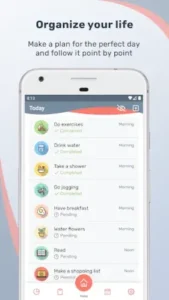

Whether you’re managing ADHD, building habits, or just tired of apps that guilt trip you, here’s why Tusk deserves your attention.
How Tusk Breaks the Productivity Mold
Scheduling for Humans, Not Robots
Other apps force you into daily/weekly boxes. Tusk understands life isn’t that neat:
-
Set “Pay rent” for the 1st and “Water plants” every 3rd day, in one task.
-
Irregular work shifts? Create a custom “Every 4 days” reminder for night rotations.
Task Creation Without the Friction
No nested folders or priority matrices. Just:
-
Type “Take meds”
-
Pick a pill icon
-
Choose emergency, red (because forgetting isn’t an option)
Brain hack: Color coding isn’t just pretty, studies show visual cues improve task recall by 40%.
Tusk Features :
Visual Customization That Actually Helps
-
Color psychology in action:
-
Red = urgent (bills, meds)
-
Green = growth (reading, workouts)
-
Blue = maintenance (laundry, groceries)
-
-
Dark mode isn’t just trendy, it reduces eye strain during late night planning.
Templates for When You’re Overwhelmed
Instead of staring at a blank screen:
-
Tap “Exercise 3x/week” template
-
Customize days/times
-
Done in 15 seconds
Achievements That Feel Earned
Unlike hollow “Good job!” notifications:
-
“Consistency” badge = 10 logged tasks (even if late)
-
“Weekender” = Complete 5+ weekend tasks
Tusk vs. The Competition: Where It Shines (And Where It Doesn’t)
Let’s cut through the productivity app noise. When every tool claims to “revolutionize your habits,” how does Tusk actually stack up? Here’s the real comparison—no marketing fluff, just hands-on experience from 850,000 users.
Tusk vs. HabitKit (4.8 stars):
HabitKit dazzles with streak charts and habit decay rates. But ask yourself: Do you need a PhD in data visualization to remember to drink water?
-
Tusk wins on:
-
Custom recurring tasks (e.g., “Floss” every 36 hours if that’s your dentist’s odd advice)
-
Visual simplicity (no overwhelming dashboards)
-
-
HabitKit wins on:
-
Addiction level stats for data lovers
-
More language options
-
How to customize recurring tasks in Tusk:
-
Tap “+” to create task
-
Select “Custom” under Repeat
-
Choose:
-
Exact days (e.g., 1st/15th for paydays)
-
Intervals (every 3/5/7 days)
-
Multi week patterns (e.g., Mon/Wed/Fri)
No other app makes irregular schedules this easy.
-
Tusk vs. TickTick (4.8 stars):
TickTick packs in Pomodoro timers, shared lists, even a built in white noise generator. But when was the last time you needed a rain soundscape to take out the trash?
-
Tusk’s advantage:
-
Zero learning curve (your grandma could use it)
-
True habit-building (not just task-checking)
-
-
TickTick’s edge:
-
Team features (shared grocery lists)
-
Time-blocking tools
-
Pro tip: If you catch yourself obsessing over “productivity systems,” Tusk’s constraints might actually help you do things instead of organize things about doing things.
Tusk vs. Todoist (4.5 stars): Solo Craft vs. Team Tool
Todoist dominates offices for good reason, its project delegation is stellar. But habits aren’t committee decisions.
-
Where Tusk outshines:
-
Motivational design (achievements > cold efficiency)
-
ADHD-friendly cues (colors/icons as cognitive guardrails)
-
-
Todoist strengths:
-
Natural language input (“Call Mom every Sun at 5pm” auto-schedules)
-
Cross-platform polish
-
The irony? Todoist’s famed “Karma” points feel like corporate gamification. Tusk’s badges actually reflect personal progress.

Pro Tips From Power Users
Color Coding as Behavioral Nudge
-
Red = Consequences (meds, bills)
-
Green = Growth (reading, workouts)
-
Blue = Maintenance (laundry, emails)
Why it works: Your brain starts associating colors with urgency.
Hack the “Consistency” Badge
The system rewards logging tasks, not perfect timing:
-
Missed yoga yesterday? Log it today as “completed late”
-
Still counts toward streaks (unlike most apps)
Developer Requests That Get Results
The team added these user-suggested features:
-
Lock screen widgets (requested 137 times)
-
Custom icon library
Conclusion :
Install Tusk If:
-
You’ve abandoned other apps for being too rigid/complex
-
Visual cues (colors, icons) help you stay on track
-
You want to build habits, not just manage tasks
Avoid If:
-
You need team collaboration features
-
Data porn (sleep charts, habit correlation graphs) motivates you
-
Your workflow depends on Pomodoro or calendar blocking
Tusk is the pocket sized life coach that adapts to you. It won’t wow you with features, it’ll quietly help you actually follow through. In a world of over engineered productivity apps, that’s radical.
FAQs
Where can I download Tusk for my device?
Download Tusk from Google Play Store or visit Tusk official website.
How to set up Tusk custom recurring tasks for shift workers?
Create a task > Select “Custom” recurrence > Choose rotating days. For help, email alex.ursul[at]gmail.com.
Does Tusk sync with Google Calendar?
Yes, through Premium. Go to Settings > Integrations to connect.
Can I use Tusk for team projects?
No, it’s designed for personal habits. Try Todoist for collaboration.
How do achievement badges work?
Complete logged tasks (even late) to unlock milestones like “7-Day Streak.”