

Waze shows you what’s happening right now on the road ahead not like other apps where you are and where to go..
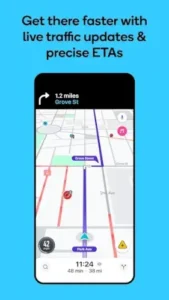

Waze answers the universal driver’s question: what’s the quickest, smoothest, and safest way to get there, given the current reality of traffic, accidents, and road conditions? This isn’t just another mapping service; it’s a community powered platform that turns every user into a sensor, collectively building a dynamic, real time understanding of the road network. Is a Waze GPS navigation approach the future of how we navigate?
Waze Engine: The Power of the Crowd
The core of Waze is a simple but revolutionary idea: the most accurate information comes from people actually on the road. The app’s entire system is built on this crowd sourced data model. When you report an accident, a speed trap, or a pothole, you are not just adding a note; you are feeding a live network that instantly updates for every other user in the area. This transforms the map from a static image into a living, breathing entity. This collective intelligence provides a distinct advantage over systems that rely solely on algorithms and historical data.
How quickly can an algorithm detect a sudden traffic jam caused by a fresh breakdown? Waze live traffic updates often know before official sources because the data comes from the source, the drivers stuck in it.
Waze Toolkit: Features Beyond Basic Navigation
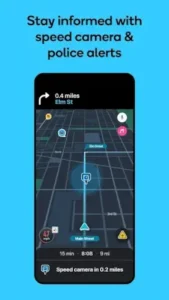
This robust data engine powers a suite of practical features. The most obvious is dynamic rerouting; the app doesn’t just give you a path, it continuously monitors conditions and can automatically shift you to a faster route, saving significant time. This leads to highly accurate estimated times of arrival (ETAs). Beyond speed, Waze safety alerts add a layer of awareness that other apps lack. Notifications for roadworks, speed cameras, and even vehicles stopped on the shoulder provide crucial seconds of warning, potentially preventing accidents. Ancillary tools like real time fuel prices, a parking locator, and specific multi lane guidance (“stay in the second lane from the right”) handle the entire trip, not just the drive.
Waze Interface: Designed for the Drive
All these features would be useless with a cluttered interface. Waze employs a clean, intuitive design philosophy meant for quick glances, not prolonged stares. The map uses a clear color-coded system for traffic severity and instantly recognizable icons for different reports. This visual language allows you to assess the road situation intuitively. The voice guided navigation is equally thoughtful, offering turn by turn directions in multiple languages and even celebrity voices, which can make long drives less monotonous. The design serves a single purpose: to provide maximum information with minimum distraction, a critical balance for any Waze navigation app used while driving.
Waze User reviews and Considerations
The collective user voice is overwhelmingly positive, with a 4.1 star average from nearly 9 million reviews. The praise consistently highlights real time savings on commutes, the accuracy of traffic conditions, and the sense of contributing to a helpful community. However, this powerful, always on functionality has costs. The primary critiques focus on significant battery drain and higher than average mobile data consumption. Some users also report occasional bugs, such as audio directions cutting out or the app crashing. It’s important to note that the developers are active in addressing issues through updates, demonstrating a commitment to improvement. The app’s download size is roughly 150MB, and it’s rated for users of all ages.
For drivers seeking a more data light, comprehensive mapping alternative, Google Maps offers robust offline capabilities and extensive business information, serving as a strong counterpart to Waze’s live focused model.
Using Waze Effectively
Unlocking the full potential of Waze requires moving beyond passive use. The first and most critical tip is to contribute. The entire ecosystem thrives on user reports; taking four seconds to report a police officer, a hazard, or slowed traffic directly improves route accuracy for everyone behind you. This is the fundamental contract of the app: you receive superior data by helping to create it. For longer trips, proactive planning is key. Use the planned drive feature to schedule your departure time; Waze will then analyze historical data to predict conditions and provide a recommended time to leave, a crucial tool for avoiding known congestion. To manage the noted battery consumption, enable the battery saver mode in the app’s settings, especially for extended navigation sessions.
For true hands free operation, master voice commands. A simple “OK Waze” allows you to report incidents or find a new destination without touching your phone, significantly enhancing safety. Finally, for the most seamless experience, integrate it with your car’s system via Android Auto or Apple CarPlay. This projects the clean interface onto your dashboard display and often uses the car’s built-in microphone and power, solving the battery and distraction issues simultaneously. These Waze tips transform the app from a simple guide into an active co pilot.
To understand Waze‘s place, it must be compared to its two largest competitors: Google Maps and Apple Maps. Google Maps is the comprehensive all rounder; it excels at business information, detailed street view imagery, and robust offline navigation. Apple Maps offers deeply integrated, privacy-focused routing for users within its ecosystem. Waze does not attempt to beat them at their own game. Its unique value proposition is singular: real-time human intelligence. While other apps use algorithms to predict traffic based on historical patterns, Waze knows about the accident that happened three minutes ago because someone just reported it. This makes it the undisputed leader for real time agility on roads you know well.
However, this strength is also a limitation. If you are searching for a specific store’s hours or need a reliable map in a area with no data signal, Google Maps is the superior tool. The choice isn’t about which app is objectively better, but which is right for the specific task. This is why many drivers seeking the best Waze alternative for offline use will keep a second app installed.
Conclusion :
Waze succeeds not by being everything to everyone, but by mastering one thing exceptionally well: leveraging a community to navigate right now. Its unparalleled strengths are hyper current traffic data, proactive safety alerts, and routing that dynamically adapts to the second by second reality of the road. These features come with valid considerations, namely higher battery and data usage than more static applications. This profile makes the ideal user clear. Waze is not necessarily the best choice for the occasional driver or someone traveling through remote areas with poor data coverage. It is, however, an indispensable tool for the daily commuter, the ride share driver, or anyone whose routine travel depends on avoiding the unexpected.
It is for the driver who doesn’t just want to be told a route, but wants to understand the why behind it and is willing to actively participate in that system. Does the value of shaving minutes off your drive by avoiding a jam that just formed outweigh the cost of a bit of extra battery life? For millions, the answer is a definitive yes.
FAQ
How does Waze get its real time traffic information?
Waze uses data from its community of active drivers. The app anonymously collects speed and location data from users, and more importantly, it incorporates manual reports for hazards, police, and accidents, creating a live map of current conditions.
Where can I get the official Waze download for Android?
The Waze app is available on the Google Play Store.
Is there a central resource for learning about advanced features?
Yes, the Waze Wiki is a comprehensive community run resource for detailed guides, feature explanations, and troubleshooting. The official Waze website is also the best source for official news and updates.
Does using Waze consume a lot of mobile data?
While it uses more data than a standard offline map due to its live updates, data consumption is generally manageable for most users on modern plans. You can further reduce usage by limiting background data in your phone’s settings.
Who owns Waze and how can I provide feedback?
Waze is a subsidiary of Google. For general feedback or business inquiries, you can reach out via their official contact page or email: support[at]waze.com