

Zoom Earth delivers a near real time, visual representation of global weather data, allowing you to observe everything from a developing thunderstorm to the massive swirl of a hurricane.
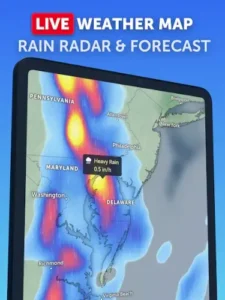

Zoom Earth app holds a 4.8 star rating from over 500,000 user reviews on the Google Play Store. With a download size of approximately 30MB, it is suitable for a wide age range, from students and travelers to professionals in agriculture and logistics who need a clear visual on weather patterns.
What is Zoom Earth
The foundation of the Zoom Earth weather forecast experience is its live satellite imagery. The app pulls data from sources like NOAA and NASA satellites, with updates arriving every 10 to 15 minutes. This provides the stunning, high resolution visual base that makes the planet feel alive and dynamic.
On top of this base, you can layer interactive weather data. With a few taps, you can overlay maps for precipitation, wind speed and direction, temperature, and atmospheric pressure. This Zoom Earth live satellite view, combined with these dynamic layers, allows you to see not just that it is raining, but how the rain is moving and what wind patterns are driving it. The intuitive, globe based interface makes navigating this wealth of information seamless, letting you zoom from a global view down to a regional perspective effortlessly.
Defining Features of Zoom Earth for Proactive Weather Monitoring
Where Zoom Earth becomes particularly powerful is in its specialized monitoring tools. The Zoom Earth hurricane tracking feature integrates data from official agencies like the National Hurricane Center, allowing you to monitor a storm’s path, its wind field, and its predicted movement in the context of live satellite imagery. Similarly, the Zoom Earth wildfire map uses NASA’s FIRMS data to display active fire and heat spots, providing critical information for those in affected regions or tracking smoke patterns.
For planning ahead, the forecast functionality uses a timeline slider. You can drag this slider to see how weather systems are predicted to develop and move over the coming days. For users seeking the most advanced features, the Zoom Earth Pro subscription offers an ad-free experience and access to beta features like a more detailed real time radar, enhancing the precision of precipitation tracking.
Zoom Earth User Experience and Interface
The application prioritizes visual clarity. The design is clean, using vibrant but distinct color schemes to represent different types of weather data without creating a cluttered look. You can customize units between metric and imperial and adjust settings to fit your preferences.
In terms of performance, user feedback suggests the app generally provides a smooth experience. However, some note that in low-network conditions, loading indicators can be absent, which may cause confusion. It is also important to understand that “near real-time” data can occasionally have brief delays, meaning a developing storm might appear on the map moments after it is detected by ground-based radar.
For those comparing options, a similar application known for its detailed visualizations is Ventusky, which also offers animated weather models. However, Zoom Earth distinguishes itself with its heavy emphasis on the most recent satellite imagery as the core of its user experience.
The exceptional visual detail of the satellite imagery is frequently praised, as is the intuitive interface that makes complex meteorological data accessible. The powerful, free access to severe weather tracking tools like hurricane and wildfire maps is consistently noted as a primary benefit.
The main considerations from users typically involve the ad-supported model, where advertisements can occasionally feel intrusive, though the Pro version resolves this. Additionally, the minor delays between a real world weather event and its appearance on the map, while understandable, are a point of note for users requiring instantaneous data.


Zoom Earth Tips
To get the most from the platform, a few Zoom Earth tips can tailor the experience to your needs. For the everyday user, start by using the Zoom Earth app to check your local forecast. Instead of just looking at a temperature, use the precipitation and wind layers to understand why the day will feel a certain way. Seeing a storm system approach on the satellite view provides much more context than a simple percentage of rain.
If you are a traveler or weather enthusiast, the app becomes an indispensable planning tool. Before a trip, use the Zoom Earth satellite view and forecast slider to visualize weather patterns at your destination over your travel dates. This is especially useful for monitoring weather in remote locations that lack dense ground-based weather stations. You can see cloud cover, potential storm development, and wind patterns directly.
For those in regions prone to extreme weather, the app is a powerful component of a safety plan. While the app itself does not push alerts, you can use it proactively. Regularly check the Zoom Earth hurricane tracking and wildfire map overlays during relevant seasons. Monitoring the official data integrated into these layers gives you a visual understanding of a threat’s scope, progression, and potential impact area, complementing official emergency alerts.
Zoom Earth Similar Apps :
Where does this app fit among other weather services? A neutral comparison helps clarify its position. Windy.com is known for its deep access to multiple, advanced weather models for users who want to analyze data. Ventusky excels at creating beautifully fluid animations of weather phenomena. Clime is heavily focused on real time radar for hyper-local storm tracking.
The family of Zoom Earth apps carves out a distinct niche by prioritizing live and recent satellite imagery as the primary visual context. While it offers forecast models and data layers, its core strength is showing you what the atmosphere actually looks like right now, and then letting you explore the data within that visual framework. It answers the question “What is happening globally?” before delving into the specifics of what might happen next.
Conclusion :
The Zoom Earth app serves as a uniquely visual and comprehensive tool for understanding global weather. It synthesizes vast amounts of data into an intuitive, map based interface that feels more like exploration than analysis.
For visually oriented learners, frequent travelers, and anyone who has ever wanted to see the story behind the forecast, Zoom Earth is an essential application. It provides a powerful, real-time window into the planet’s atmospheric dynamics, transforming abstract weather data into a tangible, observable system. It makes the invisible forces shaping our daily environment not just understandable, but visible.
Frequently Asked Questions
How current is the weather data on Zoom Earth?
The satellite imagery is updated every 10 to 15 minutes from sources like NOAA and NASA, providing a near real-time view. Other data layers, like precipitation forecasts and wind maps, are also frequently refreshed to maintain accuracy.
How do I perform a Zoom Earth download and is there a cost?
You can get the Zoom Earth app for free from the official Google Play Store.
Can I use Zoom Earth to track a storm in my area?
Yes, the app is effective for local storm tracking. You can use the rain radar layer to see precipitation intensity and movement, and combine it with the wind speed map to understand the storm’s structure and dynamics.
What is the main difference between Zoom Earth and a standard weather app?
Standard apps typically give you a simplified forecast for one location. Zoom Earth shows you the big picture, allowing you to see the entire weather system, like a storm front or hurricane, and how it moves across the map, providing much deeper context.