

AppFlowy is a free, open source AI collaborative workspace that gives you the power of Notion without the vendor lock-in.
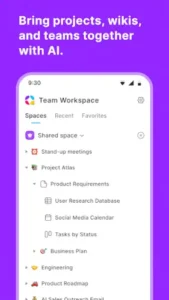

With a 4.0 star rating and a massive 75,000+ stars on GitHub, AppFlowy has quickly become the go-to choice for privacy conscious individuals and teams. The app is available on iOS, Android, Mac, Windows, Linux, and web browsers, with the mobile version requiring approximately 50 MB of storage, AppFlowy is designed for users of all skill levels who value data ownership and transparency.
What Is AppFlowy and What Can I Use It For?
AppFlowy is an AI-powered collaborative workspace built as a privacy first alternative to Notion. It lets you manage projects, wikis, tasks, and databases while keeping full control over your data. The platform combines rich text documents, multi view databases (Grid, Board, Calendar, Gallery), real time collaboration, and built-in AI assistance with offline first architecture and self hosting capabilities.
The core difference between AppFlowy and other productivity tools is its commitment to data sovereignty. Your information stays on your device or your own server by default. There is no forced cloud dependency. No vendor lock-in. No wondering who has access to your notes and documents .
Your Data, Your Control
AppFlowy is built on open source code (AGPL-3.0) that gives teams full control over their data . All information is stored in your PostgreSQL instance and MinIO object storage if you choose to self host. The desktop app writes to local SQLite and syncs when the cloud is reachable .
This means you are not renting your workspace. You own it. You can deploy AppFlowy on your own infrastructure, access it offline, and never worry about a company shutting down or changing its pricing model. The freedom of owning your data is not a feature. It is the foundation.
Built for Privacy, Powered by AI
AppFlowy includes a built-in AI assistant capable of writing, summarizing, answering questions about your notes, or filling tables automatically. What makes this different from other AI tools is the local AI option. You can run models on your own machine (via Ollama, Llama 3, Mistral 7B) for maximum privacy.
For users who want more powerful AI capabilities, the AI MAX add-on provides access to GPT-5, Gemini 2.5 Pro, and Claude 3.7 Sonnet. The Vault Workspace add-on offers local AI on your own hardware with unlimited AI chat, fully offline capable. Whether you choose local or cloud AI, you decide where your data goes.
Open Source with 75,000+ Stars
AppFlowy has earned its reputation through transparent, community driven development. With 75,221+ stars on GitHub and 400+ active contributors, this is not a small side project. It is a serious productivity tool backed by a passionate community of developers and users.
Built with Flutter for the frontend and Rust for the backend, AppFlowy delivers fast, efficient performance that rivals proprietary alternatives. The active community continuously improves the software, adds features, and provides support through forums, Discord, and Reddit.
What Can You Use AppFlowy For?
Project and Task Management – Break down complex projects into manageable tasks. Create your own priority labels, status tags, and set due dates. Capture every detail in a database and visualize data in any way you want .
Notes and Documentation – Create beautiful, organized documents with to-dos, images, files, code blocks, math equations, and 20+ content types. The block based editor gives you the familiar Notion like experience with slash commands and Markdown shortcuts.
Knowledge Management – Build a centralized knowledge base for yourself or your team using wiki features. Nested pages create hierarchical organization. Linking between pages connects related content. Search functionality helps you find information quickly.
Visual Workflow Management – Use Kanban boards to visualize your workflow with customizable columns. Add checklists to track subtasks. Label and group tasks into different buckets. The calendar view helps you stay on top of deadlines and milestones.
Team Collaboration – Invite team members to collaborate in the same workspace. Plan sprints, organize meetings, set goals, and collaborate on documents in real time. Whether you are a startup, marketing team, or software development team, AppFlowy adapts to your needs.
AI-Powered Assistance – Ask AppFlowy AI questions about your content and get answers in seconds. Use AI to generate first drafts, write better, check spelling and grammar, translate, and extract keywords and insights. The built-in AI uses advanced models like GPT-4 and Claude 3 Sonnet.
Offline-First Work – Work anywhere, anytime without an internet connection. All your notes are saved to your device first, making them accessible even on a flight or during an internet outage. The app syncs automatically when you reconnect.
Self-Hosting and Data Ownership – Keep your data under your control with easy self hosting options. You can self host on your own infrastructure using PostgreSQL and MinIO object storage. AppFlowy is open source (AGPL-3.0), so the code sits on GitHub for anyone to inspect.
Cross Platform Sync – Create on the go from anywhere. Seamlessly transition between desktop and mobile with cross device sync. Available on Windows, macOS, Linux, iOS, Android, and web browsers.
Core Features That Make AppFlowy Stand Out
Block Based Rich Text Editor
AppFlowy includes a block based document editor comparable to Notion . You can type ” / ” to access slash commands for quick formatting and block insertion. Markdown shortcuts let experienced users work faster. Drag and drop block reordering makes content organization intuitive. Nested pages let you build hierarchical document structures .
The editor is polished and responsive, with rich text formatting, tables, and embeds. Everything works smoothly whether you are writing a simple note or drafting a complex document.
Multi View Database System
Organize and visualize your data in tables, Kanban boards, calendars, and more. The database system supports multiple views:
-
Grid view for traditional table format with structured data.
-
Board view for visual task management with columns.
-
Calendar view for time based organization and scheduling.
-
Gallery view for visual card based layout.
-
List view for simple list format.
Custom properties let you define your own data fields and types. Relations and rollups let you link databases and calculate values. Inline databases can be embedded within documents.
AI-Powered Assistance
The built-in AI assistant can write, summarize, answer questions, and autofill tables automatically. Local AI options (Ollama, Llama 3, Mistral 7B) keep your data private. AI MAX add-on provides access to GPT-5, Gemini 2.5 Pro, and Claude 3.7 Sonnet for more powerful results . AI chat, search, and RAG-powered insights bring intelligent assistance to your entire workspace.
Real Time Collaboration
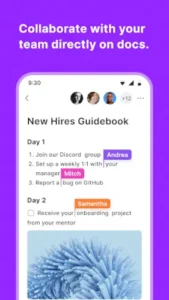
Work together efficiently with real time editing and granular permissions . Multiple users can edit simultaneously. Granular permissions control who can view, edit, or administer content. Team workspaces organize content by team or project. Guest editors can be invited with limited access. Sharing and publishing features let you share pages internally or publish externally.
Offline First Architecture
AppFlowy supports offline first usage. The desktop app writes to local SQLite and syncs when the cloud is reachable. Data is stored on your device by default. Full functionality works without an internet connection. Automatic synchronization happens when network is available. There is no vendor lock-in. Your data remains under your control.
Self Hosting & Full Data Ownership
Deploy on your own infrastructure using PostgreSQL and MinIO object storage. Complete control over data with no forced cloud dependency. The open source code lets you verify exactly what the software does.
Cross Platform Support
AppFlowy runs from a browser, desktop app (Mac, Windows, Linux), or mobile (iOS, Android). Desktop apps support Windows, macOS, and Linux. Mobile apps support iOS and Android. Web browser access provides full functionality. Seamless transition lets you work across devices with synchronized data.
AppFlowy Sites (Publishing)
Transform a workspace into a public website via AppFlowy Sites. Custom domains let you use your own domain for published content. SEO optimization helps published content rank in search engines. Access control lets you control who can view published content.
Customization & Extensibility
Deep customization options let you organize and visualize data exactly how you prefer. Custom views let you organize data with custom filters and sorts. Custom blocks let you create your own content block types. Custom properties let you define your own data fields. Personalized themes let you choose from various visual themes. Custom fonts and page styles let you tailor the appearance to your preferences. Community plugins and templates extend functionality.
AppFlowy Graphics and Design
AppFlowy uses a clean, modern, minimalist design optimized for productivity and focus. The consistent design system shows a mature, disciplined approach to UI design. Spacing and hierarchy are consistent with no deviations. Customizable themes let you match your preferences, with dark mode support for extended use. The responsive design adapts to different screen sizes across desktop, tablet, and mobile.
The app has been praised for its polished editor experience and consistent design system. The block based editor provides a Notion like experience with familiar slash commands, drag and drop functionality, and rich text formatting.
What Users Say About AppFlowy App
What Works
Users consistently praise the open source nature with full data ownership, privacy first approach with local AI options, offline first architecture, self hosting capabilities, Notion like functionality without vendor lock-in, fast performance (Rust backend), cross platform support, built-in AI assistance, customizable themes and workflows, and active community with 400+ contributors .
The free tier is generous for individuals and small teams. Users who prioritize privacy appreciate having full control over their data without relying on a third party cloud service.
Where The Tool Struggles
Mobile apps may be less feature complete than desktop, though development is active. Real time cloud collaboration may be limited compared to Notion. The plugin ecosystem is smaller than established competitors. Some users may find the transition from Notion challenging as workflows differ. The free tier AI has usage limits (10 AI responses/month), though the local AI option bypasses this entirely.
Check out Obsidian for another privacy-focused note-taking app with a similar local first approach, or explore the full collection of productivity tools to find your next workspace solution.
AppFlowy Tips
Getting started with AppFlowy is straightforward, but a few smart choices early on will save you time and help you build a workspace that actually works for you. Here is what to focus on first.
Beginner Advice
Start with pre-built templates. AppFlowy offers templates for project management, task tracking, meeting notes, and content planning. Using a template gives you a working structure immediately. You can see how everything fits together before building your own system from scratch. Templates also teach you how databases, views, and pages relate to each other.
Master slash commands for efficient editing. Type “/” anywhere in a document to access formatting options, block types, and database inserts. This is the fastest way to work in AppFlowy. Learn the common commands early. Bold, heading, bullet list, and to-do list will cover most of your daily needs. The more you use slash commands, the less you will reach for your mouse.
Explore different database views. AppFlowy gives you Grid, Board, Calendar, Gallery, and List views for the same data. Try each one. Grid is great for structured data. Board is perfect for task management. Calendar helps with scheduling and deadlines. Gallery works well for visual content. Different projects need different views. Knowing which one to use makes your workspace more effective.
Take advantage of offline-first architecture. AppFlowy works without an internet connection. Your data lives on your device. This means you can work anywhere, anytime. On a plane. In a coffee shop with no Wi-Fi. During a network outage. The app syncs automatically when you reconnect. No interruptions. No waiting for cloud servers.
Join the community for tips and plugins. AppFlowy has an active community on GitHub, Reddit, and Discord . Users share templates, plugins, and workflows. If you are stuck, someone has probably already solved your problem. The community also provides early access to new features and beta releases. Being part of the conversation keeps you informed and connected.
Customize themes and fonts. AppFlowy lets you personalize the look and feel. Choose from different visual themes. Adjust fonts and page styles. Dark mode is available for extended use. A workspace that looks good feels better to use. Small visual adjustments make a big difference in daily comfort.
Start with the generous free tier. The free plan is generous for individuals and small teams. You get full access to documents, databases, wikis, and AI assistance. The free tier includes 10 AI responses per month. For most users, this is enough to evaluate the tool. If you need more, the paid plans are reasonably priced.
Experiment with the AI assistant. Try the built-in AI for writing, summarizing, and answering questions about your notes . Ask it to draft an outline. Request a summary of a long document. Let it autofill a database table. The AI assistant shows you what is possible and helps you work faster.
Use wiki features for internal documentation. AppFlowy’s wiki capabilities let you build structured knowledge bases . Nested pages create hierarchical organization. Linking between pages connects related content. Search functionality helps you find information quickly. A well-organized wiki becomes a valuable reference for yourself or your team.
Backup your local data regularly. If you are using local storage, backup is important . Export your data periodically. Save copies to external drives or cloud storage. Regular backups protect against device failure or accidental deletion.
Advanced Strategy
Use local AI for maximum privacy. Run AI models on your own machine via Ollama, Llama 3, or Mistral 7B. This keeps all your data completely private. No external servers. No third party access. The AI performance is good enough for most writing and summarization tasks. You get the benefits of AI without the privacy concerns.
Self host for complete data ownership. Deploy AppFlowy on your own infrastructure. Use PostgreSQL for data storage and MinIO for file storage. Self hosting gives you full control over security, backups, and access. Your data stays on your servers. No one else can access it. This is the ultimate privacy solution.
Leverage multi view databases for different purposes. Use Grid view for structured data entry. Switch to Board view for task tracking. Use Calendar view for deadlines and scheduling. Apply Gallery view for media rich content. The same database can serve multiple purposes depending on the view . Think about how each view helps you understand your data differently.
Create custom workflows for your team. AppFlowy is flexible enough to match your team’s processes. Define custom properties. Set up specific views. Create page templates. Build workflows that reflect how your team actually works. A tool that fits your workflow increases adoption and productivity.
Upgrade to AI MAX for advanced models. If you need more powerful AI, consider the AI MAX add-on. It provides access to GPT-5, Gemini 2.5 Pro, and Claude 3.7 Sonnet. These models handle complex tasks better than the free tier AI. For teams doing serious content work, research, or analysis, the upgrade is worth considering.
Publish with AppFlowy Sites. Transform internal documentation into public facing websites. Use custom domains. Optimize for SEO. Control who can view published content. This is useful for company documentation, product guides, and public knowledge bases. You get a professional website without building one from scratch.
Integrate with other tools via APIs. AppFlowy supports integration with other productivity tools. Connect to your calendar, task manager, or communication platform. Build custom integrations using the API. A connected workspace reduces context switching and keeps everything in one place.
Optimize performance with Rust backend features. AppFlowy’s Rust backend is fast and efficient. Large documents load quickly. Database operations are responsive. The app handles complex data without lag. If you experience performance issues, check your device specifications and network connection.
Collaborate effectively with real-time editing. Use real time editing for team projects. Multiple people can work on the same document simultaneously. Granular permissions control who can view, edit, or administer. Comments and mentions keep discussions organized. Version history lets you track changes and revert if needed.
Stay updated with community releases. AppFlowy is under active development. New features and improvements are released regularly. Follow the GitHub repository. Join the community channels. Stay informed about updates. Early adopters get access to new features and can provide feedback that shapes development.
AppFlowy Similar Apps
AppFlowy sits in a crowded space of productivity tools, but its open source, privacy first approach sets it apart. Here is how it compares.
| Tool | Similarity | Key Difference |
|---|---|---|
| Notion | Closest alternative with similar block based editor, databases, and wikis | Notion is cloud-only with vendor lock-in. AppFlowy is open-source with offline first and self-hosting. |
| Obsidian | Local first, Markdown based note taking with graph view and plugins | Obsidian focuses on personal knowledge management. AppFlowy offers stronger collaboration and database features . |
| Anytype | Local first, privacy focused workspace with block based editor | Anytype has a unique object based system. AppFlowy is closer to Notion in interface and structure . |
| Logseq | Open source, privacy first knowledge base with graph based navigation | Logseq uses outliner based editing. AppFlowy uses block-based documents more like Notion. |
| Coda | Collaborative workspace with documents, databases, and automation | Coda is cloud based with strong automation. AppFlowy prioritizes data ownership and offline access . |
| ClickUp | Project management with docs, tasks, and databases | ClickUp focuses on project management. AppFlowy is a more general purpose workspace. |
AppFlowy is closest to Notion because it offers a similar block based editor, multi view databases, and wiki functionality. It differs from Notion through its open source nature, offline first architecture, self hosting capabilities, and privacy focused design. For users who need Notion like functionality without vendor lock-in, AppFlowy is the clear alternative.
Who Is AppFlowy For?
AppFlowy is for users who want a Notion like workspace with data ownership. If you value privacy and transparency, AppFlowy delivers. The open source code lets you verify exactly what the software does. No hidden data collection. No unexpected changes to terms of service.
Privacy conscious individuals and teams will appreciate the local AI options and self hosting capabilities. Your data stays on your device or your own servers. You are not renting your workspace. You own it.
Users who need offline first functionality will find AppFlowy fits their workflow. Working without an internet connection is not a compromise. It is a feature. The app syncs automatically when you reconnect, so you never lose work.
Teams wanting self hosting capabilities will appreciate the full control over their data. Deploy on your own infrastructure. Manage your own backups. Control access and permissions. This is particularly valuable for organizations with strict data compliance requirements.
If you are frustrated with Notion’s cloud dependency or concerned about data privacy, AppFlowy is worth your time. If you need a workspace that works offline and gives you full control, AppFlowy is the answer.
Conclusion
AppFlowy delivers a productivity workspace that respects your privacy and your data. The open source nature gives you transparency and control. The offline first architecture keeps you working without interruptions. The self hosting capabilities put you in charge of your infrastructure. The AI features are useful without compromising privacy.
The tool has its limitations. Mobile apps are less mature than the desktop version. Cloud collaboration is not as seamless as Notion. The plugin ecosystem is smaller. The learning curve for Notion users is real. The free tier AI usage is limited to 10 responses per month.
For users willing to invest time in learning the system, AppFlowy offers a compelling alternative to proprietary productivity tools. It does not try to be everything to everyone. It focuses on privacy, control, and open-source transparency. And it delivers on those promises.
If you value owning your data and controlling your workspace, AppFlowy is worth trying.
Your data, your control, your workspace. The choice is yours.
AppFlowy FAQ
Is AppFlowy really free or do I have to pay?
AppFlowy offers a generous Free plan that stays free forever for individuals and small groups. The Free plan includes unlimited pages and blocks, 5 GB of storage for cloud sync, intelligent search, real time collaboration, and the mobile app. You also get 10 AI responses and 2 AI images per month. The app is also 100% open source, meaning you can download it for free from GitHub and self host without paying anything. For teams needing more features, paid plans start at $10 per user per month.
How much does AppFlowy cost for teams?
AppFlowy has several paid options for teams and individuals who need more:
-
Pro plan: $10 per user per month (billed annually) – includes unlimited storage, up to 50 workspace members, 100 guest editors, unlimited AI responses, and 50 AI images per month
-
AI MAX add-on: $8 per user per month – provides access to GPT-5, Gemini 2.5 Pro, and Claude 3.7 Sonnet
-
Vault Workspace: $6 per user per month – runs AI locally on your hardware for complete privacy
Each workspace is billed separately based on how many members it has. Always check official website for the prices, changes can be made.
Where can I download AppFlowy?
You can download AppFlowy from multiple places, all 100% free and open source:
-
Official website: appflowy.com – download desktop apps for Mac, Windows, or Linux
-
GitHub: github.com/AppFlowy-IO/appflowy/releases – all packages available
-
Mac:
brew install --cask appflowy(Homebrew) or direct download -
Linux: Flatpak (
flatpak install flathub io.appflowy.AppFlowy) or Snap Store -
Mobile: Download AppFlowy from the Official Google Play Store, it`s also Available for iOS.
-
Web: Access via web browser with full functionality
How do I get help or report a problem?
You can get assistance from the AppFlowy team through several channels :
-
Email: support[at]appflowy.io – for specific problems and support inquiries
-
Discord: Join the community for real-time help and discussions
-
GitHub: Create an issue if you find a bug or need technical help
-
Troubleshooting: Check the Troubleshooting page on GitHub for common issues
Can I use AppFlowy offline and collaborate with others?
Yes. AppFlowy takes a local first approach, which means all your notes are saved to your device first, making them accessible even without internet. If you are on a flight or have a spotty connection, you can still work. When you reconnect, the app syncs automatically. This is different from Notion, which primarily runs as a cloud service and requires you to manually mark pages for offline access.
For collaboration, you can share pages, invite guest editors, and see changes in real time, similar to Google Docs. The collaboration features are more mature for small teams and personal projects than large organizations.