

Codecademy Go is on mobile now. You have been learning to code on Codecademy. You understand the concepts on your desktop. Then you step away from the computer. The knowledge starts to fade.
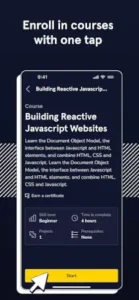

Codecademy Go solves that problem. It gives you short review sessions on your phone. Flashcards. Quizzes. Quick exercises. The idea is simple: practice a little every day, even when you are not at your desk.
What is Codecademy Go exactly?
You are looking at a mobile companion app by Skillsoft that lets you practice and review coding concepts from Codecademy courses anywhere, using flashcards, quizzes, and short exercises.
Codecademy Go is explicitly designed as a supplement to the main Codecademy website, not a replacement. The app helps you review concepts, practice syntax, and maintain learning streaks during short breaks or commutes. It is most useful for learners who want to reinforce what they already studied on the desktop platform instead of starting fresh lessons on mobile.
Codecademy Go holds a 4.9 star rating from more than 39,900 reviews. The app size is roughly 50 MB. The age rating is Everyone. The app is free with optional in app purchases for Pro and Plus subscriptions.
A mobile companion app for practicing and reviewing coding concepts on the go
The category matters here. Codecademy Go is not a full course platform. It is not a coding environment. It is a review app. You use it to reinforce what you have already learned. The app gives you flashcards, quizzes, and short exercises. The content is synced with your Codecademy account.
Who this app was built for
Codecademy users who want to practice during short breaks or commutes
Do you have a few minutes between meetings? Waiting for a bus? Codecademy Go fits into those small windows. The short sessions are designed for on the go practice.
Learners who want to reinforce concepts from desktop courses
You learn on the desktop. You review on mobile. The app reinforces what you already studied. The sync keeps your progress consistent.
People who want to maintain coding streaks and daily habits
Consistency is key to learning. Codecademy Go helps you maintain your daily practice. The streak tracking motivates you to keep going.
Anyone who prefers bite sized review over full lessons on mobile
Full coding lessons on mobile can be frustrating. Codecademy Go focuses on review, not new learning. The bite sized format is perfect for mobile.
Codecademy Go Main Features
Daily flashcards and concept reviews tailored to your courses
The flashcards are based on your courses. They adapt to your progress. The reviews are personalized.
Smart Flashcards that auto generate personalized decks using AI and spaced repetition
AI generates the decks. Spaced repetition schedules the reviews. The system adapts to your performance.
Practice packs and quizzes synchronized with your progress on the website
Your progress syncs between desktop and mobile. The practice packs match your current courses. The quizzes test your knowledge.
Progress tracking and streak maintenance to keep you consistent
You can track your progress. Streaks motivate daily practice. The tracking is visible and encouraging.
Content recommendations across the full Codecademy catalog
The app recommends content based on your progress. The recommendations help you discover new topics.
Subjects include Web Development, Data Science, Computer Science, Python, JavaScript, SQL, and more
The subject range is broad. Web development. Data science. Computer science. Specific languages. The coverage is extensive.
Works with free accounts (limited daily practice) and unlocks more with Pro and Plus
Free accounts get limited daily practice. Pro and Plus unlock more. The subscription model is standard.
Offline support for previously downloaded content
You can download content for offline use. The offline support is useful for travel.
Apple Single Sign-On for easier login on iOS
The app supports Apple Single Sign-On. The login is streamlined.
Improved home page and onboarding in recent updates
The home page is cleaner. The onboarding is smoother. The updates improve the user experience.
Codecademy Go Graphics and Design
Clean, minimalist design that matches the main site’s look and feel
The design is consistent with Codecademy. The minimalism keeps the focus on learning.
UI optimized for quick, bite sized practice with flashcards and multiple choice questions
The interface is simple. You answer questions. You flip flashcards. The UI supports quick sessions.
Interface is easy to navigate and digestible for quick study sessions
Navigation is straightforward. The content is digestible. The app is easy to use.
Where the design works well
The app is fast. The interface is responsive. The design supports the learning goals.
Where the lack of live coding and projects limits the experience
Codecademy Go app is for review. There is no live coding. There are no projects. The limitations are by design.
What users actually say about the Codecademy Go app
The parts people enjoy
Positive reviews often mention the convenience. The flashcards are praised. The streaks are motivating.
The parts people complain about
No learning app escapes criticism. Here is what comes up most often.
Does not support live coding or full projects
Codecademy Go is for review. There is no live coding. There are no projects. Some users want more.
Many features locked behind Pro subscription
The free version is limited. Pro unlocks more. The subscription cost is a barrier for some.
Best seen as a supplement, not a standalone learning platform
The app is not for new learning. It is for review. Users expecting full courses are disappointed.
Free version has limited daily practice
Free users get limited daily practice. The limit is restrictive for some.
How Codecademy Go app mechanics work
Review flashcards → complete practice packs → maintain streaks → sync progress with desktop account
The loop is simple. Review flashcards. Complete practice packs. Maintain your streak. Sync with your desktop account.
Smart Flashcards and personalized recommendations act like adaptive challenges
The AI adapts to your performance. The recommendations are personalized. The challenges adjust to your level.
Content changes based on performance and course progress
The app tracks your performance. The content adjusts accordingly. The progress is visible.
Gamified learning mechanics: streaks, progress tracking, daily practice goals
The gamification keeps you engaged. Streaks motivate daily use. Progress tracking shows improvement.
Not a full course platform; a reinforcement tool for existing learners
Codecademy Go is a supplement. It reinforces existing knowledge. It is not a replacement for desktop learning.
Looking for another mobile learning app that uses flashcards and spaced repetition for skill reinforcement? Check out Duolingo, a popular app for language learning with similar gamified mechanics and daily practice goals.
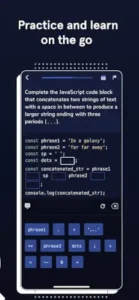
Codecademy Go Tips
You can start Codecademy Go app and complete your first review session in minutes. Getting the most out of the app as a learning supplement takes a little strategy. These tips help you reinforce your coding skills effectively.
Use the app mainly between full lessons, not as your primary way of learning new topics
Here is a question. Why do some learners progress faster than others? They use the right tool for the right job.
Codecademy Go tips from experienced users all say the same thing. The app is for review, not new learning. Use it between desktop sessions. A player who uses the app for review reinforces knowledge. A player who uses it to learn new topics misses the depth of full lessons.
Enable daily practice and streaks to keep your coding habit consistent even on busy days
Consistency is the key to learning. Codecademy Go is built around daily practice.
Enable daily practice. Maintain your streak. A player who practices daily builds a habit. A player who practices sporadically forgets. The daily habit is the path to progress.
Focus on courses you are already taking on the website so flashcards and practice packs align with your goals
Codecademy Go similar apps sometimes work independently. This app works best when synced.
Sync your progress. Focus on courses you are already taking. A player who aligns mobile practice with desktop learning gets more value than a player who uses random flashcards.
Use Smart Flashcards regularly to reinforce weaker areas identified by the app’s AI
Codecademy Go app uses AI. The AI identifies your weak areas. Smart Flashcards focus on those areas.
Use Smart Flashcards regularly. A player who reinforces weak areas improves faster than a player who only reviews strong areas. The AI is a valuable tool.
Download content while online so you can review offline during commutes or travel
Codecademy Go codes for free content sometimes appear during promotions. More importantly, offline support is available.
Download content while online. Review it offline. A player who uses offline support never wastes a commute. A player who only reviews online misses opportunities.
If you are on a free plan, use daily practice strategically for the languages you are focusing on most
The free plan has limited daily practice. Use it strategically.
Focus on one language at a time. A player who focuses on one language gets more value than a player who spreads practice across multiple languages. The free plan is enough for focused learning.
Keep your progress synced between desktop and mobile so recommendations stay accurate
Sync is automatic. But sometimes it fails. Check your sync status.
A player with accurate sync gets relevant recommendations. A player with outdated sync gets irrelevant content. Check the sync regularly.
Treat the app like a micro practice routine rather than a replacement for real coding projects
Codecademy Go is a supplement. It is not a replacement.
Use it for review. Use it for reinforcement. Do not use it as your only learning tool. A player who uses the app alongside projects progresses faster than a player who relies only on the app.
Apps similar to Codecademy Go
If you like Codecademy Go, here are five other apps worth your time. Each offers something similar with a different twist.
Duolingo
Duolingo is the most direct comparison. Daily habit. Streaks. Bite sized practice. Codecademy Go similar apps should start here. The difference is that Duolingo is for language learning, not coding. Good for users who want the same gamified format for different subjects.
Elevate
Elevate focuses on cognitive skills. Reading. Writing. Math. The difference is that Elevate is more about general brain training than specific coding knowledge. Good for users who want broader skill development.
Brilliant
Brilliant teaches math, science, and coding through interactive problem solving. The difference is that Brilliant is more of a full learning platform than a review app. Good for users who want interactive lessons, not just flashcards.
Sololearn
Sololearn is a mobile coding app with lessons and community features. The difference is that Sololearn offers full lessons on mobile, not just review. Good for users who want to learn new topics on their phone.
Memrise
Memrise uses spaced repetition for language learning. The difference is that Memrise is focused on vocabulary, not coding. Good for users who want the spaced repetition format for a different subject.
Codecademy Go Community
Mostly an individual study tool with limited direct social features
No multiplayer. No leaderboards. No chat. The app is for solo practice.
Broader Codecademy ecosystem has forums and community discussions
The Codecademy community is active on the website. Forums. Discussions. Help threads. The community is external.
App focuses on personal progress, streaks, and personalized recommendations
The app is about your progress. Your streaks. Your recommendations. The focus is personal.
Community value is indirect: staying aligned with courses and peers
The community value is indirect. You stay aligned with your courses. You keep pace with peers. The community is a motivator, not a feature.
Conclusion
Codecademy Go works for three types of people. First, Codecademy users who want to practice during short breaks or commutes with bite-sized review sessions. Second, learners who want to reinforce concepts from desktop courses and maintain coding streaks. Third, anyone who prefers bite-sized review over full lessons on mobile and wants to turn dead time into productive practice.
Does not support live coding or full projects. Many features locked behind Pro subscription. Best seen as a supplement, not a standalone learning platform. Free version has limited daily practice.
Do you want a mobile review app that reinforces what you learn on Codecademy desktop, even if the free version is limited and there is no live coding? Or do you prefer a full mobile learning platform with lessons and projects?
If the first one, Codecademy Go is a useful supplement for keeping your skills sharp. If the second one, look at Sololearn or other full mobile coding apps. Both answers are fine. Just know what you want.
FAQ
How do I get Codecademy Go download on my phone?
Go to the Google Play Store if you use Android. Search for Codecademy Go. The developer is Skillsoft. Tap install. or use the direct link to Download Codecademy Go from the Official Google Play Store.
Is Codecademy Go free to use, or do I need to pay?
The app is free with limited daily practice. Free users can access flashcards and quizzes, but the number of daily practice sessions is limited. Pro and Plus subscribers unlock unlimited practice, Smart Flashcards, and full content access. You need a Codecademy account to use the app, which is also free to create.
Where can I find the official website and help documentation?
The official Codecademy help center has information about the app, features, and troubleshooting: Official Codecademy Go Help Center. For general Codecademy information, visit the main website: Official Codecademy Website.
I have a problem with the app. Who do I contact?
Send an email to the Codecademy support team. They handle account issues, billing problems, bug reports, and technical support. Here is the address: support[at]codecademy.zendesk.com. For Codecademy Go download problems or installation issues, that same email applies. Include your device model, app version, and a description of the problem.
Can I learn coding from scratch using just Codecademy Go?
No. Codecademy Go is designed as a companion app for reviewing and reinforcing concepts you learn on the desktop version. It does not teach new topics from scratch. You need to use the main Codecademy website or app for full lessons, projects, and live coding practice. Codecademy Go is best used for daily practice and keeping your skills sharp during short breaks or commutes.