

Facebook Lite save your social life when your internet connection is slow, your phone is older, or your data plan is limited?
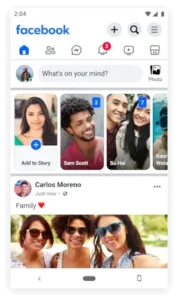

Facebook Lite it is a strategically streamlined version of Facebook engineered for reliability over luxury. With over one billion downloads and a 4.6 star rating from nearly 34 million reviews, its success is a testament to its necessity. The app size is a remarkably small 3MB, and its user base is vast, spanning all ages in emerging markets and anyone elsewhere with a budget device or a metered data connection.
What Is Facebook Lite and Why Does It Exist?
Facebook Lite is an official application from Meta Platforms, Inc. designed to provide the core Facebook experience while consuming minimal storage space and mobile data. Its existence addresses a fundamental digital divide: the gap between the feature rich, data heavy apps of the developed world and the practical constraints faced by a huge portion of the global population. The primary value of Facebook Lite for low storage phones is immediate, it installs and runs on devices where the standard Facebook app would not fit or would run sluggishly. Furthermore, its optimization for 2G networks and unstable connections makes it a vital tool for Facebook Lite for slow internet areas, ensuring that staying connected does not require the latest technology or the fastest speeds.
Facebook Lite Features: What’s Included (and What’s Not)
The philosophy behind Facebook Lite is one of essentialism. It includes the tools needed for fundamental social networking while stripping away anything that would compromise its speed or size.
-
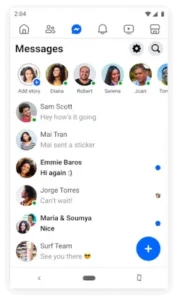
Core Social Functions: You can perform the basic actions that define the platform. This includes finding and adding friends, sharing text status updates, posting and viewing photos, and commenting with reactions. The Facebook Lite messaging and news feed are fully functional, keeping you in the loop with your social circle.
-
Key Platform Elements: Surprisingly, it retains several of Facebook’s most useful features. You receive real-time notifications for likes and comments, can actively participate in Groups, discover Local Events, and even buy and sell items through the integrated Marketplace.
-
Efficiency Features: This is where the app’s engineering shines. The built in Data Saver mode actively compresses images and reduces data usage in the background. The support for Dark Mode provides a more comfortable viewing experience and can help save battery life on capable screens.
Facebook Lite User Experience: Design and Performance
The interface of Facebook Lite is a study in minimalism. The design foregoes the smooth animations and glossy visuals of the main app in favor of a clean, text forward, and icon based layout. Navigation is straightforward, using a simple tab bar for Home, Friends, Notifications, and Menu. This lack of visual clutter is not a drawback but the source of its strength.
The Performance & Data Use is the app’s primary achievement. Pages load significantly faster on weak signals, and the app consumes a fraction of the data compared to its full featured counterpart. This makes the Facebook Lite data saving capability its most praised feature, allowing users to browse for longer without worrying about their data cap.
The Trade offs are a direct result of this efficiency. The experience is visually plainer. High resolution photos are downscaled, auto playing videos are disabled, and some interactive elements from the main app are absent. It provides the information and interaction of Facebook, but without the polished presentation.
What Users Are Saying About Facebook Lite
User feedback consistently highlights the app’s success in fulfilling its core mission. The overwhelming positive sentiment revolves around its reliability. Users in rural areas or with older devices report that it works consistently where other apps fail. The small app size and general speed are repeatedly commended.
The criticisms are equally pragmatic. Some long-time users note that recent updates have slightly increased data usage, though it remains far below the standard app. Others report occasional bugs, such as notification delays or the app freezing. The frequency of advertisements is also a common point of feedback, as it is in the main app. For those who also need a lightweight messaging solution, Messenger Lite offers a similarly efficient companion for Facebook chats.
Facebook Lite in the Meta Ecosystem
Within Meta’s family of applications, Facebook Lite has a clearly defined, complementary role. It is not in competition with the full Facebook app; it serves a different market. While the full app pushes the boundaries with features like advanced video editing and VR integration, Facebook Lite focuses on accessibility and reliability.
Its closest relatives are other “Lite” apps, like Messenger Lite and Instagram Lite. These apps share the same design philosophy: deliver the essential service in the most efficient package possible. Facebook Lite’s role is to be the gateway to the social network, ensuring that the barrier to entry remains as low as possible for anyone with an internet connection, regardless of its speed or their device’s capabilities.
Facebook Lite Tips for Optimal Use
To truly harness the efficiency of Facebook Lite, a proactive approach to its settings is key. Implementing a few specific Facebook Lite tips can significantly enhance both performance and data conservation.
The most impactful setting is the Data Saver mode. This is not just a toggle; it’s the core of the app’s efficiency. To activate it, go to the Menu > Settings & Privacy > Data Saver, and turn it on. When active, this feature prevents videos from playing automatically and heavily compresses images before they load. You can then tap on any photo to load a clearer version if needed. This gives you control, ensuring you only use data for the content you actively choose to see. For those on extremely limited plans, this is the definitive method for how to use Facebook Lite on limited data.
Next, manage your storage and notifications. Over time, the app’s cache, temporary data stored to speed up loading, can grow and ironically slow the app down. Periodically navigating to your phone’s application settings, selecting Facebook Lite, and clearing the cache can restore its snappy responsiveness. Similarly, customizing your notification settings within the app can reduce unnecessary background data usage and battery drain. Disable notifications for less critical activities to minimize the app’s silent demands on your device’s resources.
Finally, do not overlook the Dark Mode feature. Found in the Settings under Dark Mode, this option does more than just reduce eye strain in low light. On smartphones with OLED or AMOLED screens, displaying black pixels requires no power. By switching the app’s interface to a predominantly black background, you can achieve tangible Facebook Lite battery saving, making your charge last longer. This is a simple change with a compound benefit, especially in regions where access to consistent electricity may also be a concern.
Facebook Lite for Global Communities
The significance of Facebook Lite extends far beyond a mere convenience; it functions as a critical piece of social infrastructure in many parts of the world. Its role in Facebook Lite for emerging markets is to lower the barrier to digital participation to its bare minimum.
The Accessibility it provides is foundational. In areas where a smartphone might be a family’s primary or only computing device, and where data is purchased in small, expensive bundles, the full version of Facebook is often a impractical luxury. Facebook Lite makes the platform accessible. It allows individuals to maintain social ties, share important life updates, and access information networks that are increasingly central to modern life, all without requiring a hardware or data plan upgrade. This is the essence of Facebook Lite for 2G networks; it ensures that a slower connection does not mean a total disconnection.
The Utility of its specific features takes on a different level of importance. In many communities, the Facebook Lite Marketplace is not just for selling old furniture; it is a vibrant, local digital economy. People use it to buy and sell goods, find and offer services, and engage in commerce in a way that was previously limited to physical marketplaces. Similarly, local Facebook Lite Groups become indispensable for community organization. They are used to share news, coordinate community events, discuss local issues, and create support networks. In this context, the app is more than a social network; it is a tool for civic engagement and economic survival.
Conclusion :
Facebook Lite is a masterclass in purposeful design. It succeeds not by being the most powerful or visually impressive app, but by being the most resilient and accessible version of Facebook possible.
Its strengths are precisely aligned with the needs of its massive user base: unparalleled data efficiency, minimal storage footprint, and reliable performance on hardware and networks that the tech industry often leaves behind. It demonstrates that “less” can be a powerful feature when that “less” is a deliberate choice to prioritize function and access.
The trade offs, the simpler interface, the compressed media, the absence of the latest features, are not failures but the direct result of its focused engineering. For its target user, these are not significant drawbacks but the very reasons the app is usable at all.
In conclusion, Facebook Lite is more than just an app; it is a bridge. It connects billions of people to the global conversation who would otherwise be excluded by the relentless advance of technology that demands more data, more storage, and more processing power. It proves that social media’s true value lies not in high resolution videos, but in human connection. For anyone operating under technological constraints, it is not just a good option; it is the only one that makes sense.
Frequently Asked Questions (FAQ)
Is Facebook Lite an official app from Facebook?
Yes, it is an official application developed and maintained by Meta Platforms, Inc. It is a legitimate, streamlined version of the main Facebook app designed for efficiency.
Where can I find the official Facebook Lite download link?
The verified source for the Facebook Lite app is the Google Play Store. You can also find more information on the Facebook Lite Official Website, which will direct you to the correct store listing.
Can I use Facebook Lite for messaging, or do I need Messenger?
Yes, Facebook Lite includes built-in messaging. You can send and receive text messages and stickers directly within the app, which is a key advantage for avoiding the need to install a separate Messenger application.
Who do I contact for account or app support?
For issues related to your Facebook account or the app’s functionality, you can contact Meta support through the app’s help section or via their general support channels. For direct developer contact, you can try lite-android-support[at]fb.com.
How does Facebook Lite compare to using Facebook in a mobile browser?
The app is generally more reliable and feature-rich than the mobile browser experience. It provides faster navigation, push notifications, and better integration with your phone’s OS, all while maintaining its low data usage.