Fossify Notes is not trying to be Evernote.

Fossify Notes it does not have cloud sync, it does not have rich text formatting and it does not have AI summarization. It is a place to write things down and check them off and it does that without asking for your email address or your data. It currently holds a 4.5 star rating from over 500 reviews on Google Play, with 10,000+ downloads. The install size is tiny, sitting around 10 MB to 15 MB and the age rating is Everyone. It is a tool for people who want to capture ideas without being tracked, even if that means giving up the bells and whistles of mainstream productivity apps.
What Is Fossify Notes
Most note apps want to be your second brain. They want to sync across devices, collaborate with teams and use AI to organize your thoughts. Fossify Notes does none of that. It is built on a simple premise: your notes are your business.
The core value of Fossify Notes is its zero network permission. Technically, it cannot upload your notes anywhere because it does not request internet permission at all. For anyone writing private journals, recording password hints or handling sensitive work information, that is a clear security boundary.
Fossify Notes Mechanics of Note Taking and Organization
Quick Note Taking
You open the app, tap the plus button and start typing. There is no loading screen, no sync delay and no account login. The quick capture in Fossify Notes is “open and write,” with no extra steps. For recording fleeting ideas or shopping lists, it is the most direct experience.
Automatic Saving
Every edit is saved automatically. You do not need to hit a save button and you do not need to worry about closing the app and losing your work. The automatic saving in Fossify Notes lets you exit anytime without worrying about whether you saved.
Checklists
You can create checklists for tasks and to-dos. Mark items as complete, reorder them and keep track of what is done. The checklist feature in Fossify Notes is enough for shopping lists, travel packing, or daily task management.
Simple Organizer
The layout is straightforward. You see your notes and lists and you tap into them. There is no complex folder structure and no tagging system. The organization in Fossify Notes is “simple and direct,” suited for people who do not want to spend time categorizing.
Task Management + Note Taking: Can One App Do Both?
Fossify Notes handles both, but in a basic way. Task management and note taking in Fossify Notes are not separate features. You create a note and if you need a checklist, you use the checklist format. It is not a full task manager with due dates, reminders or recurring tasks.
For simple to-dos and shopping lists, it works. For complex project management, it does not. The app is designed for quick capture, not for managing a team or tracking dependencies.
Fossify Notes Customization and Widgets
Colorful Note Taking Widget
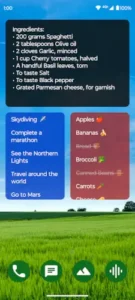
You can add a widget to your home screen to access lists and manage tasks without opening the app. The widget in Fossify Notes saves frequent users the step of opening the app just to check a shopping list or to-do item.
Custom Colors and Fonts
You can change the colors and fonts to match your style. The customization options in Fossify Notes are not deep, but they are enough to make the interface look decent.
Material Design and Dark Theme
The design is clean and modern, with dark theme support for low light use. The dark mode in Fossify Notes reduces eye strain for people writing notes at night.
How to Customize Your Notes App for Maximum Productivity
The customization in Fossify Notes is limited to colors, fonts and widgets. Customizing Fossify Notes for productivity is mostly about widget placement. Put the widget for your daily checklist on your home screen so you see it immediately. Change the font to something easy to read. Use the dark theme if you write at night.
There is no productivity dashboard, no tagging system and no folder hierarchy. The “customization” is visual. The productivity gain comes from the fact that there is nothing to configure, so you just open the app and write.
Fossify Notes Privacy and Security Features
Offline Operation
The app works entirely offline. It does not request internet permission, so it technically cannot send your notes anywhere. The offline nature of Fossify Notes is not “it works when you are disconnected.” It is “it never needed a network in the first place.”
No Data Collection
The developer states no data is shared with third parties and no data is collected. It requests only the permissions necessary to function as a note app. The permission list for Fossify Notes is short enough to read in under a minute.
Open Source Transparency
The source code is available on GitHub. If you do not trust the statement “we do not collect data,” you can look at the code yourself. The open source transparency of Fossify Notes makes the privacy promise verifiable.
How to Sync Notes Across Your Devices Without Cloud Storage
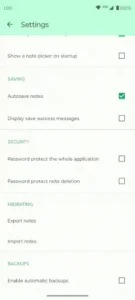
You cannot sync automatically with Fossify Notes. There is no cloud account, no background sync and no server storing your data. Syncing notes without cloud storage in Fossify Notes requires manual export and import or using a local sync tool like Syncthing.
If you want to move a note to another device, you export it as a file and transfer it via USB, Bluetooth, or a local network share. It is not seamless. But the trade-off is that your notes never touch a third party server. You control every step of the transfer.
What Users Say About Fossify Notes App
What users like
Users appreciate the no-ads, no-permissions, no data collection model. Basic note taking works reliably and without frills. Customization options for colors and fonts earn consistent mention.
Were work is need it
The feature set is limited compared to mainstream note apps. The app is in beta, so bugs or missing features may be present. User complaints about Fossify Notes focus on missing features and beta instability, not the core note-taking experience.