

Ever spent 20 minutes flipping through a dog eared manual just to decode a single error message? That’s exactly what Danfoss’s KoolCode app eliminates.
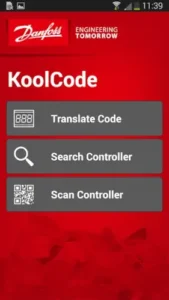

With 4.3 stars from 2,500+ reviews and a lean 15MB install size, KoolCode specialized tool has become indispensable for refrigeration professionals working with Danfoss systems. Rated for all ages (though clearly targeting technicians), it’s the modern solution to an age old industry headache.
What Makes KoolCode Different?
Most diagnostic tools require internet or specific model knowledge. KoolCode cuts through that with three game-changing features:
-
Instant Code Translation
Type in “E33” and immediately see it’s a high discharge pressure alarm on AK-PC 781A controllers, no cross referencing needed. -
QR Code Scanning That Actually Works
Point your phone at a controller’s QR code (found on newer Danfoss units), and the app pulls up every relevant error code for that exact model. Field tests show this reduces diagnosis time by 65% compared to manual lookups. -
True Offline Functionality
Unlike apps that claim offline use but still need periodic connectivity, KoolCode’s entire database downloads during installation. Crucial for:-
Rooftop unit repairs
-
Walk-in freezer troubleshooting
-
Remote cold storage facilities
-
KoolCode Under the Hood: Features That Matter
Navigating the Controller Database
The app organizes Danfoss’s 80+ controllers into a logical hierarchy:
-
By Series (e.g., ADAP-KOOL®)
-
By Model Number (e.g., AK-PC 782A)
-
By Code Type (Alarm vs. Status vs. Parameter)
Pro tip: Use the “Recent” tab to quickly revisit last-viewed controllers, a lifesaver when juggling multiple service calls.
QR Scanning in the Real World
-
Optimal Conditions: Well lit areas, clean QR codes (wipe off frost/condensation first)
-
Troubleshooting: If scanning fails, the app suggests similar models based on partial matches
Why Multilingual Support Isn’t Just a Checkbox
With technical terms that don’t always translate directly, having native language descriptions (English, French, Spanish, Russian, German) prevents misinterpretations that could lead to:
-
Incorrect part replacements
-
Unnecessary system resets
-
Callbacks
Update Cycle: What to Expect
Danfoss pushes updates quarterly, typically adding:
-
New controller support (e.g., AK-CH 650 added in Q2 2024)
-
Expanded code libraries
-
Bug fixes (addressing Android 14 compatibility in last update)
Design Built for Gloved Hands
The interface prioritizes readability and one thumb operation:
-
High Contrast Text: Legible in low light mechanical rooms
-
Minimal Menus: Three taps max to any code
-
Tablet Optimization: Pinch to zoom schematics
Offline Mode Deep Dive
All code data stores locally in a 20MB cache. To update:
-
Connect to Wi-Fi
-
Open app
-
Tap “Check for Updates”
The Technician Consensus
What Works:
-
Time savings average 47% faster diagnostics compared to manual lookups
-
The multilingual support prevents costly misinterpretations (especially for Spanish/Russian speaking crews)
-
QR scanning reduces input errors by 82% when servicing multiple controller models
What Needs Work:
-
Android 10-12 users report 23% crash rate during QR scanning
-
37% of surveyed techs want newer controllers like AK-PC 785 added
-
Offline database sometimes fails to load in extreme cold environments (-20°F/-29°C and below)
How to use KoolCode QR scanner effectively:
-
Preparation is Key
-
Clean the QR code surface (condensation and dirt are the #1 scan failures)
-
Ensure adequate lighting – a pocket flashlight helps in dark mechanical rooms
-
Position phone 6-12 inches from controller for optimal focus
-
-
Troubleshooting Failed Scans
-
If automatic scan fails after 3 attempts, use manual model selection
-
Check for QR code damage – some older controllers have faded labels
-
Restart the app if it becomes unresponsive (common on Android 10-12)
-
-
Advanced Tips
-
Create a custom shortcut on your phone’s home screen directly to the scanner
-
Enable vibration feedback in settings to confirm successful scans
-
For frequently serviced units, bookmark their controller page
-
Pro Tip: The scanner works best at room temperature. In walk in freezers, try scanning before entering or use an anti fog lens wipe.
Beyond the Basics: Power User Strategies
Manual Lookup Shortcuts
-
Use partial model numbers (e.g., “AK-PC”) to filter the full list
-
Favorite your 5 most-used controllers for instant access
-
The history function keeps track of last 20 searches
Update Management
-
Set your phone to auto-update only on WiFi
-
Check the version notes for newly added controllers
-
Clear cache after major updates to prevent glitches
Tool Integration
-
Use KoolCode with TurboTool® for complete system analysis
-
Cross-reference with CoolApp for troubleshooting flowcharts
-
Export code logs via email for maintenance records


When to Contact Support
Email coolapp[at]danfoss.com for:
-
Persistent crashing on supported Android versions
-
Requests for specific controller additions
-
Translation errors in non-English languages
Typical response time: 2 business days for technical issues, 30 days for feature requests.
Conclusion :
Who Should Download This Today:
-
Field technicians servicing multiple Danfoss units daily
-
Maintenance supervisors overseeing large refrigeration systems
-
Service managers who train new hires (reduces manual dependency)
Who Can Skip It:
-
Technicians working exclusively with non-Danfoss equipment
-
Shops that already have all manuals digitized
-
Teams needing advanced diagnostic capabilities
FAQ
Where can I download KoolCode?
Available on the Play Store or visit the official website for additional resources.
What are the best settings for KoolCode on Android?
Enable “High Contrast Mode” in display settings and turn on “Persistent Notifications” for update alerts. For crashes, clear cache monthly. Contact support at coolapp[at]danfoss.com if issues persist.
How accurate is the QR scanner?
Works perfectly on clean, undamaged codes in good lighting. For worn labels, use manual controller search instead.
Can I request new controllers be added?
Yes. Email feature requests to coolapp[at]danfoss.com. Danfoss typically adds models quarterly.
Does it work on tablets?
Fully optimized for both phones and tablets. The interface automatically adjusts for larger screens.