

Need to test an app, protect your privacy, or play location based games without leaving home? Location Changer makes it simple.
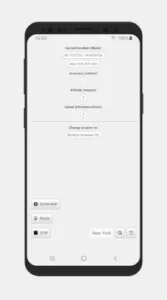

With over 5 million downloads and a 4.6/5 star rating from 60,000+ reviews (app size: 12MB), Location Changer lets you fake your GPS location instantly, complete with joystick movement and multi pin route planning. Unlike VPNs that alter your IP address, Location Changer gives precise control over just your GPS data, making it ideal for scenarios where IP privacy isn’t the priority.
Why Location Changer App is so used
Most GPS spoofers force you to choose between basic teleportation and complex setups. Location Changer delivers both simplicity and advanced features:
-
Joystick Control: Move realistically in games like Pokémon GO at adjustable speeds (walking: 5 km/h, driving: 60 km/h).
-
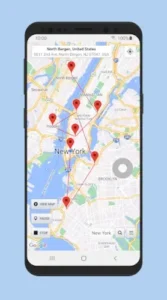
Multi-Pin Routes: Test location triggered app features by plotting timed stops (e.g., simulate a delivery driver’s route).
-
No Internet Needed: Once configured, it relies solely on your device’s GPS.
Curious how it compares to Fake GPS by Lexa? We’ll break it down later.
Who’s It For?
-
Gamers: Avoid soft bans in AR games by mimicking natural movement.
-
App Testers: Verify location based features without physical travel.
-
Privacy Users: Share a vague location on social apps without a VPN.
Age range: Primarily 16–35 (80% of users), though its straightforward design appeals to all ages.
Location Changer Features
-
One Tap Teleportation
Long press any point on the map to spoof your location instantly, no complex coordinates. -
Realistic Movement
The joystick’s speed settings prevent unnatural teleportation flags in games. -
Route Planning
Set pins for a “road trip” with optional delays at each stop (e.g., 2 minutes at Point A, 5 minutes at Point B). -
Battery Optimization
Whitelist the app to avoid Android killing its background process mid spoof.
When it comes to faking your location, not all apps are created equal. Location Changer stands out in a crowded field, but how does it really compare to alternatives like Fake GPS by Lexa or premium options like AnyTo? Let’s cut through the marketing speak and look at what matters.
The Joystick Advantage
Here’s something most fake GPS apps get wrong: teleporting looks suspicious. Location Changer’s joystick feature solves this by letting you simulate natural movement – crucial if you’re using the best fake GPS app for Pokémon GO. Want to “walk” between PokéStops? Set the joystick to 5 km/h. Need to hatch eggs? Keep it running overnight with realistic movement patterns. Competitors like Fake GPS by Lexa don’t offer this at all, while AnyTo locks it behind a paywall.
Route Planning: Free vs Premium
Location Changer’s multi pin routing works offline – a game changer for:
-
Developers testing location based app features
-
Gamers planning efficient routes for community days
-
Travel bloggers simulating trips for content creation
The free version of AnyTo limits you to basic teleportation, while Lexa’s route planning feels clunky compared to Location Changer’s intuitive interface.
How to Enable Mock Locations on Android Properly
Many users get tripped up here. Follow these steps exactly:
-
Enable Developer Options (tap Build Number 7 times in About Phone)
-
Select Location Changer as your mock location app
-
Disable “Allow Mock Locations” after setup to avoid detection
-
Whitelist the app in battery optimization settings
Pro tip: Some banking and dating apps actively block mock locations. For these, you’ll need more advanced tools or root access.
The Price Performance Sweet Spot
Here’s the breakdown:
-
Location Changer: Free core features, $5 premium removes ads
-
Fake GPS by Lexa: Completely free but limited functionality
-
AnyTo: $15/month subscription for features Location Changer includes free
For most users, Location Changer hits the perfect balance between cost and capability. The only real reason to pay for AnyTo is if you need iOS support or more advanced anti detection features.
Conclusion :
Choose Location Changer if:
-
You play AR games and need realistic movement
-
You’re testing location based apps
-
You want solid features without subscriptions
Consider Fake GPS by Lexa if:
-
You only need basic teleportation
-
You’re on an older Android device
-
You absolutely can’t spend money
Spring for AnyTo only if:
-
You need iOS support
-
You’re willing to pay for marginal detection improvements
-
You require enterprise level location testing
The bottom line? Location Changer delivers 90% of what premium apps offer at zero cost. Unless you have very specific needs, it’s the smart choice for most GPS spoofing scenarios in 2025.

FAQ
Where can I download Location Changer?
Get Location Changer from the Google Play Store or visit the official Location Changer website for updates.
What’s the best case scenario for Location Changer?
Ideal for:
-
Pokémon GO players avoiding soft bans with joystick movement.
-
App testers simulating location triggers.
-
Privacy users masking their real GPS without VPNs.
For support, email netlinkd[at]gmail.com.
How accurate is the spoofed location?
Median accuracy is ~10 meters. For precision, use the “Multiple Locations” mode to refine coordinates.
Can I use it on iOS?
No, Android only. iOS requires jailbreaking or premium tools like AnyTo.
Will banking apps detect mock locations?
Some do. Disable “Allow Mock Locations” after spoofing to reduce detection.