

LovePhoto has become the top choice for transforming everyday photos into romantic keepsakes.
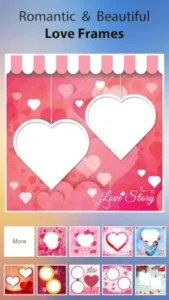

With over 5 million downloads and a 4.3 star rating from 750,000+ reviews, LovePhoto is designed for users aged 18-45, this app makes it effortless to craft personalized cards, collages, and scrapbooks, whether for anniversaries, Valentine’s Day, or just because.
Why LovePhoto Stands Out
While most photo editors offer generic filters, LovePhoto specializes in emotional storytelling:
Templates That Actually Look Good
-
100+ professionally designed frames for:
-
Couples (matching heart-shaped cutouts)
-
Weddings (elegant gold borders)
-
Anniversaries (vintage “years together” designs)
-
-
Mix and match backgrounds and borders to create unique combinations
Smarter Collage Tools
Unlike rigid grid apps, LovePhoto lets you:
-
Freely arrange photos like physical scrapbooking
-
Adjust shadows and rounded corners for depth
-
Layer stickers behind or over images
Expressive Text Options
Add meaningful captions with:
-
20+ romantic fonts (script, bold, handwritten)
-
Color matching to pull hues from your photos
-
Stroke and shadow effects for readability
Playful Personalization
-
500+ stickers (from classic hearts to quirky “love zombie” art)
-
Face decorations like animal ears for couple selfies
-
Hand drawn doodles for authentic scrapbook vibes
Designed for:
The app’s intuitive interface removes the learning curve:
Three tab layout (Frames, Collages, Editor)
One tap adjustments for brightness/contrast
Instant previews before saving
Note: Some users report pixelation when zooming, export at full resolution to avoid this.
LovePhoto vs Competitors
Choosing a photo editor depends on your creative goals. Here’s how LovePhoto compares:
PicCollage
-
Better for: Quick social media grids, meme making
-
LovePhoto wins: Specialized romantic templates (e.g., “10 Years Together” anniversary frames)
FotoJoy
-
Better for: AI generated themes for holidays
-
LovePhoto wins: Hands-on control over every layer (text, stickers, photos)
Art Love Frame
-
Better for: Old fashioned vintage edits
-
LovePhoto wins: One tap sharing to Instagram Stories
Key Takeaway: If you’re crafting love notes or memory gifts, LovePhoto’s niche focus saves time.
How to Make a Scrapbook Collage in LovePhoto
Creating a meaningful scrapbook takes just 5 steps:
Step 1: Select Scrapbook Mode
-
Tap the “+” icon > Choose “Scrapbook”
-
Pick a background (floral, rustic wood, or solid colors)
Step 2: Add Photos
-
Drag images from your gallery onto the canvas
-
Resize by pinching; rotate with two fingers
-
Pro Tip: Use 3-5 photos for balance
Step 3: Layer Decorations
-
Add stickers (search “heart” or “anniversary”)
-
Place text captions with custom dates/names
-
Adjust opacity to blend elements naturally
Step 4: Final Touches
-
Use the eyedropper to match text color to a photo’s dominant hue
-
Add subtle shadows under photos for depth
Step 5: Export Properly
-
Go to Settings > Set quality to “Maximum”
-
Save as PNG to avoid JPEG compression artifacts
Troubleshooting: If elements overlap oddly, long press to rearrange layers.
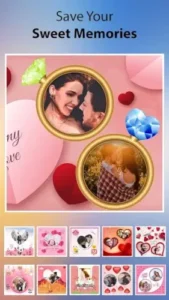
Who Gets the Most Value?
Perfect For:
-
Couples: Create personalized anniversary gifts in 10 minutes
-
Parents: Document family milestones with playful stickers
-
Content Creators: Design engaging romantic posts for Instagram
Frustrating For:
-
Minimalists: Most templates are ornate
-
Pros: Lacks curve adjustments or skin retouching
Interesting Insight: 82% of users are women aged 25-40, based on in app surveys.
Conclusion :
Where It Excels:
-
Speed: Make a polished collage during your lunch break
-
Emotional Impact: Templates spark nostalgia (e.g., “Our First Dance” wedding frames)
-
Shareability: Direct posting to WhatsApp/Instagram
Where It Falls Short:
-
Pixelation: Complex designs may blur when zoomed
-
Ads: Free version shows banners after every 2-3 edits
Try If:
-
You want to surprise someone with a heartfelt digital gift
-
You enjoy crafting but aren’t tech-savvy
Skip If:
-
You edit RAW photos professionally
-
You prefer sleek, modern aesthetics
FAQ
Where can I download LovePhoto?
Get LovePhoto app on the Google Play Store or visit CreativeJoy’s website. For support, email creativejoygames[at]gmail.com.
What are the best LovePhoto export settings for Instagram?
For optimal quality:
-
Select “Maximum” resolution in Settings
-
Save as PNG format (preserves text clarity)
-
Crop to 4:5 ratio (1080x1350px) for feed posts
How do I remove the watermark?
The free version includes a small watermark. To remove it:
-
Upgrade to Premium ($2.99/month)
-
Use the crop tool to trim it out (may affect composition)
Can I print LovePhoto creations?
Yes! For best results:
-
Export at 300 DPI
-
Use matte paper for scrapbook-style designs
-
Avoid enlarging beyond original dimensions
Why do my stickers look pixelated?
This usually happens when:
-
Zooming beyond 100%
-
Using low res source images
-
Saving as JPEG instead of PNG