

Shell Racing give you more then most racing games that give you a track and a car.
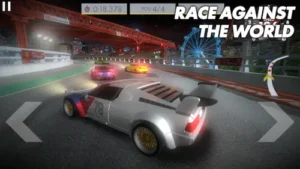

Shell Racing gives you the track editor too. You build your own circuits. You share them with the world. You race on tracks made by other players. The creativity is as important as the driving.
What is Shell Racing?
You are looking at a casual racing game from BrandBase Ltd built around Shell Motorsports cars, daily events, a track editor, community sharing, and AR viewing.
Shell Racing puts you behind the wheel of Shell branded performance cars on colorful tracks, with the goal of winning races, unlocking vehicles, and competing in daily events. The game is designed around a collectible car experience and includes a track editor so players can build and share custom circuits with the community. It also supports AR viewing on compatible devices, letting players see their cars life sized in real space.
Shell Racing holds a 4.2 star rating from more than 26,000 reviews. The app size is roughly 170 MB. The age rating is 4 and up. The game is free with optional in app purchases.
A casual racing game with Shell Motorsports cars, a track editor, community sharing, and AR viewing
The genre matters here. Shell Racing is not a racing simulator. It is not a hardcore competitive racer. It is an arcade style game with a creative twist. You race short tracks. You collect cars from the Shell Motorsports Collection. You build your own circuits using the easy track editor. The creative tools are as important as the driving.
Who this game was built for
Not every mobile player will enjoy Shell Racing. Here is who will.
Casual racing fans who enjoy arcade style gameplay
Do you like racing games that are easy to pick up and play? Short races. Simple controls. No complex tuning. That is Shell Racing. The arcade feel is the main draw.
Creators who like building and sharing custom tracks
The track editor is the standout feature. You design circuits. You share them with the community. You race on tracks made by other players. The creativity keeps the game fresh.
Car collectors who enjoy unlocking branded vehicles
The Shell Motorsports Collection has multiple cars. You unlock them through daily events. The collection aspect adds long term goals.
Players who like community driven content and challenges
The community shares tracks. Players vote on the Track of the Week. Friend challenges add social competition. The community layer is a big part of the experience.
Shell Racing Main Features.
Shell Motorsports Collection cars
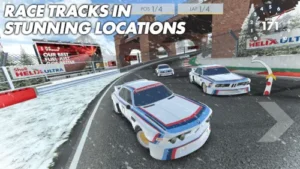
The cars in Shell Racing are not generic vehicles. They are officially licensed Shell Motorsports cars, modeled after real Shell sponsored race cars from various racing series. Each car has a distinct look, with Shell’s recognizable red and yellow branding featured prominently on the bodywork. You start with a basic car, but as you progress, you unlock more powerful and visually impressive vehicles.
The collection aspect adds a sense of achievement. Collecting all the cars is a long term goal for dedicated players. Each car has slightly different handling characteristics. Some are faster on straights. Others corner better. Learning the strengths and weaknesses of each car is part of the strategy. The car collection is the main progression system in the game.
Daily events that reward players with new cars and prizes
Daily events are the heartbeat of Shell Racing. Every day, a new event appears with a specific challenge. It might be a time trial on a specific track. It might be a race against AI opponents with a particular car class restriction. Completing the event rewards you with in game currency, car parts, or sometimes even a new car.
The events rotate regularly, so there is always something new to do. Missing a day means missing out on that day’s reward, but the events cycle back eventually. The daily structure encourages regular play without punishing you too harshly if you skip a day. The rewards are generous enough that participating in events is the most efficient way to progress.
Easy to use track editor for creating custom tracks
The track editor is arguably Shell Racing’s best feature. It is simple enough for anyone to use, yet flexible enough to create complex and challenging circuits. You start with a blank canvas. You place track pieces one by one. Straights. Curves. Elevation changes. You connect them to form a complete loop. The editor provides visual guides to help you align pieces correctly.
You can test your track at any time during the building process. The editor’s simplicity means you can create a basic track in minutes. But the depth comes from experimenting with different combinations of corners and straights to create truly unique racing experiences. No technical skills are required. The editor is designed for casual creators.
Community sharing for user made tracks
Creating a track is only half the fun. Sharing it with the community is the other half. Shell Racing allows you to publish your tracks to a global library. Other players can then download and race on your creation. They can rate it. They can leave comments. The most popular tracks get featured. The sharing system creates a vibrant community of creators and racers. You are not limited to the game’s pre made tracks.
The community generates an endless supply of new content. Every day, new tracks are uploaded. You will never run out of fresh circuits to race on. The sharing feature is the reason many players keep coming back.
Track of the Week competition for player created content
To encourage high quality track creation, Shell Racing runs a Track of the Week competition. Each week, a selection of the best player created tracks is featured. Players vote on their favorites. The track with the most votes wins the title. The winner gets in game rewards and recognition.
The competition creates a friendly rivalry among creators. It pushes players to refine their track designs. It also ensures that the featured tracks are consistently high quality. If you are looking for the best tracks to race on, the Track of the Week selection is a good place to start. The competition keeps the community engaged and creative.
AR viewing of cars on compatible devices
Augmented reality is a fun bonus feature in Shell Racing. On compatible devices, you can place your car in your real environment using your phone’s camera. The car appears life sized. You can walk around it. You can view it from any angle. The AR feature is not essential to gameplay. It does not help you win races. But it is a cool way to appreciate the car models you have unlocked. It adds a collectible aspect to the game. You can take photos of your car in your living room or driveway. The feature is a novelty, but it is well executed.
Leaderboards and challenges with friends
Competition is at the heart of Shell Racing. The game includes leaderboards that track your performance on every track. Your best lap times are recorded. You can see how you compare to other players globally. You can also challenge your friends directly. Send a challenge. Your friend races the same track. Whoever sets the faster time wins. The friend challenges add a social layer. They give you a reason to keep improving your times. The leaderboards create long term goals. Climbing the ranks is satisfying.
Custom races and adjustable race settings
Not all races need to be the same. Shell Racing lets you customize your races. You can choose the number of laps. You can adjust the difficulty of AI opponents. You can select which car to use. You can even choose specific tracks, including ones you have created yourself. The customization gives you control over your experience. Want a quick race? Set it to one lap. Want a longer challenge? Set it to five laps. Want to practice a specific track? Run it as many times as you like. The settings are flexible.
Video recording and graphics options
Shell Racing includes video recording functionality. You can record your races and replay them later. The feature is useful for reviewing your performance. You can see where you made mistakes. You can learn from them. You can also share your recorded races with friends. The game also has adjustable graphics settings. You can lower the graphics quality for smoother performance on older devices. You can raise it for better visuals on newer devices. The flexibility ensures the game runs well on a wide range of phones.
Multiple steering modes and device controls
Control options are important in a racing game. Shell Racing offers several steering modes. Tilt steering uses your phone’s gyroscope. You tilt the phone to turn. Touch steering uses on screen buttons. You tap left or right to steer. Wheel steering uses a virtual steering wheel on screen. You drag it to turn. The variety of options means you can find a control style that feels comfortable. The game also supports external controllers on compatible devices. The flexibility ensures that everyone can find a way to play that suits them.
Shell Racing Graphics and Design
Bright, stylized presentation that fits casual racing identity
The visual style of Shell Racing is bright and colorful. The tracks feature bold colors. Green grass. Blue skies. Red and yellow curbs. The cars are shiny and polished. The style is not realistic. It is not trying to be. It is playful and approachable. The presentation matches the casual racing identity of the game. The bright visuals are appealing to a wide audience. The game looks fun.
Graphics are enjoyable and interface is simple enough for a wide audience
The graphics are not cutting edge. They are not trying to compete with console racing games. But they are pleasant. The environments are clean. The car models are detailed enough. The interface is simple. Menus are clearly labeled. Buttons are large. Anyone can pick up the game and start playing. The simplicity is intentional. It makes the game accessible.
Graphics settings and camera options added over time
Shell Racing has evolved visually since its initial release. The developers have added graphics settings. Players can now adjust visual quality to balance performance and appearance. Camera options have also been expanded. You can choose from different camera angles during races. The additions show that the developers are committed to improving the game over time.
Where the design works well
The game is easy to navigate. The main menu is clear. The track editor is intuitive. The race interface is uncluttered. The design works well because it prioritizes usability over flashiness. You never feel lost. Everything is where you expect it to be.
Where racing physics may feel less polished than creative tools
The creative tools in Shell Racing are the highlight. The track editor is excellent. The community sharing system is robust. The racing physics, however, are simpler. The cars do not handle like real race cars. There is no tire wear. No fuel management. No complex tuning. The physics are arcade style. The driving is fun, but it is not deep. Some players find the racing less satisfying than the creative aspects. The game is better as a creation tool than a racing simulator.
What players say about the Shell Racing game
The parts people enjoy
Positive reviews frequently highlight the track editor. Players love creating their own circuits. They enjoy the freedom and creativity. The community sharing is also praised. Racing on tracks made by other players adds variety. Daily events give players a reason to log in regularly. The game is described as fun and easy to pick up. One player wrote: “Love creating tracks and racing on others’ creations. The track editor is the best part.”
The parts people complain about
No racing game is perfect. Shell Racing has its share of criticisms. Here is what comes up most often.
Racing can feel slow; players want speed options
Some players feel that the racing speed is too slow. The cars do not feel fast. The pace feels leisurely rather than thrilling. Players want options to increase the speed. The current speed limits the excitement for some.
Some players find the game feels robotic or cheap
The game has a basic feel. The physics are simple. The car handling is not nuanced. Some players find that the game lacks polish. It can feel cheap compared to other mobile racing games.
Track loading issues on user created tracks
Not all user created tracks load perfectly. Some tracks have loading problems. The game may crash when loading certain tracks. The stability is not always reliable.
Some reviews mention car unlock frustrations
Unlocking cars can be slow. The progression is not always satisfying. Some players find the grind frustrating. The car unlocks are tied to daily events, which means you have to wait for specific events to appear.
How the Shell Racing game mechanics work
Arcade style racer focused on short races and time trials
Shell Racing is an arcade racer. The races are short. Typically one to three laps. Time trials are also available. The focus is on quick, accessible sessions. You can play a race in a few minutes. The short format is perfect for mobile gaming.
Unlock new cars through daily events and challenges
Cars are earned, not bought. You unlock them by completing daily events. You also earn them through challenges. The progression is event driven. You cannot simply buy all the cars. You have to play to unlock them.
Track editor lets you create new racing layouts
The track editor is the creative core. You place track pieces. You connect them. You build circuits. The editor is easy to use. It is the game’s standout feature.
Race assists and multiple control options for handling
Driving assists are available. They help you stay on track. They prevent you from spinning out. You can also choose your control style. Tilt. Touch. Wheel. The options suit different preferences.
Custom race settings and friend challenges add flexibility
You can customize race settings. You can challenge friends. The flexibility adds variety to the gameplay. You are not stuck with the default settings.
AR mode for viewing cars in real space
AR mode is a novelty feature. It shows your car in the real world. It is not essential to gameplay. But it is a fun extra.
Shell Racing Tips that actually help
You can start Shell Racing game and complete your first race in minutes. Getting the most out of the track editor, daily events, and community features takes a little strategy. These tips separate players who unlock all the cars quickly from players who struggle to progress.
Turn off assists if you want tighter control and a more competitive racing feel
Here is a question. Why do some players seem to corner faster and brake later than others? They turned off the assists.
Shell Racing tips from experienced players all say the same thing. Driving assists are helpful for beginners. They keep you on the track. They prevent spins. But they also slow you down. The assists limit your control. They apply brakes automatically. They reduce acceleration when you are turning. Turn them off. You will crash more at first. But you will also learn the car’s limits. A player who practices without assists becomes faster than a player who relies on them.
Use the track editor to design easier practice tracks before building harder challenge layouts
The track editor is the game’s best feature. New players jump straight into complex tracks. They try to build a Formula 1 circuit on their first attempt. They get frustrated.
Start simple. Build a basic oval. A few straights. A couple of gentle corners. Practice racing on your own track. Learn how the track editor works. Then add complexity. A sharp hairpin. A chicane. An elevation change. A player who masters the editor on simple tracks builds better complex tracks later.
Play daily events regularly to unlock new cars and prizes faster
Shell Racing similar games often have slow progression. This game rewards daily play.
Daily events are the most efficient way to earn new cars. They give better rewards than standard races. A player who completes daily events every day unlocks cars faster than a player who only races occasionally. The events are not hard. They take a few minutes each. The rewards add up.
Try different camera views and control styles to find the most comfortable setup
The game has multiple camera angles. Chase cam. Bumper cam. Hood cam. It also has multiple control styles. Tilt. Touch. Wheel.
A player who sticks with the default settings may never find what works best. A player who experiments finds a setup that feels natural. Try each camera view for a few races. Try each control style for a few races. The difference is noticeable.
Share your tracks to get feedback and increase the chance of being featured
Shell Racing game has a community track library. You can share your creations. Other players can race on them. They can rate them. They can leave comments.
A player who shares tracks gets feedback. They learn what works and what does not. A player who keeps tracks private never improves. The best tracks get featured in Track of the Week. Share your tracks. The community is supportive.
If you use AR compatible devices, try the AR mode to view your car and appreciate the model design
Shell Racing codes for free cars sometimes appear during events. More importantly, the AR feature is a fun bonus.
AR mode shows your car in your real environment. It is not essential to gameplay. But it is a cool way to appreciate the car models. A player who uses AR mode enjoys the collectible aspect more than a player who ignores it.
For friend races, use custom race settings to balance difficulty and make the match more fun
Friend challenges are competitive. A player who is much faster than their friend will win every time. That is not fun for anyone.
Use custom race settings. Adjust the difficulty. Add a handicap. A player who balances the race keeps the competition close. Close races are more fun than blowouts.
If you notice loading issues on user created tracks, keep your track layouts simple to test stability first
Some user created tracks have loading problems. The game may crash. The stability is not perfect.
If you are building a track, test it before you share it. Run a few laps. Check for loading issues. A player who tests their track avoids frustrating other players. A player who shares without testing risks negative feedback.
Games similar to Shell Racing
If you like Shell Racing, here are five other games worth your time. Each offers something similar with a different twist.
Hot Wheels style racers
Hot Wheels style racers share the collectible toy car feel and playful racing. Games like Hot Wheels: Race Off and Hot Wheels Infinite Loop have similar arcade physics and colorful tracks. Shell Racing similar games should start here. The difference is that Hot Wheels games have more licensed cars and official branding. Good for players who want a wider variety of vehicles.
Track builder racing games
Track builder racing games focus on the creative aspect. Games like Trackmania and Modnation Racers have deep track editors. The difference is that these games are more complex and often on PC or consoles. Good for players who want more advanced track building tools.
Arcade mobile racers
Arcade mobile racers are the broad category. Games like Asphalt and CSR Racing have similar controls and short races. The difference is that these games have no track editor. Good for players who just want to race without building.
RC style racing apps
RC style racing apps have the same toy car feel and real world vehicle tie-ins. Games like RC Car Racing and Real RC Racing have similar visual styles. The difference is that these games focus more on realistic RC handling. Good for players who want the RC car experience without the track editor.
Custom challenge racing games
Custom challenge racing games focus on friend challenges and leaderboard competition. Games like Mario Kart Tour have similar social features. The difference is that these games have no user generated tracks. Good for players who want competition without creation.
Shell Racing Community
Community is one of the game’s biggest strengths
The track sharing feature is the main draw. Players create tracks. They share them. They race on others’ creations. The community keeps the game fresh.
Players share tracks, race on others’ creations, and compete for featured recognition
The Track of the Week competition gives creators a goal. The featured recognition is a reward. A player who creates popular tracks gains recognition. A player who races on them never runs out of content.
Later updates added challenges and friend races
The game has evolved. Friend challenges were added. Custom race settings were added. The social features have expanded.
Notifications for track plays and challenges keep community active
When someone plays your track, you get a notification. When a friend challenges you, you get a notification. The notifications keep players engaged.
Conclusion
Shell Racing works for three types of people. First, casual racing fans who enjoy arcade style gameplay with simple controls and short races. Second, creators who like building and sharing custom tracks with the community. Third, car collectors who enjoy unlocking branded vehicles from the Shell Motorsports Collection.
Racing can feel slow; players want speed options. Some players find the game feels robotic or cheap. Track loading issues on user created tracks. Some reviews mention car unlock frustrations.
Do you enjoy casual racing games where you can create your own tracks and share them with the community, even if the racing physics are simple? Or do you prefer realistic racing simulators with deep handling physics?
If the first one, Shell Racing offers a unique blend of arcade racing and creative track building. If the second one, look at games like Real Racing 3 or Grid Autosport. Both answers are fine. Just know what you want.

FAQ
How do I get Shell Racing download on my phone?
Go to the Google Play Store if you use Android. Search for Shell Racing. The developer is BrandBase Ltd. Tap install or use the direct link to Download Shell Racing from the Official Google Play Store, you can also play on your PC with Google Play Games on PC.
Is Shell Racing free to play, or do I need to spend money?
The game is free to download and play. You can race, collect cars, build tracks, and share them with the community without spending. The monetization focuses on optional in app purchases for cars and currency. Free players can unlock all cars through daily events, but it takes longer. No forced ads interrupt gameplay, which is a big plus according to player reviews.
I have a problem with the game. Who do I contact?
Send an email to the developer support team. They handle account issues, billing problems, bug reports, and technical support. Here is the address: support[at]shell-racing.com. For Shell Racing download problems or installation issues, that same email applies. Include your device model, game version, and a description of the problem.
How does the track editor work in Shell Racing?
The track editor is the game’s standout feature. You start with a blank canvas and place track pieces one by one. Straights. Curves. Elevation changes. You connect them to form a complete circuit. The editor provides visual guides to help you align pieces correctly.
You can test your track at any time during the building process. Once finished, you can publish your track to the community library. Other players can race on it, rate it, and leave comments. The best tracks get featured in Track of the Week. No technical skills are required. The editor is designed for casual creators.