

What if your phone could not just show you the night sky, but help you navigate it like an astronomer? That’s exactly what SkEye, the Android astronomy app by developer Harshad RJ, delivers.
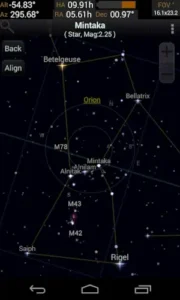

SkEye, with over 1 million downloads, a 4.6 star rating (based on 50,000+ reviews), and a compact 18MB footprint, this app turns your device into a high precision planetarium, and even a telescope assistant.
Unlike flashy stargazing apps cluttered with animations, SkEye focuses on accuracy, utility, and clean design. It doesn’t just display stars; it helps you find them, whether you’re casually stargazing or aligning a telescope.
SkEye astronomer
Dynamic Sky Map: Your Real Time Celestial Navigator
Point your phone skyward, and SkEye’s map adjusts instantly, stars, planets, constellations, and deep sky objects appear exactly where they should. But there’s a catch: your device needs a magnetometer for auto tracking. No sensor? No problem. You can still pan manually.
How to use SkEye as a telescope PushTo : Star Hopping Made Simple
This is where SkEye shines. Mount your phone to a telescope, and the app becomes a “PushTo” guide, directing you to objects with a bullseye marker or arrow. No computerized mount? No issue. SkEye helps you navigate manually, making it a favorite among amateur astronomers on a budget.
Time Machine: Rewind or Fast Forward the Sky
Planning to catch the next meteor shower? SkEye’s Time Machine lets you jump to any date, past or future, to preview celestial events. It’s like having a cosmic DVR.
Dual Coordinates: Speak the Language of Astronomy
SkEye displays both Alt Azimuth (Alt/Az) and Equatorial (RA/Dec) coordinates. Why does this matter? Alt/Az is intuitive for beginners (up/down, left/right), while RA/Dec is the standard for telescope mounts and star charts.
Search & Guided Arrow: Never Get Lost in the Cosmos
With 3,000+ searchable objects, finding Jupiter’s moons or the Andromeda Galaxy takes seconds. The guided arrow points you in the right direction, no guesswork.
Customization & Offline Use
-
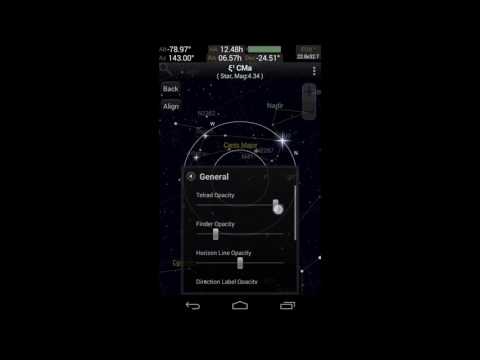
Night modes (red/green) preserve your night vision.
-
Offline databases mean no signal? No problem. Ideal for remote stargazing.
SkEye Free vs. Pro: Which One’s Right for You?
The free version covers the basics, no ads, no paywalls, just a reliable sky map. But the Pro upgrade ($4.99) unlocks:
-
Satellite tracking (ISS, Hubble, etc.)
-
Expanded catalogs (comets, custom lists)
-
Galilean moon positions (for Jupiter observers)
Who should go Pro?
-
Serious hobbyists who track satellites or comets.
-
Educators needing detailed celestial data.
Casual stargazers? The free version is plenty.
User Experience: Designed for Function
SkEye’s minimalist interface prioritizes clarity over eye candy. You won’t find galaxy backdrops here, just crisp star maps, adjustable grids, and customizable displays.
Performance highlights:
-
Lightweight (18MB): Runs smoothly on older Android devices.
-
No lag: Even with 3,000+ objects loaded.
Drawbacks?
-
Smaller catalog than Stellarium or SkySafari.
-
Android only.
Alternatives to SkEye
If you’re looking for more visuals or iOS support, try:
-
Stellarium Mobile (free, open-source, richer graphics)
-
SkySafari (paid, larger database, telescope control)
Understanding SkEye Limits and Maximizing Its Potential
Even the best tools have trade offs. SkEye excels in precision and utility, but it’s not perfect. Here’s what you should know before relying on it as your primary astronomy companion, and how to work around its limitations.
Limitations & Considerations
Smaller Catalog: Depth Over Breadth
SkEye covers 3,000+ celestial objects, including stars, planets, and Messier catalog entries. But compared to Stellarium (600,000+ objects) or SkySafari (40 million+), its database feels lean.
-
What’s missing?
-
Faint deep sky objects (e.g., distant galaxies like NGC 4565).
-
Lesser known asteroids or variable stars.
-
-
Workaround:
-
Use SkEye for general navigation, then switch to a telescope eyepiece or a more exhaustive app for faint targets.
-
Android Only: Why No iOS Version?
SkEye’s developer has focused on Android’s open ecosystem, where sensor access and customization are easier. iOS restrictions (like limited background processes) make a port unlikely.
-
For iPhone users:
-
Try SkySafari or Star Walk 2, though neither offers SkEye’s PushTo simplicity.
-
Sensor Requirements: Magnetometer or Manual
SkEye’s auto tracking relies on your phone’s magnetometer (compass). No sensor? You’ll manually drag the sky map, less intuitive but still functional.
-
Check your device:
-
Apps like Sensor Box can test for a magnetometer.
-
UI Quirks: A Small Learning Curve
-
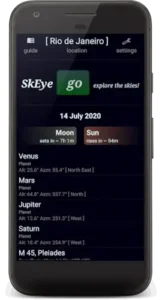
Search placement: The magnifying glass icon is small; use the menu search for faster object lookup.
-
Menu hierarchy: Some settings (like grid toggles) are buried under multiple taps.

SkEye vs. Alternatives: Which App Fits Your Needs?
| Feature | SkEye | Stellarium Mobile | SkySafari |
|---|---|---|---|
| Catalog Size | 3,000+ objects | 600,000+ | 40 million+ |
| Telescope Aid | PushTo guide | Limited | Full GoTo control |
| Offline Use | Yes | Yes | Partial |
| Price | Free / $4.99 Pro | Free / $9.99 Premium | $14.99+ |
Best for:
-
SkEye: Hands on learners, telescope users on a budget.
-
Stellarium: Casual stargazers who want pretty visuals.
-
SkySafari: Pros with computerized mounts.
Niche alternative:
-
Astrohopper (web based): More accurate PushTo, but requires a laptop/tablet.
Pro Tips: Squeeze Every Drop from SkEye
Telescope Mounting: Secure It Right
-
Use a sturdy phone clamp (e.g., Orion AccuFocus).
-
Align SkEye’s display with your telescope’s view (calibrate via settings).
-
Test indoors first: Aim at a distant object (e.g., a TV antenna) to check alignment.
Sensor Calibration: The Figure 8 Trick
If tracking feels off:
-
Open SkEye.
-
Wave your phone in a slow figure 8 motion for 10 seconds.
-
Retest accuracy on a bright star like Vega.
Night Mode Mastery: Beyond Red Filters
-
Green mode works better for some users (less eye strain).
-
Adjust brightness sliders to match your environment (full moon vs. dark sky).
Coordinate Literacy: Decoding Alt/Az vs. RA/Dec
-
Alt/Az (Altitude/Azimuth):
-
Think “up/down, left/right.” Easy for beginners.
-
-
RA/Dec (Right Ascension/Declination):
-
Celestial GPS coordinates. Essential for telescope star-hopping.
-
-
Practice tip: Use SkEye’s dual display to compare both systems on Polaris.
Conclusion :
Ideal for:
-
Amateur astronomers who value precision over polish.
-
Educators teaching celestial navigation.
-
Backpackers needing offline functionality.
Not ideal for:
-
iOS users (no version exists).
-
Visual learners who prefer planetarium style graphics.
SkEye proves that the best tools aren’t the flashiest, they’re the ones that solve real problems. For Android users, it’s a rare blend of accuracy, utility, and simplicity.
FAQ
How do I download SkEye?
You can get SkEye on the Google Play Store or visit the SkEye official website for additional details.
How to align SkEye with a telescope?
Mount your phone securely to the telescope’s optical tube, then use SkEye’s Align feature to sync the display with your view. Need help? Email the developer at hi.skeye[at]gmail.com.
Does SkEye work without an internet connection?
Yes. SkEye’s offline database includes stars, planets, and deep sky objects, perfect for remote stargazing.
Why doesn’t SkEye show all constellations?
SkEye prioritizes accuracy over quantity, focusing on 3,000+ key objects. For more extensive catalogs, try Stellarium Mobile.