

You’re signing up for yet another messaging app. The screen demands your phone number. Then your email. Maybe even a selfie. What if you could skip all that, no personal data, no trail, no nagging permissions? That’s Skred Messenger’s entire pitch.
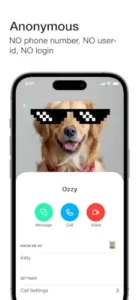

With 5 million downloads and a 4.3 star rating from 120K+ reviews (as of July 2025), Skred Messenger app promises true anonymity.
How Skred Messenger Privacy Tech Functions :
Most “secure” apps still want your digits. Skred doesn’t. Here’s the breakdown:
-
No Data Signup
-
No phone number. No email. Not even a username.
-
You get a QR code or temporary Mini Code (expires in 24 hours) to share with contacts.
-
-
Peer to Peer Encryption
-
Messages jump directly between devices, no middleman servers storing your texts.
-
Uses open source encryption vetted by The Guardian Project (the same team behind Signal’s protocol).
-
-
SkredBoard Identities
-
Create multiple profiles (e.g., “Work,” “Family,” “Burner”) under one app.
-
Each has its own QR code. No crossover.
-
-
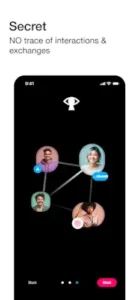
Disappearing Acts
-
Delete a message? It vanishes from all devices, not just yours.
-
Skred vs. Privacy App Alternatives
| Feature | Skred | Signal | Session |
|---|---|---|---|
| No Phone # | ✔️ | ❌ | ✔️ |
| Multi-IDs | ✔️ (Paid) | ❌ | ❌ |
| Call Quality | 3.5/5 | 4.5/5 | N/A |
| Cost | Freemium | Free | $2.99/month |
Verdict:
-
Choose Skred if you need absolute anonymity with multiple identities.
-
Pick Signal for reliability and larger networks.
Pro Tips for New Users
-
Mini Codes Are Your Friend
-
Share these for temporary contacts (e.g., dating apps, Craigslist deals).
-
-
Lock Down Battery Settings
-
Prevent transfers from dying in the background (Android: Settings > Apps > Skred > Battery > Unrestricted).
-
-
SkredBoard Organization
-
Label identities clearly (e.g., “Journalism Sources,” “Family Group”).
-
Skred vs. The Competition: Privacy Showdown
The Anonymity Factor
-
Skred’s Killer Feature: That magical Skred Messenger anonymous signup without phone number works exactly as promised. Here’s how:
-
Download the app (35MB on Android, 42MB on iOS)
-
Open and immediately get a QR code
-
Share it, or generate a 24 hour Mini-Code for temporary contacts
No names. No emails. No lies.
-
-
Signal’s Weakness: Still demands your phone number. Dealbreaker for some.
-
Session’s Middle Ground: No phone number but uses decentralized nodes (slightly less direct than Skred’s P2P).
Call Quality Face Off
-
Signal (4.5/5): Crystal clear 90% of the time
-
Skred (3.5/5): Good when it works, but:
-
Drops if your screen locks
-
No background call support (switch apps? Call dies)
-
-
Session: No native calling yet
The Multi Identity Advantage
Only Skred lets you create separate personas:
-
Personal Identity: For friends/family
-
Work Identity: Client communications
-
Burner Identity: Online dating, Craigslist
But there’s a catch, you need Premium ($4.99/month) for more than two identities.
Pro Tips They Don’t Tell You
-
Mini-Code Hacks
-
Set expiration to 1 hour (not 24) for sensitive meets
-
Screenshot codes before sharing, they can’t be regenerated
-
-
Media Transfer Survival Guide
-
Android: Go to Settings > Apps > Skred > Battery > Unrestricted
-
iOS: Keep app open (no workaround, sadly)
-
-
SkredBoard Organization
-
Color code identities (Red=Urgent, Blue=Personal)
-
Pro tip: Create a “Decoy” identity with plausible fake info
-
The Glitches You Will Encounter
-
The Phantom Message Fail
-
Sometimes files show “sent” but never arrive
-
Fix: Resend as a document (not photo/video)
-
-
Premium Paywall Frustrations
-
Want message scheduling? Pay.
-
Fancy fonts? Pay.
-
Alternative: Session offers more free features
-
-
No Cloud Backup = Risk
Lose your phone? All chats are gone forever.
Conclusion :
The Ideal User:
-
Privacy radicals who want zero digital footprint
-
Journalists protecting sources (combine with Tor for maximum anonymity)
-
Teens with strict parents (separate “Family” and “Real” identities)
-
Travelers using local SIMs (no number changes needed)
Who Should Avoid It:
-
Business teams needing reliable file sharing
-
Long-distance couples relying on stable video calls
-
Anyone who multitasks during conversations

FAQ
How truly anonymous is Skred Messenger?
The app requires zero personal data – no phone number, email, or username. Just scan a QR code to connect. Download Skred Messenger from Google Play Store
What’s the fix for Skred Messenger call reliability issues?
Ensure your device doesn’t sleep during calls (disable battery optimization). For persistent problems, contact support: support[a]skred.mobi
Can I use Skred on multiple devices?
Yes, but each device gets a unique identity. There’s no cloud sync – messages only exist on the device where they’re sent/received.
Are Mini Codes really secure for one-time contacts?
Completely. These 24 hour disposable links use the same encryption as your main account. Perfect for sensitive connections.
Why pay for Premium when Signal is free?
Skred’s multi identity feature and true anonymity justify the cost for privacy focused users.