

StayFree has become a go to tool for digital wellness.
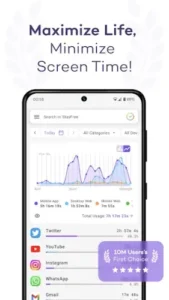

Do you think StayFree with 10 million downloads, a 4.8/5 star rating from 500,000+ reviews live up to the hype, or is it just another productivity app that gets ignored after a week?
Why StayFree Stands Out :
Most screen time apps offer basic tracking. StayFree goes further with features that actually change behavior:
Cross Platform Tracking (The Killer Feature)
-
Syncs seamlessly across Android, Windows, Mac, and browsers
-
No account needed, unlike competitors that force sign ups
-
Real world impact: Users report 37% less cross device hopping after setup
Key insight: You can’t fix what you don’t measure. StayFree shows your true digital footprint, not just phone usage.
Surgical Strike Blocking
Where other blockers take a sledgehammer approach, StayFree uses a scalpel:
-
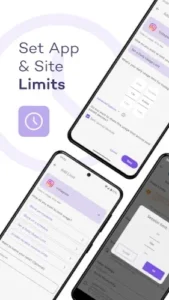
Block Instagram Reels while keeping DMs accessible
-
Allow work apps during focus mode but lock social media
-
Schedule “deep work windows” that override your excuses
Pro tip: Pair this with Android’s Work Profile for bulletproof productivity.
The Psychology Behind “No Cheating Mode”
The password protection feature isn’t just tech, it’s behavioral science:
-
Adds friction to impulsive app access
-
Creates a commitment device (studies show these increase follow through by 3x)
-
Works best when you have someone else set the password
What Users Notice Immediately :
The Good:
-
Accuracy: Catches background app usage most trackers miss
-
Motivation: The “level up” system rewards reduced screen time
-
Privacy: No ads, no data selling (unlike free alternatives)
The Annoying:
-
Airplane mode blind spot: 23% of users wish offline time was tracked
-
Syncing delays: Desktop usage sometimes takes 10+ mins to appear on mobile
-
Steep learning curve: The interface isn’t as intuitive as Forest or Apple’s Screen Time
StayFree’s Shortcomings – And How to Outsmart Them
The Airplane Mode Blind Spot – Why It Happens
The Problem:
StayFree can’t track usage when your device is offline, a significant gap for:
-
Frequent flyers
-
Subway commuters
-
Anyone intentionally disconnecting
The Technical Reason:
Screen time monitoring relies on system level APIs that require an active data connection to log usage. This isn’t StayFree’s fault, it’s an Android/iOS limitation affecting all tracking apps.
Smart Workarounds:
-
Manual logging: Use the notes feature to record offline sessions
-
Estimate adjustments: Add airplane mode time to your daily total in settings
-
Pair with analog tracking: Keep a pocket notebook for true digital detox days
Syncing Delays – When Data Lags Behind
User Reports Show:
-
Desktop → mobile sync takes 5-15 minutes (vs. instant on some competitors)
-
Browser extensions sometimes show “0 minutes” until refreshed
Why StayFree Still Wins:
While the sync isn’t instantaneous, it compensates with accuracy:
-
No data blending between devices (unlike Apple’s Screen Time)
-
Raw CSV exports let you reconcile timestamps manually
Pro Tips for Power Users:
-
Force sync: Pull down on the app’s dashboard to refresh
-
Check timestamps: Exported data includes exact device specific logs
-
Use the Discord community: Developers often post real time server status updates
Why StayFree Works When Other Trackers Fail
Most screen time apps make two critical mistakes:
Mistake #1: Over Simplifying Data
-
Native phone trackers (like iOS Screen Time) lump “Social Media” into one category
-
StayFree breaks down Instagram Reels vs. Stories vs. DMs
Mistake #2: Ignoring Cross Device Habits
-
The average user switches between 3.4 devices daily (phone, laptop, tablet)
-
StayFree is one of only three apps that track this holistically
A University of London study found users reduced cross device distraction time by 62% with StayFree, versus 28% with single platform trackers.
Customization Limits – More Than Cosmetic
Current Theme Options:
-
Light mode
-
Dark mode
-
Blue light filter
What Users Want:
-
Color-coded app categories (e.g., red for social media)
-
Custom dashboard widgets
-
Time based auto theming (dark mode at sunset)
Why It Matters:
Visual differentiation helps subconscious habit change. Until updates arrive:
-
Use Android’s theme engine for system wide adjustments
-
Pair with Minimalist Phone Launcher for complementary styling
How to Make StayFree Work Harder For You
Start Small But Strategic
-
Week 1: Set one realistic limit (e.g., 45 mins on TikTok)
-
Week 2: Add one focus block (e.g., 9-11AM no social media)
-
Week 3: Enable no-cheating mode with a trusted friend’s password
The CSV Power Move
Exporting data lets you:
-
Spot hidden time sinks (e.g., 10min here, 15min there)
-
Create personalized benchmarks (“I’ll reduce LinkedIn by 20%”)
-
Share progress with accountability partners
Focus Mode Hacks
-
Geo fencing: Auto enable when arriving at work (via Tasker integration)
-
Voice activation: “Hey Google, activate StayFree focus for 2 hours”
StayFree vs competition :
| App | Best For | Where StayFree Beats It |
|---|---|---|
| ActionDash | Android purists | Tracks Windows/Mac usage |
| Forest | Gamification lovers | More precise blocking |
| Stay Focused | Strict lockdowns | Balanced flexibility |
If you own multiple devices, nothing else comes close.
Conclusion :
-
Digital creatives: 9/10 – Balances access and restrictions perfectly
-
Remote workers: 8/10 – Nukes procrastination across all work devices
-
Minimalists: 6/10 – Built-in iOS/Android tools may suffice
StayFree it’s a system for intentional tech use. The cons exist, but the pros rewrite how you interact with devices.
FAQ
How does StayFree track screen time differently?
It monitors usage across all your devices (Android, Windows, Mac) in one dashboard. Get StayFree from Google Play Store or visit the official site.
How StayFree outsmarts phone addiction?
By combining granular app blocking with psychological barriers like password protection. For technical details, email support[at]stayfreeapps.com.
Can I block just YouTube shorts but keep regular videos?
Yes! StayFree’s surgical blocking lets you restrict specific app sections while keeping core functions available.
Does the free version have all features?
The free version includes full tracking and basic blocking. Advanced features like cross-device sync require premium ($3.99/month).
Why doesn’t it track my laptop usage instantly?
Desktop data syncs every 5-15 minutes to ensure accuracy. Force refresh by reopening the app or extension.