

Tiledom is a tile matching game that does not try to reinvent the genre.
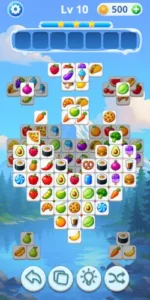

Tiledom gives you a board of overlapping tiles, a seven slot deck and a single instruction: find three identical tiles and clear them. That simplicity is why the game has crossed 100 million downloads with a 4.6 star rating from over 1 million reviews on Google Play. The install size sits around 100 MB to 150 MB, and the age rating is Everyone, fitting a game designed for anyone who wants to unwind. But the trade-offs are real. The ad load is heavy enough that some players feel they spend more time watching commercials than playing, and sudden difficulty spikes can turn a relaxing session into a frustrating one.
What Is Tiledom
Funvent Studios built a match 3 game that leans on a cozy, light hearted aesthetic. You tap tiles from a stacked board. They slide into your deck at the bottom. Match three identical tiles and they disappear. If seven mismatched tiles fill the deck, the level ends.
There are no energy timers, no stamina systems and no forced social mechanics. You pick it up, play a few levels and put it down. The appeal of Tiledom is the lack of friction. Most mobile games drown you in currencies, daily missions and popups. This one keeps the loop clean enough that you can play while half paying attention to a podcast or a TV show.
Tiledom Mechanics of Matching
Tap to Match Gameplay
The board is a stack of tiles, and you can only tap tiles that are not covered. The seven slot deck is your constraint. Every tap either moves you closer to a match or wastes a slot. The tension comes from the fact that you cannot see everything at once. You have to mentally track which tiles are available and which combinations are within reach.
Progression and Level Design
The game ships with thousands of levels and the difficulty rises gradually. Early levels are essentially tutorials disguised as puzzles. Later levels introduce denser stacks and tile distributions that require actual planning. Every few levels unlock new tile sets. These are cosmetic, but they keep the board from looking stale after dozens of levels.
Boosters and Hints
You have access to power-ups like Undo and Mix Tiles. A hint shows you a valid match. The mistake most players make is burning these early. The first fifty levels do not need them. Save them for the dense mid game boards where a single wrong tap fills your deck and ends the run. Keep in mind that some boosters require coins or watching an ad to use.
Offline Play
This is one of the most practical features. You can play without Wi-Fi. On a flight, on the subway, in a basement with bad signal, the board still loads. The offline mode in Tiledom does not feel like a degraded experience. It is the same game, just without the ad interruptions that require a connection.
Tiledom Visual Themes and Design
The art style is bright and clean. Tiles are distinct enough that you can tell them apart at a glance, which matters more than you might think when the board is dense. The sound design is soft. The overall aesthetic is designed to feel like a mini getaway.
The trade-off is that the visual polish does not extend to the ad experience. The ads that play between levels are jarring compared to the game itself. They break the zen atmosphere that the art style tries to create. The design of Tiledom is calm. The monetization is not.
Tiledom Monetization and Ads
Ad-Supported Model
The game is free to download with ads between levels and sometimes during gameplay. Some players report the frequency is high enough to be frustrating. There is an option to mute or time your sessions, but you cannot avoid the ads entirely without paying.
In-App Purchases
You can buy coins to use on boosters. The pricing is standard for casual games. But there are reports of difficulty spikes that feel engineered to push you toward spending. If you are going to spend money on Tiledom, buy the ad removal first. It solves the biggest complaint immediately, and you do not have to worry about coin management affecting your progress.
What Users Say About Tiledom Game
What user like
Players describe it as relaxing and a great way to unwind. The graphics and smooth gameplay earn consistent mention. The simple rules make it easy to learn for all ages. Many say the core loop is satisfying enough to keep them coming back.
Were its need some work
The ads are the biggest complaint. Some players feel they watch more ads than they play. Difficulty spikes are the second complaint. Some levels suddenly become much harder than the ones before them, which feels unfair when you are playing to relax. There are also sound issues where the app cannot be muted without muting the entire phone.
How Long Does a Tiledom Match Take to Play?
Most levels are designed to be cleared in two to five minutes. Early levels take less than a minute. Later levels, with denser stacks and more overlapping tiles, push closer to the five minute mark. The lack of a countdown timer means you can play at your own pace, but the seven-slot deck creates a natural time pressure. If you sit and stare at the board, the game does not punish you. It waits. But if you start tapping without a plan, the deck fills up fast and the level ends abruptly.
Best Tile Matching Games for Relaxation and Stress Relief
If you want pure relaxation, Tiledom is a strong option because it does not demand constant attention. The visuals are soft, the sound design is gentle, and the core mechanic is repetitive in a soothing way. If you want something a bit more structured, Tile Master Pro offers a similar loop with a mahjong inspired aesthetic. If you want a travel themed experience, Tile Quest leans into global backgrounds that make each level feel like a mini getaway. All three share the same low stakes, no-timer structure that makes them easy to pick up and put down.
Are Tile Matching Games Actually Good Brain Training?
They train a specific kind of focus. You are not learning a new language or solving complex logic puzzles. You are practicing pattern recognition, spatial awareness and short term memory. The game forces you to track which tiles are available, which are buried and which combinations are within reach. That is a real cognitive task, but it is not the same as deep brain training. Tiledom is good for keeping your mind engaged during downtime, not for improving general intelligence. Think of it as a mental fidget spinner, not a cognitive workout.
How to Progress Faster in Tiledom Without Spending Money
The key is not spending money. It is saving your boosters. The early levels do not need them. If you burn a hint on level 12 because you cannot find the obvious match, you will be stuck on level 80 with nothing left. Save Undo and Mix Tiles for the dense boards where multiple tile types overlap. The second strategy is to play offline. When you play offline, the ads that normally appear between levels cannot load. The game becomes faster, smoother and closer to the zen experience the art style promises. You will not be able to watch ads for free coins, but you will not be interrupted either.
Can You Play Tiledom With Friends Online?
No. Tiledom does not have a multiplayer mode or a social network. There are no leaderboards, no friend lists and no way to send gifts or compete with other players. The game is designed for solo play. If you want a social experience, you need a different app. Tiledom is a solitary game. You, the board, and the deck. That is the whole loop.
Tiledom Tips for Beginners: Getting Started Guide
The biggest mistake new players make is tapping tiles randomly. The board is a stack. You can only tap tiles that are not covered. Clear the top layer first. This exposes the tiles underneath and gives you more options. The second mistake is chasing pairs you already have in the deck. If completing a set requires tapping a buried tile, ignore it. Clear what is accessible, then reassess. The third mistake is ignoring the deck limit. You only have seven slots. If you tap one of three different tile types, the deck fills up before any of them reach three. Focus on one tile type at a time.

Tiledom Tips
Match Near the Top First
The board is a stack, not a flat grid. Tiles at the top are fully exposed. Tiles underneath are hidden until the ones above them are removed. Your deck only holds seven tiles. If you waste slots on bottom layer tiles while the top layer is still cluttered, you will run out of space before you can clear anything.
Tiledom tips often boil down to this one rule: clear the top layer first. It sounds obvious, but in the heat of a run, you will be tempted to chase a pair you already have in the deck. If that pair requires tapping a buried tile, ignore it. Clear what is accessible, then reassess.
Focus on One Tile Type at a Time
Your deck holds seven tiles. If you tap one of three different tile types, your deck fills up before any of them reach three. You lose. The fix is to commit. Pick one tile type, clear all three instances of it, and then move to the next. This means ignoring tiles that look “almost” ready. The game Tiledom rewards discipline, not greed.
Save Boosters for Tricky Levels
You have Undo and Mix Tiles. The early levels do not need them. If you burn a booster on level 12 because you cannot find the obvious match, you will be stuck on level 80 with nothing left. Save them for the dense boards where multiple tile types overlap and every tap fills a slot. If you can clear the board by looking at it, do not use a booster.
Play Offline for Uninterrupted Sessions
Tiledom works without Wi-Fi. When you play offline, the ads that normally appear between levels cannot load. The game becomes faster, smoother and closer to the zen experience the art style promises. Tiledom similar games often require an internet connection, which makes the offline mode here a genuine advantage. You can play on a plane, on the subway, or in a waiting room with no signal, and the game runs exactly as intended.
If you are searching for Tiledom codes, they usually do not exist in the traditional sense. The game does not use redeemable codes for coins or boosters. Your best source for free coins is daily rewards or watching optional ads. The developer does not distribute promo codes, so do not waste time looking for them.
Tiledom Similar Games
Tiledom vs Tile Club
Tile Club uses similar mechanics but a different art style. It is cleaner and more minimalist. Tiledom leans harder into cozy, relaxing visuals and the offline experience. If you want a more stripped down look, Tile Club is the pick. If you want the colorful, textured tiles, stay here.
Tiledom vs Matching Tiles: City Scape
City Scape uses urban themed tiles and backgrounds. Skyscrapers, streets, neon. Tiledom is travel and nature themed. The gameplay is almost identical. The difference is visual preference. If you like the city vibe, pick City Scape. If you like the vacation vibe, pick Tiledom.
Tiledom vs Tile Explorer
Tile Explorer has more levels and a more detailed aesthetic. It also demands more of your attention. Tiledom is simpler. It does not ask you to manage resources or complete daily missions. If you want depth, Tile Explorer is better. If you want to turn your brain off for ten minutes, Tiledom is the right choice.
Tiledom vs Tile Master Pro
Tile Master Pro leans harder into a mahjong inspired aesthetic. It feels more like a traditional tile game. Tiledom focuses on a broader variety of tile sets and casual accessibility. If you care most about how the tiles look, Tile Master Pro is worth a look. If you care about having more content and a simpler loop, Tiledom is better.
If you want a similar matching experience but with a block based mechanic instead of tiles, searches for blockblast will point you toward that genre. It scratches a similar itch but requires a different approach to clearing the board.
Conclusion
Who Tiledom Is For
Players who want a relaxing, low pressure puzzle game. Fans of beautiful tile art and cozy visual themes. Anyone who wants a match 3 game they can play offline without worrying about data usage.
Who Should Look Elsewhere
Players who cannot tolerate heavy ad interruptions. Users who get frustrated by sudden difficulty spikes. Anyone looking for deep progression systems or social features. And players who want a harder puzzle challenge than triple-match can provide.
FAQ
Where is the safest place to get the Tiledom download and is it free?
You can download directly from the Official Google Play Store. The game is free to download and play, supported by ads. There are optional in-app purchases for coins to use on boosters, but you can clear levels without spending money.
Can I play Tiledom offline?
Yes. It works without a network connection, and offline play skips the ads that require loading. This is one of the best reasons to keep it installed.
How do I get more coins?
Daily rewards and optional ad-watching are the main free sources. You can also buy them, but be aware of reported difficulty spikes that might push you to spend. Keep screenshots of your receipts.
How do I contact support if I lose my progress or encounter a bug?
If you run into technical issues or need help with a purchase, the developer’s support email is hello[at]funvent.cc. You can usually find this contact info at the bottom of the Google Play listing or within the game’s settings menu. Including your player ID and a screenshot of the issue will help speed up the response.
Why does the game get so hard suddenly?
This is a known complaint. The difficulty curve is not always smooth. Some levels spike unexpectedly, which can break the relaxing flow. If you hit a wall, use your saved boosters or try again later.
Is there a way to remove ads?
Yes. The game offers a paid option to remove ads. If the ads are your main frustration, this is the only permanent fix. Offline play avoids most of them, but some rewards may not be available without a connection.
Why does the deck limit fill up so fast?
The deck only holds seven tiles. If you tap three different tile types without matching any of them, the deck fills up and you lose. The trick is to focus on one tile type at a time and clear the top layers first to avoid burying the tiles you need.