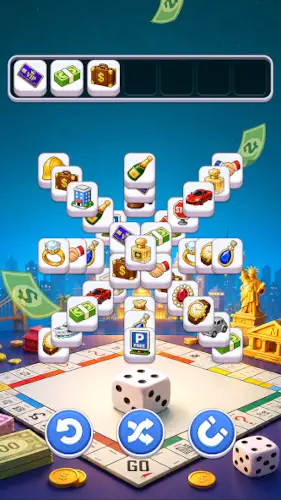
Tile Quest is not designed to make you win.

Tile Quest is designed to make you pause. You open it, tap three matching tiles, clear them and move to the next level. There is no timer rushing you, no leaderboard reminding you that you are falling behind and no energy system telling you to wait four hours. It currently holds a 4.8 star rating from over 6,700 reviews on Google Play, with 1M+ downloads. The install size sits around 80 MB to 120 MB depending on your device architecture. The age rating is Everyone, with no violence, no gambling, just one tile board after another.
What Is Tile Quest
It is a free tile matching puzzle game. The rules are simple enough that you do not need a tutorial. Select three identical tiles from the board. They move into slots at the bottom. When three matching tiles gather, they disappear. You can only hold seven tiles in the slots. If the slots fill up before you clear a set, the level ends.
The real appeal of Tile Quest is low pressure. It does not force you to finish within a set number of moves. It does not punish you with aggressive ads after a loss. It does not hit you with “play again” popups. You lose, you tap start, the board shuffles and you try again. This design is increasingly rare in casual games, because most developers rely on frustration to push in-app purchases. Tile Quest takes a different path. It lets you relax, then makes money through ads and optional purchases.
Tile Quest Mechanics of Matching and Clearing the Board
Tap to Match Gameplay
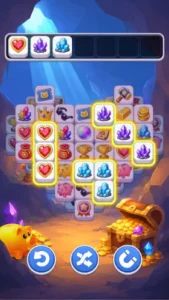
Tap three identical tiles. They go into slots, and when three match, they clear. The core strategy is to clear the top tiles first. Tiles on the board are stacked. You can only tap tiles that are not fully covered. If you do not clear the top tiles, the ones underneath never become available. The slot limit of seven forces you to make choices at every step. Do you clear what is accessible on top, or do you chase a pair you already hold in the slots?
Progression and Level Design
The level count reaches into the thousands, and the difficulty curve is slow. The first few dozen levels teach you the rules. Only later do layouts become more complex, with denser stacks and trickier tile distribution. Every few levels unlock new tile designs. Fruits, sweets, animals. These visual changes are the main way the game keeps things fresh.
Boosters and Power-Ups
There are three types: Shuffle, Undo, and Hint. Do not waste these early. The first few dozen levels are easy enough that you do not need them. Save them for the mid-to-late levels where the layouts are dense and the slot pressure is real. You can earn boosters by clearing levels or by watching ads. You do not need to pay.
Offline Play
This is one of its most practical features. It works without Wi-Fi. On the subway, on a plane, in areas with bad signal, the board still opens. The offline mode in Tile Quest is not just “technically playable.” It plays exactly the same as online, because the game does not need a live connection. All data is local.
Tile Quest Visual Themes and Design
The tiles are cute illustrations. Fruits, sweets, animals. The colors are saturated but not harsh. The backgrounds are travel-themed. Each level has a different backdrop and decoration. This does not affect gameplay, but it keeps you from getting visually bored after dozens of levels.
The trade-off is that it looks lighter than it actually is. Some players see the art style and assume it is a game for children, then discover that the difficulty in the mid to late game is not trivial. Stack logic, slot management, and tile recognition require actual thought in later levels. There is a gap between the visual style and the actual difficulty of Tile Quest. It is not a flaw, but it does shape your expectations going in.
Tile Quest Monetization and Ads
Ad-Supported Model
Free to download with ads between levels. The length and frequency depend on your region and version, but most user feedback says it is at an “acceptable” level. Ads do not force their way in mid-level.
In-App Purchases
Purchases are optional. You can buy boosters or remove ads. The monetization in Tile Quest is not aggressive. You can play through every level without spending, and you can earn boosters by clearing levels or watching ads. This is fundamentally different from games where you hit a hard wall unless you buy energy or currency.
What Users Say About Tile Quest Game
What users like
What players praise most is the sense of relaxation. Simple rules mean you can tap mindlessly when you do not want to think, but there is still strategy when you do. The art is cute, the backgrounds are nice and playing does not feel exhausting. The offline mode is mentioned repeatedly because it makes the game something you can truly open anywhere.
Were is need work
The most common complaint is the auto finish feature. On some levels, when you are close to losing, the game automatically makes moves for you, and sometimes it just clears the level. The developer’s intent was probably to reduce frustration, but for some players, it removes the satisfaction of solving the problem yourself. The other complaint is ads. The frequency is not high, but for someone who wants full immersion, any interruption is an interruption.
Tile Quest Tips
Match Near the Top First
The tiles on the board are stacked. You can only tap tiles that are not completely covered. If you do not clear the top tiles, the ones underneath never come out. The most common beginner mistake is chasing a pair already in your slots while the top tiles sit untouched, until the slots fill up.
The correct order is this: scan the board, find the tiles that are completely uncovered and clear those first. The faster you clear the top layer, the more of the bottom layer is exposed, and the more options you have later. A frequent Tile Quest tip on Reddit is simply: “Clear the top, then build the pair.” It sounds obvious until the seventh slot is about to fill and you suddenly remember.
Focus on One Tile Type at a Time
There are only seven slots. If you chase three different tile types at once, put one of each in the slots, and the slots fill up before any of them reach three. The correct approach is to focus on one tile type at a time. Get three, clear them, then move to the next.
The cost of this strategy is that you have to abandon some tiles that look close to matching. But if they cannot be completed right now, they only take up slot space and slow you down. The core of the game Tile Quest is not “tap whatever you see.” It is “decide when to give up.”
Save Boosters for Tricky Levels
There are three boosters: Shuffle, Undo, and Hint. The first few dozen levels are easy enough that you do not need them. Many players burn them the moment they get stuck, then find themselves empty handed when the real hard levels arrive.
Save the boosters for when the layout is dense, the stacks are deep and the slots are almost full. The judgment call is simple. If you can still scan the board and find three matching tiles, you do not need a booster. If you have scanned three times and still cannot find a path forward, that is when Hint or Shuffle is worth using. The booster design in Tile Quest is meant for emergencies, not daily consumption.
Play Offline for Uninterrupted Sessions
Playing offline is not just “it technically works.” It is “it runs smoother.” When you are online, ads play between levels. When you are offline, ads cannot load, and the flow feels much cleaner. The offline mode in Tile Quest is not just for the subway or airplane. It is for anyone who just wants to tap tiles in peace.
If you are searching for Tile Quest codes, those searches usually point to promo codes shared by the community. But this game does not run on redeemable codes. You earn boosters by clearing levels or watching ads. There is no code to hunt down.
Tile Quest Similar Games
Tile Quest vs Triple Tile
Triple Tile has a steeper difficulty curve and fewer boosters. It feels more like a “serious puzzle” game. Tile Quest is more relaxed, with more auto-finish assistance and a stronger travel themed backdrop. If you want a challenge, Triple Tile fits better. If you want “play without getting tired,” Tile Quest is the right path.
Tile Quest vs Tile Master Pro
Tile Master Pro has more levels, stronger competitive elements, leaderboards, and event systems. Tile Quest has none of that. It does not try to make you check in every day. Tile Quest is positioned as “open it anytime, close it anytime.” Tile Master Pro is positioned as “there are tasks to do today.” Both have value. It depends on what kind of relationship you want with a game.
Tile Quest vs Matching Tiles: City Scape
City Scape uses urban themed tiles and backgrounds. Skyscrapers, streets, neon. Tile Quest is travel themed. Beaches, mountains, exotic architecture. The gameplay is almost identical. The difference is visual preference. If you like the city vibe, pick City Scape. If you like the vacation vibe, pick Tile Quest.
Tile Quest vs Block Match
Block Match uses block-based puzzle mechanics, not triple-match. It is closer to a mix of Tetris and jigsaw puzzles. If what you want is “tap three identical tiles,” Block Match is not the same category. If what you want is “low-pressure puzzle,” it is worth a try.
Conclusion
Who Tile Quest Is For
People who want a relaxing match 3 game that does not pressure them to spend money and can be opened anytime. People who need something that does not demand much attention during commutes, before bed, or while waiting for food. People who like cute art and travel themed backgrounds.
Who Should Look Elsewhere
Players who want high difficulty and deep strategy. People who hate auto-finish and feel it robs the game of its fun. Anyone with zero tolerance for ads. And anyone expecting social features, leaderboards, or competition with friends.
FAQ
Where is the safest place to get the Tile Quest games?
You can download Tile Quest from the Official Google Play Store. The game is free to download and play, supported by ads. There are optional in-app purchases for boosters or to remove ads, but you can progress through the levels without spending money.
How do I contact support if I lose my progress or encounter a bug?
If you run into a technical issue or need help with a purchase, the developer’s support email is dingshan.support[at]gmail.com. You can usually find a direct link to this email in the game’s settings menu or on the Google Play listing under the developer contact section. Including your device model and a screenshot of the issue will help speed up the response.
Can I play Tile Quest offline?
Yes. It works without a network connection and when you are offline, ads cannot load, making the flow smoother. This is one of its most practical features.
Why does the game sometimes finish the level for me?
This is the auto finish feature. When you are about to lose or the board is in a specific state, the game will automatically match the remaining tiles to save you. While some players appreciate it for keeping the game stress free, others feel it removes the challenge. Currently, there is no setting to turn this feature off.
How do I stop the auto finish feature?
There is currently no official toggle. Auto finish triggers when you are close to losing. Some players like it, and some feel it robs them of the satisfaction. If this bothers you deeply, you may want to consider a different match 3 game.
What are the best boosters to use?
Hint is most useful when the layout is dense and you cannot find a path. Shuffle is for when the board layout is bad and no taps work. Undo is for when you just made a mistake and can still take it back. Save boosters for the mid to late game. Early levels do not need them.
Is there a way to remove ads?
Yes. The game offers an in-app purchase to remove ads. If ads bother you a lot, that is the only complete solution. Playing offline also avoids most ads, but some rewards may not be available offline.
What happens if my bottom slots fill up?
You have seven slots at the bottom of the screen. If you tap tiles and fill all seven slots without making a match of three, you will fail the level. The strategy is to keep at least one or two slots open for emergencies and clear the top layers to free up more tile options.