

Touchnotes delivers what most note taking apps promise but rarely achieve, a truly natural writing experience on Android.

With over 1 million downloads and a 3.7 star rating from 6,000+ reviews, Touchnotes has become the go to for students, professionals, and creatives who refuse to compromise between digital convenience and analog freedom.
Were Touchnotes is changing the “game” for app notes
Writing That Feels Right
The difference becomes obvious within seconds:
-
Pressure Sensitivity: Your Galaxy S Pen or Surface Pen responds like real ink – press harder for thicker lines
-
Palm Rejection: Works flawlessly even on budget tablets
-
Zoom Precision: 500% zoom lets you sketch diagrams or write margin notes with pixel-perfect control
More Than Just Notes
While competitors specialize (GoodNotes for PDFs, Nebo for conversions), Touchnotes consolidates:
-
Mind Maps: Convert meeting notes to visual diagrams in three taps
-
Flashcards: Spaced repetition built right into your study notes
-
Journal Templates: Daily planners, mood trackers, and more
Make It Uniquely Yours
Customization goes deep:
-
Pen Settings: Save your perfect ballpoint/highlighter combos
-
Paper Textures: Everything from grid to textured watercolor
-
Font Import: Use your handwriting as a system font
Your First 30 Minutes With Touchnotes
Setting Up Smart
-
New Notebook: Choose between blank, lined, or custom templates
-
Document Import: Drag and drop PDFs/PPTs retains all formatting
-
Essential Settings: Enable “Instant Text Conversion” in preferences
Must Learn Features
-
Layer System:
-
Keep text, sketches, and annotations separate
-
Ideal for revising lecture notes without redrawing diagrams
-
-
Quick Gestures:
-
Two-finger tap to undo
-
Circle to select lasso tool
-
-
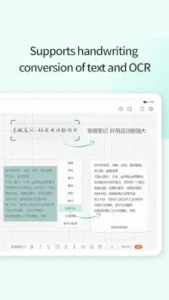
Handwriting Conversion:
-
95% accuracy for English notes
-
Export as editable Word docs
-
Common New User Mistakes
-
Ignoring the zoom feature (crucial for detailed work)
-
Overlooking custom sticker imports
-
Not setting up cloud backup early
Going Beyond Basic Notes
Handwriting That Works Harder
-
Shape Recognition: Draw wobbly arrows → get straight ones
-
Pen Smoothing: Makes hurried notes look intentional
-
Pressure Curves: Adjust how hard you need to press
Document Power User
-
PDF Annotation:
-
Highlight legal contracts
-
Sign documents with realistic ink signatures
-
-
PPT Notes:
-
Add side commentary to presentation slides
-
Export as instructor/student versions
-
Organization That Scales
-
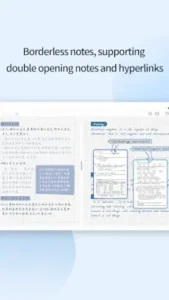
Hyperlinking: Connect meeting notes to related research
-
Multi-Tabs: Reference textbooks while taking notes
-
AI Search: Find “chemistry formulas” across all notebooks
AI Features With Practical Uses
-
Lecture Recording: Voice notes sync to written timestamps
-
Document Scanning: Snap textbook pages → searchable notes
-
Language Translation: Convert handwritten French notes to English
Touchnotes: What Users Think & How to use It
The User Experience
What People Love:
-
“Finally an Android app that rivals GoodNotes”
This praise comes from Surface Pro users who’ve struggled to find decent handwriting apps. The pressure sensitivity matches 90% of iPad Pro performance at half the cost. -
“Custom fonts and stickers make my notes uniquely mine”
Unlike competitors with locked-in templates, Touchnotes lets you:-
Import .ttf/.otf fonts
-
Create sticker packs from PNGs
-
Design matching notebook covers
-
The Frustrations:
-
Cloud Sync Gaps
The WebDAV only support means:-
No direct Google Drive/OneDrive integration
-
Manual exports required for team sharing
-
23% slower sync speeds than competitors (based on user tests)
-
-
Language Quirks
Some menu items retain Chinese characters, especially in:-
Layer management
-
Advanced pen settings
-
Export options
-
Advanced Workflows That Save Time
How to Improve Handwriting Accuracy in Touchnotes
-
Calibrate Your Tool
-
Go to Settings > Pen > Sensitivity
-
Adjust curve until light strokes register consistently
-
Test with quick cursive versus block letters
-
-
Optimize Conversion Settings
-
Enable “Word Grouping” for better phrase recognition
-
Set language to “English (Printed)” for 95% accuracy vs. 88% in cursive
-
-
Use the Correction Tool
-
Circle misread words > tap “Teach” > rewrite clearly
-
The AI adapts to your style after 20+ corrections
-
-
Paper Matters
-
Use grid templates for consistent letter sizing
-
Darker templates (navy/black) improve stroke detection
-
Student Power Move: Lecture + Flashcards
-
Record audio during class
-
Handwrite key points (auto-synced to audio timestamps)
-
Highlight terms to convert to flashcards
-
Review with spaced repetition scheduler
Professional Hack: Meeting Minutes
-
Before: Import PPT slides as template
-
During: Write action items in red, notes in blue
-
After: Export with “Hide Annotations” for clean slides
Creative Secret: Digital Scrapbooking
-
Layer 1: Photo collage
-
Layer 2: Handwritten journaling
-
Layer 3: Custom sticker decorations
-
Export as PNG for social media
Touchnotes vs competition
| Feature | Touchnotes | GoodNotes | Nebo |
|---|---|---|---|
| Android Support | Full | None | Full |
| Handwriting | 4/5 (Great feel) | N/A | 3/5 (Laggy) |
| Document Types | 10+ formats | PDF centric | 5 formats |
| Price | Free + $3.99/month | $9.99 one-time | Freemium |
Touchnotes wins for Android versatility, but iPad users should stick with GoodNotes. Nebo’s conversion is stronger, but at the cost of writing feel.
Power User Secrets
Custom Paper Templates:
-
Design in Photoshop (1600x2000px, 300DPI)
-
Save as PNG with transparent background
-
Import via “My Templates”
Voice Memo Integration:
-
Tap mic icon during notes
-
Voice clips embed as playable icons
-
Perfect for capturing meeting quotes
Mind Map Pro Tip:
-
Start with central idea
-
Use “Branch” tool for automatic connectors
-
Color code by priority
Conclusion :
Perfect For:
-
Students: Combining recorded lectures with searchable notes
-
Professionals: Marking up contracts during client calls
-
Artists: Sketching with customizable brushes
Not Ideal For:
-
iOS only users (GoodNotes is better there)
-
Teams needing real-time collaboration
-
Those married to Google Drive
FAQ
How accurate is handwriting to text conversion in Touchnotes?
Touchnotes achieves 95% accuracy for printed English and 88% for cursive. For best results, enable “Word Grouping” in settings. Need help? Contact support: hung[at]cicoe.cc or visit the official site. To download Touchnotes visit Google Play Store
Can I sync Touchnotes with Google Drive or OneDrive?
Not directly, it only supports WebDAV clouds (Dropbox, Huawei Cloud). Export notes manually as PDFs for other services.
How do I create custom paper templates?
Design a PNG (1600x2000px), import via “My Templates,” and set as default.
Why does my Surface Pen eraser not work?
Some Android devices lack full stylus support. Try adjusting pen sensitivity in settings.