

You just took what should’ve been a great selfie. The lighting’s decent, your angle is on point, but there’s a shiny forehead, a stray blemish, and teeth that look suspiciously yellow. You could spend 15 minutes in Photoshop, wrestling with layers and brushes… or you could tap a button, Visage Lab.
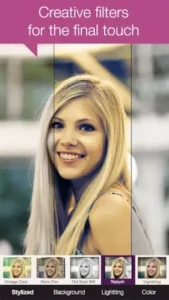

Visage Lab developed by Photo Lab DMCC, this Android/iOS app boasts 10 million downloads, a 3.5 star rating (based on 53.6K+ reviews), and a simple promise: professional grade retouching without the manual labor. At just 35MB, it’s lightweight enough for older devices, and its intuitive design makes it accessible for teens to adults (though its core demographic skews 18-35).
But does it actually work? And more importantly, does it make you look better, or just artificially enhanced? Let’s take it point by point.
What Makes Visage Lab Different?
Most photo editors force you to:
-
Manually select areas to edit
-
Guess which sliders do what
-
Pray the result doesn’t look like a wax figure
Visage Lab cuts the nonsense. Its AI detects faces automatically, then applies targeted fixes:
-
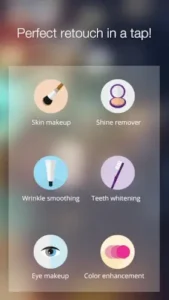
Skin: Smooths texture, removes shine and blemishes, without that uncanny “filtered” look.
-
Eyes: Brightens whites, defines lashes, erases redness.
-
Teeth: Whitens subtly (no glow in the dark Chiclets).
-
Multi Face Mode: Edits everyone in group shots at once.
Key Advantage: It’s fast. Upload a photo, tap “Enhance,” and you’re done in under 10 seconds. For comparison, Facetune, the “pro” alternative, requires manual brushing and often over processes.
How Visage Lab Works :
-
Upload or Snap: Open the app, pick a photo from your gallery or take a new one.
-
AI Detection: Scans for facial features (works 90% of the time, more on glitches later).
-
One-Tap Magic: Hit “Auto Retouch” for instant fixes. No confusing menus.
-
Fine-Tuning (Optional): Don’t like how aggressive the smoothing is? Toggle it down.
-
Save/Share: Export directly to Instagram, WhatsApp, or your camera roll.
Pro Tip: Pair it with natural lighting for best results. Low light photos sometimes confuse the AI.
Visage Lab Features :
-
Skin Retouch: Unlike cheaper apps, it preserves pores and texture. You look refreshed, not airbrushed.
-
Teeth Whitening: Adjustable intensity, because not everyone wants a Colgate commercial smile.
-
Before/After Slider: Instantly compare edits to avoid overdoing it.
-
40+ Filters: From subtle lighting tweaks to dramatic “fantasy” backgrounds.
Missing Link? For users craving more control, AirBrush (4.3 stars, 50M+ downloads) offers manual touch-up tools. But it’s slower.
Visage Lab Users Review :
What Users Love (The Pros)
-
“Fixed my passport photo in 3 seconds, no more oily forehead.”
This is Visage Lab’s sweet spot: quick, utilitarian fixes for photos that need to look polished. No one wants a shiny forehead on their visa application. -
“The ‘natural’ skin setting actually looks natural.”
Most auto retouch apps turn skin into a plastic mask. Visage Lab’s algorithm preserves texture, you still look like you, just well-rested. -
“Teeth whitening doesn’t make me look like I chew glow sticks.”
A subtle but critical win. Over-whitened teeth scream “edited.” Visage Lab’s version? Just enough to remove coffee stains without looking artificial.
What Frustrates Users (The Cons)
-
“Sometimes misses faces in low light.”
The AI struggles with dim lighting or extreme angles. Workaround: Brighten the photo first or reposition the face center frame. -
“Free version has aggressive ads.”
Expect a full screen ad after every 2-3 edits. Annoying, but the $4.99 upgrade nukes them permanently. -
“Can’t adjust individual facial features.”
Want to slim your nose or enlarge eyes? You’ll need Facetune. Visage Lab is for enhancements, not transformations.
Visage Lab vs. Competitors:
| Feature | Visage Lab | Facetune | AirBrush |
|---|---|---|---|
| Auto-Editing | ✔️ (Best) | ❌ (Manual only) | ✔️ (Good) |
| Pro Controls | Limited | ✔️ (Advanced) | Moderate |
| Price | Freemium | $$$ ($5.99/month) | Freemium |
| Best For | Quick social pics | Pro level edits | Balanced use |
Key Takeaways:
-
Need speed? Visage Lab’s one tap AI is unmatched.
-
Want precision? Facetune’s manual tools win, but you’ll pay for them.
-
Middle ground? AirBrush offers both auto and manual, but its results are less consistent.
For how to whiten teeth in photos without overdoing it, Visage Lab is the clear choice. Its algorithm avoids the unnaturally bright look competitors often create. Simply enable “Teeth Whitening” and drag the slider to 50-70% for realism.
Pro Tips to Make Visage Lab Work Harder for You
-
Lighting Is Everything
-
Soft, front-facing light = fewer AI errors.
-
Avoid harsh shadows or backlighting (the app may miss facial features).
-
-
Dial Down the Auto Enhance
-
Default settings can be aggressive. Reduce “Smoothing” and “Whitening” to 60-70% for believable results.
-
-
Group Photo Hack
-
If the app skips someone in a crowd, crop tighter or edit faces individually.
-
-
Stack Filters Strategically
-
First, apply retouching. Then add artistic effects. Order matters.
-
Known Limits (And How to Beat Them)
-
Buggy Face Detection?
-
Crop the photo to focus on the face.
-
Increase brightness/contrast before uploading.
-
-
Ads Driving You Nuts?
-
The one time $4.99 Pro upgrade is worth it for frequent users.
-
-
Too Much Smoothing?
-
Toggle off “Auto Retouch” and manually enable only the fixes you need.
-
Conclusion :
Best For:
-
Busy people who want Instagram ready photos in under a minute.
-
Anyone editing ID/passport photos (it’s shockingly good at subtle fixes).
-
Social media managers batch processing client selfies.
Not For:
-
Pros who need layer-based editing (try Lightroom Mobile).
-
Perfectionists who want to reshape facial features.
-
Users who hate ads and refuse to pay the one time $5 fee.
Flaws? Yes. But for effortless, natural looking retouching, Visage Lab delivers. Just temper your expectations, it’s a quick fix, not a Photoshop replacement.
FAQ :
Does Visage Lab work for professional headshots?
Yes, its “natural” skin setting subtly removes shine and blemishes without over processing. For best results, use even lighting and avoid heavy filters. Download Visage Lab from Google Play Store.
How to edit group photos with Visage Lab’s multi face mode?
Upload the photo, ensure all faces are well-lit and visible, then tap “Auto Retouch.” If the app misses someone, crop tighter or adjust brightness. Need help? Contact support: support[at]pho.to.
Are the artistic filters customizable?
Somewhat. You can layer retouching with filters like “Vintage Card” or “Signalizing,” but each filter’s intensity is preset. For full control, try AirBrush.
Is there a way to reduce teeth whitening intensity?
Absolutely. After applying autoretouch, toggle to manual mode and drag the “Teeth Whitening” slider to 50-70% for a natural look.
Why does the free version show so many ads?
Ads offset development costs. To remove them permanently, upgrade to Pro ($4.99 one-time). More details: Visage Lab Official Site.