

WhatsApp Messenger has become the default, the standard for over two billion people.
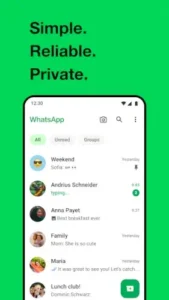

WhatsApp Messenger has over 10 billion downloads on Google Play alone and a 4.5 star rating from more than 212 million reviewers, its dominance is a matter of sheer utility. From teenagers coordinating plans to grandparents seeing their grandchildren for the first time on a video call.
What Is WhatsApp Messenger and Why Does It Dominate?
WhatsApp Messenger is a free, cross platform messaging and voice over IP service owned by Meta. Its core proposition is deceptively simple: to provide a reliable, secure, and ad free way to communicate with anyone, anywhere. Its dominance isn’t rooted in a single revolutionary feature, but in a powerful combination of factors. Its initial masterstroke was using your phone number as your identity, eliminating the friction of creating yet another username and password. This, combined with its early commitment to being a subscription free service, fueled its viral growth.
The WhatsApp Messenger for global communication network effect is its ultimate moat; you use it because literally everyone else in your contact list already does. Its value is in its ubiquity.
The Core Features: How WhatsApp Messenger Works for You
Beyond simple text, the app provides a suite of communication tools that cover nearly every need.
-
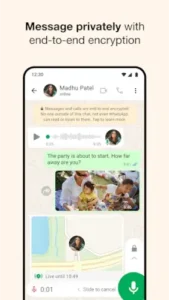
Secure Messaging: The foundation is end to end encryption, a system where only you and the person you’re communicating with can read what is sent. This applies to all forms of communication, making WhatsApp Messenger secure messaging a default, not an option.
-
Multimedia & File Sharing: The platform effortlessly handles photos, videos, voice messages, and documents. The ability to send files up to 2GB is a significant advantage for professional use, turning a simple chat into a collaborative workspace.
-
Voice and Video Calls: The quality of both one on one and group calls is a key reason for its staying power. The technology is optimized to work even on slower networks, making WhatsApp Messenger video call quality consistently reliable where other apps might fail.
-
Group Chats: This is where WhatsApp transitions from a tool into a community hub. Groups can host up to 1024 participants, with comprehensive admin controls to manage the conversation, making it indispensable for everything from family updates to project coordination.
-
Status Updates: Similar to Stories on other platforms, this feature allows you to share text, photo, or video updates that vanish after 24 hours, offering a more personal broadcast to your contacts.
WhatsApp Messenger User Experience: Design and Usability
WhatsApp’s design philosophy is one of radical simplicity. The interface is clean, almost spartan, with a familiar green and white color scheme and intuitive icons. There is no clutter, no confusing menus. The focus is on speed, getting you into a conversation as quickly as possible. This minimalist approach ensures smooth performance across a vast range of devices, from the latest flagship phones to older, budget-friendly models.
A critical component of its utility is seamless cross platform sync. The WhatsApp Messenger for desktop and web versions mirror your phone’s conversations, allowing you to type on a physical keyboard and easily share files from your computer. This fluid transition between mobile and desktop makes it a constant presence throughout the day.
WhatsApp Messenger Privacy and Security: The Encryption Foundation
The term “end to end encryption” is often mentioned but rarely explained. In simple terms, it means your messages are locked with a unique key that only your device and the recipient’s device possess. Not even WhatsApp’s servers can access the content of your conversations. This is not a mere feature; it is the bedrock of the app.
Beyond this, the platform offers granular privacy controls. You can manage who sees your “last seen” status, your profile photo, and your “about” information. You can disable read receipts if you prefer. For added security, the two step verification feature allows you to add a PIN to your account, preventing anyone from registering your number on a new device without your authorization.
What Users Are Saying About WhatsApp Messenger
The voice of hundreds of millions of users provides a clear, consistent narrative. The overwhelming praise is for the app’s reliability and its role as a essential utility. It is described as the digital thread that holds families and friendships together across continents. The group chat and call features are frequently highlighted as life changing for maintaining these connections.
The criticisms are practical and recurring. Many users point to the lack of control over media downloads, which can silently consume significant phone storage. The ability to be added to group chats without explicit permission is another common grievance. Some also note that the frequent, sometimes large, updates can be a nuisance. For users seeking a different approach to privacy focused messaging, Signal offers a highly regarded, open source alternative that also emphasizes strong encryption and data minimization.
Choosing a messaging app often feels like selecting a neighborhood to live in; each has its own culture, rules, and trade offs. When considering WhatsApp Messenger similar apps, it’s helpful to understand these distinctions. Telegram, for instance, champions cloud based messaging and vast customization. Its channels and massive group sizes are powerful for broadcasting, but its default chats use a different encryption model than WhatsApp’s universal end to end standard.
Signal is the gold standard for privacy purists. It is open source, collects minimal data, and its security protocol is the very one WhatsApp uses. However, its user base is smaller, creating that classic network effect challenge.
Then there’s Facebook Messenger, which is deeply integrated with the social network and offers playful features and bots. Its separation from a phone number can be an advantage or a limitation. WhatsApp Messenger carves its position squarely in the middle of this spectrum. It may not have Telegram’s super groups or Signal’s radical transparency, but it offers a crucial balance: robust, default encryption combined with unparalleled ubiquity. Its network is its most defensible feature. The question isn’t which app is technically best, but which one everyone you need to talk to is already using. For most of the world, the answer is still WhatsApp.
Practical WhatsApp Messenger Tips for Users
Many people use WhatsApp, but far fewer use it to its full potential. Applying a few strategic WhatsApp Messenger tips can transform your experience from a basic messaging tool into a highly organized communication hub.
The single most effective change you can make is to manage your media auto download settings. Left unchecked, photos and videos from every group chat can silently devour your phone’s storage. Navigate to Settings > Storage and Data > Media Auto-Download. Here, you can configure different rules for when using mobile data, Wi-Fi, and roaming. A smart configuration is to disable auto-download on mobile data entirely and only allow photos (not videos) on Wi-Fi. This simple adjustment for managing WhatsApp Messenger storage puts you in control and prevents unpleasant surprises.
Next, master the art of organization. For your most important conversations, use the “pin chat” feature. Long press any chat and select the pin icon to keep it at the top of your list, ensuring you never lose track of crucial family groups or work threads. For individual messages within a chat that you need to reference later, an address, a flight confirmation number, a important link, use the “star message” function. Simply long-press the message and tap the star icon. You can then access all your starred messages from the main menu, creating a personal, cross context bookmarking system.
Finally, do not overlook how to use WhatsApp Messenger on desktop. WhatsApp Web and the standalone desktop app are not just casual accessories; they are productivity multipliers. Using a full keyboard for typing is faster and more accurate. Dragging and dropping files from your computer is seamless. It allows you to maintain your conversations without constantly picking up your phone, creating a much more fluid workflow between devices.
WhatsApp Messenger for Business and Communities
The platform’s utility extends far beyond personal gossip. It has become a critical infrastructure for small enterprises and large communities alike. The WhatsApp Business app is a separate, free application designed for this purpose. It provides tools like a business profile with your address, website, and email; quick replies for frequently asked questions; and away messages to set expectations outside business hours. For a small shop, this transforms a simple chat into a legitimate customer service channel.
Another powerful, yet underutilized, tool is the Broadcast List. This feature allows you to send a message to multiple contacts without creating a group. Each recipient receives it as an individual message, and their replies come only to you. This is perfect for sending announcements, updates, or marketing messages without exposing everyone’s phone numbers or inviting a group chat free for all. It is one of the most effective WhatsApp Messenger for business communication strategies.
The dynamics of group chats themselves are worth examining. A family group operates on different social rules than a project team or a neighborhood watch. The admin controls, determining who can send messages, change the group info, or add participants, are essential for maintaining a healthy community. These groups often become the digital embodiment of real-world communities, demonstrating the app’s role as a social fabric.
Conclusion :
After a thorough examination, the verdict on WhatsApp Messenger is clear. It is the utility player of the digital world, the reliable, consistent, and indispensable tool that may not always be the most exciting, but is always the most necessary. Its strengths are foundational: a simple interface that anyone can use, a security model that protects billions of conversations by default, and a network effect so powerful it has become a global standard.
The trade offs are real but manageable. The app demands active storage management, and its integration with your phone number can be a double edged sword. However, these are often minor inconveniences weighed against the colossal benefit of being connected to nearly everyone you know.
In conclusion, WhatsApp Messenger it is a utility. It is the dial tone for the 21st century. Its value lies not in any single feature, but in its profound simplicity and its unmatched ability to fulfill the most basic human need: to connect with others, reliably and securely, no matter where they are. For the foreseeable future, it remains the default, and for good reason.
Frequently Asked Questions (FAQ)
Is WhatsApp Messenger really free to use?
Yes, the app is completely free. There are no subscription fees or in app purchases required for its core features, including messaging, voice calls, and video calls. It operates without ads, which is a key part of its value proposition.
Where can I find the official WhatsApp Messenger download?
The official and secure source for the WhatsApp Messenger app is the Google Play Store. You can also verify information and find direct links on the WhatsApp Official Website to ensure you are downloading the authentic application from WhatsApp LLC.
Who should I contact for technical support?
For issues with your account, troubleshooting, or to report a bug, you can contact WhatsApp support directly through the app in Settings > Help > Contact Us. For broader inquiries, the general support contact is android[at]support.whatsapp.com.
Is there a resource to understand the encryption and features?
For a detailed, community maintained breakdown of the security protocol, feature updates, and usage guides, the WhatsApp Wiki Page is a comprehensive and reliable resource.
Can I use WhatsApp Messenger on a tablet without a phone?
Currently, a working phone number with an active smartphone is required to set up and verify your WhatsApp account. Tablets can be linked as companion devices using the “Linked Devices” feature, but they cannot operate independently as the primary device.