

AccuBattery gives you real numbers instead of guesses.
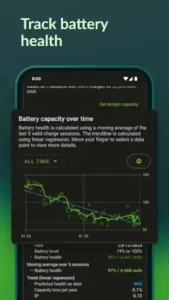

Your phone says battery health is good. But what does that actually mean? The percentage on your screen does not tell you how much capacity your battery has lost. It does not tell you how fast your charger is working. It does not tell you which apps are draining power. AccuBattery fills those gaps.
What is AccuBattery?
You are looking at a battery health and charging analytics app for Android from Digibites. It helps users measure battery capacity, monitor charging speed, estimate battery wear, and compare battery usage over time using real device measurements.
AccuBattery is built for users who want to understand and improve battery health rather than just see a percentage on screen. The app estimates real battery capacity in mAh, tracks wear from charging sessions, and shows how long your device can last in active use or standby. It is also designed to help identify which apps consume the most battery and whether your charger or cable is performing well.
AccuBattery holds a 4.8 star rating from more than 592,000 reviews. The app size is roughly 20 MB. The age rating is Everyone. The app is free with optional in app purchases for premium features.
A battery health and charging analytics app for Android
The category matters here. AccuBattery is not a game. It is not a social app. It is a diagnostic tool. You open it. You plug in your charger. You read the numbers. The app tracks real capacity in mAh. It estimates how much battery health remains. It shows charging speed in milliamps. The data helps you understand your battery’s condition.
Who this app was built for
Not every Android user needs AccuBattery. Here is who will find it useful.
Users who want to know their battery’s real capacity in mAh
Your phone’s rated capacity is 3,000 mAh. But after two years, the real capacity might be 2,500 mAh. AccuBattery tells you the actual number.
People who want to track battery wear over time
Batteries degrade with use. AccuBattery tracks wear from each charge session. You can see the decline over months.
Android users who need to compare chargers and cables
You have multiple chargers. Multiple cables. Which combination charges fastest? AccuBattery gives you the current reading. Test each setup. Use the best one.
Anyone curious about which apps drain the most battery
Some apps consume more power than others. AccuBattery shows usage per app. You can identify the worst offenders and limit their background activity.
AccuBattery Main Features
Measures real battery capacity in mAh
This is the headline feature. AccuBattery estimates your battery’s actual capacity. The number is based on multiple charge sessions. More sessions mean better accuracy.
Tracks battery wear from each charge session
Every charge session adds wear. AccuBattery tracks the cumulative wear. You can see how much capacity you have lost over time.
Monitors charging current and discharging current
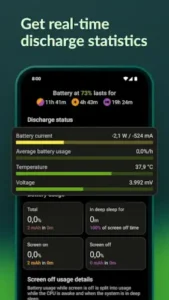
Plug in your charger. The app shows the current in milliamps. Unplug the charger. The app shows discharge current. The data is real time.
Estimates remaining charge time and remaining use time
The app predicts how long until your battery is full. It also predicts how long your battery will last during use. The estimates are based on current consumption.
Shows battery usage per app and deep sleep percentage
AccuBattery app lists which apps consume the most power. It also shows deep sleep percentage. High deep sleep means good standby efficiency. Low deep sleep means something is keeping the phone awake.
Includes charge alarms to help reduce overcharging
Research shows that charging to 100 percent wears batteries faster. AccuBattery has a charge alarm. Set it to 80 percent. The alarm notifies you when to unplug.
Offers historical charging and discharging statistics
The app stores data from every session. You can view historical charts. The trends show how your battery is aging.
Supports dark and AMOLED black themes
The app has dark and AMOLED black themes. Dark mode is easier on the eyes. AMOLED black saves power on OLED screens.
Provides ongoing battery statistics in a notification
The app can show battery stats in your notification bar. Current. Temperature. Remaining time. The data is always visible.
Premium features include no ads, more history, and a stats overlay
The free version is functional. Premium removes ads. Premium adds more history. Premium includes a stats overlay. The overlay shows data while you use other apps.
AccuBattery Interface and Design
Clean, data first interface that makes technical battery information readable
The app looks like a dashboard. Charts. Numbers. Tabs. The design prioritizes information over decoration.
Design focused on charts, tabs, and clear metrics rather than flashy visuals
There are four main tabs. Charging. Discharging. Health. History. Each tab shows relevant data. No extra fluff.
Dark and AMOLED black themes make long monitoring sessions comfortable
Dark mode is available. AMOLED black is available. The dark themes reduce eye strain.
Where the design works well
The app is fast. It opens quickly. It updates quickly. The data is clear.
Where absolute accuracy depends on device hardware and usage patterns
AccuBattery is not a lab instrument. The readings are estimates. Accuracy depends on your device’s hardware and your charging habits.
What users say about the AccuBattery app
The parts people enjoy
Positive reviews often mention the real capacity measurement. The charge alarm is praised. The charger comparison is useful.
The parts people complain about
No utility app escapes criticism. Here is what comes up most often.
Accuracy is relative, not lab grade precise
Some users expect exact measurements. AccuBattery gives estimates. The accuracy varies by device.
Some users question absolute accuracy of capacity estimates
The estimated capacity may not match the manufacturer’s rating. The app’s numbers are based on calculations, not direct hardware readings.
Measurements depend on device hardware and charging patterns
Different devices give different results. The app works best on supported hardware. Inconsistent charging patterns affect accuracy.
Premium features are paid; free version has limitations
The free version is functional. Premium adds convenience. Some users feel the free version is too limited.
How the AccuBattery app mechanics work
Measurement loop: charge phone, collect session data, review health stats
The loop is simple. Charge your phone. The app collects data during the session. Review the health stats after the session.
Compare results over time to track battery wear
Battery wear takes time. AccuBattery tracks wear over months. The historical data shows the decline.
Real time statistics on current charge performance and battery consumption
The charging tab shows current in real time. The discharging tab shows consumption in real time. The data updates continuously.
Historical overview of all charge and discharge cycles
The history tab stores every session. You can view trends. You can compare sessions.
Core loop: monitor, compare, and optimize battery use
Monitor your battery’s health. Compare chargers and cables. Optimize your charging habits. The loop helps you extend battery life.
Looking for another battery monitor app with detailed analytics? Check out Ampere, a simpler app that focuses on charging current measurement and charger comparison.
AccuBattery Tips
You can install AccuBattery app and see your first charge session data in minutes. Getting useful, accurate insights about battery health takes a little patience. These tips help you get the most out of the app.
Use the app for several charging cycles before judging battery health; long term data improves accuracy
Here is a question. Why does AccuBattery show different capacity estimates after each charge? Because one session is not enough.
AccuBattery tips from experienced users all say the same thing. Wait for multiple sessions. The app needs data from several charge cycles to give a reliable estimate. A player who judges battery health after one session gets an inaccurate number. A player who waits for 10 sessions gets a reliable number.
Set a charge alarm to avoid charging to very high levels unnecessarily
Charging to 100 percent wears batteries faster. The wear is most significant above 80 percent.
AccuBattery app has a charge alarm. Set it to 80 percent. The alarm notifies you when to unplug. A player who uses the charge alarm extends battery lifespan. A player who ignores it adds unnecessary wear.
Compare chargers and USB cables by checking charging current with the screen off
The screen uses power. The charging current reading is lower when the screen is on.
Turn off the screen. Let the app log the charging current. Test charger A. Note the current. Test charger B. Note the current. A player who tests with the screen off gets accurate comparisons. A player who tests with the screen on gets unreliable data.
Review app specific battery consumption to find hidden drainers
AccuBattery similar apps show battery usage. This app shows usage per app.
Open the discharging tab. Look at the app list. Which apps consume the most power? A player who reviews app usage finds hidden drainers. A player who ignores the list misses opportunities to save battery.
Check deep sleep percentages if standby drain seems unusually high
Deep sleep is a low power state. High deep sleep means good standby efficiency. Low deep sleep means something is keeping the phone awake.
If your battery drains fast while idle, check the deep sleep percentage. A player with low deep sleep investigates further. A player who ignores it continues to experience poor standby time.
Use the historical tab to compare sessions and notice gradual battery wear
Battery wear is gradual. You might not notice it day to day. The historical tab shows the trend.
Compare session data from three months ago to today. A player who reviews history sees the wear. A player who ignores history misses the gradual decline.
Enable dark or AMOLED theme to reduce display strain and save power
AccuBattery app has dark and AMOLED black themes. Dark mode is easier on the eyes. AMOLED black saves power on OLED screens.
Enable dark mode for comfort. Enable AMOLED black for power savings. A player who uses dark themes reduces eye strain and saves battery. A player who uses light themes drains more power.
Consider premium if you want longer history and the live stats overlay
The free version is functional. Premium removes ads. Premium adds more history. Premium includes a stats overlay.
If you use AccuBattery daily, premium is worth it. A player who pays for premium gets more features. A player who stays free still gets the core functionality.
Apps similar to AccuBattery
If you like AccuBattery, here are other utility apps worth your time. Each offers something similar with a different twist.
Battery health monitors
Battery health monitors show capacity, wear, and charging status. Ampere is a popular example. The difference is that Ampere focuses more on charging current than health tracking. Good for users who want a simpler, more focused app.
Charging testers
Charging testers measure current and voltage. Some are hardware devices that plug between the charger and phone. The difference is that hardware testers are more accurate but cost money. Good for users who want lab grade precision.
Phone diagnostics apps
Phone diagnostics apps check multiple hardware components. Battery. Screen. Camera. Sensors. The difference is that these apps are more comprehensive but less focused. Good for users who want a full device checkup, not just battery info.
Other utility style battery tools
Other apps like GSam Battery Monitor and Battery Life provide similar information. Some focus on battery health. Others focus on remaining time. The difference is in the presentation and features. Good for users who want a different interface or additional metrics.
AccuBattery Community
AccuBattery is a solo utility app. There are no social features.
Mainly a solo utility without social or multiplayer features
No guilds. No friends lists. No leaderboards. The app is for one user and one phone.
Community aspect comes from app reviews, help articles, YouTube tutorials, and forum discussions
The community exists outside the app. Users share tips on Reddit. They post tutorials on YouTube. They discuss accuracy on forums. The shared knowledge is valuable.
Shared knowledge is more important than in app social interaction
A player who reads community tips gets better results than a player who uses the app alone. The community knowledge is the social feature.
Users discuss accuracy, tips, and charger comparisons on forums
Reddit has active discussions. Users compare AccuBattery readings. They share charging tips. They recommend cables and chargers. The discussions are helpful.
Conclusion
AccuBattery works for three types of people. First, users who want to know their battery’s real capacity in mAh and track wear over time. Second, people who need to compare chargers and cables to find the fastest combination. Third, Android users who want to identify which apps drain the most battery and optimize their charging habits.
Do you want to know your battery’s real health and charging speed, or do you just plug in and hope for the best?
If the first one, AccuBattery gives you the data you need to make informed decisions. If the second one, you probably do not need this app. Both answers are fine. Just know what you want.
Frequently asked questions about AccuBattery
How do I get AccuBattery download on my phone?
Go to the Google Play Store if you use Android. Search for AccuBattery. The developer is Digibites. Tap install or use the direct link to Download AccuBAttery from the Official Google Play Store
Is AccuBattery free to use, or do I need to pay?
The app is free with ads. You can measure battery capacity, track wear, monitor charging current, and see app usage without paying. The free version is functional. A paid Pro version removes ads, adds more history storage, and includes a stats overlay . Most users find the free version sufficient for basic battery monitoring.
Where can I find the official website and help documentation?
The official AccuBattery website has guides and feature explanations: https://accubatteryapp.com . The Help Center has a getting started guide and detailed feature descriptions: https://accubattery.zendesk.com .
I have a problem with the app. Who do I contact?
If you encounter issues, first check the Help Center articles. If problems persist use the developer email: support@accubatteryapp.com.
How accurate is AccuBattery’s battery health estimate?
The estimate is based on measurements from your device’s hardware and is meant for relative comparison rather than lab grade precision. The app uses a moving average of your last 5 valid charge sessions to calculate health. Accuracy improves with more sessions. Expect some variation between devices . Use the app to track trends over time rather than focusing on a single number.