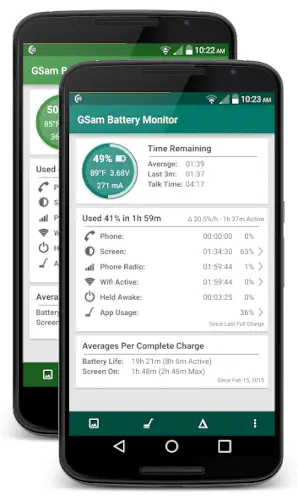
GSam Battery Monitor show all the info you need for your battery.
Your phone says battery is at 40 percent. But how long will that last? An hour? Three hours? Depends on what you are doing. The default battery screen shows a list. Screen. Chrome. YouTube. But it does not show the full picture. It does not show wakelocks. It does not show CPU usage per app. It does not show signal strength drain. GSam Battery Monitor fills those gaps.
What is GSam Battery Monitor exactly?
You are looking at an Android battery analytics app from GSam Labs that shows what is draining your battery, how long you have left, and how different apps or system components affect battery life.
GSam Battery Monitor helps users understand battery drain in a more detailed way than the default Android battery screen. The app tracks battery status, estimated remaining time, app usage, wakelocks, temperature, CPU related drain, and historical trends so you can find what is consuming power. It is particularly useful on phones and tablets where battery life changes depending on workload, background activity, and signal conditions.
On Google Play, GSam Battery Monitor holds a 4.6 star rating from more than 73,000 reviews. The app size is roughly 12 MB. The age rating is Everyone. The app is free with optional in app purchases for the Pro version.
An Android battery analytics app that shows what is draining your battery
The category matters here. GSam Battery Monitor is not a game. It is not a social app. It is a diagnostic tool. You open it. You see which apps are using power. You see how much time you have left. You see wakelocks. You see CPU usage. The data is detailed and technical.
Who this app was built for
Not every Android user needs GSam Battery Monitor. Here is who will find it useful.
Android power users who want detailed battery data
The default battery screen gives basic information. GSam gives detailed information. Power users will appreciate the depth.
People who want to identify which apps are draining battery
Some apps consume more power than others. GSam shows you exactly which ones. You can uninstall or restrict the worst offenders.
Users who need to track wakelocks and background activity
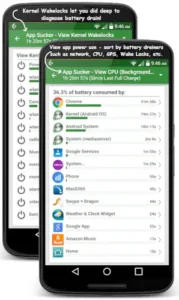
Wakelocks keep your phone awake. They drain battery even when the screen is off. GSam shows you which apps are causing wakelocks.
Anyone who wants remaining battery time estimates and historical averages
The app estimates how long your battery will last based on current usage. It also shows historical averages. You can see trends over time.
GSam Battery Monitor Main Features
Deep battery drain analysis with App Sucker style breakdowns
The App Sucker feature shows which apps and system components are using battery. The breakdown is detailed. You see percentage usage for each item.
Remaining battery time estimates and historical averages
The app estimates how long your battery will last. The estimate is based on current usage. The historical averages show typical battery life for your device.
App by app battery usage tracking
GSam Battery Monitor app tracks usage per app. You can see which apps consume the most power. The list is updated in real time.
Wakelock, CPU, sensor, screen, Wi‑Fi, GPS, and signal usage insights
The app breaks down usage by component. Wakelocks. CPU. Sensors. Screen. Wi‑Fi. GPS. Signal. You see exactly what is using power.
Custom reference time selection for reviewing statistics over a chosen period
You can select a custom time period. Review statistics from the last hour. Review statistics from the last day. The custom reference time gives you control.
Battery temperature and charging state alarms
The app can alert you when battery temperature is too high. It can also alert you when charging completes. The alarms help protect battery health.
Home screen widgets and status bar notifications
GSam Battery Monitor app has widgets. You can put battery status on your home screen. You can also see battery stats in the notification bar.
Optimized tablet layouts and better time estimates for long standby devices
The app works on tablets. The layout is optimized for larger screens. The time estimates are more accurate for devices with long standby times.
Optional Pro version with expanded functionality
The free version is functional. The Pro version adds more features. More detail. More customization. The Pro version is for power users.
GSam Battery Monitor Interface and Design
Utility first interface that prioritizes data density and clarity
The app looks like a dashboard. Charts. Numbers. Lists. The design prioritizes information over decoration.
Not flashy; presents battery status, charts, and usage lists in a readable way
There are no animations. No flashy graphics. Just data. The data is presented clearly.
Layout is especially practical for users who want graphs, breakdowns, and technical detail
The layout works for technical users. You can see graphs. You can see breakdowns. You can see details. The information is easy to find.
Where the design works well
The app is fast. It opens quickly. It updates quickly. The data is clear.
Where the app is best suited for users comfortable with technical data
GSam Battery Monitor is not for casual users. The data is technical. You need to understand what wakelocks are. You need to understand CPU usage. The app is for users who want detailed information.
What users actually say about the GSam Battery Monitor app
The parts people enjoy
Positive reviews often mention the detail. The app shows more than the default battery screen. The App Sucker feature is praised.
One user wrote: “More useful than built in battery screen. Shows me exactly what is draining my battery.”
The parts people complain about
No utility app escapes criticism. Here is what comes up most often.
More useful than built in battery screen
The app provides more detail than the default screen. That is the main selling point.
Exposes more detail than system settings
GSam Battery Monitor app shows information that is hidden in system settings. Power users appreciate this.
Practical tool for identifying power hungry apps
The app helps you find which apps are draining your battery. You can take action based on the data.
May require root access for some advanced features
Some features require root access. Without root, the app cannot see certain details. Root access is not required for basic functionality.
How the GSam Battery Monitor app mechanics work
Monitors battery data in the background
GSam Battery Monitor app runs in the background. It collects data continuously. The data is stored for later review.
Compares usage by app or component
The app compares usage across apps. It compares usage across components. You see which items are consuming the most power.
Uses information to help improve battery life
The data is actionable. You see which apps are draining battery. You can uninstall or restrict them. The information helps you extend battery life.
Core loop: collect data, review graphs, change habits based on results
The loop is simple. Collect data. Review graphs. Change habits. The loop helps you optimize battery usage.
Custom reference time allows study of specific periods
You can select a specific time period. Study battery usage during that period. The custom reference time gives you flexibility.
Historical averages for trend analysis
The app stores historical data. You can see trends over time. The historical averages show how your battery usage changes.
Looking for another battery monitor app with detailed analytics and app usage tracking? Check out AccuBattery, a popular alternative that focuses on battery health and charging speed.
GSam Battery Monitor Tips that actually help
You can install GSam Battery Monitor app and see your battery stats in minutes. Finding the root cause of battery drain takes a little detective work. These tips help you get the most out of the app.
Set a custom reference time when you want to study battery use for a specific period
Here is a question. Why does your battery drain faster on some days than others? The answer might be in a specific time period.
GSam Battery Monitor tips from experienced users all say the same thing. Use the custom reference time. Select the period when battery drain was high. Review the stats for that period. A player who studies specific periods finds patterns. A player who looks at overall averages misses the details.
Check app level drain first if battery life suddenly gets worse
Battery life is fine one day. The next day it is terrible. Something changed.
Open GSam. Check the app usage list. Which app is at the top? A player who checks app drain first finds the culprit quickly. A player who ignores the list misses the obvious.
Use graphs to look for patterns in temperature, signal strength, and discharge rate
GSam Battery Monitor similar apps show numbers. This app shows graphs.
Look at the discharge graph. Is the slope steep or gentle? Look at the temperature graph. Is the phone heating up? Look at the signal strength graph. Is the signal weak? A player who reads the graphs understands the context. A player who only looks at numbers misses the patterns.
Pay attention to wakelocks and background activity if standby drain is high
Standby drain is the battery used when the screen is off. If standby drain is high, something is waking the phone.
Check the wakelock section. Which app is keeping the phone awake? A player who checks wakelocks finds the background drainer. A player who ignores wakelocks continues to experience poor standby time.
Try widgets or notification tracking for quick access to battery status
GSam Battery Monitor app has widgets. You can put battery status on your home screen. You can also see battery stats in the notification bar.
A player who uses widgets checks battery status quickly. A player who opens the app every time spends more effort. Widgets make monitoring easier.
On tablets, use optimized layout for more accurate long standby estimates
GSam Battery Monitor app has an optimized layout for tablets. The time estimates are more accurate for devices with long standby times.
A player who uses the tablet layout gets better estimates. A player who uses the phone layout on a tablet gets less accurate data. Use the right layout for your device.
Compare CPU and sensor usage across apps to identify hidden drains
Some apps drain battery through CPU usage. Others drain through sensor usage. GPS. Accelerometer. Gyroscope.
GSam shows both. Compare CPU usage across apps. Compare sensor usage across apps. A player who compares finds hidden drains. A player who ignores CPU and sensor misses the full picture.
If you use the Pro version, take advantage of advanced reporting and customization
The Pro version adds more features. More detail. More customization. More reporting options.
A player who uses Pro gets more value than a player who stays free. If you use GSam daily, Pro is worth it. The advanced features save time and provide deeper insight.
Apps similar to GSam Battery Monitor
If you like GSam Battery Monitor, here are other utility apps worth your time. Each offers something similar with a different twist.
AccuBattery
AccuBattery is the most direct comparison. Battery health tracking. Charging speed monitoring. App usage stats. The difference is that AccuBattery focuses more on battery health and capacity, while GSam focuses more on drain analysis and wakelocks. Good for users who want both health and drain tracking.
BetterBatteryStats
BetterBatteryStats is a classic Android battery monitor. Detailed wakelock analysis. Kernel wakelocks. CPU states. The difference is that BetterBatteryStats requires root access for full functionality. Good for users with rooted devices who want the deepest possible analysis.
Other Android battery analyzers
Other apps like Battery HD and Battery Life provide similar information. Some focus on remaining time. Others focus on health. The difference is in the presentation and features. Good for users who want a different interface or additional metrics.
Utility style battery tools
This category includes apps like Greenify and Naptime. Battery optimization tools. They do not just monitor. They actively manage background activity. The difference is that these tools require more permissions and can affect app behavior. Good for users who want to actively manage battery usage, not just monitor it.
GSam Battery Monitor Community
Community value comes from user reviews, forum discussions, tutorial videos, and troubleshooting posts
The community exists outside the app. Users share tips on Reddit. They post tutorials on YouTube. They discuss issues on forums. The shared knowledge is valuable.
Main social layer is external discussion and sharing rather than in app collaboration
A player who reads community tips gets better results than a player who uses the app alone. The community knowledge is the social feature.
Android enthusiasts share tips and advice on forums
Reddit has active discussions. XDA Developers has threads. Users compare GSam readings. They share optimization tips. The discussions are helpful.
Conclusion
GSam Battery Monitor works for three types of people. First, Android power users who want detailed battery data beyond the default screen. Second, people who want to identify which apps are draining battery and track wakelocks and background activity. Third, anyone who wants remaining battery time estimates and historical averages to understand battery trends.
Do you want detailed battery analytics that show exactly what is draining your power, or is the default battery screen enough for you?
If the first one, GSam Battery Monitor gives you the data you need to find and fix battery drain. If the second one, you probably do not need this app. Both answers are fine. Just know what you want.
Frequently asked questions about GSam Battery Monitor
How do I get GSam Battery Monitor download on my phone?
Go to the Google Play Store if you use Android. Search for GSam Battery Monitor. The developer is GSam Labs. Tap install or use the direct link to Download GSam Battery Monitor from the Official Google Play Store
Is GSam Battery Monitor free to use, or do I need to pay?
The app is free with ads. You can track battery usage, identify drainers, and view detailed stats without paying . A paid Pro version removes ads, adds optimized tablet views, more accurate standby time estimates for tablets, and additional reporting features . Most users find the free version sufficient for identifying problem apps.
Where can I find the official website and help documentation?
The official GSam Labs blog has a comprehensive users guide covering all features, including App breakdowns, wakelocks, and Enhanced Stats mode . There is also a FAQ section addressing compatibility with Android versions from KitKat to Android 16 . Contact the developer directly at gsamtan[at]@gmail.com for support .
I have a problem with the app. Who do I contact?
Send an email to the developer at gsamtan[at]@gmail.com if you encounter any issues with the app .
Does GSam Battery Monitor require root access for full functionality?
Not necessarily. The app works in Standard mode without root. For Enhanced Statistics, which provides more detailed data like app wakelocks and kernel wakelocks, you need either root access or you can use ADB to grant the BATTERY_STATS permission . The app will guide you through the steps to enable Enhanced mode . For non-rooted devices running Android KitKat (4.4) or later, Enhanced mode requires ADB setup