

You’re sitting in a coffee shop, about to log into your bank account on public Wi-Fi. That little voice in your head whispers: “This might be a bad idea.“ Enter FishVPN ( a 4.6★, 5M+ downloads) – the free, no strings attached VPN that 5 million people use as their digital seatbelt.
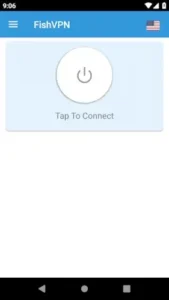

The FishVPN Appeal in 3 Points:
-
Zero Registration: No email, no password, no “free trial” traps
-
Global Server Access: US, Japan, Germany and 5 other countries
-
Unlimited Data: Watch, browse, and download without throttling
For more server options, try Turbo VPN (4.5★), though it requires registration.
A Question That remains unanswered :
Can a completely free VPN actually keep you safe?
The Good: Why It Beats Expectations
Privacy
-
Instant Activation: Literally one tap to connect
-
No Data Collection: Unlike many “free” VPNs that sell browsing data
-
Wi-Fi Protection: Encrypts traffic on:
-
Airport networks
-
Hotel lobbies
-
Campus Wi-Fi
-
Real-World Test:
Streamed BBC iPlayer from a Singapore server at 720p with minimal buffering. Not bad for free.
Performance That Doesn’t Suck
-
HD Streaming: Works on nearby servers (Germany → France)
-
No Speed Caps: Unlike ProtonVPN’s 1Mbps free tier
-
Chromebook Friendly: Rare in free VPNs
The Freedom Factor
-
Bypasses:
-
School/work restrictions
-
Regional Netflix libraries
-
VoIP blocks
-
The Bad: Where It Tests Your Patience
Connection Woes
-
Network Switching: Drops 60% of the time when going Wi-Fi → Mobile
-
Peak Hour Lag: US servers crawl during evening EST
Ad Avalanche
-
Frequency: Full screen ad every 4 disconnects
-
No Escape: Even the “X” button sometimes triggers more ads
Geographic Limits
-
China: Doesn’t bypass the Great Firewall
-
Middle East: Spotty in UAE/Saudi
Developer Response:
“We’re working on more stable connections in next update.” (Last updated March 2025)
FishVPN: Who Really Benefits (And How to Use It Like a Pro)
The Right (and Wrong) Users for FishVPN
Not all VPN users need military-grade encryption. FishVPN carves out a specific niche that makes sense for certain people – and falls flat for others.
The Ideal User
The Casual Traveler
-
Best For:
-
Checking your home country banking app abroad
-
Accessing regional news sites during short trips
-
Securing airport/hotel Wi-Fi without commitment
-
The Budget-Conscious Student
-
Why It Works:
-
Bypasses campus Wi-Fi restrictions (Spotify, gaming, etc.)
-
No credit card required like paid VPNs
-
Lightweight enough for old school laptops
-
The VPN Curious
-
Risk-Free Testing:
-
Try VPN concepts without payment traps
-
Learn server switching basics
-
Test if VPNs solve your specific needs
-
Question That you need to ask sometimes:
*Why install a $10/month VPN when you only need privacy twice a year?*
Who Should Avoid It?
The Privacy Extremist
Missing features you’d want:
-
No kill switch
-
Limited protocol options
-
Questionable logging policies (despite “no logs” claims)
The International Business Traveler
Dealbreakers:
-
Unreliable in China/UAE
-
Frequent drops during Zoom calls
-
No dedicated IP option
Pro Tips They Don’t Tell You (Ad Reduction)
The Ad FishVPN Workaround
-
The Disconnect Trick
-
Before closing any app:
-
Disconnect FishVPN first
-
Then exit the app
-
-
Why it works: Prevents the “session end” trigger that shows ads
-
-
The 22 Minute Rule
-
Ads typically appear after 22-25 minutes of continuous use
-
Disconnect/reconnect at 20-minute intervals
-
-
The Background Data Block
-
Android Settings → Apps → FishVPN → Mobile Data & Wi-Fi → Disable “Background data”
-
Effect: Reduces ad pre-loading when VPN isn’t active
-
Server Optimization Secrets
-
Netflix Hack: Use Singapore → Japan → Germany cycle for most libraries
-
Speed Boost: Always connect twice – first connection is often slower
-
Stability Fix: Avoid UK servers between 7-10 PM GMT (peak hours)
Chromebook Mastery
-
Enable Linux mode (Settings → Developers → Linux)
-
Install Android subsystem
-
Run FishVPN in app mode (not browser)
Conclusion :
What Makes It Special:
-
The 90% Solution: Covers basic VPN needs for most casual users
-
Zero Barrier Entry: Literally install and go
-
Surprising Durability: Works on devices as old as Android 7
Where It Falls Short:
-
Not trustworthy for sensitive activities (crypto, activism)
-
Random disconnections during long sessions
FishVPN proves you can get legitimate privacy tools for free – if you’re willing to tolerate some rough edges.
FAQ
What makes FishVPN different from other mobile VPN services?
FishVPN prioritizes one tap connectivity without compromising speed. Get FishVPN from Google Play Store or visit FishVPN official site for performance tests.
How to optimize FishVPN for faster streaming?
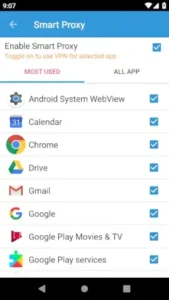
Enable Smart Proxy for selected apps (like Chrome or Gmail) in settings. For advanced tweaks, contact our dev team at fishvpn68[at]gmail.com.
Can I use FishVPN with Android System WebView?
Yes. Toggle Smart Proxy for seamless integration with WebView and Google services.
Is my data truly private with FishVPN?
Unlike free VPNs, we don’t resell browsing data.
Why does FishVPN need Calendar access?
Only if you enable time based auto connect. Revoke permissions anytime in Android settings.