

Samsung Health packs more health tracking tools into one free app than most people will ever need.
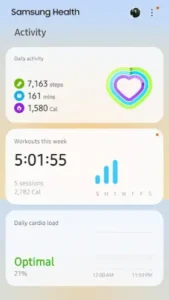

Samsung Health is developed by Samsung Electronics, this comprehensive wellness platform has been downloaded more than 1 billion times and holds a 3.9 star rating from over 1.5 million reviews on Google Play. It tracks your steps, workouts, sleep, heart rate, stress, blood oxygen, nutrition and even your menstrual cycle. If you own a Galaxy Watch, the integration goes even deeper. The app is rated for ages 3 and up and works on Android 6.0 or higher.
What Is Samsung Health?
Samsung Health is a free, ad-free health and fitness app that turns your Android phone or Galaxy Watch into a personal wellness hub. It automatically records many activities including steps, workouts, sleep, heart rate, stress and blood oxygen. It also helps you build healthy habits around fitness, diet, sleep and mindfulness.
What separates Samsung Health from simpler trackers is the sheer breadth of features. You can log meals, track your menstrual cycle, meditate, challenge friends and access expert coaching videos. All of it lives in one app. Whether that is a strength or a weakness depends on what you want. If you want an all in one health hub, Samsung Health delivers. If you want simplicity, the feature density can feel overwhelming.
Automatic Activity Detection and Workout Tracking
Samsung Health automatically records steps, workouts and activity time. You do not have to press start for a walk or a run. The app notices movement and adds it to your health record. For more intentional exercise, you can start a workout manually and see real time stats like pace, route and heart rate.
The app uses your phone’s sensors or a Galaxy Watch’s heart-rate sensors. If you have a Galaxy Watch, the tracking becomes more accurate and continuous. The watch monitors your heart rate throughout the day, not just during workouts, giving you a fuller picture of your cardiovascular health.
Sleep, Mindfulness and Cycle Tracking
Sleep tracking with Galaxy Watch gives you detailed sleep levels and a sleep score. You can track sleep vitals and get notified when meaningful shifts occur. The app also offers mindfulness and meditation tools for stress relief, with content available in multiple languages. Some meditation content requires an optional paid subscription.
For users who need it, Samsung Health includes menstrual cycle tracking with personalized insights via the Natural Cycles partner. That combination of fitness, sleep, mindfulness and reproductive health makes Samsung Health one of the few apps that covers the full spectrum of wellness.
Free and Ad-Free with Galaxy Watch Integration
Samsung Health is completely free with no ads and no in-app purchases. There is no premium tier hiding features behind a paywall. If you own a Galaxy Watch, the integration is seamless. Sleep tracking, heart rate monitoring and workout tracking all sync automatically. Samsung Health Together lets you challenge friends and family to health goals, adding a social element that keeps you motivated.
Samsung Health Core Features
Samsung Health is not a simple step counter with a few extras tacked on. It is a full wellness platform that tries to cover every angle of your health in one place. That ambition is both its greatest strength and the source of its biggest frustrations. Here is what actually matters and why each feature earns its place.
Automatic Activity Detection
Samsung Health records steps, workouts, and activity time automatically. You do not have to press start for a walk or a run. The app notices movement and adds it to your health record using your phone or Galaxy Watch sensors.
The value here is consistency. Most people forget to track their activity. They walk somewhere, come home and never open the app. Samsung Health removes that friction. The tracking happens in the background. When you check the app later, the activity is already there. It is not always perfectly accurate, but it catches more than manual tracking ever would.
Manual Workout Tracking
When you want more control, you can start a workout manually and see real time stats like pace, route and heart rate. The app uses your phone sensors or Galaxy Watch heart rate sensors. Running, cycling, swimming and other activities all get detailed tracking.
If you own a Galaxy Watch, this feature becomes significantly more useful. The watch monitors your heart rate continuously during the workout, not just at intervals. You get a more accurate picture of your effort and recovery. If you are training seriously, that data matters.
Goal Setting and Progress Tracking
You can set personalized goals for steps, activity time and more. The app tracks your daily condition including activity amount, workout intensity, heart rate, stress, and blood oxygen. That combination gives you a broader view of your health than just step counts.
The goal system is flexible. If you are meeting your targets easily, you can increase them. If you are consistently missing them, you can lower them. The goal is to keep you moving without discouraging you. That said, some users find the data trends hard to access. Seeing progress over months requires digging or exporting data.
Sleep Tracking with Galaxy Watch
Sleep tracking is where Samsung Health shines if you own a Galaxy Watch. The app monitors sleep patterns with sleep levels and sleep scores. It tracks sleep vitals to catch changes and notifies you of meaningful shifts.
The sleep score gives you a simple number that summarizes your night. Higher scores mean better sleep quality. Tracking vitals over time can reveal patterns you might not notice otherwise. However, some users report that sleep tracking stopped working entirely after updates, requiring manual logging. When it works, it is excellent. When it does not, it is frustrating.
Mindfulness and Meditation
Samsung Health includes meditation tools to relieve stress throughout the day. Content is available in multiple languages. Some meditation content requires an optional paid subscription.
The mindfulness section is useful for users who want to manage stress but do not want a separate app for it. Having meditation alongside fitness tracking means you do not have to switch between apps. That said, the free content is limited. If you want the full library, you will need to pay.
Cycle Tracking
Samsung Health lets you track menstrual cycles and manage symptoms. Personalized insights are provided via the Natural Cycles partner. This makes Samsung Health one of the few mainstream fitness apps that covers reproductive health.
For users who need this feature, having it integrated into the same app as fitness and sleep tracking is convenient. You do not have to juggle multiple apps to track different aspects of your health. Everything lives in one place.
Nutrition and Diet Logging
You can record daily meals and snacks, tracking calories, macros and nutritional intake. The app lets you search for meals and edit entries. This gives you a fuller picture of your health beyond just activity.
The logging experience is not as polished as dedicated nutrition apps like MyFitnessPal. Some users report slow search and clunky editing. But for basic tracking, it works. If you want detailed nutrition analysis, a dedicated app might serve you better.
Samsung Health Together
Samsung Health Together lets you challenge friends and family to become healthier in a fun, interactive way. It requires contacts permission to create friend lists. The social element adds motivation that solo tracking cannot provide.
If you have friends or family who also use Samsung Health, the challenges create friendly competition. That accountability keeps you moving on days when you would rather skip. If you do not know anyone else using the app, the feature is less useful.
Expert Content and Coaching
You can access videos from expert coaches covering stretching, weight loss, and other fitness goals. Guided workouts help you know what to do without designing your own routine.
The expert content is a nice addition, but it is not the reason most people use Samsung Health. It complements the tracking features rather than replacing dedicated fitness apps. For beginners who need guidance, it provides a useful starting point.
Privacy and Data Safety
Samsung Health states no data is shared with third parties. The app may collect location, personal info and other data types. Data is encrypted in transit and can be deleted on request.
This is standard for a major health app. The trade-off is clear. You get a free, comprehensive health tracker that works across your devices. In exchange, Samsung collects some data to operate the service. If that works for you, the app delivers real value.
Samsung Health Graphics and Design
Samsung Health uses a polished, feature rich UI with customizable health records. The home screen gives you quick access to your stats and lets you add or remove items based on what matters to you. Galaxy Watch integration makes the experience seamless if you own a Samsung wearable.
Some users find the UI cartoonish compared to more adult-oriented apps. The color coded amoeba aesthetic does not appeal to everyone. Data trends are also not prominently displayed, making it harder to see long-term progress without exporting to a spreadsheet. Recent updates have introduced performance issues, with some users describing the app as slow and clunky. The menus feel divided, and search functionality has degraded.
What Users Say About Samsung Health App
What Works
Users appreciate the wide range of features in one app. Fitness, nutrition, sleep, mindfulness and cycle tracking all live in the same place. Galaxy Watch users value the detailed sleep and workout tracking. The app is free and ad-free, which makes it accessible to everyone. Samsung Health Together adds a fun, competitive element to health goals. Expert content and coaching videos provide guidance for different fitness levels.
Where The App Could Improve
Common criticisms include sleep tracking issues. Some users report that sleep tracking stopped working entirely and required manual logging. The UI is described as clunky and slow after recent updates, with poor search functionality and divided menus. Data trends are not prominent, making it hard to interpret progress over time. Some users dislike the cartoonish aesthetic. Others report that the app has become less reliable with each update.
Check out Google Fit for a simpler, free activity tracker with WHO and AHA backed goals or explore the full collection of Health & Fitness apps to find your next health tool.
How Accurate Is Samsung Health Step Tracking?
Your phone is doing the heavy lifting, not some magical sensor. Samsung Health tracks steps using the accelerometer built into your Galaxy device or Android phone, detecting movement and calculating the count from there. On a flat, consistent walk, it is solid. The problems show up when you are pushing a shopping cart, driving on bumpy roads or doing anything that mimics a walking motion without actually walking. If you want the most reliable number, carry your phone in your pocket rather than a bag. And if you are comparing two devices and getting wildly different numbers, that is normal. No two algorithms agree on every step. Samsung Health gives you the trend, not a courtroom grade measurement. Trust the pattern over weeks, not the exact number on any single Tuesday.
Why Did My Samsung Health Data Disappear?
This one stings because it usually happens at the worst possible time. The most common culprit is a reset or reinstall without a proper backup. If you unpaired your watch, reset the app, or switched phones without syncing to Samsung Cloud first, your local data can vanish. Samsung is explicit about this: if it becomes necessary to reset your watch or the app, back up your data using the Galaxy Wearable app, because Samsung is not responsible for lost data.
The fix is not dramatic. Log into your Samsung account, open Samsung Health, go to Settings, tap your Samsung account, then Samsung Cloud and select Back up data. Do that now. Not after the next update breaks something. Now. One Reddit user learned this the hard way after losing five years of data during a troubleshooting attempt. Do not be that person.
How to Fix Samsung Health Sync Problems
Sync issues are almost never the app’s fault. They are almost always a mode or a connection getting in the way. First, check that your watch is not stuck in Power saving, Airplane mode or Watch only mode. Each of those restricts the features required for syncing. Second, make sure Bluetooth is actually on for both your phone and your watch and that they are connected through the Galaxy Wearable app, not just the system Bluetooth menu.
Third, open Samsung Health, tap the three dots, go to Settings, tap Sync with Samsung Cloud and hit Sync now. If that does nothing, update both the app and your watch software. The version matters. If you are still stuck after all that, uninstall and reinstall Samsung Health, then re-pair your watch. It sounds like a lot. It usually takes less than five minutes.
Can You Use Samsung Health on Non-Samsung Devices?
Yes, but you are getting the “good” version, not the “full” version. Samsung Health itself is available on any Android phone running Android 10 or newer. You get activity tracking, sleep data, heart rate and the Energy Score feature. What you do not get are the FDA cleared features that Samsung keeps locked to its own ecosystem. Blood pressure measurement, ECG and irregular heart rhythm alerts require a Galaxy phone paired with a Galaxy Watch. Sleep apnea detection also stays exclusive to Samsung devices. So if you are on a Pixel or a OnePlus, you can absolutely use Samsung Health and get real value from it. You just will not get the medical grade extras. For most people tracking steps and sleep, that tradeoff is fine.
Best Samsung Health Features for Weight Loss
Weight loss is not about one metric. It is about the relationship between what you eat, how you move and how you recover. Samsung Health handles all three better than most people give it credit for. The food and water intake tracker lets you log meals, snacks and caffeine, and it tracks macros like protein, carbs and fats for a clearer picture of what you are actually consuming.
The weight tracking feature shows your trend over time, not just today’s number. And the activity tracking covers running, swimming, boxing and more, calculating calories burned based on your biometrics and connected devices. The real advantage is the in-app fitness programs, including structured weight loss plans that take the guesswork out of what to do next. Pair that with the Energy Score, which tells you whether you are recovered enough to push harder or need a lighter day, and you have a system that rewards consistency over crash dieting.
Does Samsung Health Track Sleep Quality?
Yes, and it goes deeper than most people realize. If you wear a Galaxy Watch or Galaxy Ring to bed, Samsung Health tracks your sleep stages automatically. Without a wearable, you can log your sleep time manually on your phone, but you will miss the vital signs and stage data. The real value kicks in after about seven days of consistent wear. That is when Sleep Coaching unlocks, assigns you a “sleep animal” and starts giving you a tailored program based on your actual patterns. The Energy Score then ties your sleep quality directly to your daily readiness, showing you how last night’s rest affects today’s performance. If you are just logging sleep times manually, you are getting the outline. The wearable gives you the full story.
Samsung Health Tips and Tricks
Samsung Health is packed with features and most people only scratch the surface. A few deliberate choices will make the app work harder for you without adding complexity to your routine.
Beginner Advice
Enable automatic activity detection. This is the first thing you should do after installing Samsung Health. Let the app detect walks, runs and workouts without you pressing start. Most people forget to track movement. Automatic detection solves that problem. You just live your life and the app logs what you do.
Use Galaxy Watch for sleep tracking. If you own a Galaxy Watch, wear it to bed. The watch monitors sleep patterns with sleep levels and sleep scores. It tracks sleep vitals and notifies you of meaningful changes. Without the watch, sleep tracking is limited. With it, you get a detailed picture of your sleep quality.
Log meals regularly. The nutrition section is easy to ignore, but logging meals gives you a fuller picture of your health. You do not have to log every bite. Even tracking breakfast and dinner gives you useful data about your eating patterns. Consistency matters more than perfection.
Use mindfulness tools. The meditation and mindfulness content is there for a reason. Stress affects sleep, heart rate and recovery. A few minutes of guided breathing or meditation can make a measurable difference. Some content is free. Some requires a subscription. Try the free content first to see if it helps.
Join Together challenges. Samsung Health Together turns health goals into a social activity. Challenge friends or family to step counts, activity time or other metrics. The friendly competition keeps you motivated on days when you would rather skip. If you do not know anyone using Samsung Health, the app has a community feature to find challenges.
Explore expert videos. The expert content section includes videos from coaches covering stretching, weight loss and fitness programs. If you are unsure where to start with exercise, these videos provide structure. They are not a replacement for personal training, but they give you a foundation.
Adjust goals as needed. If you are hitting your step and activity goals every day without effort, increase them. If you are consistently missing them, decrease them. Goals should challenge you without discouraging you. Find the target that keeps you moving.
Set realistic daily targets. Do not set a goal of 15,000 steps if you currently walk 3,000. Start where you are and build up. Realistic goals create momentum. Unrealistic goals create frustration. The app lets you adjust goals easily, so there is no reason to set yourself up for failure.
Review privacy settings. Samsung Health may collect location, personal info and other data types. Data is encrypted in transit and can be deleted on request. If you are privacy conscious, review the settings and decide what you are comfortable sharing. You can use the app without granting every permission.
Check data trends regularly. The app tracks your progress over time, but the trends are not always front and center. Review your data weekly or monthly to see patterns. If you notice your activity declining, you can adjust before it becomes a habit.
Advanced Strategy
Use Galaxy Watch for continuous heart rate monitoring. The Galaxy Watch tracks your heart rate throughout the day, not just during workouts. This gives you a fuller picture of your cardiovascular health. You can see how stress, sleep and activity affect your heart rate over time.
Combine with Natural Cycles for cycle insights. Samsung Health partners with Natural Cycles for menstrual cycle tracking. If you need this feature, the integration provides personalized insights and symptom management. It is one of the few mainstream fitness apps that covers reproductive health.
Export data for deeper analysis. The app does not make data trends particularly easy to read. If you want deeper analysis, export your data to a spreadsheet. You can then see patterns over months or years that the app does not highlight. It is extra work, but the insights are worth it.
Use Samsung Health Together for team motivation. The social features are more powerful than they look. If you have a team, a family or a group of friends, create a challenge. The accountability keeps everyone moving. The competition is friendly, and the motivation is real.
Track sleep vitals to catch changes. Sleep vitals can reveal changes in your health before you notice them. If your sleep score drops or your vitals shift, pay attention. It might be stress, illness, or a change in routine. Catching those shifts early lets you respond before they become problems.
Adjust goals seasonally. Your activity changes with the seasons. You might walk more in spring and less in winter. You might run more when training for a race. Adjust your goals to match your current capacity. Goals that stay static become irrelevant.
Explore partner integrations like Technogym. Samsung Health integrates with Life Fitness, Technogym and Corehealth. If you use gym equipment from these brands, the integration lets you sync workout data directly into Samsung Health. Your gym sessions count toward your goals without manual logging.
Use expert coaching for specific goals. If you have a specific goal like losing weight, improving flexibility or building strength, the expert content has programs for that. Follow a structured program rather than randomly choosing workouts. The structure keeps you consistent.
Monitor stress and blood oxygen regularly. Samsung Health tracks stress and blood oxygen if you have a compatible Galaxy Watch. These metrics give you a broader view of your health. High stress and low blood oxygen can affect sleep, recovery and overall well-being.
Join fitness communities for additional motivation. The Samsung Health subreddit and other online communities share tips, progress updates and encouragement. Seeing other people’s progress can motivate you to keep going. You do not have to do this alone.
Samsung Health Similar Apps
| App | Similarity | Key Difference |
|---|---|---|
| Samsung Health | Comprehensive health tracking across fitness, nutrition, sleep, mindfulness and cycle tracking | Deep Galaxy Watch integration, social challenges, free with no ads. More features but heavier UI. |
| Google Fit | Free activity tracking with Heart Points and integration | Simpler and lighter. WHO and AHA backed goals. Better for users who want basic tracking without extra features. |
| Fitbit | Detailed fitness and sleep tracking with wearable integration | Requires a subscription for premium features and works best with Fitbit devices. More polished but not free. |
| Strava | Running, cycling, and social fitness tracking | Social oriented with detailed workout data. Requires a subscription for advanced features. Better for serious athletes. |
| MyFitnessPal | Calorie and nutrition tracking | Focuses on diet and exercise logging. Requires a subscription for premium features. Better for nutrition focused users. |
Samsung Health is the best free option for Galaxy users who want an all in one health tracker. Google Fit is better if you want something simpler with less feature density. Fitbit and Strava are better for serious athletes who want detailed workout data. MyFitnessPal is the best choice if nutrition tracking is your priority.
Who Is Samsung Health For?
Samsung Health is for Galaxy Watch users who want deep integration between their phone and wearable. If you own a Galaxy Watch, the sleep tracking, heart rate monitoring and workout tracking are seamless. The watch and phone work together to give you a complete picture of your health.
Users who want comprehensive health tracking in one app will appreciate the breadth of features. Fitness, nutrition, sleep, mindfulness and cycle tracking all live in the same place. You do not have to juggle multiple apps for different aspects of your health.
People who value free, ad-free health tools will find Samsung Health appealing. There is no subscription required for the core experience. The app is completely free with no ads. Some meditation content requires payment, but the fitness tracking does not.
Users who enjoy social challenges and expert content will get more from the app than solo users. The Together challenges add accountability and motivation. The expert videos provide structure for workouts. If you engage with those features, the app becomes more than a tracker.
If you want a comprehensive health app that works seamlessly with your Galaxy Watch, Samsung Health is worth trying.
Conclusion
Samsung Health offer a feature rich health tracking experience that stands out for its breadth and Galaxy Watch integration. The app covers fitness, nutrition, sleep, mindfulness and cycle tracking in one place. The automatic activity detection and sleep tracking (with a Galaxy Watch) are genuinely useful. The social challenges add motivation. And the price is hard to beat.
The app has limitations. The UI can feel clunky and slow after recent updates. Sleep tracking is unreliable for some users. Data trends are not prominently displayed. The cartoonish aesthetic does not appeal to everyone. The menus feel divided. Some users report that the app has become less reliable over time.
For users willing to accept the trade-offs, Samsung Health offers a comprehensive health tracking solution that covers more ground than most competitors. It does not try to be the simplest app or the most polished. It tries to be the most complete free option for Galaxy users. And for a specific kind of user, that is exactly what they want.
If you want an all in one health tracker that works with your Galaxy Watch, Samsung Health is worth downloading.
Your health deserves more than one metric. Samsung Health tracks them all.
FAQ
Do I need a Galaxy Watch to get useful data from Samsung Health, or can I just use my phone?
Your phone alone gets you further than most people realize. It tracks steps, sleep patterns, heart rate via the camera sensor and even cardio load if you are consistent. The watch adds convenience and richer continuous data, but the app is not a paperweight without it. Start with what you have. You will still see the trends that matter.
Where do I get the app, and is there a direct support channel if something breaks?
You can grab the Samsung Health download straight from the Google Play Store. The official Wikipedia at en.wikipedia.org/wiki/Samsung_Health. If you hit a bug or need account help, the developer support email is noreply.sec[at]samsung.com. That is the real channel. Use it.
What does “2 out of range” actually mean, and should I panic?
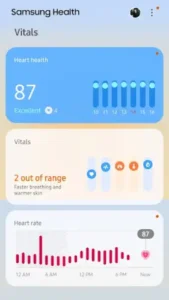
It means your breathing rate or skin temperature drifted outside your personal baseline, not that something is wrong with you. The app flags deviation, not diagnosis. A late meal, a tough workout, or a stressful week can push those numbers. Look at the pattern over several days. One orange dot is noise. Five in a row is a signal worth paying attention to.
How does the heart health score get calculated, and can I improve it?
It blends resting heart rate, heart rate variability, and activity consistency into a single number. An 87 with an “Excellent” tag means your cardiovascular markers are cooperating. You improve it by moving often, sleeping on a schedule and not treating cardio as a punishment. The score rewards rhythm, not heroics.
Is the cardio load metric worth watching, or is it just another number?
It is one of the more honest metrics in the app. “Optimal” at 21 percent means you are loading your system enough to adapt but not so much that you are digging a recovery hole. If it climbs into the red for days, your body is asking for a break. Listen to it.