

Think you need a $2,000 computer to create professional graphics? Tenada is quietly proving otherwise.
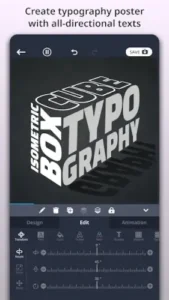

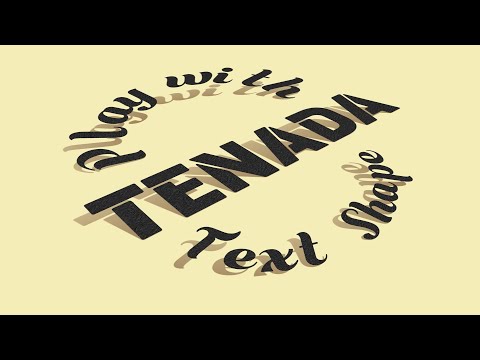
Tenada it’s a full 3D design suite that fits in your hand, yet delivers results that rival desktop applications with over 1M+ downloads, 4.8 stars.
How Tenada Closes the Desktop Mobile Gap
3D Design That Doesn’t Feel Like a Compromise
While most mobile apps offer flat, basic text tools, Tenada brings desktop-grade features to your smartphone:
-
Material realism: Apply concrete, metal, or fabric textures to text with adjustable bump mapping
-
Lighting control: Position virtual light sources to cast realistic shadows on your logos
-
Example workflow: Creating an animated neon sign effect in 3 steps:
-
Select “Neon 3D” template
-
Adjust glow intensity and color bleed
-
Export as transparent PNG for merchandise mockups
-
Animation That Doesn’t Require a Degree
After Effects demands weeks of learning. Tenada offers:
-
300+ motion presets for YouTube intros, logos, and social posts
-
Particle systems for professional-looking effects (no keyframing needed)
-
Real-world use case: Local bakeries creating animated Instagram story ads in 15 minutes
Tenada Features That Earn Their Keep
Templates With Actual Personality
Unlike generic Canva designs, Tenada’s templates:
-
Avoid visual clichés (no overused “corporate blue” gradients)
-
Encourage customization through layered PSD like editing
-
Integrate Unsplash photos seamlessly (no jarring stock photo look)
Layer Mode: The Desktop Secret Weapon
How Tenada mimics professional workflows:
-
Z-axis positioning for true 3D compositions
-
Blend modes for advanced texture mixing
-
Comparison point: Similar layer stack to Illustrator, but with touch optimized controls
Behind every 4.8 star rating are real designers with strong opinions. Here’s what they’re saying when no one’s listening, the genuine praise, the quiet frustrations, and the workarounds that make Tenada shine.
The Praise That Matters (From People Who Know Design)
Clients Can’t Tell It’s Mobile Made
The ultimate compliment:
-
Restaurant owners assuming their logo came from a design agency
-
Instagram influencers using Tenada’s particle effects for professional reels
-
Why this matters: When your $5/month app produces $500-quality work, the ROI speaks for itself
Desktop Grade Tools Without the Bloat
Specific features earning respect:
-
3D material editor that mimics Substance Painter’s basics
-
Particle systems comparable to After Effects’ Trapcode
-
Key difference: Tenada offers these through intuitive sliders, not 50-layer compositions
The Critiques That Need Addressing
Subscription Fatigue is Real
Freelancers note:
-
$60/year adds up vs. one-time $50 purchases like Procreate
-
Workaround: Use free version for mockups, then one-month PRO for final exports
Some Tools Play Hide and Seek
Common friction points:
-
Bump mapping controls buried in advanced settings
-
No in app glossary for terms like “chromakey smoothing”
-
Pro tip: Screenshot the tutorial pop-ups, they disappear forever after first use
Tenada vs. The Competition:
Vs. Logo Maker (4.3 stars)
-
Tenada wins on:
-
True 3D manipulation (not just faux-3D filters)
-
Frame by frame animation control
-
-
Logo Maker wins on:
-
AI generated logo concepts (Tenada requires manual design)
-
Faster one tap exports
-
Vs. PixelFlow (4.2 stars)
-
Tenada’s edge:
-
Full scene lighting control (not just text effects)
-
Realistic material textures (metal, glass, fabric)
-
-
PixelFlow’s advantage:
-
Specialized cinematic title presets
-
Better social media aspect ratio guides
-
Vs. Renderforest (4.0 stars)
-
Why Tenada dominates:
-
All processing happens on device (no cloud rendering queues)
-
More granular 3D camera control
-
-
Renderforest’s strength:
-
Team collaboration features
-
Brand kit storage
-

Pro Techniques You Won’t Find in Tutorials
How to Create Neon Effects in Tenada (Step by Step)
-
Start with “Glowing Text” template
-
In Material Editor:
-
Set Base Color to electric blue (#00F5FF)
-
Enable “Emission” at 150% intensity
-
-
Add Light Source:
-
Position 45° upper left
-
Choose purple tint for ambient glow
-
-
Final Touch:
-
Add “Light Bloom” effect from FX menu
-
Render at 1080p for clean edges
-
Export Hacks for Professionals
-
Chromakey Magic: Export animations with green background for easy compositing
-
PNG Sequences: For frame perfect editing in other apps
-
Template Frankensteining: Combine “Watercolor Background” with “Holographic Text” for unique hybrids
Conclusion :
Best For:
-
Content creators needing studio polish without studio prices
-
Small businesses creating branded assets in-house
-
Design students learning 3D principles on a budget
Not Ideal For:
-
Teams needing shared libraries or version control
-
Print designers requiring CMYK export
-
Subscription haters (free version has watermarks)
Tenada isn’t trying to replace your desktop apps, it’s giving you 80% of their power for 10% of the cost, available anywhere your phone goes. That tradeoff works for over a million designers. Will it work for you?
FAQ
Where can I download Tenada for my design projects?
Get Tenada from Google Play Store or visit the Tenada official website.
How do I create professional neon effects in Tenada?
Use the Glow Text template, adjust Emission intensity to 150%, add a colored light source, and finish with Light Bloom effect. For troubleshooting, email contact[at]tenadacorp.com.
Can I use Tenada for commercial designs without watermarks?
Yes, upgrade to Tenada PRO for watermark free exports and commercial licensing rights.
Does Tenada support team collaboration features?
No, it’s designed for individual creators. For team projects, consider Renderforest’s cloud platform.
What makes Tenada different from Canva?
Tenada offers true 3D design tools and animation controls, while Canva focuses on simpler 2D templates.