

TimeTune is not the kind of app that tries to make you feel productive.
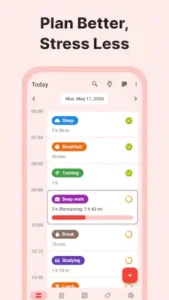

TimeTune does not hand out badges, streak rewards, or fireworks when you finish a task. What it does is simpler and harder. It breaks your day into blocks of time and lets you decide what goes into each one. It currently holds a 4.6 star rating from over 99,000 reviews on Google Play, with 5 million+ downloads. The install size sits around 20 MB to 30 MB, it supports Android 6.0 and up and the age rating is Everyone. These numbers reflect a clear positioning. It does not try to make you addicted. It tries to make sure you know where your time went at the end of the day.
What Is TimeTune
It is a free, ad-free time blocking app. The core function is to divide your day into segments, assign an activity to each segment and then set reminders, track duration, and generate templates.
It has been recommended by ADHD expert Jessica McCabe from the “How to ADHD” channel because it turns an abstract day into something concrete and executable. For people who get easily distracted, the value is not “increasing efficiency.” It is giving the day a shape. You know 7 to 8 AM is exercise, 8 to 9 AM is commute, 9 AM to 12 PM is deep work. That structure itself reduces cognitive load.
The free version of TimeTune already covers the core features: time blocks, templates, reminders and basic statistics. The Premium tier unlocks backup, cross device sync, advanced statistics and some customization options. You do not need to pay to use the main features, but if you switch phones, you cannot migrate your data without Premium.
TimeTune Mechanics of Time Blocking and Routine Planning
Time Blocks
Open the app and you see a timeline. Tap an empty space to create a time block. Choose an activity type (work, rest, exercise, study), set a start and end time. Activity types and colors are customizable. Time blocks in TimeTune are not a task list. They do not track whether something is done. They only track what that period of time belongs to. That distinction matters because it shifts focus from “completion” to “allocation.”
Templates and Automated Agendas
This is its most practical feature. You can create a template for a day, like a “workday template,” “weekend template” or “travel template.” The template contains all the time blocks and activity assignments. Create it once, and from then on you just apply the template to any given day and the schedule fills in automatically.
The value of TimeTune templates is that they automate repetitive planning. You do not need to re-arrange your day every morning. You only update the template when your routine changes. For people with regular schedules, this is a huge time saver. For people with irregular schedules, it at least gives a baseline you can adjust.
Custom Reminders
Each time block can have a reminder. The sound, vibration pattern, and voice prompts are all customizable. The custom reminders in TimeTune are especially useful for people who need an external signal to switch tasks, because the reminder is not “you should do this now.” It is “this time block has started.” That wording difference affects how you react to the reminder psychologically.
Overlap Indicator
If you accidentally schedule two time blocks in the same period, a visual indicator warns you. This was added in a recent update and solved a long standing pain point. Before, you had to spot overlapping blocks yourself.
TimeTune Statistics and Productivity Analysis
Activity Statistics
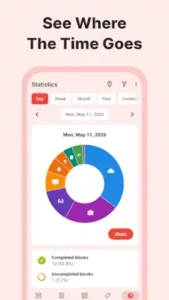
TimeTune tracks how much time you spend on each activity type, displayed by week, month and year. Time allocation statistics in TimeTune are not the kind of report that makes you feel guilty. They just lay the data out for you. You might discover you spent 50 hours on “work,” but 15 of those were actually spent switching between “commute” and “meetings.” Once you see that, you decide for yourself whether to adjust.
Data Visualization
Statistics are shown as charts, with colors matching your time blocks. You do not need to read numbers. One look at the color distribution tells you where your time went. This visualization is more intuitive than a table and more likely to trigger the “I need to change something” instinct than raw numbers.
TimeTune Design and Interface
The interface is clean, with moderate information density. The timeline is the main axis, and stats and data appear as cards. Dark mode follows the system. The interface of TimeTune has no flashy animations and no unnecessary decoration. Its design goal is to let you understand today’s schedule in three seconds.
But there is a problem that comes up repeatedly in user feedback. Some users lose their Premium access after updates, and the developer attributes it to account verification issues. Also, backup is locked behind the paywall. This means if you do not pay, switching phones or clearing data will wipe all your time blocks and templates. This design is questioned repeatedly in user reviews because backup is a basic function. It should not be a paid feature.
What Users Say About TimeTune
What users like
What users appreciate most is simplicity and lack of distraction. Core features are free, there are no ads, and the interface is not flashy. ADHD users report that time blocks give their days structure and reminders help them switch from one task to another. Custom reminders and colorful labels are mentioned repeatedly because they make the schedule visually easy to recognize.
Were changes are need it
Losing Premium access is the most concentrated complaint. Backup requiring payment is second. Some users also mention not being able to view data from previous months. Statistics only show recent data and reviewing older time allocation is not possible. These are specific functional limitations, not a problem with the design philosophy, but they do affect long term users.
Best Apps to Stop Wasting Time and Stay Productive
“Wasting time” usually does not happen because you are slacking off. It happens because you have not assigned a task to that time. Empty time gets filled by whatever requires the least brainpower. Scrolling short videos, mindlessly refreshing messages, switching between apps. TimeTune does not stop you from doing those things. It makes you decide what that time block belongs to first.
Its logic is different from apps that lock your phone or force focus mode. TimeTune does not restrict you. It only records you. When you look at your weekly statistics and see that “social apps” took up 15 hours, that number is more persuasive than any forced blocker. The core of TimeTune is not stopping you from wasting time. It is making sure you know exactly how much you wasted.
What’s the Easiest Way to Build a Daily Routine?
The routine that is easiest to stick to is not the one you designed perfectly. It is the one you do not have to re-decide every single day. That is the value of the template feature.
You build a “Workday Template” and slot in wake up, commute, work, lunch, break, exercise and sleep. From then on, you just apply the template each day without rethinking “how should I arrange today.” The template design in TimeTune is meant to drop the decision cost from once a day to once a week. You only update the template when your life rhythm changes. The rest is automated.
For people with ADHD or who get easily distracted, the value is not efficiency. It is reducing the feeling of being lost at the start of the day. You do not face a blank page. You face a structure that is already laid out.
Best Way to Track Your Daily Activities and Time Usage
People who manually track their time usually quit within three days. TimeTune’s approach is to let you record while you plan, instead of trying to remember it later.
When you create a time block, you are already defining what that period belongs to. At the end of the day, you do not need to recall “what did I do today.” You just look at the statistics. The time allocation statistics in TimeTune tell you how many hours you spent on “deep work,” “meetings” and “commute” this week. These numbers are not there to judge you. They are there to show you the “free time” you thought existed but actually did not.
Best Scheduling App for Busy Professionals
What busy people lack is not time. It is boundaries. The reminder feature in TimeTune solves the boundary problem. Each time block can have a reminder, and the sound, vibration and voice are all customizable.
The job of this reminder is not “nagging you to do something.” It is telling you this block is over. When you get stuck in a meeting and cannot pull away, the reminder for the next block tells you it is time to switch. The reminder design in TimeTune is different from most apps. It does not emphasize “start.” It emphasizes “switch.” For people with dense schedules, the switching boundary matters more than the starting one.
Is It Better to Schedule Everything or Stay Flexible?
That is a false choice. A fully packed schedule collapses the moment something unexpected happens. A fully flexible schedule turns into a blank void because there is no structure at all. TimeTune’s answer is to build a baseline, then leave room to adjust.
The practical method is this. Use templates to cover 80% of your routine and leave 20% open for spontaneous events. When the unexpected happens, you do not throw out the whole plan. You clear a specific day and apply a “Rest Day” or “Emergency” template. The clear function in TimeTune is built for exactly this. It keeps you from feeling powerless in front of a broken schedule. You reset and keep going.
TimeTune Tips
Use Templates for Routines
The template feature is the most underrated part of TimeTune. You can save the structure of an entire day as a template, like “Workday,” “Weekend” or “Travel.” Create it once, and whenever you need it, just apply the template to a specific date. The entire schedule populates automatically.
A frequent TimeTune tip on Reddit is to build a “baseline template” first, then tweak from there. Do not start planning from a blank slate every morning. The baseline template covers 80% of your normal routine. You only adjust the remaining 20% on the fly. This drops your planning time from ten minutes a day to ten minutes a week.
Set Custom Reminders for Focus
Reminder sounds, vibrations and voice prompts can be set individually. The value here is not just “reminding you to do something.” It is using an external signal to help you switch tasks.
If you find yourself stuck in one task and unable to pull away, or struggling to transition from a break back to work, give each time block a distinct sound. When the time comes, the sound plays and you know it is time to switch. Users on the app TimeTune ADHD forums mention this repeatedly. The reminder is not there to nag you. It is there to mark a boundary.
Check Statistics Regularly
Statistics are displayed by week, month and year, with colors matching your time blocks. Time allocation statistics in TimeTune are not a guilt trip report. They just lay the data out.
A practical habit is to review them for five minutes on Sunday night. You might discover you spent 50 hours on “work,” but 15 of those were actually spent commuting or sitting in meetings. Once you see that, you decide whether to change it. Data by itself changes nothing. Seeing the data is what triggers the shift.
Use the Overlap Indicator
If you accidentally schedule two time blocks in the same period, a visual indicator warns you. This feature was added recently and solves a long standing pain point.
An overlooked use case is to intentionally overlap things to test them. If you are not sure whether two activities can happen at the same time, schedule both and watch how the indicator responds. If it flags a conflict, your time allocation has an issue. This feature in the TimeTune app is not a restriction. It is a diagnostic tool.
Clear the Whole Day When Needed
When plans fall apart, you can wipe all time blocks for the day with one tap. The option is buried a bit deep, but it is much faster than deleting blocks one by one.
A practical scenario: you get sick or have to travel unexpectedly. Do not try to modify every single block. Just clear the day and apply a “Sick Day” or “Travel” template. The clear function in TimeTune solves the psychological hurdle of not wanting to face a broken schedule.
If you are searching for TimeTune codes, those searches usually point to app store promotions or community shared configuration snippets. The app itself does not run on redeemable codes. Premium subscriptions occasionally go on sale, but there is no “enter code to unlock” mechanism.
TimeTune Similar Apps
TimeTune vs WaterDo
WaterDo focuses on combining a to do list with scheduling. You create a task, assign a time, and check it off when done. TimeTune does not do “completion.” It only does “allocation.” If you need to know “did I finish it,” WaterDo is the right path. If you need to know “where did my time go,” TimeTune is a better fit.
TimeTune vs HabitNow
HabitNow focuses on habit tracking. You check in daily, maintain streaks and watch yourself stick to something. TimeTune does not track habits. It tracks time blocks. HabitNow is for “I want to build a habit.” TimeTune is for “I want to know how my day was structured.” They can be used together, but they solve different problems.
TimeTune vs N Calendar
N Calendar is an offline calendar and planning tool. The focus is on calendar views and event management. TimeTune adds time blocks and template automation on top of a calendar. If you only need a calendar, N Calendar is enough. If you need to slice your calendar into blocks and automate them, TimeTune is more complete.
TimeTune vs Weekly Planner
Weekly Planner focuses on weekly planning and notes. You write plans in a week view and record thoughts. TimeTune focuses on daily time blocks and templates. Weekly Planner is for “I want to plan this week.” TimeTune is for “I want to know what I am doing every hour today.”
If you are looking for TimeTune similar apps, the task route of WaterDo is another direction. It leans closer to a to-do list than time blocks.
As for searches like google lich, those usually point to Google Calendar alternatives. TimeTune is not a calendar replacement. It is a time blocking planner. They can be used together, but they cannot replace each other.
Conclusion
Who TimeTune Is For
People who want to break their day into structured time segments. ADHD users or anyone who needs external reminders to switch tasks. People who like template driven, automated scheduling. And anyone who does not need social features or gamified rewards and just wants a quiet time management tool.
Who Should Look Elsewhere
People who need free backup and cross device sync. People who want a to-do list rather than time blocks. People who require high stability for Premium access and cannot accept losing permissions after an update. And anyone expecting deeper statistics.
FAQ
Where is the safest place to download the TimeTune download and what does it cost?
You can download TimeTune from the Official Google Play Store. The app is free to download and use, with no ads interrupting your workflow. While the core time blocking and template features are free, you will need a Premium subscription if you want to back up your data or sync it across multiple devices.
Does TimeTune collect any data?
The Play Store declaration says no data is shared with third parties. It may collect app activity data. Data is encrypted in transit and you can request deletion. Compared to most productivity apps, its privacy stance is cleaner.
Can I use TimeTune without a premium subscription?
Yes. Time blocks, templates, reminders and basic statistics do not require payment. But if you switch phones or clear your data, you cannot back up or restore without Premium. All data will be lost. This is the biggest limitation of the free version.
Why did I lose my premium access after an update?
This is one of the most common issues in user feedback. The developer attributes it to account verification problems, usually an error when the app re-verifies subscription status after an update. The fix is to confirm your Google account and purchase history are intact, then try logging in again or contact the developer at: timetuneapp[at]gmail.com. The TimeTune reddit community has user shared troubleshooting steps, so search there first.
Is backup available without premium?
No. Backup is locked behind Premium. If you do not pay, switching phones or clearing data means all your time blocks and templates disappear. This design has been questioned repeatedly in user reviews, but the developer has not changed the policy.
Can I use TimeTune as a standard calendar replacement?
No. TimeTune is built for time blocking and routine planning, not for scheduling future appointments or syncing with Google Calendar. It focuses on the current day’s structure and tracking how long activities take. If you need a traditional calendar, you will still need a separate app for that.
Why do my statistics show incomplete blocks even when I finished the task?
TimeTune tracks the actual time spent in a block, not just your intention. If a block is set for 3 hours but you leave it early, it registers as incomplete. You have to manually check off the block when you are done to record it accurately in the statistics.