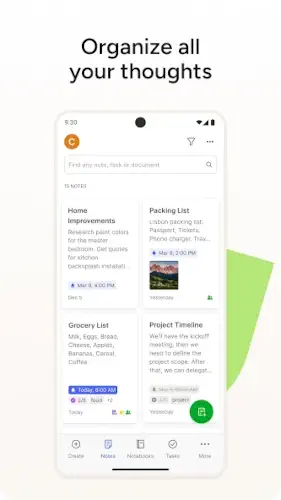
Evernote puts notes, scraps of paper, phone memos, andom text files in one place.
Evernote is not just a note taker. It is a second brain.
What is Evernote?
You are looking at a cross platform note taking and productivity app by Evernote, now owned by Bending Spoons, that lets you capture text, images, PDFs, scans, audio, and web clippings into searchable notes and notebooks, with added tasks, calendar integration, and AI powered tools.
Evernote is one of the original digital note taking platforms, launched in the late 2000s and now used by tens of millions of users worldwide as a central place to store and retrieve information. Under Bending Spoons, it has been repositioned as an AI enhanced note organizer that combines notes, tasks, schedule, and a customizable Home dashboard in one workspace. It is available on Android, iOS, web, Windows, and macOS, with a freemium model.
Evernote holds a 3.7 star rating from more than 1.85 million reviews. The app size is roughly 113 MB. The age rating is Everyone. The app is free with optional in app purchases for paid plans.
A cross platform note taking app with AI tools, tasks, and powerful search
The category matters here. Evernote is not just a note taking app. It is a note organizer. You can capture text, images, PDFs, scans, audio, and web clippings. The AI adds summarizing, action item extraction, and audio transcription. The search is powerful, with OCR for images and handwriting.
Who this tool was built for
Individuals who want a second brain for personal and work notes
If you have notes everywhere, Evernote consolidates them. The tool is for personal knowledge management.
Students who need to organize lecture notes, research, and study materials
Students can organize notes. They can scan handouts. They can clip web articles. The tool is for academic organization.
Professionals who need to capture meeting notes, documents, and projects
Professionals can capture meeting notes. They can store documents. They can manage projects. The tool is for work productivity.
Teams that need shared notebooks and collaboration features
Teams can share notebooks. They can collaborate in real time. They can assign tasks. The tool is for team productivity.
Evernote Main Features
Rich Notes with text, checklists, images, PDFs, sketches, audio, and web clippings
Notes are rich. Text. Checklists. Images. PDFs. Sketches. Audio. Web clippings. The media support is broad.
Document Scanning for receipts, business cards, whiteboards, and handwritten notes
You can scan documents. Receipts. Business cards. Whiteboards. Handwritten notes. The scanning is convenient.
Powerful Search with OCR for text in images and handwriting
The search is powerful. OCR finds text in images. OCR finds handwriting. The search is a core strength.
Tasks and To Dos with due dates and reminders
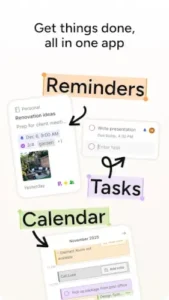
You can manage tasks. Due dates. Reminders. The tasks integrate with notes.
Google Calendar Integration for notes and tasks alongside events
You can integrate Google Calendar. Notes and tasks appear alongside events. The integration is seamless.
Home Dashboard for relevant notes, tasks, and upcoming events
The Home dashboard shows relevant notes. Tasks. Upcoming events. The dashboard is customizable.
Web Clipper to save articles, recipes, and web pages
You can save web pages. Articles. Recipes. The clipper is convenient.
AI Features for summarizing notes, extracting action items, and transcribing audio
The AI can summarize notes. Extract action items. Transcribe audio. The AI features are useful.
Collaboration and Spaces for shared notebooks and real time teamwork
You can share notebooks. Collaborate in real time. Leave comments. Assign tasks.
Templates for meeting notes, project plans, lectures, and more
Templates are available. Meeting notes. Project plans. Lectures. The templates speed up setup.
Evernote Graphics and Design
Clean, card based interface with left sidebar for notebooks and tags
The design is clean. The layout is card based. The left sidebar shows notebooks and tags. The design is functional.
Utilitarian and text focused, optimized for scanning lists and jumping between notebooks
The focus is on text. The design is utilitarian. You scan lists. You jump between notebooks. The design supports efficiency.
Easy to navigate and consistent across platforms
The app is easy to navigate. The design is consistent across platforms. The consistency is a strength.
Where the design works well
The app is functional. The navigation is clear. The design supports organization.
Where free tier limits and UI feel dated or busy affect the experience
The free tier is restrictive. The UI can feel busy. The design feels dated compared to newer apps.
What users say about the Evernote app
The parts people enjoy
Positive reviews often mention the search. The OCR is praised. The organization is useful.
The parts people complain about
No note taking app escapes criticism. Here is what comes up most often.
Restrictive free tier with limits on notes and devices
The free tier is limited. Notes are capped. Devices are capped. The limits frustrate users.
Price increases and perceived value compared to rivals
Prices have increased. The value is questioned. Rivals offer more for less.
Bugs and sync quirks on large libraries
Large libraries have issues. Syncing can be quirky. Bugs appear.
UI can feel busy or dated compared to newer minimalist apps
The UI is busy. It feels dated. Newer apps are more minimalist.
How the Evernote app mechanics work
Capture ideas, notes, scans, clippings, and audio across devices
You capture content across devices. Ideas. Notes. Scans. Clippings. Audio. The capture is seamless.
Organize notes into notebooks and tags with tasks and deadlines
You organize notes into notebooks. You add tags. You attach tasks and deadlines. The organization is flexible.
Retrieve information quickly using search, filters, and the Home dashboard
You retrieve information quickly. Search. Filters. Home dashboard. The retrieval is efficient.
Collaborate by sharing notes and notebooks, assigning tasks, and using AI summaries
You collaborate by sharing. Assigning tasks. Using AI summaries. The collaboration is integrated.
AI tools for summarizing notes, extracting action items, and transcribing audio
AI tools are integrated. Summarizing. Action items. Transcribing. The AI adds value.
Looking for another note taking app with powerful search and organization features? Check out Notion, a flexible all in one workspace with notes, databases, and project tracking.
Evernote Tips
You can start Evernote app and create your first note in seconds. Building a system that actually helps you find information later takes a little strategy. These tips help you organize without getting overwhelmed.
Use tags and notebooks together for flexible filtering
Here is a question. Why do some users find notes instantly while others scroll endlessly? They use tags.
Evernote tips from experienced users all say the same thing. Notebooks are broad containers. Tags are specific labels. A user who combines notebooks and tags creates a powerful filtering system. A user who only uses notebooks ends up with cluttered folders.
Leverage OCR and document scanning to find content later without perfect naming
Evernote similar apps have OCR. This tool has powerful OCR.
Scan documents. The app recognizes text in images and handwriting. A user who scans documents never needs to remember the exact name. A user who relies on manual naming loses information.
Set up templates for meeting notes, lectures, and project plans to save time
Evernote app has templates. Use them.
Set up templates for recurring tasks. Meeting notes. Lectures. Project plans. A user who uses templates saves time. A user who starts from scratch every time wastes effort.
Integrate Google Calendar so relevant notes and tasks appear with events
Evernote codes for free features are not needed. The calendar integration is included.
Connect Google Calendar. Notes and tasks appear alongside events. A user who integrates calendar prepares for meetings efficiently. A user who does not misses context.
Use Web Clipper strategically for research, reading lists, and quick references
The Web Clipper is a powerful tool. Use it wisely.
Clip articles for research. Clip recipes for cooking. Clip pages for reading lists. A user who clips strategically builds a knowledge base. A user who clips everything creates clutter.
Try AI features for summaries and action items from meeting and lecture recordings
Evernote app has AI features. Summaries. Action items. Transcription.
Use AI for meeting recordings. Use it for lectures. A user who uses AI saves time. A user who ignores AI does manual work.
Create a Home dashboard as a personal command center
The Home dashboard is customizable. Make it yours.
Pin important notes. Show upcoming tasks. Display calendar events. A user who customizes the dashboard works efficiently. A user who uses the default view misses opportunities.
Mind the free limits and track note count and device usage
The free tier has limits. Notes. Devices.
Track your usage. A user who tracks limits avoids surprises. A user who ignores limits hits a paywall unexpectedly.
Apps similar to Evernote
Notion
Notion is the most direct comparison for all in one workspaces. Notes, databases, tasks, wikis. Evernote similar apps should start here. The difference is that Notion is more flexible and powerful, but has a steeper learning curve. Good for users who want a customizable workspace beyond notes.
OneNote
OneNote is Microsoft’s note taking app. Free. Cross platform. Strong Office integration. The difference is that OneNote has less powerful search and fewer AI features. Good for users who are already in the Microsoft ecosystem.
Obsidian and Logseq
Obsidian and Logseq are local, linked note taking apps. Markdown based. Privacy focused. The difference is that they are offline first and more technical. Good for users who want control over their data.
Bear and UpNote
Bear and UpNote are elegant, fast note taking apps. Tags. Clean design. The difference is that they are simpler and less feature rich. Good for users who want a minimalist experience.
Evernote Community
No built in social feed
No feed. No public posts. The tool is for personal and team use.
Shared notebooks and Spaces for collaboration
Teams share notebooks. Spaces allow collaboration. Comments. Assignments. The collaboration is active.
Official forum and help center for user discussion
The official forum has discussions. Help center articles. User tips. The community is supportive.
External community on YouTube, Reddit, blogs, and productivity sites
Users share tips on YouTube. They discuss workflows on Evernote Reddit. They compare apps on blogs. The community is active.
Conclusion
Evernote works for three types of people. First, individuals who want a second brain for personal and work notes with powerful search and OCR. Second, students who need to organize lecture notes, research, and study materials. Third, professionals who need to capture meeting notes, documents, and projects with AI tools.
FAQ (Frequently asked questions about Evernote)
How do I get Evernote download on my phone?
Go to the Google Play Store if you use Android. Search for Evernote Note Organizer. The developer is Evernote Corporation / Bending Spoons. Tap install or use the direct link to Download Evernote from the Official Google Play Store.
Is Evernote free to use, or do I need to pay?
The app is free with limitations. You can create notes, scan documents, and use basic search without paying. The free tier limits you to 50 notes and one device. Paid plans remove these limits and add AI features, offline access, and more storage. Most users find the free version too restrictive for regular use.
Where can I find the official website and help documentation?
The official Evernote website has information about features, plans, and use cases: Official Evernote Website Link. For troubleshooting, user guides, and community discussions, check the Evernote Help Center or the community wiki: Evernote Wiki Link.
I have a problem with the app. Who do I contact?
Send an email to the Evernote support team. They handle account issues, billing problems, bug reports, and technical support. Here is the address: appstore-evernote-android[at]evernote.com. For Evernote download problems or installation issues, that same email applies. Include your device model, app version, and a description of the problem.
Is Evernote still worth using in 2026?
Evernote remains powerful for users who need strong search, OCR, and document scanning. The AI features for summarization and transcription are useful. However, the free tier is very restrictive. The pricing has increased. Newer apps like Notion and Obsidian offer more flexibility for less money. If you rely on OCR and scanning, Evernote is still hard to beat. If you primarily take text notes, alternatives may serve you better.