World of Solitaire takes the classic Klondike game we all remember from Windows PCs and adapts it for mobile without losing what made it special in the first place.
What You’re Actually Getting
At its core, this is the same solitaire you’ve played for years:
-
9,000+ variations of Klondike (so you’ll never run out of games)
-
No weird rule changes, it’s the real deal with alternating colors and foundation building
-
Works completely offline, which is rare for mobile games these days
But there are thoughtful upgrades:
Daily challenges that give you new puzzles to solve
Left hand mode (finally, a game that considers southpaws)
Customizable looks, change card backs and backgrounds when you want a fresh feel
The developers clearly focused on what matters:
-
Large, easy to tap areas so you don’t misplace cards
-
Smooth animations that make playing feel satisfying
-
A clean interface that doesn’t bombard you with ads
All About World of Solitaire: Klondike
If you remember the classic card game from your old Windows PC, World of Solitaire: Klondike brings that exact feeling back to your phone. This isn’t a complicated game with flashy effects. It is the pure, classic solitaire you already know and love, adapted perfectly for modern mobile devices.
A Familiar Friend with a Fresh Coat of Paint
The core of the app is the classic Klondike solitaire. You get a standard 52 card deck, and the goal is to move all the cards to the four foundation piles, sorted by suit in ascending order from Ace to King. You arrange cards on the tableau in alternating colors and descending order to uncover hidden cards and find your path to victory.
What Makes This Version Special?
-
Massive Content: It offers a staggering 9,000 unique stages. You will never run out of new challenges.
-
Play Anywhere: One of its best features is the complete offline mode. You can play on a plane, in a subway, or anywhere without Wi-Fi.
-
Modern Touches: It includes daily challenges to earn trophies, a star collection system, and various themes to customize the look and feel of your game.
-
Player Friendly Design: The app features large, easy to tap cards, simple one-finger controls, and even a left handed mode, making it accessible for everyone.
What Do Players Think?
The feedback is mostly positive, with the app boasting a strong 4.7 star rating from over 37,000 reviews on Google Play.
-
What Players Like: Many users appreciate its faithful recreation of the classic PC experience, the convenience of offline play, and the simple, clean interface.
-
What Players Mention: The most common complaint is about the frequency of ads in the free version. Some players have also noted that the undo function is limited, which can be frustrating in tricky situations. The developer has acknowledged the ad feedback.
How Can I Actually Win?
While luck plays a role, smart strategies significantly improve your chances. Here are a few key tips from expert solitaire players:
-
Reveal Hidden Cards First: Your priority should be to turn over face-down tableau cards. This gives you more options and is almost always a better move than just cycling through the stockpile.
-
Fill Empty Spaces with a King: If you empty a tableau column, the only card that can go there is a King. Do this as soon as possible to open up the new column and potentially uncover more cards.
-
Don’t Be Afraid to Undo: Use the undo button to test different moves, especially when you have a “split” (e.g., two different 7s you could place on an 8). Undo lets you see which path is better without risking the game.
-
Balance Your Foundations: Try to build up your foundation piles evenly. Don’t focus all your cards on one suit, or you might block yourself from moving other crucial cards later on.
What Players Notice
With over 37,000 reviews averaging 4.7 stars and over 1+ million downloads the feedback is telling:
What keeps people playing:
“It’s the closest thing to the Windows version I’ve found on mobile.”
“I play a few games every morning with my coffee, the daily challenges give me something new to try.”
“Being able to play on flights without WiFi is a game changer.”
Where it falls short:
“The undo button shouldn’t be a ‘limited use item’, that’s just frustrating.”
“Some deals feel impossible unless you use hints, which also cost resources.”
If you want pure solitaire without gimmicks, this delivers. But be ready for some old school difficulty spikes.
You’ll appreciate World of Solitaire if:
-
You miss the simplicity of classic PC solitaire
-
You want a game that doesn’t require constant internet
-
You prefer straightforward controls (one finger play works perfectly)
You might want to skip it if:
-
You’re looking for social features or multiplayer
-
You prefer modern solitaire variants with power ups
This isn’t trying to reinvent solitaire, it’s trying to perfect it. While the limited undo system can be annoying, the sheer number of games, clean presentation, and offline capability make it one of the better mobile options for purists.
How to Play Like You’ve Been Dealing Cards for Decades
Whether you’re new to solitaire or have been playing since the Windows 95 era, World of Solitaire rewards smart play. Here’s how to get the most out of your games:
For Beginners:
-
Always prioritize revealing hidden cards. That face down seven of spades could be the key to unlocking your entire game. Don’t get tunnel vision on building foundations – sometimes keeping cards in play creates more options.
-
Go easy on the undo button. Since undos are limited (more on this later), treat each move like it counts. Think two steps ahead before dragging cards.
-
Learn to spot automatic moves. The game will highlight obvious plays, but try to see them yourself first to build your skills.
For Seasoned Players:
-
Save your undos for “oh no” moments. That brutal level 4,872? That’s when you’ll want those precious undo tokens. Use them to test different strategies on tough boards.
-
Master the art of column balancing. Keep roughly equal numbers of cards in each column to maintain flexibility when you hit tricky spots.
-
Don’t sleep on daily challenges. These often contain clever board setups that’ll sharpen your skills for regular play.
Pro Moves Worth Trying:
-
Theme rotation isn’t just cosmetic. Switching between light and dark backgrounds can reduce eye fatigue during marathon sessions.
-
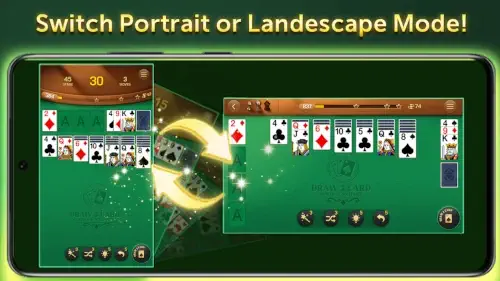
Play in landscape on tablets. The wider view helps you spot connections between columns you might miss in portrait.
-
When stuck, walk away. Like real cards, sometimes a fresh look reveals solutions your tired eyes missed.
How World of Solitaire Compares to Other Mobile Card Games
If you’re wondering how this stacks up against other options:
| Game | Best For | How World of Solitaire Differs |
|---|---|---|
| Solitaire Tripeaks | Fast, arcade style play | Focuses purely on traditional Klondike rules |
| Solitaire Farm | Relaxing theme progression | Offers deeper level based advancement |
| Microsoft Solitaire | Nostalgic Windows feel | Provides more game variants (Spider, FreeCell) |
World of Solitaire carves its niche by being the most faithful mobile version of classic Klondike, especially if you’re looking for a solitaire game that plays like the Windows version. It doesn’t try to be everything to everyone – just an excellent, no-nonsense digital card table.
Conclusion :
World of Solitaire succeeds by doing one thing exceptionally well: recreating that satisfying, methodical Klondike experience. With 9,000+ unique deals, it’s perfect if you want:
-
A true to form offline solitaire experience
-
Just enough modern touches (like daily challenges) to keep things interesting
-
No unnecessary social features cluttering the experience
You Might Prefer Something Else If:
-
You want flashy power ups or fast-paced variants
-
Social leaderboards are important to you
-
You prefer games with more explicit tutorials
World of Solitaire remains refreshingly honest. It’s not trying to be the most innovative card game – just the most reliable digital version of a timeless classic. For purists who judge a solitaire game by how closely it captures that Windows experience, this might be the closest you’ll find.
FAQ
Where can I download World of Solitaire?
Get the official World of Solitaire Klondike from the Google Play Store . Need help? Email solitaire[at]help.neowiz.com.
Does World of Solitaire work offline?
Yes! Once installed, you can play without an internet connection, perfect for flights or commutes.
Can I customize the card designs?
Absolutely. The game lets you change card backs, backgrounds, and even switch between portrait and landscape mode for better visibility.
Are there in app purchases?
The base game is free. Optional cosmetic upgrades (like special card decks) are available but don’t affect gameplay.
How do I reset my progress if I get stuck?
Go to Settings > Reset Game, or contact support at solitaire[at]help.neowiz.com for manual assistance.
8 thoughts on “World of Solitaire – Reproduce the style of Klondike Solitaire”