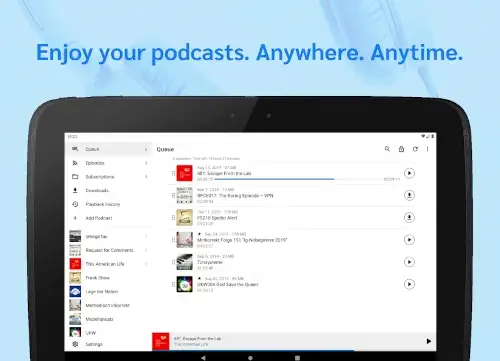
AntennaPod app delivers what others promise but rarely deliver: total control over your listening experience.
Why AntennaPod Feels Like Finding an Uncrowded Café in a Busy City
You know that feeling when an app just works without demanding anything in return? That’s AntennaPod.
No Ads, No Tracking, No Nonsense
-
Unlike Spotify or Pocket Casts, zero data is collected, not even your subscription list.
-
No “premium tiers” hiding essential features. Everything’s unlocked from day one.
Subscription Freedom (You’re Not Locked In)
-
Add podcasts via RSS feeds (even obscure ones), OPML imports (from other apps), or Apple Podcasts.
-
Password protected feeds? Covered. Private podcasts work seamlessly.
Automation That Actually Saves You Time
-
Set rules like:
-
“Download new episodes only on WiFi between 2AM–5AM.”
-
“Delete played episodes after 3 days, but keep my favorites forever.”
-
-
Sleep timer with volume fade out? Check. Shake your phone to reset it? Of course.
AntennaPod Features You’ll Use Daily (Not Just Show Off)
Playback Control That Adapts to You
-
Adjust speed from 0.5x (for dense interviews) to 3x (for slow talkers).
-
Chapter support lets you skip intros/ads with one tap.
Storage Management That Doesn’t Require Baby Sitting
-
Auto-delete old episodes (except those you favorite).
-
Queue management ensures continuous playback without gaps.
Backups You Can Actually Trust
-
Export subscriptions as OPML files (store them anywhere).
-
Sync with gPodder.net to restore your list if you switch devices.
What Listeners Think About AntennaPod
Let’s cut through the noise, here’s what actual users say about AntennaPod, along with actionable tips to fix common pain points and alternatives if it’s not your fit.
The Praise: Why Users Stick Around
-
“Finally, a podcast app that doesn’t treat me as the product.”
-
Unlike Spotify or Google Podcasts, AntennaPod doesn’t track your listening habits or sell data. At all.
-
Why it matters: Your subscription list stays private. No algorithms pushing “recommendations.”
-
-
“Automation saves me hours of manual cleanup.”
-
Set rules like *”auto download new episodes at 3AM on WiFi”* or “delete played episodes after 48 hours.”
-
Pro Tip: Combine this with gPodder.net sync to backup subscriptions automatically.
-
-
“The sleep timer with fade out is perfect for falling asleep.”
-
Unlike rigid timers in other apps, AntennaPod’s volume gradually decreases before stopping.
-
Bonus: Shake your phone to reset the timer without unlocking.
-
The Critiques (And How to Work Around Them)
-
“Needs better search across all my subscriptions.”
-
Current Workaround: Use the global search in the Discover tab, but note it only searches directories (not your library).
-
Future Hope: The dev team is exploring improvements here.
-
-
“Playlists would be a game changer.”
-
Alternatives for Now:
-
Use the queue to line up episodes manually.
-
Mark episodes as favorites for quick access.
-
-
-
“The UI feels basic compared to Pocket Casts.”
-
Tradeoff: The simplicity means no clutter, just your podcasts and controls.
-
How to Import OPML Files to AntennaPod (Step by Step)
-
Export Your Subscriptions from Your Current App
-
In apps like Pocket Casts or Apple Podcasts, look for Export to OPML in settings.
-
Save the file to Google Drive, Dropbox, or your phone’s storage.
-
-
Open AntennaPod → Settings → Import/Export
-
Tap “Import OPML” and select your file.
-
-
Wait for Subscriptions to Load
-
Large lists may take a minute. Ensure you’re on WiFi if syncing show artwork.
-
-
Verify Everything Transferred
-
Check that all podcasts appear under Subscriptions. Missing one? Manually add it via RSS.
-
-
Set Up Automation (Optional but Recommended)
-
Go to Settings → Network → Auto-Download to configure rules.
-
Pro Tip: Backup your OPML file periodically. Services like gPodder.net can sync subscriptions across devices.
Alternatives Compared
| App | Best For | Downsides |
|---|---|---|
| Podcast Addict | Playlist lovers | Ad supported, cluttered UI |
| Pocket Casts | Design-focused users | $10/year for sync |
| Spotify | Music + podcast listeners | Heavy tracking, no OPML |
Conclusion :
Ideal For:
-
Privacy-focused listeners (no tracking, no ads).
-
Tinkerers who love automation (auto download, smart deletion).
-
Open-source advocates who want transparency.
Not For:
-
Those who need built in social features (no sharing clips, no comments).
-
People who prefer algorithm driven recommendations.
AntennaPod isn’t trying to be everything to everyone, and that’s its strength. It does three things exceptionally well:
-
Respects your privacy (zero data collection).
-
Saves you time (automation that actually works).
-
Stays out of your way (no bloated features).
If you want a podcast app that prioritizes control over convenience, this is it.
AntennaPod FAQ :
How do I transfer my podcasts from another app to AntennaPod?
Export your subscriptions as an OPML file from your current app, then import it in AntennaPod’s settings. Works with most podcast apps. Download AntennaPod from Google Play Store
What are some AntennaPod unknown tricks most users miss?
Try shaking your phone to reset the sleep timer, or set up auto-downloads by WiFi network (home vs. work). For support: info[at]antennapod.org
Does AntennaPod work without an internet connection?
Yes! Downloaded episodes play offline, and you can schedule downloads for when you have WiFi. Official website
Can I use AntennaPod with private/paywalled podcasts?
Absolutely. Just enter the RSS feed URL and password in the “Add Podcast” section.
How often does AntennaPod get updates?
The open-source community releases updates every few months.