
UC Browser can define your entire online experience
UC Browser, a long standing contender that promises speed, privacy, and a suite of integrated features outside the mainstream. At the time of writing, the application holds a 4.3 star rating from over 50 million reviews on the Google Play Store, requires approximately 80 MB of storage, and is suitable for a general audience.
UC Browser Experience: Interface and Performance
What do you actually gain from installing a third party browser in 2025? The answer lies in the specific efficiencies it offers. UC Browser builds its case on a foundation of a streamlined interface and performance oriented features, but the real world experience reveals a more nuanced picture.
The design philosophy leans heavily into minimalism. The interface presents a clean homepage with a prominent search bar and quick access shortcuts to frequently visited sites. This approach prioritizes content visibility and reduces initial cognitive load, which is a significant benefit for users who find other browsers cluttered. However, this simplicity comes with a trade off. Does the clean UI enhance usability or lack advanced customization? The browser offers a selection of themes and layout adjustments, but users seeking the deep customization found in browsers like Firefox may find the options limited. The design serves its purpose well for straightforward navigation but may not satisfy power users.
Speed and data efficiency are central to the browser’s marketing. In practice, the browser does demonstrate competent page load times, particularly on stable Wi Fi connections. Its data compression technology can noticeably reduce mobile data consumption when browsing text heavy sites, a valuable feature for users with limited data plans. However, the claim of being a universally “lightweight” solution is less consistent. On older or lower spec devices, performance can sometimes stutter, especially when multiple tabs are open or when a page contains heavy media content. It is fast, but not always the fastest, and its performance is highly dependent on your specific device and network conditions.
The browsing mechanics are generally fluid. Tab management is intuitive, with a visual overview that makes switching between sessions simple. Gestures for navigation, like swiping to go forward or backward, work reliably. The overall feel is that of a competent, modern browser. It handles the basics without introducing friction, creating a smooth, if not particularly revolutionary, user experience for everyday web tasks.
UC Browser Feature Set: Beyond Basic Browsing
Where UC Browser attempts to distinguish itself is in its integrated toolkit. These features aim to create a self contained browsing environment, reducing the need to switch between different apps.
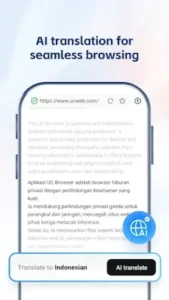
The AI translation and multi engine search functionality is a practical example. When you encounter a website in a foreign language, the browser can translate the entire page with a couple of taps. The translation quality is functional for grasping the general meaning of a page, though it may struggle with nuanced or complex phrasing. The ability to instantly switch search engines from the same search bar is also a subtle but useful productivity booster, allowing you to compare results from Google, Bing, or others without manual navigation.
The integrated video downloader is arguably the browser’s most prominent and controversial feature. It allows you to download video content directly from a wide array of websites with a single tap, saving it for offline viewing. The functionality is straightforward and effective for its intended purpose. However, this convenience raises immediate questions about copyright and ethical use. It is a powerful tool that demands responsible use, and it is crucial to only download content you have the legal right to access offline.
The ad blocking and privacy tools present a complex duality. The built in ad blocker does a respectable job of suppressing pop ups and intrusive banners, leading to a cleaner, faster browsing experience on many sites. This is a genuine quality of life improvement. Conversely, the optional built in VPN feature requires careful consideration. While it can help access region restricted content, the privacy policy and data handling practices of free, integrated VPNs are a common point of scrutiny among security conscious users. It provides a layer of obscurity but should not be conflated with the robust security of a dedicated, reputable VPN service.
UC Browser Daily Use and Management
A browser’s value is proven in daily use, through its ability to stay organized and run efficiently in the background.
Customization and organization are adequate for most users. You can personalize the home screen with your preferred sites and news feeds, and the bookmark manager and download folder are logically structured for easy retrieval. It covers the organizational basics well without offering groundbreaking new methods for managing information.
Battery and resource consumption is a mixed bag. The browser is generally efficient during casual browsing sessions. However, during prolonged use, especially with the video downloader active or multiple media heavy tabs open, it can have a noticeable impact on battery drain. It is not the most frugal browser on the market, but its consumption is typical for a feature rich application.
The social and sharing integration feels like a legacy feature. The ability to access quick shortcuts to platforms like Facebook and Twitter from within the browser is convenient for some, but for most users, it is a feature that duplicates the functionality of dedicated apps already on their phone. Its utility is largely dependent on your specific social media habits, and for many, it may simply add visual noise to the interface.
UC Browser Critique, Strengths and Shortcomings
Every tool has its limitations, and an honest review must weigh them against the benefits. For users comparing UC Browser similar apps or troubleshooting the UC Browser android experience, understanding these trade offs is essential.
Synthesizing global user sentiment reveals a clear divide. The community consistently praises the browser’s core utility features, particularly the integrated video downloader and the generally effective ad blocker that creates a cleaner viewing experience. The data saving mode also receives positive feedback from users with limited mobile data plans, making it a strong alternative to UC Browser mini for those seeking efficiency. However, these strengths are directly countered by a persistent wave of criticism.
The most vocal complaints focus on the very thing the browser claims to block: advertisements. Many users report that the browser itself has become a source of intrusive ads and push notifications, creating a frustrating paradox. Performance issues, such as occasional keyboard lag during typing and slower loading times on image heavy sites, are also frequently mentioned in reviews, particularly for the standard UC Browser app on older devices.
This leads directly to the central Ad Paradox. How can a browser with a dedicated ad blocking feature simultaneously be criticized for being ad heavy? The contradiction appears to stem from the app’s own monetization strategy. While the ad blocker can suppress ads on external websites, the browser’s own interface, such as its news feed and notification system, can promote sponsored content. This creates a user experience where you are protected from ads out there, but may be confronted with them in here. For a user who installed the browser specifically for an ad free experience, this can feel like a fundamental breach of trust.
The privacy and security standing of any browser is a legitimate concern. UC Browser states it employs encryption and offers privacy options like a incognito mode. However, the browser’s history and the opaque nature of its built in VPN have drawn scrutiny from security analysts over the years. When compared to the transparent, open source models of privacy focused competitors, UC Browser operates with less public accountability. Its security features provide a basic level of protection for casual browsing but may not meet the standards demanded by users handling highly sensitive information.
Optimizing Your UC Browser Use: A Power User’s Guide
To get the best from any software, you need to configure it to your needs. For those seeking practical UC Browser tips, these steps can significantly refine your daily experience.
Your essential first step configurations should happen immediately after installation. Before you do anything else, navigate to the settings menu. First, manage your notifications. Disable promotional alerts and news updates to prevent the notification spam that many users report. Second, activate the data saving mode if you browse on mobile data; this will compress images and reduce your data consumption from the start. Third, within the ad blocker settings, ensure it is enabled and set to its most aggressive filtering option. These three adjustments address the most common user grievances right away.
Leveraging the advanced features is where the browser’s utility shines. The download manager is more than just for videos. Use it to directly grab PDFs, APK files, and other documents from the web without redirects. For the AI translation, remember it works best on predominantly text based websites. For complex pages with lots of embedded media, the translation might be incomplete. The data saver is most effective on text and image heavy sites, but you may want to disable it when on Wi Fi for full quality media streaming. Understanding the ideal use case for each tool prevents frustration.
Regular maintenance and troubleshooting are key to sustained performance. If you encounter slow loading, your first action should be to clear the browsing cache and history from the settings menu. This often resolves performance hiccups. For persistent issues, check for app updates, as developers frequently release stability patches. If a specific website does not load correctly, try switching the user agent setting in the advanced menu to “Desktop.” This can sometimes bypass compatibility issues designed for other browsers.
Conclusion: A Primary Browser or a Specialist Tool?
So, where does UC Browser fit in the modern user’s toolkit? The answer is not universal, but highly specific to your needs and priorities.
This browser functions best as a powerful specialist tool rather than a primary, everyday browser. It is an excellent choice for the user who frequently needs to download online videos for offline access, who browses primarily on a limited data plan and needs robust compression, and who values the convenience of built in translation. For these specific use cases, its integrated features are genuinely difficult to replicate with other browsers without using multiple separate apps.
However, its drawbacks may outweigh its benefits for the user seeking a minimalist, private, and consistently fast browsing experience. If you are irritated by any form of advertising within your browser interface, if your primary concern is maximum privacy and transparency, or if you use a lower end device and need the absolute lightest possible application, you will likely find UC Browser frustrating. In these scenarios, a more streamlined or privacy focused alternative would be a better fit for your daily driver.
In the crowded mobile browser market, UC Browser carves out a viable niche by offering a suite of utilities that appeal to practical, data conscious users. It delivers on specific promises but comes with compromises in other areas. Your decision to use it depends entirely on which set of features you value more: integrated convenience or a pristine, minimalist, and private browsing environment.
Frequently Asked Questions
How effective is the AI translation feature for daily use?
The AI translation works well for getting the general meaning of text-heavy websites and articles. It’s particularly useful for quick translations while browsing, though complex sentences might lose some nuance.
Where can I find the official UC Browser download?
You can install the UC Browser from the Google Play Store. For technical support with installation or app functionality, contact UCWeb directly at help[at]idc.ucweb.com.
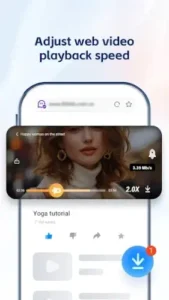
Can I adjust video playback speed in UC Browser?
Yes, the browser includes video playback controls that let you speed up or slow down videos directly within the player, which is useful for tutorials or lectures.
Is there a community wiki for tips and troubleshooting?
The UC Browser Wiki offers user generated guides on advanced features, troubleshooting common issues, and maximizing the browser’s utility.
How does UC Browser compare to other lightweight browsers?
UC Browser offers more integrated features like video downloading and AI translation compared to minimal browsers, but this comes with a larger app size and different privacy considerations than options like Brave or Opera Mini.