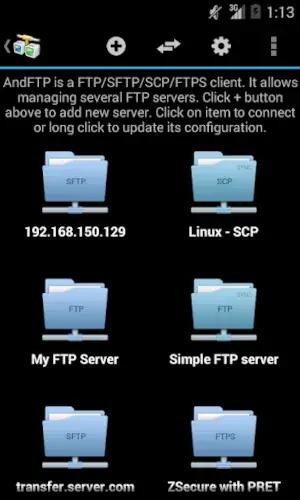
AndFTP operates with a specific, technical purpose.
AndFTP developed by LYSESOFT, its fundamental role is to act as a pragmatic bridge, enabling management of file transfers between an Android device and remote servers. This isn’t a general purpose file manager with added network features; it is a dedicated tool built around the mechanics of FTP, FTPS, SCP, and SFTP protocols. Its primary value proposition is consolidation. Instead of needing separate applications for different connection types, it provides a single, mobile friendly interface that handles them all. This makes it a practical answer for anyone searching for a reliable AndFTP SFTP client or a way to handle secure file transfers on the go, especially for tasks like managing website content or transferring project files.
AndFTP Functionality and Features: Beyond Basic Transfer
The app’s functionality is comprehensive, built around the needs of someone who regularly works with servers. The foundation is its protocol support and connection management. You can configure and save connections for a wide array of servers, standard FTP, encrypted FTPS, and the more secure SCP and SFTP. This allows for quick access to multiple frequently used servers, which is essential for developers or system administrators.
The dual pane navigation and file operations are the core of the user experience. The interface presents two panels: one showing the local files on your Android device and the other displaying the remote server’s file system. This layout makes uploading, downloading, and managing files across locations an intuitive drag and drop or tap to select process. Beyond simple transfers, it supports essential file operations on the remote server, such as renaming files and changing permissions (chmod), which are necessary for proper website or application maintenance.
Advanced functionality separates casual use from professional utility. Features like transfer resumption are invaluable for managing large files over potentially unstable mobile connections. Support for RSA and DSA SSH key authentication provides a more secure and convenient login method for SFTP/SCP connections compared to repeatedly entering passwords. The Pro version unlocks further capabilities like folder synchronization, which can automate the process of keeping local and remote directories identical, and the ability to run custom FTP commands for specific server management tasks. Finally, the integration and sharing feature allows you to upload files directly from other applications, like your gallery or a document editor, to a pre configured server without first saving the file locally, streamlining the workflow significantly.
AndFTP Interface and Design: Prioritizing Function Over Form
The visual and interactive design of AndFTP is best described as utilitarian. The interface is functional and no frills, prioritizing the clear presentation of information, file names, sizes, dates, and transfer statuses, over aesthetic flair. It uses a simple dark theme with clear icons, ensuring controls are accessible and the focus remains on the file lists and transfer queues. The design philosophy is centered on efficiency for technical users who need to accomplish a task quickly.
However, this focus on function comes with acknowledged trade offs. User feedback consistently highlights points of friction regarding stability, with reports of occasional app crashes during operations. The interface, while clear, lacks some modern conveniences and polish. The absence of certain sorting options, like filtering by file type, can make navigating directories with many files less efficient than in some newer file managers. This creates a clear picture: the design serves its primary purpose well but shows its age in terms of refinement and reliability.
AndFTP User Reviews: Practicality and Points of Friction
The user base presents a mixed but telling consensus. The aspects that work well are highly praised and often relate to specific, practical use cases. Its reliability for connecting to modded consoles, like the Nintendo Switch, for file management is frequently mentioned. The support for multiple protocols and the ability to save numerous server configurations is seen as a major convenience. For these tasks, the app is often described as effective and straightforward, providing the necessary AndFTP server setup capabilities without unnecessary complexity.
The drawbacks are equally consistent and impactful. The stability issues, primarily unexpected crashes, are the most common and serious complaint, undermining confidence in the app for critical transfers. The limitations of the free version, which locks advanced features like synchronization behind a Pro upgrade, are a point of contention for some users. Furthermore, the functional gaps, such as the lack of advanced sorting or a more modernized UI, are noted as areas where the app falls behind current standards, indicating that while it is capable, it may not be the most polished experience available.
Effective Usage of AndFTP : Configuring for Reliability
Getting the most out of AndFTP requires a focus on stability and precision in setup. The difference between a smooth experience and a frustrating one often comes down to how you configure the app and manage your connections. So, what does a reliable setup actually look like for a user who needs consistent performance?
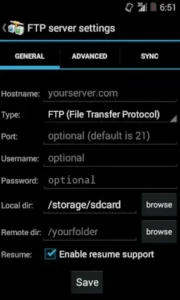
It begins with meticulous server configuration. When adding a new connection, accuracy is non-negotiable. A single typo in the hostname, username, password, or port number will cause a failure. For SFTP and SCP connections, moving beyond password authentication is a significant step toward both security and reliability. Generating and using RSA or DSA SSH keys eliminates the need to repeatedly enter passwords and provides a more secure handshake with the server. This process involves creating a key pair on your device, adding the public key to the authorized_keys file on your server, and then configuring AndFTP to use the private key for authentication. This method is far more robust and is a cornerstone of professional server management, making it a vital practice for anyone using this FTP client for your Android device for serious work.
Understanding the app’s behavior during transfers is another critical factor. While AndFTP can support background transfers to a degree, the most stable results come from keeping the app open and active on your screen during important file movements. Switching to other applications or letting the screen sleep can sometimes interrupt the connection, especially on devices with aggressive battery optimization. For large uploads or downloads, it is advisable to stay within the app until the transfer completes. Additionally, the resume function is your best friend when working with large files or unstable networks. If a transfer is interrupted, you can restart it, and the app will attempt to pick up where it left off, saving you time and bandwidth.
Development, Support, and Comparable Tools
For users who encounter issues that community knowledge cannot solve, the primary channel for support is direct email contact with the developer, LYSESOFT, at support[at]lysesoft.com. The developer has maintained the app for years and is generally responsive to bug reports and technical inquiries. The app also offers a Pro version, which unlocks advanced features like folder synchronization and the ability to execute custom commands, catering to users who require more than basic transfer capabilities.
When evaluating AndFTP, it’s helpful to understand its position among alternatives. Solid Explorer, for example, is a full featured file manager that includes FTP and SFTP support within a much more modern and polished interface. It’s an excellent choice for users who want network capabilities integrated into a broader file management tool. FileZilla Mobile offers a familiar experience for users of the desktop client but may not support as many protocols. This comparison clarifies AndFTP’s role: it is not the newest or most visually polished app, but it remains a dedicated, multi protocol workhorse focused specifically on the task of file transfer. It is for the user who needs a specific tool, not an all in one suite.
Conclusion :
The essential question is this: who will genuinely benefit from using AndFTP? The answer is specific and hinges on a clear tolerance for utility over polish. This app is a capable, albeit flawed, tool for an individual with a defined and recurring need for mobile FTP, SFTP, or SCP access. It is particularly well suited for technical tasks like quick server maintenance, uploading web content directly from a phone, or managing files on modded devices like the Nintendo Switch where its specific protocol support is directly applicable.
Its strengths are foundational and address core needs. The support for a wide array of protocols in a single application is genuinely valuable. The core functionality of transferring files, managing remote permissions, and storing multiple server profiles works effectively when the app is stable. However, a honest assessment requires acknowledging its significant weaknesses. The user interface is dated and lacks the fluidity of modern applications. The stability issues, manifested as occasional crashes, are its most serious drawback and can undermine its utility for critical tasks.
Therefore, the ideal user is someone who prioritizes function and specific feature sets above all else. Your satisfaction will be directly proportional to your need for its unique combination of protocols and your ability to overlook its lack of visual polish and occasional instability. If you require a reliable, polished, and modern-looking application for daily use, you will likely find better alternatives. But if you need a dedicated, powerful tool for specific technical file transfer jobs and are willing to configure it carefully, AndFTP continues to serve a narrow but important niche, proving that specialized function can sometimes outweigh a lack of universal appeal.
FAQ
Do I need root to use AndFTP on my Android device?
No, root access is not required. AndFTP functions as a standard Android application and only requires permissions to access your device’s local storage to upload or download files. It does not need elevated system permissions to connect to external FTP or SFTP servers. For technical support, you can contact the developer at support[at]lysesoft.com.
Where is the official source to download the app?
The primary and most secure source for AndFTP is the Google Play Store. This ensures you receive the authentic version with all current updates and security patches directly from the developer, LYSESOFT.
Is there a detailed wiki or guide for advanced server configuration?
While the app includes its own help section, detailed community-driven guides and configuration tips can often be found on tech forums and the app’s official listing pages. For specific protocol setups, searching for your server type alongside “AndFTP configuration” typically yields helpful results.
Who should I contact if I encounter a connection bug or crash?
The developer provides support primarily through email. You can report persistent issues, such as failed transfers or app instability, to support[at]lysesoft.com. Including details like your device model and Android version helps them diagnose problems.
Can I use AndFTP to manage files on my home computer or NAS?
Yes, absolutely. AndFTP is well suited for this. You can configure it to connect to a server running on your home network, such as a PC with an FTP server enabled or a Network Attached Storage (NAS) device that supports FTP or SFTP protocols, allowing you to manage files remotely.