Colorfy change the way most coloring apps give you brushes and expect you to draw.
Colorfy does the opposite. You tap. The color fills. No staying inside the lines. No worrying about brush pressure. Just choose a palette and tap your stress away. The question is whether that simplicity feels freeing or too limiting for anyone who wants more control.
What is Colorfy exactly?
You are looking at a digital coloring app that focuses on relaxation, creativity, and easy tap to color gameplay with a large library of mandalas, animals, florals, patterns, and art pages.
Colorfy comes from Wildlife Studios, the developer behind other casual mobile hits. The app is positioned as a stress relief and creativity tool. It is designed to help users relax, reduce everyday stress, and have fun through a digital coloring book format. It appeals to both casual users and adult coloring fans because the app offers a broad range of art styles, from simple pages to more detailed illustrations. It is easy to pick up, which makes it a popular pick any page and start coloring experience.
On Google Play, Colorfy holds a 3.8 star rating from more than 735K reviews. On the Apple App Store, it holds a 4.8 star rating from over 1 million reviews. The app size comes in at roughly 165 MB. The age rating is 4 and up. The app is free with in app purchases and offers a subscription called Colorfy Plus.
A digital coloring app focused on relaxation and easy tap to fill
The category matters here. Colorfy is not a drawing app. It is not a painting app. It is a coloring app. The difference is important. You do not draw lines. You fill pre made outlines. The tap to fill interface means you never worry about staying inside the lines. The app handles precision. You handle color choices. This makes Colorfy accessible to anyone, regardless of artistic skill.
Who this app was built for
Not every mobile artist will enjoy Colorfy. Here is who will.
Adults looking for stress relief through coloring
Adult coloring books became popular for a reason. The repetitive act of choosing colors and filling shapes calms the mind. Colorfy brings that experience to your phone. No pencils to sharpen. No pages to tear out. Just tap and relax.
Casual users who want simple, low pressure creativity
Not everyone wants to learn layers, blending modes, and brush settings. Colorfy removes those barriers. Open the app. Pick a page. Pick a palette. Tap. You are done in five minutes. The low pressure approach keeps creativity fun, not stressful.
People who enjoy mandalas, patterns, and florals
The library focuses on popular coloring categories. Mandalas for mindfulness. Patterns for repetition. Florals for beauty. Animals for fun. If these genres appeal to you, the selection will feel curated. If you prefer drawing people or landscapes, the library may feel limited.
Users who prefer tap to fill over freehand drawing
Drawing requires skill. Coloring requires patience. Tap to fill requires neither. You tap a section. The color spreads to the edges automatically. The result looks clean every time. This is perfect for users who want a finished piece without practicing technique.
Colorfy Main Features you will use
The app offers several features. Here are the ones that matter most.
Large coloring library with mandalas, animals, patterns, florals
The gallery is massive. Thousands of pages. New designs added regularly. Categories include mandalas, animals, patterns, florals, gardens, famous paintings, and more. You will never run out of pages to color.
Tap to color interface for simple and fast coloring
Tap any closed area. The color fills instantly. No dragging. No painting. No risk of going outside the lines. The interface is designed for speed. A simple mandala can be finished in under a minute. A complex page might take ten minutes.
Custom color palette selection instead of only color by number
Many coloring apps force you to use preset colors. Colorfy lets you choose. Pick any color from the wheel. Save custom palettes. Reuse them across pages. The freedom to choose is what separates Colorfy from simpler color by number apps.
Different brush types for advanced coloring effects
Not all taps are the same. You can switch brush types. Solid fill for flat color. Gradient for smooth transitions. Pattern brushes for texture. The brush options add depth for users who want more than basic coloring.
Upload your own drawings for digital coloring
Draw something on paper. Take a photo. Import it to Colorfy. The app converts your drawing into a colorable page. You then tap to fill your own artwork. This feature bridges physical and digital creativity.
Works offline with no Wi Fi needed
Colorfy does not require an internet connection. Download pages while online. Color them anywhere. On a plane. In a subway. At a cabin without Wi Fi. Offline support makes the app reliable for travel.
AR virtual gallery for viewing drawings in real world style
Finished artwork can be viewed in augmented reality. Place your colored page on a virtual wall. Walk around it. See it from different angles. The AR feature is novel. It is not the main reason to download the app, but it is fun to try.
Draw your own mandala mode
Not just coloring existing pages. You can generate mandalas. Choose symmetry. Choose complexity. The app creates a custom mandala for you to color. This mode adds variety when the standard gallery feels repetitive.
Community sharing and social media sharing
Finished pages can be shared. Inside the app to the Colorfy community. Outside to Instagram, Facebook, Pinterest, or messengers. Seeing others’ work inspires your own color choices.
Regular updates with new designs and content
The library grows. New pages appear weekly. Seasonal themes. Holiday specials. Collaborations with artists. Regular updates keep the app from feeling stale.
Colorfy Graphics and Design
Bright, gallery like interface
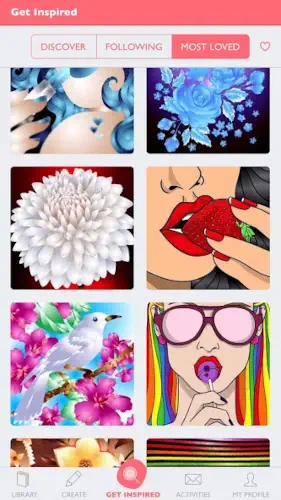
The app looks cheerful. Large thumbnails show you exactly what each page looks like. Categories are clearly labeled. The design encourages browsing.
Focus on art selection and coloring, not flashy menus
Menus are minimal. The coloring screen takes most of the space. Palettes appear when you need them and hide when you do not. The focus stays on the artwork.
Simple and intuitive layout
You never wonder where to tap. The color picker is obvious. The save button is clearly labeled. Undo and redo are easy to find. The layout works for all ages.
Where the design works well
The app is fast. Pages load quickly. Coloring responds instantly. No lag between tap and fill. The smooth performance makes the relaxing experience actually relaxing.
Where freemium limits may interrupt
The free version includes a limited selection of pages. Many attractive designs are locked behind the subscription. Popups encouraging you to upgrade appear regularly. These interruptions break the relaxation flow.
What users say about the Colorfy app
The parts people enjoy
Positive reviews often mention stress relief. Coloring helps users unwind after work or before bed. The variety of pages keeps things fresh. The tap to fill interface is called satisfying. The app is described as addictive in a good way.
One user wrote: “So relaxing. I color before bed every night. Helps me sleep better.”
The parts people complain about
No freemium app escapes criticism. Here is what comes up most often.
Free version has limited pages
The free gallery is small. You see many locked pages. The constant reminder that you are missing out frustrates some users.
Subscription price feels high for some users
Colorfy Plus costs money weekly, monthly, or yearly. Some users feel the price is too high for a coloring app. They compare it to buying a physical coloring book for a one time cost.
More pages and palettes needed for free experience
Even within the free tier, users want more options. More pages. More palettes. More brushes. The free version feels like an extended trial rather than a standalone product.
In app purchase prompts can be intrusive
Popups appear when you tap a locked page. Popups appear when you finish a free page. Popups appear when you open the app. The frequency annoys users who just want to color without being sold to.
How the coloring mechanics work
Choose a page from the gallery
Browse the library. Tap a thumbnail. The coloring screen opens. Free pages are marked clearly. Locked pages show a premium icon.
Pick a color palette
Tap the color picker. Choose from the default palette. Or create your own. Save custom palettes for future pages.
Tap areas to fill them with color
Tap any closed area on the page. The color fills instantly. The fill stops at the black lines. You never paint outside the lines.
Use different brush types for texture
Switch from solid fill to gradient. Or pattern. Or watercolor effect. Different brushes change how the color looks. Experiment to add depth.
Save finished artwork to device
Tap the save button. The finished page saves to your camera roll. Full resolution. No watermark in the free version.
Share to community or social media
Tap share. Post to the Colorfy community gallery. Or send to Instagram, Facebook, Pinterest, or messaging apps. Sharing is optional but encouraged.
Optional upload of own drawings
Tap the camera icon. Take a photo of a drawing on paper. The app converts it to a colorable outline. Then tap to fill your own artwork.
Looking for another relaxing coloring app with tap to fill controls? Check out Happy Color, a color by numbers app with a massive library of free pages and no subscription required.
Colorfy Tips
You can open Colorfy and start tapping in seconds. Getting the most out of the brush types, custom palettes, and mandala mode takes a little exploration. These tips separate users who make art they want to share from users who color the same few pages over and over.
Use a tablet for larger screens and easier detailed coloring
Here is a question. Why do some users finish complex pages faster and with less frustration? They use a tablet.
Colorfy app works on phones. It works better on tablets. The larger screen means bigger tap targets. Detailed pages with small sections become easier to fill. Your finger covers less of the artwork. You see more of the page at once. If you color regularly, try it on an iPad or Android tablet. The experience improves noticeably.
Try different brush types for texture and variety
Most users stick to the default solid fill brush. Flat colors. Clean edges. Gets the job done.
Colorfy tips from experienced colorists say otherwise. Switch to the gradient brush. Colors blend smoothly across a section. Switch to the pattern brush. Add stripes or dots or polka dots. Switch to the watercolor brush. Soft edges. Semi transparent layers. Different brushes turn a flat page into something that looks dimensional. Experiment. You might be surprised.
Save favorite finished pieces for sharing later
You finish a page. You feel proud. You close the app. That pride fades when you cannot find the page later.
Save every finished piece to your device. The app saves to your camera roll automatically if you enable the setting. Or tap save manually. Build a gallery of your work. Share it on social media weeks later. Compare old pages to new ones. See how your color choices improve over time.
Use custom palettes for more creative control
The default palettes are fine. The app includes many presets. But you are not limited to them.
Tap the custom palette option. Pick any color from the wheel. Adjust saturation and brightness. Save that color. Build a palette of your own. A sunset palette with oranges, pinks, and purples. A ocean palette with blues, teals, and whites. A forest palette with greens, browns, and yellows. Custom palettes make your artwork distinct from everyone else’s.
Explore mandala mode for quick repetitive stress relief
The gallery has many pages. Mandala mode is something else.
Open mandala mode. Choose symmetry. 4 way. 6 way. 8 way. Choose complexity. Simple shapes or intricate patterns. The app generates a custom mandala. Color it. The symmetry means each tap repeats across the mandala. You fill one section, and six others fill identically. The effect is meditative. Quick. Satisfying.
Upload your own drawings to personalize the app
Colorfy coloring book app includes thousands of pages. But none of them are yours.
Draw something on paper. A flower. A portrait. A doodle. Take a clear photo. Import it to Colorfy. The app converts the photo to a black and white outline. Now you tap to color your own drawing. This feature turns the app from a generic coloring book into a personal art tool.
Use offline mode during travel when Wi Fi is unavailable
Colorfy works without internet. Download pages while you have Wi Fi. Color them on a plane, in a car, or anywhere without a signal.
Offline mode is reliable. No lag. No popups asking you to connect. The app caches pages you have opened. You can also manually download pages for offline access. Use this feature during travel. You will not miss coloring sessions just because you are away from Wi Fi.
Start with simpler pages before moving to detailed art
New users open the app and pick the most beautiful, detailed page they see. Then they feel overwhelmed. Too many small sections. Too many color decisions.
Start simple. Pick a mandala with large sections. Or a pattern with repeating shapes. Finish that page. Feel the satisfaction. Then move to more detailed art. Working up gradually keeps the experience relaxing, not frustrating. Colorfy art can be as simple or complex as you want. Choose complexity that matches your mood.
Apps similar to Colorfy
If you like Colorfy, here are five other apps worth your time. Each offers something similar with a different twist.
Happy Color
Happy Color is perhaps the simplest coloring app. Color by numbers. Tap a number. Tap the matching color. The section fills. No choices. No decisions. Colorfy similar apps should start here if you want even less decision making. The difference is that Happy Color has no custom palettes and no brush options. Good for users who want pure, mindless relaxation.
Pigment
Pigment is a premium coloring app with realistic brushes and high quality pages. The tools are more advanced. The subscription costs more. The difference is that Pigment is for users who want to feel like they are using real art supplies. Good for colorists who outgrow Colorfy’s simplicity.
Recolor
Recolor focuses on adult coloring with a calm design style. Large library. Daily new pages. The difference is that Recolor has more detailed illustrations and a stronger community focus. Good for users who want variety and social features.
Lake
Lake is a coloring app that collaborates with real artists. The pages are curated. The art style is distinctive. The difference is that Lake has a smaller library but higher quality illustrations. Good for users who want unique art they cannot find elsewhere.
Color by Number apps
The category of color by number apps is large. Many options. Most work the same way. Tap. Fill. Relax. The difference is that most have no custom palette options and no brush variety. Good for users who want the simplest possible experience.

Colorfy Community
Colorfy includes community features, but the app is not a social network.
View and share drawings with users around the world
The in app community gallery shows finished pages from other users. You can browse. You can like. You can leave comments. You can post your own work. The community is positive. No harsh criticism. Just people sharing art they enjoyed making.
Share finished creations to social networks
Beyond the in app community, Colorfy supports sharing to Instagram, Facebook, Pinterest, and messengers. Tap share. Choose the platform. Add a caption. Post. Your followers see your artwork. This feature is for users who want to show off their color choices.
Participate in broader coloring communities
External communities exist on Reddit, Facebook, and Discord. Users share Colorfy pages there. They discuss favorite palettes. They suggest pages worth coloring. The external communities are more active than the in app gallery. Join them if you want deeper discussion.
Community oriented but still personal and relaxing
The social features are optional. You can ignore the community entirely and still enjoy the app. The core experience is personal and relaxing. Sharing is extra. Not required. Not pushed. The community exists for users who want it and stays quiet for users who do not.
Conclusion
Colorfy works for three types of people. First, adults looking for stress relief through a simple, repetitive creative activity. Second, casual users who want to make pretty art without learning drawing skills. Third, people who enjoy mandalas, patterns, and florals and prefer tap to fill over freehand drawing.
If you fit any of those, the download is worth trying.
Free version has limited pages. Subscription price feels high for a coloring app. More pages and palettes are needed for a satisfying free experience. In app purchase prompts can be intrusive. The constant reminders to upgrade interrupt the relaxation.
None of these are deal breakers for the right user. But they are honest warnings.
Do you want a simple, relaxing coloring app and are willing to pay a subscription for full access? Or would you rather use a free app with ads or a one time purchase app with fewer features?
If the first one, Colorfy offers a polished, stress free coloring experience with thousands of pages. If the second one, look at Happy Color for free color by numbers or Pigment for a premium alternative. Both answers are fine. Just know what you want.
Frequently asked questions about Colorfy
How do I get Colorfy download on my phone?
Go to the Google Play Store, Search for Colorfy Coloring Book Games. The developer is Wildlife Studios. Tap install or use the direct link to Download Colorfy from the Official Google Play Store
Is Colorfy free to use, or do I need to pay?
The app is free to download. You can color hundreds of pages without paying. The free tier includes ads and a limited selection of pages. Colorfy Plus is a subscription that removes ads, unlocks the full library of thousands of pages, adds exclusive palettes and brushes, and includes new weekly content. Subscription options include weekly, monthly, or yearly plans. Most casual users find the free version sufficient.
Where can I find the official website and help documentation?
The official website has information about features, subscriptions, and updates: Official Colorfy Website
I have a problem with the app. Who do I contact?
Send an email to the developer support team. They handle account issues, billing problems, bug reports, and feature requests. Here is the address: support+colorfyandroid[at]fungames-forfree.com.
Can I use Colorfy offline without Wi Fi?
Yes. Colorfy works offline. Download pages while you have an internet connection. Color them anywhere. On a plane. In a subway. At a cabin. No Wi Fi needed. The free version includes offline access for pages you have already opened. The subscription allows you to download any page for offline use. Offline mode works smoothly with no lag or popups. Perfect for travel or commuting.