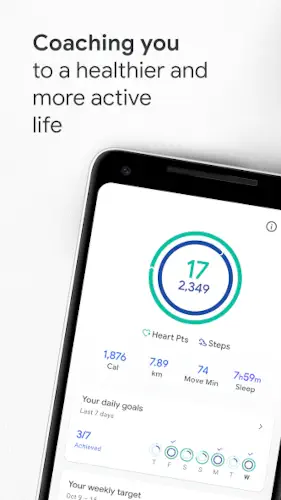
Google Fit turns your phone into a personal activity tracker with a system that actually rewards you for moving more.
Google Fit is developed by Google LLC in collaboration with the World Health Organization and the American Heart Association, this free app centers on Heart Points, a goal system that gives you one point per minute of moderate activity and two points per minute of intense activity. With over 100 million downloads and a 4.0 star rating from roughly 686,000 reviews on Google Play, Google Fit has become one of the most widely used fitness apps on Android. The app requires no subscription, no ads and works with your phone or Wear OS smartwatch.
What Is Google Fit?
Google Fit is a free, ad-free health and fitness app that automatically logs your steps, workouts and heart rate data while syncing with popular fitness apps and devices. It is designed for users who want to improve cardiovascular health, sleep and mental well being without a paid subscription or a complicated setup.
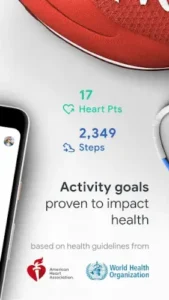
The app was built with guidance from the World Health Organization and the American Heart Association. That collaboration shapes the Heart Points system, which is designed to encourage the kind of activity that actually improves heart health. You are not just chasing a step count. You are earning points for movement that gets your heart pumping.
Heart Points and Steps Goals
Heart Points are the core of Google Fit’s motivation system. Moderate activity like brisk walking earns one point per minute. Intense activity like running earns two points per minute. The American Heart Association recommends at least 150 minutes of moderate activity or 75 minutes of intense activity per week, and Heart Points are designed to help you hit that target.
You can also set daily Step goals and adjust them as your fitness improves. The combination of Heart Points and Steps gives you two ways to measure progress. Some days you might focus on movement. Other days you might focus on intensity.
Automatic Activity Detection
Google Fit detects walking, running, and biking automatically using your phone or watch sensors. You do not have to remember to start a workout. The app notices when you are moving and logs the activity to your journal. That matters because most people forget to track their movement. Google Fit removes that friction entirely.
The app also supports manual workout tracking for activities like pilates, rowing and spinning. When you start a workout manually, you get real time stats including speed, pace, route and heart rate.
Integration and Free Access
Google Fit syncs with Lifesum, Nike+, Runkeeper, Strava, MyFitnessPal, Sleep as Android, Withings and Xiaomi Mi bands. If you already use another fitness app, Google Fit can pull that data into a single view. The app is completely free with no ads and no in-app purchases. There is no premium tier. Everything is available without paying.
Google Fit Core Features
Google Fit is not trying to be the most feature-packed fitness app on Android. It is trying to be the simplest one that actually works without a subscription. Every feature is designed around one goal: getting you to move more without making you think about it. Here is what actually matters and why each piece earns its place.
Automatic Activity Detection
Google Fit detects walking, running and biking automatically using your phone or watch sensors. You do not have to press start. You do not have to remember to log anything. The app notices when you are moving and adds the activity to your journal.
That matters more than it sounds. Most people forget to track their movement. They go for a walk, come home, and never open the app. Google Fit removes that friction entirely. The tracking happens in the background while you live your life. When you check the app later, the activity is already there.
Manual Workout Tracking
When you want more control, Google Fit lets you start a workout manually. You can choose from walk, run, bike, pilates, rowing, spinning and more. During the workout, you see real time stats including speed, pace, route and heart rate. The app uses your phone’s sensors or a Wear OS smartwatch’s heart rate sensor.
This is the feature for people who want to be intentional about their exercise. Automatic detection catches casual movement. Manual tracking captures the workouts you actually plan. Both matter, and Google Fit handles both.
Heart Points and Steps Goals
Heart Points are the core of Google Fit’s motivation system. One point per minute of moderate activity. Two points per minute of intense activity. The American Heart Association recommends at least 150 minutes of moderate activity per week and Heart Points are designed to help you hit that target .
You can also set daily Step goals and adjust them as your fitness improves. The combination of Heart Points and Steps gives you two ways to measure progress. Some days you focus on movement. Other days you focus on intensity. Either way, the app tracks it.
Paced Walking
Paced walking is a small feature that makes a real difference. You start a paced walking workout and the app plays a beat for you to step to. Matching your pace to the beat encourages faster walking. That matters because walking faster burns more calories and earns Heart Points more quickly.
It is a simple idea executed well. You do not have to think about your pace. The app handles it. You just step to the beat and let the points accumulate.
Heart Rate and Respiratory Rate Measurement
Google Fit lets you measure your heart rate using your phone’s camera. You place your finger over the lens and the app reads your pulse. Respiratory rate measurement is also available on selected devices. This gives you basic health insights without needing a separate heart-rate monitor or wearable.
It is not going to replace a chest strap or a medical grade device. But for casual check-ins, it works well enough. You get a general sense of your heart rate and breathing patterns without extra equipment.
Connect with Apps and Devices
Google Fit syncs with Lifesum, Nike+, Runkeeper, Strava, MyFitnessPal, Sleep as Android, Withings, Xiaomi Mi bands and more. If you already use another fitness app, Google Fit pulls that data into one place. You get a holistic view of your health across apps and devices.
The integration is what separates Google Fit from standalone trackers. You are not locked into one ecosystem. You can use the apps you already love and still see everything in Google Fit.
Journal and Browse Tabs
The Journal tab shows a snapshot of your activity history. The Browse tab contains all your health and wellness data in one place. The redesign makes both tabs easier to navigate. You can quickly see what you did yesterday, last week or last month without digging through menus.
The two tab structure keeps things simple. Journal is for activity. Browse is for everything else. No confusion about where to find what you need.
Widgets and Wear OS Tiles
A home-screen widget gives you quick stats without opening the app. On Wear OS, you can set up a tile and complication for at a glance access. If you wear a smartwatch, you can check your Heart Points or steps with a glance at your wrist.
That convenience matters. The easier it is to see your progress, the more likely you are to stay motivated. Google Fit makes progress visible without requiring you to open the app.
Privacy and Data Safety
Google Fit states no data is shared with third parties. The app may collect location, personal info, and other data types. Data is encrypted in transit and can be deleted on request. This is standard for a Google app, though it is worth understanding before you install.
The trade-off is clear. You get a free, ad-free fitness tracker that works across your devices. In exchange, Google collects some data to operate the service. If that works for you, Google Fit delivers real value.
Google Fit Graphics and Design
Google Fit uses a clean, modern UI with redesigned Journal and Browse tabs that make navigation easy. The design focuses on readability and quick access to stats. Widgets and Wear OS integration provide at a glance access to your activity data without opening the app.
There are minimal visual distractions. No flashy animations or themes. The emphasis is on function over form. Dark mode support means the app works with Android’s system dark mode. The overall design is simple and utilitarian, matching its role as a health and activity tracker.
What Users Say About Google Fit App
What Works
Users appreciate the automatic detection of walking, running and biking. Many like the WHO and AHA backed Heart Points system for encouraging regular activity. The app is free and ad-free, which makes it accessible to everyone. Wear OS users value the tile and complication features. The broad integration with other fitness apps gives a holistic view of health data.
Where The App Could Improve
Common criticisms include step counting inaccuracies. Some users report steps not being counted or being undercounted even during logged workouts. Syncing issues are another complaint, with apps no longer syncing properly and Google Fit blocking connections it previously allowed. Step counts and Heart Points sometimes take 30 seconds or more to update or do not update at all. Some users report Heart Points or steps decreasing after being earned, which can demotivate streak keepers. There is also no way to edit the duration of a workout if you forget to end it, leading to inaccurate tracking.
Check out Samsung Health for a more feature rich health tracking alternative or explore the full collection of Health & Fitness apps to find your next fitness tool.
Google Fit Tips and Tricks
Beginner Advice
Enable automatic activity detection. This is the first thing you should do after installing Google Fit. Let the app detect walks, runs and bikes without you pressing start . Most people forget to track their movement and automatic detection solves that problem. You just live your life. Google Fit logs the rest.
Use paced walking for extra credit. When you go for a walk, start a paced walking workout instead of just walking. The app plays a beat for you to step to, which nudges you to walk faster. Faster walking earns Heart Points more quickly. You do not have to think about it. Just step to the beat and let the points add up.
Sync with your favorite fitness apps. Connect Strava, MyFitnessPal, Lifesum, Runkeeper or whichever apps you already use. Google Fit pulls that data into one view. You get a holistic picture of your health without abandoning the apps you love. The integration is what makes Google Fit useful even if you do not use it as your primary tracker.
Use Wear OS for convenience. If you have a Wear OS smartwatch, set up the Google Fit tile and complication. You can check your Heart Points or steps with a glance at your wrist. The less friction there is between you and your progress, the more likely you are to stay motivated.
Measure heart rate and respiratory rate. Google Fit lets you measure your heart rate using your phone camera. Respiratory rate measurement is available on selected devices. These are not medical grade measurements. They are casual check-ins that give you a general sense of how your body is doing. Use them as a rough guide, not a diagnosis.
Adjust goals as needed. If you are hitting your Step and Heart Points goals every day without effort, increase them. If you are consistently missing them, decrease them. Goals should challenge you without discouraging you. Find the target that keeps you moving without making you feel like a failure.
Check Journal and Browse regularly. The Journal tab shows your activity history snapshot. The Browse tab contains all your health and wellness data. Review both regularly. Seeing your progress over time is one of the strongest motivators. If you never look at the data, the tracking does nothing for you.
Set realistic daily goals. Do not start with 10,000 steps and 60 Heart Points if you currently walk 2,000 steps a day. Start where you are and build up. Realistic goals create momentum. Unrealistic goals create frustration.
Explore connected apps for a fuller picture. Google Fit is one piece of a larger health picture. If you track nutrition, sleep or specific workouts in other apps, connect them. The more data you pull into Google Fit, the more useful the app becomes.
Review privacy settings to understand data collection. Google Fit may collect location, personal info and other data types. Data is encrypted in transit and can be deleted on request. If you are privacy-conscious, review the settings and decide what you are comfortable sharing.
Advanced Strategy
Use Strava or Runkeeper for detailed workout data. Google Fit handles basic tracking well, but Strava and Runkeeper offer more detailed metrics for running and cycling. Connect them to Google Fit so the data flows into your Journal. You get the depth of a specialized app with the holistic view of Google Fit.
Combine with MyFitnessPal for nutrition tracking. Google Fit tracks movement. MyFitnessPal tracks calories and nutrition. Connect them to see how your activity and diet interact. If you are trying to lose weight or build muscle, the combination is more useful than either app alone.
Sync with sleep apps for a holistic health view. Apps like Sleep as Android track your sleep patterns. Connect them to Google Fit to see how sleep affects your activity and heart rate. Poor sleep often shows up in reduced movement and lower Heart Points. Seeing that connection can motivate you to prioritize rest.
Set custom Heart Points targets for specific goals. If you are training for a race or trying to improve cardiovascular health, set a higher Heart Points target than the default. If you are recovering from injury, set a lower one. The target should match your current goal, not a generic recommendation.
Use Wear OS tiles for quick access. Set up a Google Fit tile on your smartwatch so you can check your progress with a glance. You do not have to pull out your phone. You just look at your wrist. That convenience keeps you aware of your progress throughout the day.
Track progress over months, not days. Daily fluctuations in steps and Heart Points are normal. What matters is the trend over weeks and months. If your average daily movement is increasing, you are making progress, even if one day looks bad.
Connect Xiaomi Mi bands for continuous tracking. Xiaomi Mi bands are affordable wearables that track steps and heart rate continuously. Connect yours to Google Fit for a more complete picture of your day. You do not need an expensive smartwatch to benefit from continuous tracking.
Use Withings devices for blood pressure and weight. Withings makes scales and blood pressure monitors that sync with Google Fit . If you track weight or blood pressure, the integration gives you a more complete health picture. Movement is one piece. Weight and blood pressure are others.
Adjust goals seasonally as fitness improves. Your fitness changes with the seasons. You might walk more in spring and less in winter. You might run more when training for a race. Adjust your goals to match your current capacity. Goals that stay static become irrelevant.
Join fitness communities for motivation. The Google Fit subreddit and other online communities share tips, progress updates and encouragement. Seeing other people’s progress can motivate you to keep going. You do not have to do this alone.
Google Fit Similar Apps
| App | Similarity | Key Difference |
|---|---|---|
| Google Fit | Free activity tracking with Heart Points and integration | WHO/AHA backed goals, automatic detection, broad app syncing, completely free. |
| Samsung Health | Comprehensive health tracking (steps, sleep, heart rate) | More features but heavier UI. Samsung Health offers deeper sleep tracking and stress monitoring. |
| Fitbit | Detailed fitness and sleep tracking | Strong wearable integration. Fitbit requires a subscription for premium features and works best with Fitbit devices. |
| Strava | Running, cycling and social fitness | Social oriented with detailed workout data. Strava requires a subscription for advanced features. |
| MyFitnessPal | Calorie and nutrition tracking | Focuses on diet and exercise logging. MyFitnessPal requires a subscription for premium features. |
Google Fit is the best free option for users who want simple tracking with WHO and AHA backed goals. Samsung Health is better if you have a Samsung device and want deeper health metrics. Fitbit and Strava are better for serious athletes who want detailed workout data. MyFitnessPal is the best choice if nutrition tracking is your priority.
Who Is Google Fit For?
Google Fit is for users who want simple, free activity tracking without a subscription or a complicated setup. If you just want to know how many steps you took and how much moderate activity you accumulated, Google Fit delivers that without asking for money.
People who value WHO and AHA backed goals will appreciate the Heart Points system. It is not a random metric invented by a tech company. It is based on established cardiovascular health guidelines. That gives the goals more meaning than a generic step count.
Anyone with multiple fitness apps or devices will benefit from Google Fit’s integration. If you use Strava for running, MyFitnessPal for nutrition and a Xiaomi Mi band for step tracking, Google Fit pulls all that data into one place. You get a holistic view without abandoning your favorite apps.
Users who prefer function over form will feel at home with Google Fit. The app is not trying to win design awards. It is trying to track your activity and get out of your way. If that sounds like what you want, Google Fit is worth trying.
Conclusion
Google Fit delivers a free, ad-free activity tracking experience that stands out for its simplicity and integration. The Heart Points system gives you a meaningful way to measure cardiovascular activity. Automatic detection captures movement without requiring you to press start. The broad app and device syncing gives you a holistic view of your health. And the price is hard to beat.
The app has limitations. Step counting inaccuracies affect some users. Syncing issues can disrupt the flow of data. Updates are sometimes slow or inconsistent. Earned points occasionally decrease, which can frustrate streak keepers. There is no way to edit workout duration if you forget to end a session.
For users willing to accept the trade-offs, Google Fit offers a compelling free fitness tracker. It does not try to be the most feature rich app or the most accurate. It tries to be the simplest free option that works across your devices. And for a specific kind of user, that is exactly what they want.
If you want a free activity tracker that works without a subscription, Google Fit is worth downloading.
Every step counts. Google Fit makes sure you see them.
FAQ
How do I download Google Fit and is it really free?
Google Fit is completely free to download and use from the Official Google Play Store for Android devices or through the official Google Fit website. The app has been downloaded more than 100 million times and holds a 4.0 star rating from roughly 640,000 reviews on Google Play. There are no ads, no in-app purchases, and no subscription. Every feature is available without paying. The app is rated for ages 3 and up and works on Android 5.0 or higher.
Where can I find guides, tips and community resources?
The official Google Fit website has information about features and integration. The Google Fit Help Center covers setup, troubleshooting, and account questions. For community discussions and tips, the r/GoogleFit subreddit is active with user experiences and advice. The Google Fit Wikipedia page provides background on the app’s history and development. YouTube also has tutorials covering Heart Points, automatic tracking and integration with other fitness apps.
What if I encounter a problem or need support?
For technical issues, account recovery, or payment concerns, contact Google customer support through the in-app support menu or the Google Fit Help Center. The developer email for support inquiries is apps-help[at]google.com. If you need to recover a lost account, be prepared to provide your Google account information and any relevant purchase receipts for verification. The support team typically responds within a few business days. For community support, the r/GoogleFit subreddit is a good place to ask questions and share solutions with other users.
What are Heart Points and how do they work?
Heart Points are Google Fit’s system for rewarding cardiovascular activity. You earn one point per minute of moderate activity like brisk walking and two points per minute of intense activity like running . The system is based on guidelines from the American Heart Association and the World Health Organization. The AHA recommends at least 150 minutes of moderate activity or 75 minutes of intense activity per week. Heart Points are designed to help you hit that target without needing to track minutes manually.
Can I connect Google Fit with other fitness apps and devices?
Yes. Google Fit syncs with Lifesum, Nike+, Runkeeper, Strava, MyFitnessPal, Sleep as Android, Withings, Xiaomi Mi bands and more. The app integrates with Wear OS smartwatches for tile and complication support. This means you can use the apps and devices you already love and still see all your health data in one place. The integration gives you a holistic view of your activity, sleep and nutrition without abandoning your favorite tools.