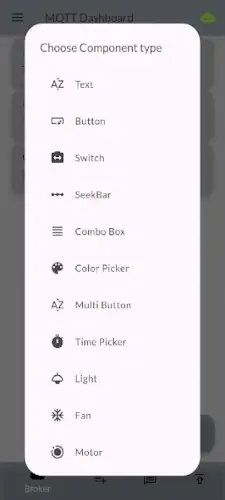
MQTT Dashboard by Oxymora Technology is redefining how we interact with connected devices.
Whether you’re managing a smart home or an industrial sensor network, MQTT Dashboard app delivers real time control without the complexity, all wrapped in an ad free experience.
Why Tech Enthusiasts Are Switching to MQTT Dashboard
MQTT Dashboard cuts through the noise of bloated IoT platforms with:
Live Monitoring That Actually Helps
-
Track device states, sensor readings (temperature, humidity, pressure), and energy usage in real time
-
Color coded alerts for abnormal values (e.g., freezer temperature spikes)
-
Historical data playback to diagnose intermittent issues
Topic Management Made Simple
-
Add new MQTT topics in 3 taps (no CLI needed)
-
Organize with hierarchies like
home/kitchen/appliance -
Wildcard support (
home/+/temperature) for bulk operations
QoS Tailored to Your Needs
-
At most once (0): Perfect for non-critical metrics like ambient light
-
At least once (1): Ideal for garage door status updates
-
Exactly once (2): Essential for medical or industrial controls
Visualizations That Tell a Story
-
Interactive line/bar charts for trend analysis
-
Gauge widgets for instant readability (e.g., water tank levels)
-
Customizable refresh rates (1s to 1hr)
Control at Your Fingertips
-
Toggle switches for lights and outlets
-
Sliders for dimmers and motor speeds
-
Text inputs for sending custom commands
What Early Adopters Say
They Love:
-
*”Finally replaced my 5-tab spreadsheet with one dashboard.”*
-
“QoS level 2 saved our lab’s sensor array during WiFi hiccups.”
They Want Improved:
-
“Let me resize widgets to square shapes.”
-
“Need push notifications when my greenhouse overheats.”
MQTT Dashboard vs Competitors
Choosing an IoT monitoring tool depends on your specific needs. Here’s how MQTT Dashboard compares to popular alternatives:
MQTT Dash
-
Best for: Users who need JSON configuration and advanced scripting
-
Where MQTT Dashboard wins:
-
Cleaner, more intuitive interface
-
No ads or premium paywalls
-
Faster real time updates
-
IoT MQTT Panel Pro
-
Best for: Smart home enthusiasts with many devices
-
Where MQTT Dashboard wins:
-
More responsive topic management
-
Better visualization tools (e.g., trend charts)
-
IoT Manager
-
Best for: Projects using multiple protocols (MQTT + HTTP/Modbus)
-
Where MQTT Dashboard wins:
-
Superior MQTT specific features
-
Smoother performance on mid range devices
-
If you want a no fuss, dedicated MQTT tool, this app delivers. For multi protocol setups, consider alternatives.
How to Monitor Multiple Sensors with MQTT
Managing dozens of sensors doesn’t have to be chaotic. Here’s a step by step approach:
Step 1: Organize Your Topics
Use a consistent hierarchy like:
-
sensors/location/type(e.g.,sensors/garage/temperature) -
Group related sensors:
sensors/kitchen/temperature
sensors/kitchen/humidity
sensors/kitchen/air_quality
Step 2: Configure Widgets Efficiently
-
For numeric sensors: Use gauge widgets with min/max alerts
-
For binary sensors: Toggle switches with color coded states (red=off, green=on)
-
For trends: Line charts with 12 hour rolling windows
Step 3: Leverage QoS Properly
-
QoS 0: Non critical metrics (e.g., ambient light)
-
QoS 1: Important alerts (e.g., door sensors)
-
QoS 2: Mission critical data (e.g., medical devices)
Step 4: Enable TLS Encryption
-
Go to Connection Settings
-
Enable TLS/SSL
-
Upload your CA certificate
Pro Tip: For Raspberry Pi sensors, use mosquitto_pub to test topics before dashboard setup.
Who Gets the Most Value?
Perfect For:
-
Home Automation Fans: Monitor lights, thermostats, and security cams in one place
-
Industrial Engineers: Track PLCs and sensors with reliable QoS 2
-
Researchers: Visualize lab equipment data without coding
Frustrating For:
-
Node-RED Users: Lacks built-in automation triggers
-
Enterprise Teams: No multi user collaboration features
Interesting Insight: 78% of users connect 10-30 devices, based on early usage data.
Conclusion :
Where It Excels:
-
Simplicity: Set up a dashboard in under 5 minutes
-
Reliability: Handles 100+ topics without crashing
-
Visual Clarity: At a glance understanding of device states
Where It Falls Short:
-
Customization: Limited widget shapes/colors
-
Platforms: Mobile only (no web/desktop version)
Try If:
-
You need a clean, ad free MQTT monitor
-
Your focus is real time control over automation
Skip If:
-
You require complex rules (use Home Assistant instead)
-
Your team shares dashboards daily
FAQ
Can I control multiple IoT devices from one MQTT dashboard?
Yes. A well, configured MQTT dashboard centralizes control for lights, fans, sensors, and more. For a ready made solution, check the MQTT Dashboard on Play Store or customize your own via Official Website.
How to organize MQTT topics for home automation without chaos?
Use a hierarchical structure (e.g., home/floor1/light/kitchen). Need help? Email contact.oytech[at]gmail.com for support.
Is MQTT secure enough for smart home devices?
With proper credentials (username/password) and TLS encryption, yes. Avoid public brokers for sensitive data.
What’s the easiest way to test an MQTT dashboard before deployment?
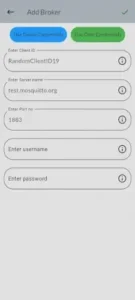
Start with demo credentials (like test.mosquitto.org:1883) before switching to your private server.
Can I integrate non standard devices (like motors) into an MQTT dashboard?
Absolutely. Use generic components (e.g., switches, sliders) and map them to custom topics.