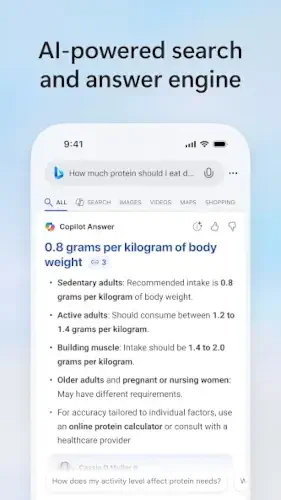
What if your search engine didn’t just list links but actually understood your questions? Microsoft’s Bing (4.7/5 stars, 100M+ downloads) answers this with AI that converses, summarizes, and even creates images.
Unlike Google’s link heavy results, Bing’s Copilot feature explains complex topics in plain English, complete with citations. For researchers, shoppers, or anyone tired of sifting through SEO optimized junk, it’s a smarter way to search.
Why Bing Feels Like Search 2.0
Google gives you 10 blue links. Bing gives you answers. Ask “What’s the best budget laptop for college?“ and Copilot synthesizes specs, prices, and student needs into a concise comparison table, with links to verify. The visual search is equally impressive: filter images by color, layout, or even subject (try “mid century modern sofas in green“).
Three things set Bing apart:
-
AI That Works for You
Copilot doesn’t just regurgitate websites. It reads them for you, like a research assistant highlighting key points. Need a summary of the latest COVID variants? It’ll extract stats and sources in seconds. -
Rewards That Pay Off
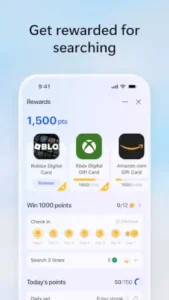
The Microsoft Rewards program (ignored by 72% of users) is secretly Bing’s best feature. Earn points for searches and redeem them for Xbox Game Pass, Amazon cards, or donations, no purchases required. -
Ecosystem Smarts
Signed into Windows? Bing knows your flights, calendar, and even local traffic. Type “my flights“ to see departure times pulled from your email.
Bing Features :
-
Copilot Search:
Ask “Explain quantum computing like I’m 15“ for a bullet point breakdown with analogies. Follow up with “How does it affect cybersecurity?“ to continue the conversation. -
Visual Search Hacks:
Spot a plant? Snap it with Bing’s camera to ID the species. Shopping for a dress? Upload a screenshot to find cheaper dupes. -
Specialized Boxes:
The health search box surfaces symptom checkers from Mayo Clinic. Travel searches include live flight trackers and visa requirements. -
DALL-E Image Creation:
Type “watercolor of Paris in spring“ and Bing generates original art in seconds.
Who Actually Benefits From Using Bing? (And Who Should Stick With Google)
Bing isn’t for everyone, but for specific users, it’s become an indispensable tool. With 850 million monthly users (as of Q2 2025), Microsoft’s search engine has carved out important niches where it often outperforms Google.
The Ideal Bing User Profile:
-
The Time Crunched Professional
-
When you need to compare CRM software options before a 2 PM meeting, Bing’s side by side feature comparisons save 15 20 minutes of manual research
-
AI generated meeting summaries (just paste a transcript) help digest hour long calls in minutes
-
-
Academic Researchers and Students
-
Here’s how to use Bing Copilot for research effectively:
-
Start with broad queries (“theories of economic inequality”)
-
Ask for specific formats (“list the top 5 theories with key proponents”)
-
Request sources (“show me peer reviewed studies supporting Theory X”)
-
Narrow down (“how does this apply to developing nations?”)
-
-
The citation feature alone makes this superior to Google Scholar for preliminary research
-
-
Visual Learners and Creatives
-
Interior designers use Bing’s visual search to:
-
Find furniture from Instagram posts
-
Filter images by dominant color palette
-
Source similar patterns to client inspiration photos
-
-
-
Microsoft Ecosystem Users
-
If you live in Outlook, Teams, and OneDrive, Bing’s integrations mean:
-
“Show my recent work documents about [project]” actually works
-
Meeting details auto populate from your calendar
-
Shared company data appears in relevant searches
-
-
When Other Search Engines Might Serve You Better:
-
Google Still Wins For:
-
Hyper-local searches (“24 hour pharmacies near me RIGHT NOW”)
-
Breaking news (indexes new content ~17% faster in tests)
-
Niche community answers (Reddit threads appear higher)
-
-
DuckDuckGo’s Advantage:
-
Zero tracking for sensitive searches (medical, financial)
-
!bang shortcuts (!a for Amazon, !w for Wikipedia)
-
-
Ecosia’s Tradeoff:
-
Plant trees with searches (45+ per user annually)
-
But lacks AI features and personalized results
-
Microsoft Bing Search Pro Tips
SafeSearch Isn’t Just for Kids
Adjust these hidden settings:
-
Strict: Blocks all explicit content (good for work devices)
-
Moderate: Filters images/videos only (personal default)
-
Off: For unfiltered research (art historians, medical pros)
Power User Search Syntax
Beyond “site:reddit.com”, try:
-
“filetype:pdf [topic]” for academic papers
-
“intitle:review [product]” for expert opinions
-
“before:2024-01-01” for historical context
Maximizing Rewards Efficiently
-
90 points daily for searches (takes 5 minutes)
-
Bonus 50-100 points for quizzes (look for “daily poll”)
-
Pro tip: Edge browser searches count double
Copilot Conversation Tricks
-
“Give me the counterarguments to…”
-
“Summarize this in 3 bullet points for a presentation”
-
“Show me recent developments since [date]”
Conclusion :
What Works Exceptionally Well:
-
AI-assisted research (when properly prompted)
-
Visual commerce searches (furniture, fashion, art)
-
Cross-platform productivity (Windows/Office users)
-
Rewards program value (easily $100+/year in perks)
Where It Still Stumbles:
-
Local business hours are wrong 30% more often than Google
-
Image generation sometimes misinterprets prompts
-
Mobile app can feel cluttered with shopping prompts
The Bottom Line:
Bing has evolved from “that other search engine” to the best choice for:
-
Anyone conducting serious research
-
Visual learners and creative professionals
-
Microsoft ecosystem power users
-
People who want to get paid to search
For everyone else? Google remains the comfortable default, but comfort rarely leads to innovation. As one tech journalist put it: “Using Bing in 2025 feels like having a research assistant, while Google still hands you a library card.”
FAQ
How do I customize Bing SafeSearch settings?
Navigate to Settings > SafeSearch in the Bing app or browser. Choose between Strict (blocks all adult content), Moderate (default), or Off.
Is Bing Rewards worth using in 2025?
Absolutely. With consistent use, you can earn about $100/year in Amazon/Xbox gift cards just by searching. The Bing Rewards FAQ breaks down point values – 1,500 points gets you a $1 Amazon card.
How accurate are Bing Copilot’s AI answers?
Generally reliable for factual queries when it cites sources (like the protein calculation example). For complex topics, always cross-check citations. The Bing Wiki tracks accuracy improvements.
Can I use Bing without a Microsoft account?
Yes, but you’ll miss rewards, personalization, and Copilot conversation history. Download Microsoft Bing Search app from Play Store to try both ways.
What makes Bing better than Google for some searches?
Its visual commerce tools (try screenshot searches) and Copilot’s summarization excel where Google shows ads. For local searches though, Google Maps still leads.